• Skip to primary navigation
  • Skip to main content
  • Skip to primary sidebar

Yellow Bricks

by Duncan Epping

  • Home
  • Unexplored Territory Podcast
  • HA Deepdive
  • ESXTOP
  • Stickers/Shirts
  • Privacy Policy
  • About
  • Show Search
Hide Search

Storage

Partitioned Cluster with HA vSphere 5, who owns what?

Duncan Epping · Aug 12, 2011 ·

I received a question today about a partitioned clusters (in vSphere 5.0) with HA. The question was which Master would own which VMs when a partition exists and how is determined which master can own which VM? I have already briefly explained the difference between an isolation and a partition. Now it is good to realize that when a partition exists the new master may take responsibility for VMs. I used “may” intentionally as there is no guarantee it will own any VMs at that point, so why is this and how does it take ownership of VMs?

A master takes ownership of VMs by locking a file on the datastores it is connected to. As soon as the master has an exclusive lock it owns the virtual machines that have their config file on the datastore. (Note that HA cares about the .vmx file and not the VMDK of the VMs.) The file is called “protectedlist” and is stored on each of the datastores under the .vSphere-HA folder as shown in the screenshot below.
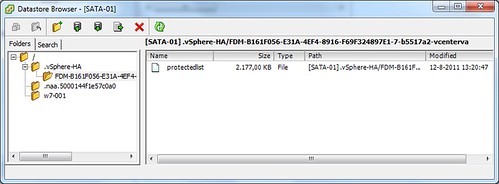
Now a master will only release the lock on that file when it is placed in to maintenance mode, removed from the cluster, loses access to the datastore, is rebooted etc. If and when that would happen the other master(s) would take ownership of the VMs which are located on that datastore by locking that file. So what does that mean?  That does indeed mean that in a “normal” situation even though you have two or more masters in a cluster, due to the fact the cluster is partitioned, you would still only have 1 master being responsible for all VMs in that cluster. Unless… unless that master is indeed placed in maintenance mode, loses access to the datastore etc.

Hope that clarifies things,

** edit: changed the wording to clarify the behavior of the master with regards to owning VMs **
vSphere 5 Coverage

Duncan Epping · Aug 6, 2011 ·

I just read Eric’s article about all the topics he covered around vSphere 5 over the last couple of weeks and as I just published the last article I had prepared I figured it would make sense to post something similar. (Great job by  the way Eric, I always enjoy reading your articles and watching your videos!) Although I did hit roughly 10.000 unique views on average per day the first week after the launch and still 7000 a day currently I have the feeling that many were focused on the licensing changes rather then all the new and exciting features that were coming up, but now that the dust has somewhat settled it makes sense to re-emphasize them. Over the last 6 months I have been working with vSphere 5 and explored these features, my focus for most of those 6 months was to complete the book but of course I wrote a large amount of articles along the way, many of which ended up in the book in some shape or form. This is the list of articles I published. If you feel there is anything that I left out that should have been covered let me know and I will try to dive in to it. I can’t make any promises though as with VMworld coming up my time is limited.

  1. Live Blog: Raising The Bar, Part V
  2. 5 is the magic number
  3. Hot of the press: vSphere 5.0 Clustering Technical Deepdive
  4. vSphere 5.0: Storage DRS introduction
  5. vSphere 5.0: What has changed for VMFS?
  6. vSphere 5.0: Storage vMotion and the Mirror Driver
  7. Punch Zeros
  8. Storage DRS interoperability
  9. vSphere 5.0: UNMAP (vaai feature)
  10. vSphere 5.0: ESXCLI
  11. ESXi 5: Suppressing the local/remote shell warning
  12. Testing VM Monitoring with vSphere 5.0
  13. What’s new?
  14. vSphere 5:0 vMotion Enhancements
  15. vSphere 5.0: vMotion enhancement, tiny but very welcome!
  16. ESXi 5.0 and Scripted Installs
  17. vSphere 5.0: Storage initiatives
  18. Scale Up/Out and impact of vRAM?!? (part 2)
  19. HA Architecture Series – FDM (1/5)
  20. HA Architecture Series – Primary nodes? (2/5)
  21. HA Architecture Series – Datastore Heartbeating (3/5)
  22. HA Architecture Series – Restarting VMs (4/5)
  23. HA Architecture Series – Advanced Settings (5/5)
  24. VMFS-5 LUN  Sizing
  25. vSphere 5.0 HA: Changes in admission control
  26. vSphere 5 – Metro vMotion
  27. SDRS and Auto-Tiering solutions – The Injector

Once again if there it something you feel I should be covering let me know and I’ll try to dig in to it. Preferably something that none of the other blogs have published of course.

SDRS and Auto-Tiering solutions – The Injector

Duncan Epping · Aug 5, 2011 ·

A couple of weeks ago I wrote an article about Storage DRS (hereafter SDRS) interoperability and I mentioned that using SDRS with Auto-Tiering solutions should work… Now the truth is slightly different, however as I noticed some people  started throwing huge exclamation marks around SDRS I wanted to make a statement. Many have discussed this and made comments around why SDRS would not be supported with auto-tiering solutions and I noticed the common idea is that SDRS would not be supported with them as it could initiate a migration to a different datastore and as such “reset” the tiered VM back to default. Although this is correct there is a different reason why VMware recommends to follow the guidelines provided by the Storage Vendor. The guideline by the way is to use Space Balancing but not enable I/O metric. Those who were part of the beta or have read the documentation, or our book might recall this when creating datastore clusters select datastores which have similar performance characteristics. In other words do not mix an SSD backed datastore with a SATA backed datastore, however mixing SATA with SAS is okay. Before we will explain why lets repeat the basics around SDRS:

SDRS allows the aggregation of multiple datastores into a single object called a datastore cluster. SDRS will make recommendations to balance virtual machines or disks based on I/O and space utilization and during virtual machine or virtual disk provisioning make recommendations for placement. SDRS can be set in fully automated or manual mode. In manual mode SDRS will only make recommendations, in fully automated mode these recommendations will be applied by SDRS as well. When balancing recommendations are applied Storage DRS is used to move the virtual machine.

So what about Auto-Tiering solutions? Auto-tiering solutions move “blocks” around based hotspots. Yes, again, when SvMotion would migrate the virtual machine or virtual disk this process would be reset. In other words the full disk will land on the same tier and the array will need to decide at some point what belongs where… but is this an issue? In my opinion it probably isn’t but it will depend on why SDRS decides to move the virtual machine as it might lead to a temporary decrease in performance for specific chunks of data within the VM. As auto-tiering solutions help preventing performance issues by moving blocks around you might not want to have SDRS making performance recommendations but why… what is the technical reason for this?

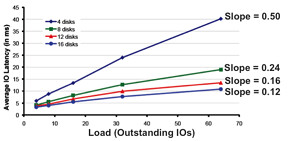
As stated SDRS uses I/O and space utilization for balancing… Space makes sense I guess but what about I/O… what does SDRS use, how does it know where to place a virtual machine or disk? Many people seem to be under the impression that SDRS simply uses average latency but would that work in a greenfield deployment where no virtual machines are deployed yet? It wouldn’t and it would also not say much about the performance capabilities of the datastore. No in order to ensure the correct datastore is selected  SDRS needs to know what the datastore is capable off, it will need to characterize the datastore and in order to do so it uses Storage IO Control (hereafter SIOC), more specifically what we call “the injector”. The injector is part of SIOC and is a mechanism which is used to characterize each of the datastore by injecting random (read) I/O. Before you get worried, the injector only injects I/O when the datastore is idle. Even when the injector is busy and it notices other activity on the datastore it will back down and retry later. Now in order to characterize the datastore the injector uses different amount of outstanding I/Os and measures the latency for these I/Os. For example it starts with 1 outstanding I/O and gets a response within 3 miliseconds. When 3 outstanding I/Os are used the average latency for these I/Os is 3.8 miliseconds. With 5 I/Os the average latency is 4.3 and so on and so forth. For each device the outcome can be plotted as show in the below screenshot and the slope of the graph indicates the performance capabilities of the datastore. The steeper the line the lower the performance capabilities. The graphs shows the test where a multitude of datastores are characterized each being backed by a different number of spindles. As clearly shown there is a relationship between the steepness and the number of spindles used.

So why does SDRS care? Well in order to ensure the correct recommendations are made each of the datastores will be characterized in other words a datastore backed by 16 spindles will be a more logical choice than a datastore with 4 spindles. So what is the problem with Auto-Tiering solutions? Well think about it for a second… when a datastore has many hotspots an auto-tiering solution will move chunks around. Although this is great for the virtual machine it also means that when the injector characterizes the datastore it could potentially read from the SSD backed chunks or the SATA backed chunks and this will lead to unexpected results in terms of average latency and as you can imagine this will be confusing to SDRS and possibly lead to incorrect recommendations. Now, this is typically one of those scenarios which requires extensive testing and hence the reason VMware refers to the storage vendor for their recommendation around using SDRS in combination with auto-tiering solutions. My opinion: Use SDRS Space Balancing as this will help preventing downtime related to “out of space” scenarios and also help speeding up the provisioning process. On top of that you will get Datastore Maintenance Mode and Affinity Rules.

VMFS-5 LUN Sizing

Duncan Epping · Jul 29, 2011 ·

I had a question on my old VMFS LUN Sizing article I did back in 2009… The question was how valid the used formula and values still were in today’s environment especially considering VMFS-5 is around the corner. It is a very valid question so I decided to take my previous article and rewrite it. Now one thing to keep in mind though is that I tried to make it usable for generic consumption and you will still need to figure out things yourself as I simply don’t have all info needed to make it cookie-cutter, but I guess this is as close as it can get.

Parameters:

MinSize = 1.2GB
MaxVMs = 40
SlackSpace = 20%
AvgSizeVMDK = 30GB
AvgDisksVMs = 2
AvgMemSize = 3GB

Before I will drop the formula I want to explain the MaxVMs parameter. You will need to figure out how many IOps your LUN can handle first, for a hint check this article. But besides IOps you will also beed to take burst room into account and of course the RTO defined for this environment:

((IOpsPerLUN – 20%) / AVGIOpsPerVM) ≤ (MaxVMsWithinRTO)

Keep in mind that the article I pointed out just a second ago is geared towards worst case numbers, so no cache or other benefits. Secondly I subtracted 20% which is room for bursting. Now this is by no means a best practice and this number will need to be tweaked based on the size of your LUN and the total amount of IOps you LUN can handle. For instance when you are using 8 SATA spindles that 20% might only be 80 IOps, depending on the raid level used, in the case of SAS it could be 280 IOps with just 8 spindles and that is a huge difference. Anyway I leave that up to you to decide but I used 20% headroom for both disk space (for snapshots and the memory overhead swap files) and performance, just to keep it simple. The second part of this one is MaxVMsWithinRTO. In short make sure that you can recover the number of VMs on the datastore within the defined recovery time objective (RTO). You don’t want to find yourself in a situation where the RTO is 4hrs but the total amount of time for the restore is 24 hours.

Formula, aaahhh yes here we go. Now note that I did not take traditional constraints around “SCSI Reservations Conflicts” into account as with VMFS -5 and VAAI SCSI Locking Offload these  are lifted. If you have an array which doesn’t support the ATS primitive make sure you take this into account as well. Although the SCSI locking mechanism has been improved over the last years it could still limit you when you have a lot of power-on events, vMotion events etc.

(((MaxVMs * AvgDisksVMs) * AvgSizeVMDK) + ( MaxVMs * AvgMemSize)) + SlackSpace ≥ MinSize

Lets use the numbers defined in the parameters above and do the math:

(((40 * 2) * 30GB) + (40 * 3GB)) + 20% = (2400GB + 120GB) * 1.2 = 3024 GB

I hope this helps making your storage design decisions. One thing to keep in mind of course is that most storage arrays have optimal configurations for LUN sizes in terms of performance. Depending on your IOps requirements you might want to make sure that these align.

vSphere 5.0: Storage initiatives

Duncan Epping · Jul 18, 2011 ·

Storage has been my primary focus for the 5.0 launch. The question often asked when talking about the separate components is how it all fits together. Lets first list some of the new or enhanced features:

  • VMFS-5
  • vSphere Storage APIs – Array Integration aka VAAI
  • vSphere Storage APIs – Storage Awareness aka VASA
  • Profile-Driven Storage (VM Storage Profiles in the GUI)
  • Storage I/O Control
  • Storage DRS

I wrote separate articles about all of these features and hopefully you have read them and already see the big picture. If you don’t than this is a good opportunity to read them or head over to the vSphere Storage Blog for more details on some of these.. I guess the best way to explain it is by using an example of what life could be like when using all of these new or enhanced features compared to what is used to be like:

The Old Way: Mr Admin is managing a large environment and currently has 300 LUNs each being 500GB divided across three 8 hosts clusters. He is maintaining a massive spreadsheet with storage characteristics and runs scripts to validate virtual machines are place on the correct tier of storage. He is leveraging SIOC to avoid the noisy neighbor problem and leveraging the VAAI primitives to offload some of the tasks to the array. Still he spends a lot of time waiting, monitoring, managing virtual machines and datastores.

vSphere 5.0: Mr Admin is managing a large environment and currently has 60 thin provisioned 2.5TB LUNs presented to a single cluster. Mr Admin defines several storage tiers using VM Storage Profiles detailing storage characteristics provided through VASA. Per tier based on the information provided through VASA a Datastore Cluster is created. Datastore Clusters form the basis of Storage DRS and Storage DRS will be responsible for initial placement and preventing both IO and diskspace bottlenecks in your environment. As Storage IO Control is automatically enabled when SDRS IO balancing is enabled the noisy neighbor problem will also be eliminated. When provisioning a new virtual machine Mr Admin simple picks the appropriate VM Storage Profile and selects the compliant Datastore Cluster. If in any case Storage DRS would move things around, the “Reclaim Dead Space” feature of VAAI is used to unmap the blocks from the source datastore so that these can be re-used if and when needed.

No more spreadsheets, no extensively monitoring diskspace / latency, no more manual validation of virtual machine placement… It is all about ease of management, reducing operational effort and offloading tasks to vCenter or even your storage array!

  • « Go to Previous Page
  • Page 1
  • Interim pages omitted …
  • Page 96
  • Page 97
  • Page 98
  • Page 99
  • Page 100
  • Page 101
  • Go to Next Page »

Primary Sidebar

About the Author

Duncan Epping is a Chief Technologist and Distinguished Engineering Architect at Broadcom. Besides writing on Yellow-Bricks, Duncan is the co-author of the vSAN Deep Dive and the vSphere Clustering Deep Dive book series. Duncan is also the host of the Unexplored Territory Podcast.

Follow Us

  • X
  • Spotify
  • RSS Feed
  • LinkedIn

Recommended Book(s)

Also visit!

For the Dutch-speaking audience, make sure to visit RunNerd.nl to follow my running adventure, read shoe/gear/race reviews, and more!

Do you like Hardcore-Punk music? Follow my Spotify Playlist!

Do you like 80s music? I got you covered!

Copyright Yellow-Bricks.com © 2026 · Log in