• Skip to primary navigation
  • Skip to main content
  • Skip to primary sidebar

Yellow Bricks

by Duncan Epping

  • Home
  • Unexplored Territory Podcast
  • HA Deepdive
  • ESXTOP
  • Stickers/Shirts
  • Privacy Policy
  • About
  • Show Search
Hide Search

Storage

Does SRM support Storage DRS? No it does not!

Duncan Epping · Sep 7, 2011 ·

During VMworld I received multiple questions around support for vSphere Storage DRS with vSphere Site Recovery Manager (SRM), we even had this question during our session and my answer was “Yes it does”. During some of the other sessions presenters stated that it was unsupported. Scott Lowe also mentions recalling the fact that it was mentioned somewhere down the line to be unsupported. Now although the Resource Management Guide for vSphere 5.0 on page 91 currently says it is supported it is not supported. Yes I know I stated it was supported but unfortunately the document is incorrect and the information provided to me was outdated. Although I verified the facts, I was not informed about this change. Hopefully this will not happen again and my apologies for that.

Now lets give the raw facts first, SRM does not support Storage vMotion and SRM does not support Storage DRS. The reason that SRM does not support Storage vMotion (and subsequently Storage DRS) is because it changes the location of the virtual machine without SRM being aware of it. After the location of the virtual machine has changed the VM that was originally protected by SRM will not be protected anymore which can have an impact on your RTO. These are the raw facts. I have requested the SRM team to document this in a KB to make sure everyone understands the reason and the impact.

The question of course is… will it work? My colleague Cormac has tested it and you can read his observations here.

This statement is documented in the SRM releasenotes: http://www.vmware.com/support/srm/srm_releasenotes_5_0_0.html

Interoperability with Storage vMotion and Storage DRS:
Due to some specific and limited cases where recoverability can be compromised during storage movement, Site Recovery Manager 5.0 is not supported for use with Storage vMotion (SVmotion) and is not supported for use with the Storage Distributed Resource Scheduler (SDRS) including the use of datastore clusters.

** update: I followed the documentation which apparently was incorrect. Documentation bug has been filed, should be update in the near future. **
** update: Link to SRM releasenotes with statement added. **
VMworld – Day 2

Duncan Epping · Aug 31, 2011 ·

VMworld Day 2 started off with a great keynote by no one less than Dr Steve Herrod. Steve spoke about all the changes we introduced with the launch of the Cloud Infrastructure Suite and all the change which are coming up… including sneak peeks of not release products. I live blogged the session and I don’t want to blog just to blog, so for more details read it here. There are a couple of things though I want to stress which in my opinion stood out:

  • VMware Appblast –> New project which allows you to start any app in a HTML5 compatible browser on any device.
  • VXLAN –> Provides a Layer 2 abstraction to virtual machines, independent of where they are located. (quote from Steve’s article)
  • VMware Octopus –> Probably best described as an enterprise level “Dropbox” service

After the keynote I headed over to the VMware Storage Booth and introduced many attendees to the cool new storage features which are part of vSphere 5. There were a couple of things which stood out for me, everyone loved Storage DRS! Profile-Driven Storage is hot and the changes in VMFS-5 were very very welcome.

Next stop was the infamous #VSP1425 aka “Ask the Expert vBloggers”. We had roughly 200 attendees. The panel was formed as follows: Scott Lowe, Frank Denneman, Chad Sakac and I. It was moderated by Rick Scherer (Thanks for buzzing out Chad :-)) and as we had an empty seat we decided to pull up a person from the audience… I forgot the name of this person (please identify yourself), but once again thanks for joining this session and thanks for your great contribution, much appreciated! This session did extremely well in my opinion. We had great questions from the audience but especially the interaction between the panel members worked great. Definitely something we will do again next year. (We scored 4.8 out of 5 on the survey.)

Next up was a meeting with Tintri. We met up with Kieran Harty and Pratik Wadher and got a demo of the current platform and discussed futures. I already discussed their product in-depth on my blog so I will not repeat our whole discussion or my thoughts. I just want to add that I was impressed by their UI now that we got to play around with it and I expect them to do really well in Europe due to the simplicity of the set up.

After having random chats with other vendors we (when I say we I mean Frank and I) headed over to my Group Discussion (#GD43). Now this was the first Group Discussion I ever hosted… I LOVED IT! This is the best format for a session and can I say thanks to Richard Garsthagen who came up with this excellent concept! I had prepared a couple of slides with questions around VMware Clustering solutions. These questions formed the basis of the discussion. The participation of the audience was excellent. Frank helped driving this session and one of our lead HA engineers, Keith Farkas, joined as well… Believe me when I say that Keith was happy with all the excellent feedback we received from the audience during this session. Next year, and in Copenhagen, I want to do more sessions like these… This is what VMworld should be like, small discussion sessions with lots of interaction with the audience!

Before I head out to breakfast there are a couple of things I would like to mention… Did everyone see PowerCLI-Man? I don’t know who he is or where he all of a sudden came from, but he is my new favorite super hero! What an amazing guy, dropping in on a session hosted by Luc Dekens and Alan Renouf while you know he is fighting operational wars on a day to day basis… amazing. (He even has Facebook?!)

I also forgot to mention VMworld TV in my “Day 1” report… Sorry Richard here you go. In all seriousness check the VMworld TV youtube channel and watch the great interviews and summaries that Richard and his team produced. It is a great way of getting an impression of what is going on at VMworld. Believe me, it is a madhouse.

Another day at VMworld about to start… hopefully I will have bit more time to watch some sessions myself today. If you are attending I would ask all of you to please fill out the session surveys. Keep in mind that all speakers, and the VMworld organizational, love to feedback on what worked well and what can be improved. Please provide constructive feedback, keep in mind that many of the people presenting at VMworld are just technical people like you and me and not professional “marketing” type speakers! My respect to each and everyone of you who does not do this on a day-to-day basis and presented a session at VMworld. I know it is a huge step and I know it is not easy to get up in front of literally hundreds of people!

VMworld – Day 1

Duncan Epping · Aug 30, 2011 ·

I am dead tired so it will be a brief overview of my first day at VMworld. I had two sessions planned today and attended another 2 sessions. (Besides other meetings of course)

We started the day with #VSP1682 aka “vSphere Clustering Q&A. The room was packed to our surprise, you never know what you are up against at 08:00 on a Monday morning… It took off slowly but after the first two questions the questions keep on coming. There were some excellent questions. No need for me to write all of them down as Scott Lowe attended and man can he type fast judging by his session transcript! Thanks Scott for attending and for writing this great summary. Everyone else who attend thanks, much appreciated that you took the time to visit this session on a Monday morning at 08:00 in Las Vegas. If you have the time provide feedback, I just checked our feedback and it is looking excellent right now… although someone had a complain about our accents, but hey Frank and I are Dutch not much we can change about that :-). Hopefully it wasn’t too bad.

The second session of the day was on I attended, #VSP3116 by Frank Denneman and Valentin Hamburger. This session was titled “vSphere Resource Management Deepdive” and I thought it was good. Frank and Valentin explain all the caveats around Resource Pools, Limits, Reservations and DPM and there was a good interaction between them. Andrew Miller from Think Meta blogged most of the slide content, if you want to get an impression of what was discussed in more depth, check it here! Yes I agree with his summary, Frank is a Rock Star and Valentin really knows his stuff!

Next up was #vsp1956 aka the ESXi Quiz Show… I was one of the people who organized this and to be honest we didn’t know what to expect, it was something completely different and new and I thought it was cool for a first time. Yes I realize we had some difficulties and my apologies for the poor audio quality. Anyway, it seemed to me that many people enjoyed themselves and that was our goal for this session… entertainment, nothing less / nothing more. The vPredators managed to beat the vRaging Bulls in the pre-qualifying rounds and in the finals they beat VMware’s own vRaminators… Great job guys and once again thanks everyone for attending.

The last session I attended today was the General  Session. What can I say about it that you haven’t already read on twitter or all the other blogs. First of all was that intro great or what? I don’t know who’s responsible for creating these but they manage to surprise me every single year. The graphics were amazing once again, and especially on those big screens really impressive. Rick Jackson was up first and there were two things that stood out for me…. the VMUG leaders that were recognized and the fact that VMworld 2012 will be in San Francisco again next year August 27th until the 30th. Paul Maritz than came up spoke about the strategic direction of VMware for the upcoming years and how recent acquisitions fit in. I always enjoy listening to him. Especially the story around how the applications will evolve and how the world will look like 3 – 5 years from now. I guess what was exciting was vFabric Data Director, there’s a press release to be found here. vFabric Data Director is a self service database provisioning and operations solution which in the first release supports a virtualization optimized version of PostgreSQL. The cool thing about the vFabric Postgres is the fact that it is optimized for memory and snapshot management in a virtual environment.

After that we walked around at the solutions exchange… it is huge this year. I bumped in to the folks of HyTrust, Tintri, Veeam, Mozy and more… Definitely worth checking out!

Now it is time to get some sleep to wake up on time for the General Session by Steve Herrod. After that I will be manning the VMware Storage Booth for a couple of hours (until 11:30) so if you feel like it stop by and say hi.

PS: I spoke with the people at the VMworld Bookstore and our book is the number 1 selling book this year! How cool is that?!

Performance Whitepapers

Duncan Epping · Aug 29, 2011 ·

I always enjoy reading the performance whitepapers. They are usually fairly technical and give you a better understanding of how the products work! All of these are most definitely worth downloading and reading! They been released a couple of days back. Check it out:

  • vMotion Architecture, Performance, and Best Practices in VMware vSphere 5
    http://www.vmware.com/resources/techresources/10202
  • Understanding Memory Management in VMware vSphere 5
    http://www.vmware.com/resources/techresources/10206
  • Performance Implications of Storage I/O Control–Enabled NFS Datastores in VMware vSphere 5
    http://www.vmware.com/resources/techresources/10207
  • Microsoft Exchange Server 2010 Performance on vSphere 5
    http://www.vmware.com/resources/techresources/10204
  • Zimbra Collaboration Server Performance on VMware vSphere 5
    http://www.vmware.com/resources/techresources/10203
  • Host Power Management in VMware vSphere 5
    http://www.vmware.com/resources/techresources/10205
  • VMware vCenter Update Manager 5.0 Performance and Best Practices
    http://www.vmware.com/resources/techresources/10208

Tintri follow up

Duncan Epping · Aug 18, 2011 ·

Back in March I wrote about this new and interesting storage vendor called Tintri which had just released a new NAS appliance called VMstore. I wrote about their level of integration and the fact that their NAS appliance is virtual machine aware and allows you to define performance policies per virtual machine. I am not going to rehash the complete post so for more details read it before you continue reading this article. During the briefing for that article we discussed some of the caveats with regards to their design and some possible enhancements. Tintri apparently is the type of company who listens to community input and can act quick. Yesterday I had a briefing of some of the new features Tintri will announce next week. I’ve been told that none of this is under embargo so I will go ahead and share with you what I feel is very exciting. Before I do though I want to mention that Tintri now also has teams in APAC and EMEA, as some of you know they started out only in North-America but now have expanded to the rest of the world.

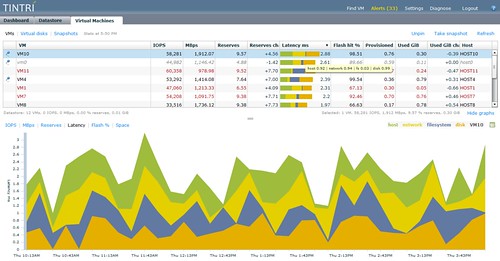
First of all, and this is probably the most heard complaint, is that the upcoming Tintri VMstore devices will be available in a dual controller configuration which makes it more interesting to many of you probably. Especially the more up-time sensitive environments will appreciate this, and who isn’t sensitive about up-time these days? Especially in a virtualized environment where many workloads share a single device this improvement is more than welcome! The second thing which I really liked is how they enhanced their dashboard. Now this seems like a minor thing but I can ensure you that it will make your life a lot easier. Let me dump a screenshot first and then discuss what you are looking at.

The screenshot shows the per VM latency statistics… Now what is exciting about that? Well if you look at the bottom you will see the different colors and each of those represent a specific type of latency. Lets assume your VM experiences 40ms of latency and your customer starts complaining. The main thing to figure out is what causes this slow down. (Or in many cases, who can I blame?) Is your network saturated? Is the host swamped? Is it your storage device? In order to identify these types of problems you would need a monitor tool and most likely multiple tools to pinpoint the issue. Tintri decided to hook in to vCenter and just pull down the various metrics and use this to create the nice graph that you see in the screenshot. This allows you to quickly pinpoint the issue from a single pane of glass. And yes you can also expect this as a new tab within vCenter.

Another great feature which Tintri offers is the ability to realign your VMDKs. Tintri does this, unlike most solutions out there, from the “inside”. With that meaning that their solution is incorporated into their appliance and not a separate tool which needs to run against each and every VM. Smart solution which can and will safe you a lot of time.

It’s all great and amazing isn’t it? Or are there any caveats? One thing I still feel needs to be addressed is replication. With this next release it is not available yet but is that a problem now that SRM offers vSphere Replication? I guess that relieves some of the immediate pressure but I would still like to see a native Tintri’s solution providing a-sync and sync replication. Yes it will take time but I would expect though that Tintri is working on this. I tried to persuade them to make a statement yesterday they unfortunately couldn’t say anything with regards to a timeline / roadmap.

Definitely a booth I will be checking out at VMworld.

  • « Go to Previous Page
  • Page 1
  • Interim pages omitted …
  • Page 95
  • Page 96
  • Page 97
  • Page 98
  • Page 99
  • Interim pages omitted …
  • Page 101
  • Go to Next Page »

Primary Sidebar

About the Author

Duncan Epping is a Chief Technologist and Distinguished Engineering Architect at Broadcom. Besides writing on Yellow-Bricks, Duncan is the co-author of the vSAN Deep Dive and the vSphere Clustering Deep Dive book series. Duncan is also the host of the Unexplored Territory Podcast.

Follow Us

  • X
  • Spotify
  • RSS Feed
  • LinkedIn

Recommended Book(s)

Also visit!

For the Dutch-speaking audience, make sure to visit RunNerd.nl to follow my running adventure, read shoe/gear/race reviews, and more!

Do you like Hardcore-Punk music? Follow my Spotify Playlist!

Do you like 80s music? I got you covered!

Copyright Yellow-Bricks.com © 2026 · Log in