**disclaimer: Some of the content has been taken from the vSphere 5 Clustering Technical Deepdive book**
The first time I was playing around with 5.0 and particularly HA I noticed a new section in the UI called Datastore Heartbeating.
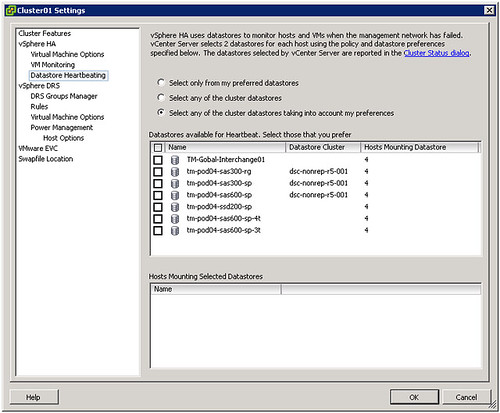
Those familiar with HA prior to vSphere 5.0 probably know that virtual machine restarts were always initiated, even if only the management network of the host was isolated and the virtual machines were still running. As you can imagine, this added an unnecessary level of stress to the host. This has been mitigated by the introduction of the datastore heartbeating mechanism. Datastore heartbeating adds a new level of resiliency and allows HA to make a distinction between a failed host and an isolated / partitioned host. Isolated vs Partitioned is explained in Part 2 of this series.
Datastore heartbeating enables a master to more correctly determine the state of a host that is not reachable via the management network. The new datastore heartbeat mechanism is only used in case the master has lost network connectivity with the slaves to validate whether the host has failed or is merely isolated/network partitioned. As shown in the screenshot above two datastores are automatically selected by vCenter. You can rule out specific volumes if and when required or even make the selection yourself. I would however recommend to let vCenter decide.
As mentioned by default it will select two datastores. It is possible however to configure an advanced setting (das.heartbeatDsPerHost) to allow for more datastores for datastore heartbeating. I can imagine this is something that you would do when you have multiple storage devices and want to pick a datastore from each, but generally speaking I would not recommend configuring this option as the default should be sufficient for most scenarios.
How does this heartbeating mechanism work? HA leverages the existing VMFS filesystem locking mechanism. The locking mechanism uses a so called “heartbeat region” which is updated as long as the lock on a file exists. In order to update a datastore heartbeat region, a host needs to have at least one open file on the volume. HA ensures there is at least one file open on this volume by creating a file specifically for datastore heartbeating. In other words, a per-host a file is created on the designated heartbeating datastores, as shown in the screenshot below. HA will simply check whether the heartbeat region has been updated.

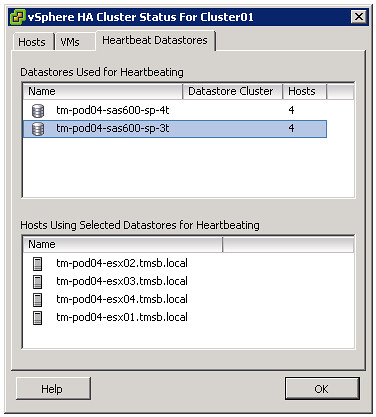
If you are curious which datastores have been selected for heartbeating. Just go to your summary tab on your cluster and click “Cluster Status”, the 3 tab “Heartbeat Datastores” will reveal it.
** Disclaimer: This article contains references to the words master and/or slave. I recognize these as exclusionary words. The words are used in this article for consistency because it’s currently the words that appear in the software, in the UI, and in the log files. When the software is updated to remove the words, this article will be updated to be in alignment. **
Hi Duncan,
ain’t it already a mechanism to check the lock files on the VM in HA before, in case the network was isolated, but the VM still up and running ? Or am I wrong ?
FredK
Well a restart will fail because of the lock, there is no real check… it would still try it. That is the huge difference here,
Ok. I see. Thank you. Instead of a failure, you have here a check saying the VM is already running.
FredK
How often do the hosts update the heartbeat region? (do they renew their locks on the heartbeat file at set intervals?)
Thanks!
Just trying : every 1 seconde ? Because of the former problem if something happened beetween the 15th and 16th second 🙂
Beetween the 14th and 15th in fact… sorry. Forgot the poweroff was initiated 1 second before the restart…
I think the lock expires after 15 seconds if I am not mistaken,
Hi,
i was not talking about the iscsi lock but about the check every one second, and the failure declaration after 15s of lost heartbeat by HA.
About the iscsi lock, i don’t know… but it will timeout on a iSCSI datastore because of the host isolation and network problems, but on a FC SAN datastore, it won’t timeout if everything is ok on the SAN. Isn’t it ? So the new method is a good thing for iscsi/nfs datastore, but did not change anything for SAN ? Am i wrong ? Except the failures in the logs about trying to restart a locked VM, which is cleaner 🙂
The point is that it won’t even try to restart it … that will reduce unnecessary stress.
Hi Duncan,
If a host management network lost but datastore heartbeats still available, will isolated host run isolation response action?
Yes it will. Datastore heartbeat has been introduced to make the distinction between a failed and an isolated host.
Hi Duncan,
Since this is a VMFS locking thing, I assume this can’t be used with NFS?
Is there an alternative for hosts that are pure NFS?
Thanks,
Sean
It is all in the book 🙂
Anyway, with NFS it should touches the file every 3 seconds or so… Master will validate if the files has been touched or not 🙂
Duncan,
I suppose the footprint for the heartbeat region will be minute in regards to space consumed and iops?
Now if there could only be a way for HA to figure out loss of connectivity on the VM traffic side and if HA could figure out a way to work with DRS in moving the VMs over to another host in case when a the VM traffic nics go down (for whatever reason)… that would be awesome..
I know I am asking for too much here.. but I am sorry I guess I am spoiled by VMware lol..
the HB file is 0 bytes and the hearbeat region aka vmfs metadata always needs 1.2GB
So if I understand this well for this to work correctly for iSCSI and NAS you need to have these networks physically seperated from your ESXi management network containing the heartbeat. Is this correct?
Grtz,
Roderick
So we are in a VDI configuration and for our Managemant Cluster we only used a single datastore from our array. We get the message that it does not have enough data stores to meet the requirement of 2. Can we safely ignore this on that cluster as our VDI hosts have multiple data stores and it is configured ok.
And if so can we disable the warning?
Yes, you can set “das.ignoreInsufficientHbDatastore” to true!
Thanks, Duncan.
what would be the impact of having one shared datastore vs 2 for datastore heartbeat?
Hi Duncan,
What would be happened if the Master Host has lost connection to the Data Stores but the network heartbeat still working?
Note: The Master Host “ESXi” is running on the local Disk, but the connection to the all Data Stores lost and management network for heartbeat is working fine.
Thanks
As long as the management network is up nothing will happen. This is the primary check. Only when the management network has failed will HA check the storage heartbeat.
What would be the expected reaction from the remaining hosts that have still have full network and datastore connectivity? We experienced an event similar and VMs on hosts with full network and storage connectivity were behaving intermittently as if they had lost storage connectivity as well.
it is very helpful. Could you please spare some time for my query which I am not comfortable with. How vcenter selects the 2 datastores, suppose if I have all the datastore shared among the esxi host in the cluster. How would the selection take place? which parameters to consider? Many Thanks.
it uses:
number of hosts connected
uuid of the datastore
Many thanks for the reply. Could you please assist me which this scenario.
What if I have 5 data-store and they all are connected to 12 hosts. How the 2 will be selected?
Another query – if I have few RDM’s and iscsi attached to Host 3 which is having all the datastore connectivity and also there are some additional vms attached through RDM and iScsi. Will these (iscsi) data-store be considered?
As I said, it uses the name/uuid of the datastore. RDMs are not part of it, only VMFS or NFS volumes. VMFS first, NFS second.
Which *with
Duncan – Thanks so much, I am very sorry to ask you again and again. I Couldn’t understand the priority set on the basis on name/uuid for VMFS provided if all the data stores shared to all the host. Could you please clear my doubt. Many Thanks.