• Skip to primary navigation
  • Skip to main content
  • Skip to primary sidebar

Yellow Bricks

by Duncan Epping

  • Home
  • Unexplored Territory Podcast
  • HA Deepdive
  • ESXTOP
  • Stickers/Shirts
  • Privacy Policy
  • About
  • Show Search
Hide Search

VMware

Top VMware/virtualization blogs 2012 voting starts today

Duncan Epping · Jan 24, 2012 ·

Yes, it is that time of the year again… vSphere-land.com’s voting for the Top 25 Blogs worldwide has started again. I had the honor of placing 1st four consecutive times, but the competition is huge this year with excellent newcomers like Chris Colotti, scripting warriors like William Lam and Alan Renouf and of course my long time rival/friend Chad Sakac.

I am hoping each of you will select the top-10 blogs based on quality, longevity and frequency. (I personally find length of the article irrelevant, content is King!) I did want to list my top 10 articles over the last 12 months:

  1. The vSphere 5.0 – HA Deepdive
  2. Using vSphere Auto-Deploy in your home lab
  3. Multiple-NIC vMotion in vSphere 5…
  4. esxtop
  5. vSphere 5.0: Storage vMotion and the Mirror Driver
  6. vSphere 5.0: What has changed for VMFS?
  7. HA Architecture Series (1 – 5)
  8. “Hacking” Site Recovery Manager (SRM) / a Storage Array Adapter
  9. ESXi 5.0 and Scripted Installs
  10. vSphere 5.0 vMotion Enhancements

The voting is very straight forward and will only take 2 minutes of your time, all you have to do is select your Top 10 favourite VMware related virtualization blog sites and then sort them in your order of preference (ie: 1 – 10) – it’s as easy as that! Don’t wait any longer, cast your vote now!
New session added for PEX

Duncan Epping · Jan 24, 2012 ·

A couple of weeks back I posted my session details for PEX. I just had a session added to my schedule which I wanted to inform you about. This session was originally hosted by no one less than Mike DiPetrillo. Chris Colotti and I have been asked to take over the session.

Session 1262 (Wednesday 2/12 @ 12:30pm): DR of the Cloud and to the Cloud

This session will look at DR and the cloud. Two different DR scenarios will be presented in depth – DR of the cloud and DR to the cloud. DR to the cloud is how end consumers fail over resources to a cloud provider. DR of the cloud is how you fail over cloud resources from one site to another. This session will go in depth on the consumer and provider side of the architecture. We’ll look at how to replicate the data, what applications are primary targets, how to size environments, how to maintain multi-tenancy, and what to avoid when architecting these solutions. This session is a must for anyone considering tier 1 applications for the cloud.

Presenters: Chris Colotti and Duncan Epping

Don’t forget to add it to your schedule, it is going to be a really cool session!

Why selecting the correct OS when creating/upgrading a VM is important

Duncan Epping · Jan 13, 2012 ·

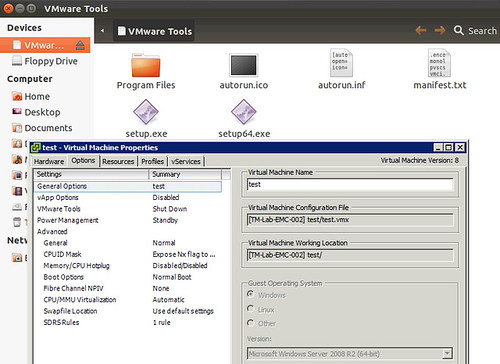
I had a discussion yesterday about why one would care about changing the “OS” type for a VM when it is upgraded, or even during the provisioning of a VM. I guess the obvious one is that a VM is “customized / optimized” based on this information from a hardware perspective. Another one that many people don’t realize is that when you initiate a VMware Tools install or Upgrade the information provided in the “Guest Operating System” (VM properties, Options, General Options) is used to mount the correct file. As you can see in the screenshot below, I selected “Windows 2008” but actually installed Ubuntu, when I wanted to install VMware Tools the Windows binaries popped up. So make sure you update this info correctly,

Fiddling around with SRM’s Storage Replication Adapter – Part II

Duncan Epping · Jan 12, 2012 ·

** Disclaimer: This is for educational purposes, please don’t implement this in your production environment as it is not supported! **

After my article this week about (ab) using the SRA provided through Site Recovery Manager to fail-over any LUN I expected some people reaching out to me with additional questions. One of the questions which came in more than once was “is it possible to do a test-failover of a LUN which is not managed by the SRM infra”? I guess the short answer is yes it is. The long answer is: well it depends on what your definition of a “test-failover” is. Of course booting up a physical machine from SAN while keeping the same IP etc would cause conflicts. I am also not going to show you how to re’ip your physical machines as I expect you to know this. From an SRM perspective how exciting is this?

To be honest, not really. The same concept applies. For a test-failover SRM calls the SRA by a script called “command.pl” and it feeds it XML. The following lines of XML are relevant for this exercise, but the critical one is “TestFailoverStartParameters”:

--> <TestFailoverStartParameters>
--> <ArrayId>BB005056AE32820000-server_2</ArrayId>
--> <AccessGroups>
--> <AccessGroup id="domain-c7">
--> <Initiator type="iSCSI" id="iqn.1998-01.com.vmware:localhost-11616041"/>
--> <Initiator type="iSCSI" id="iqn.1998-01.com.vmware:localhost-4a15366e"/>
--> <Initiator type="NFS" id="10.21.68.106"/>
--> <Initiator type="NFS" id="10.21.68.105"/>
--> </AccessGroup>
--> </AccessGroups>
--> <TargetDevices>
--> <TargetDevice key="fs14_T1_LUN1_BB005056AE32800000_fs10_T1_LUN1_BB005056AE32820000">
--> <AccessGroups>
--> <AccessGroup id="domain-c7"/>
--> </AccessGroups>
--> </TargetDevice>
--> </TargetDevices>
--> </TestFailoverStartParameters>
--> </Command>

Now in our case we want to fail-over a random non vSphere LUN. We will need the “initiator” (server(s)) who will need to see be able to see this LUN and we will need the LUN identifier. All of this can either be found in the SRM log files (LUN identifiers) or on the physical server (initiator details). If you would call command.pl and feed it the XML file the SRA will request the array to create a snapshot and give the host access to that snapshot. Now it is up to you to take the next steps!

It is no rocket science. Anything SRM does with the SRA you can do from the command line using command.pl and a custom XML file. As mentioned in the comments in my previous article, I know people are interested in using this for Physical Hosts… I will discuss this internally, but for now don’t come close, it is not supported!


“Hacking” Site Recovery Manager (SRM) / a Storage Array Adapter

Duncan Epping · Jan 10, 2012 ·

** Disclaimer: This is for educational purposes, please don’t implement this in your production environment as it is not supported! **

Last week I received a question and I figured I would dive in to it this week. The question was if it is possible to fail-over LUNs using VMware Site Recovery Manager (SRM) which are not part of the Cluster which SRM “manages”. In other words, can I fail-over a LUN which is attached to a physical Windows Server or to a completely separate VMware Cluster? Before we continue, I did not hack SRM itself, neither did I make any changes to the SRA.

Lets briefly explain what SRM does normally when you go through the process of of creating a DR plan. Now this is slimmed down with only focussing on the relevant stuff for this question:

  • First it will discover the devices using the Storage Replication Adapter (SRA)
  • It then discovers all LUNs using the SRA
  • It show the replicated LUNs containing VMs to the admin
  • Admin can use these in his plan and “protect” the VMs appropriately

I decided to install SRM in a nested environment using the Celerra Uber VSA. I installed the VNX SRA and configured it and went through some of the log files just to find a piece of evidence that my plan is even possible. For Windows 2008 you can find the SRM Log Files in this location by the way:

%ALLUSERSPROFILE%\VMware\VMware vCenter Site Recovery Manager\Logs\

Other locations are documented in this KB. When I created the environment I created multiple LUNs with different sizes to make them easily recognizable. The LUN which is replicated but not exposed to our vCenter/SRM environment is 25GB and the LUN which is exposed is 30GB. This is what the log files showed me when I did a quick find on the size:

(Production) fsid=14 size=30000MB alloc=0MB dense  read-write
path=/srm01/fs14_T1_LUN1_BB005056AE32800000/fs14_T1_LUN1_BB005056AE32800000 (snapped)
(Production) fsid=16 size=25000MB alloc=0MB dense read-write
path=/vc01/fs16_T1_LUN2_BB005056AE32800000/fs16_T1_LUN2_BB005056AE32800000 (snapped)

As you can see both my 25GB and my 30GB LUN is listed. I added a name to it which also allows me to quickly identify it “srm01” and “vc01”, where “vc01” is the one which is not managed by SRM.

So how does SRM get this information? Well it is actually pretty straight forward, SRM calls a script which is part of the SRA. SRM feeds this script XML. This XML code contains the commands / details required. I’ve written about this a long time ago when I was troubleshooting SRM and it is still applicable:

perl command.pl < file.xml

Now the XML file is of course key here… How does that need to be structured and can we use, or should I say abuse, it to do a fail-over of a LUN which is not “managed” by SRM/vCenter. Well I started digging and it turns out to be fairly straight forward. Keep in mind the disclaimer at the top though, this is not what the SRA’s were intended for… this is purely for educational purposes and far from supported. Again the logfiles exposed a lot of details here, but I stripped it down to make it readable. This is the response from the SRA when SRM asked for details on which devices are available:

2012-01-09T12:14:53.583-08:00 [05388 verbose 'SraCommand' opID=7D6C5634-00000023] discoverDevices responded with:
--> <?xml version="1.0" encoding="UTF-8" standalone="yes"?>
--> <SourceDevice state="read-write" id="1-1">
--> <Name>fs14_T1_LUN1_BB005056AE32800000</Name>
--> <Identity>
--> <Wwn>60:06:04:8c:ab:b2:88:c0:59:40:72:24:1b:5f:77:72</Wwn>
--> </Identity>
--> <TargetDevice key="fs14_T1_LUN1_BB005056AE32800000_fs10_T1_LUN1_BB005056AE32820000"/>
--> </SourceDevice>
--> <SourceDevice state="read-write" id="1-2">
--> <Name>fs16_T1_LUN2_BB005056AE32800000</Name>
--> <Identity>
--> <Wwn>60:06:04:8c:b8:50:22:96:0c:0b:bf:d8:59:0b:a1:75</Wwn>
--> </Identity>
--> <TargetDevice key="fs16_T1_LUN2_BB005056AE32800000_fs12_T1_LUN3_BB005056AE32820000"/>
--> </SourceDevice>
--> </SourceDevices>

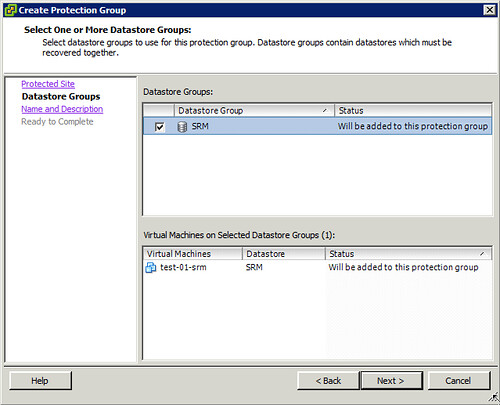
Now if you look at SRM and try to make a Protection Group plan you will quickly discover that only those Datastores which have a VM hosted on there can be added. This is shown in the screenshot below.

As mentioned SRM filters out the “irrelevant LUNs”, to me this LUN wasn’t irrelevant however. So what’s next? I decided to initiated a fail-over and to look at the log files. When the fail-over is initiated the following is issued by SRM, again I stripped some details to make it more readable:

--> <FailoverParameters>
--> <ArrayId>BB005056AE32820000-server_2</ArrayId>
--> <AccessGroups>
--> <AccessGroup id="domain-c7">
--> <Initiator id="iqn.1998-01.com.vmware:localhost-11616041" type="iSCSI"/>
--> <Initiator id="iqn.1998-01.com.vmware:localhost-4a15366e" type="iSCSI"/>
--> <Initiator id="10.21.68.106" type="NFS"/>
--> <Initiator id="10.21.68.105" type="NFS"/>
--> </AccessGroup>
--> </AccessGroups>
--> <TargetDevices>
--> <TargetDevice key="fs14_T1_LUN1_BB005056AE32800000_fs10_T1_LUN1_BB005056AE32820000">
--> <AccessGroups>
--> <AccessGroup id="domain-c7"/>
--> </AccessGroups>
--> </TargetDevice>
--> </TargetDevices>
--> </FailoverParameters>

I guess we should be able to work with this! Using the “discoverdevices” information and combining it with the “Failover” information I should be able to construct my own custom XML file. After creating this XML file I should be able to fail-over any LUN which is part of the selected device… What is my plan? I am planning to change the following:

  • Initiator id
  • TargetDevice key

I wasn’t sure if I needed to change the AccessGroup so I figured I would just test it like this. I called the script as follows:

<path to perl>\bin\perl.exe command.pl < file.xml

I watched a whole bunch of messages pass by and then looked at the Celerra when then fail-over commend was completed and noticed the following:

And of course within the “unmanaged” vCenter you can see it:

Successful fail-over of a LUN which wasn’t part of an SRM Protection Group! Yes, when you replace the Initiator ID even the masking is correctly configured. The only thing left would be either resignaturing the volume or mounting the volume. This of course depends on the OS owning the volume and the desired end result. All in all, a nice little experiment… Once again, don’t try this in your own environment, it is far from supported!

  • « Go to Previous Page
  • Page 1
  • Interim pages omitted …
  • Page 79
  • Page 80
  • Page 81
  • Page 82
  • Page 83
  • Interim pages omitted …
  • Page 124
  • Go to Next Page »

Primary Sidebar

About the Author

Duncan Epping is a Chief Technologist and Distinguished Engineering Architect at Broadcom. Besides writing on Yellow-Bricks, Duncan is the co-author of the vSAN Deep Dive and the vSphere Clustering Deep Dive book series. Duncan is also the host of the Unexplored Territory Podcast.

Follow Us

  • X
  • Spotify
  • RSS Feed
  • LinkedIn

Recommended Book(s)

Also visit!

For the Dutch-speaking audience, make sure to visit RunNerd.nl to follow my running adventure, read shoe/gear/race reviews, and more!

Do you like Hardcore-Punk music? Follow my Spotify Playlist!

Do you like 80s music? I got you covered!

Copyright Yellow-Bricks.com © 2026 · Log in