** Be warned, this is totally unsupported. Only for educational purposes should this be used **
Today I was asked the question on how to create a VIB file (.vib). In our documentation it is mentioned that you can create a VIB file to add firewall rules to your ESXi host. As the .vib tool is not available yet to the general public I decided to dig in to it. I want to stress that I tested this in my own lab, it is not supported at all, but might give a nice insight in how these VIB are constructed. Before you read how I created my own VIB file I suggest reading this excellent article on what a .vib file is and contains by my colleague Kyle Gleed.
First thing I did was download an existing VIB file. I downloaded a tiny LSI SCSI driver. I did a “more” of the .vib file and I noticed the following:
!<arch>
debian-binary
That was my first lead, it appears to be a debian-binary, which is a format that the Linux distribution Debian uses to package software / drivers etc. I knew it should be possible to check what was included in this package. So I did a quick search and stumbled on some procedures on how to do this using some standard commands provided by my Debian virtual machine. (Links at the bottom) So I did the following on the package I downloaded:
ar tv file.vib
This showed me that the .vib file contained three files:
descriptor.xml
sig.pkcs7
scsi-meg
This seemed pretty obvious to me after reading Kyle’s article. The descriptor contained the metadata, the “sig*” file contained the signature and the “scsi-meg” was the actual driver. I decided to extract the VIB file to look at the content of these files:
ar vx file.vib
As the permissions on the files didn’t allow me to look at them I changed the permissions on those by using “chmod”. Now what? Well let’s look at the “scsci-meg” file first. What is it? I looked at what was in the file by using the following command:
tar -tzvf scsi-meg
It contained a list of files and that is it. I decided to extract it using “tar -xzvf” and as expected it was the folder structure and files part of this driver. I figured that it wouldn’t be too difficult to create a simple package. Why not try it… Here we go. First I deleted everything in the “sig.pkcs7” file. As Kyle mentioned in his article that community support packages can have an empty signature. I also deleted all the files and folders that were extracted from the “scsi-meg” package that I did not need. I then created a folder underneath the “/etc/vmware” structure as I wanted to create a firewall rule. (Added the folder “firewall”.)
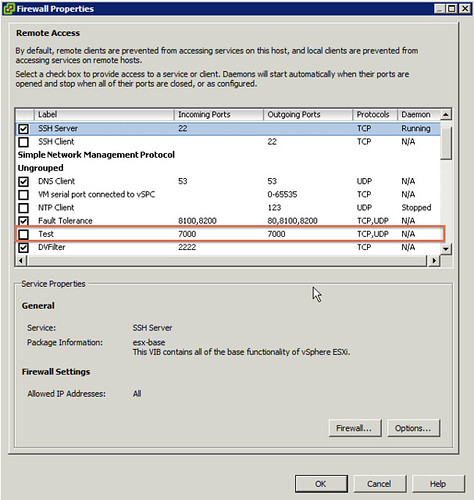
I copied a firewall rule from my existing ESXi host and which is created by HA to my Debian VM and edited the file, the original file was “fdm.xml”. I edited and and renamed it to test.xml. I changed all ports to 7000 and changed the <id> of the service that would need to be added and saved the file in “etc/vmware/firewall”.
Now it was time to package it all up and see if it would work. I guessed that the steps required would simply be the reverse of what I did to extract it all.
tar -czvf etc/ test
I then opened up the descriptor.xml file and changed some of the fields around, most don’t seem to matter much except for the following:
Change the following key to:
<acceptance-level>certified</acceptance-level>
<acceptance-level>community</acceptance-level>
Add your list of files:
<file-list>
<file>path-to-file</file>
</file-list>
Change the name of your package and the size accordingly:
<payload name="test" type="vgz" size="809">
I wasn’t sure if that would work, but I would find out eventually I guess (yes I also tried “communitysupport” as the acceptance-level but that doesn’t work!). I also removed the checksum details from the descriptor file just in case it would be used. This is what my full descriptor file looked like:
<vib version="5.0">
<type>bootbank</type>
<name>firewallrule</name>
<version>1.0</version>
<vendor>Duncan</vendor>
<summary>Firewall rule</summary>
<description>Firewall rule</description>
<release-date>2011-06-01T22:16:31.062257+00:00</release-date>
<urls/>

<relationships>
<depends>
</depends>
<conflicts/>
<replaces/>
<provides/>
<compatibleWith/>
</relationships>

<software-tags>
<tag>driver</tag>
<tag>module</tag>
</software-tags>

<system-requires>
<maintenance-mode>true</maintenance-mode>
</system-requires>

<file-list>
<file>etc/vmware/firewall/test.xml</file>
</file-list>

<acceptance-level>community</acceptance-level>
<live-install-allowed>false</live-install-allowed>
<live-remove-allowed>false</live-remove-allowed>
<cimom-restart>false</cimom-restart>
<stateless-ready>false</stateless-ready>
<overlay>false</overlay>

<payloads>
<payload name="test" type="vgz" size="809">
</payload>
</payloads>
</vib>
Next up would be making a single .vib file out of these three components again:
ar -r test.vib test descriptor.xml sig.pkcs7
Now I need to ‘scp’ the file to my ESXi host and see if I can install it:
scp test.vib root@esxi:test.vib
esxcli software vib install -v /test.vib
I received an error that the ImageProfile acceptance level needed to be changed. That was my next step:
esxcli software acceptance set --level CommunitySupported
After repeating the “esxcli software vib install” command I received the following output:
~ # esxcli software vib install -v /test.vib
Installation Result
   Message: The update completed successfully, but the system needs to be rebooted for the changes to be effective.
   Reboot Required: true
   VIBs Installed: Duncan_bootbank_firewallrule_1.0
   VIBs Removed:
   VIBs Skipped:
~ #
I rebooted the host and here’s a screenshot of the ESXi firewall with the newly added custom service “Test”:
Once again, I want to point out that this is currently unsupported. Don’t use this in your production environment!
The following articles helped me figuring this out and producing this article:
http://tldp.org/HOWTO/html_single/Debian-Binary-Package-Building-HOWTO/