How do you setup multiple-NIC vMotion? I had this question 3 times in the past couple of days during workshops so I figured it was worth explaining how to do this. It is fairly straight forward to be honest and it is more or less similar to how you would setup iSCSI with multiple vmknic’s. More or less as there is one distinct difference.
KB article has been published, including the video I recorded
You will need to bind each VMkernel Interface (vmknic) to a physical NIC. In other words:
- Create a VMkernel Interface and give it the name “vMotion-01”
- Go to the settings of this Portgroup and configure 1 physical NIC-port as active and all others as “standby” (see the screenshot below for an example)
- Create a second VMkernel Interface and give it the name “vMotion-02”
- Go to the settings of this Portgroup and configure a different NIC-port as active and all others as “standby”
- and so on…
Now when you will initiate a vMotion multiple NIC ports can be used. Keep in mind that even when you vMotion just 1 virtual machine both links will be used. Also, if you don’t have dedicated links for vMotion you might want to consider using Network I/O Control. vMotion can saturate a link and at least when you’ve set up Network I/O Control and assigned the right amount of shares each type of traffic will get what it has been assigned.
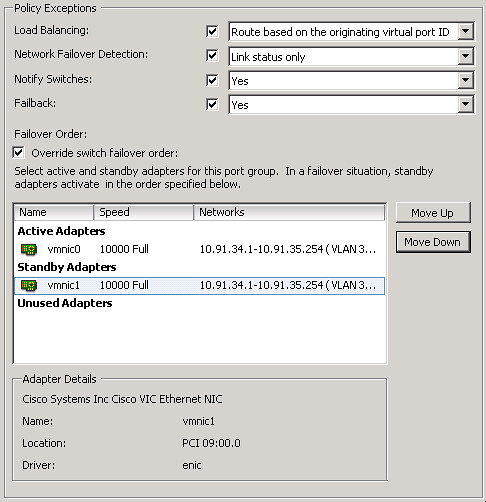
For a video on how to do this:
<update: dvSwitch details below>
For people using dvSwitches it is fairly straight forward: You will need to create two dvPortgroups. These portgroup will need to have the “active/standby” setup (Teaming and Failover section). After that you will need to create two Virtual Adapters and bind each of these to a specific dvPortgroup.
And again the video on how to set this up:
Hello Duncan. Thanks for this great Guide to multi-nic vmotion in vSphere5. But for me a Question still exists… How should the VMkernel Nics configured at IP Side? IPs on the same Subnet for vmknic0 and vmknic1 ?
They can be on the same subnet, and that is probably easiest as well.
If they’re on the same subnet, which port on server 1 connects to which port on server 2 ?
I’d put them in different subnets so I can arrange for each network to stay on 1 switch. Otherwise vMotion might be taxing the inter-switch links unnecessarily.
Then this is not an option as you cannot predict which link it takes. But is the “cost” really that high for the average VM?
I think the cost of vmotion across interswitch links could be high. I was under the assumption the host would use its local routing table and make a connection based on its matching subnets.
Just found out that my preconceptions and some of my implementations where/are flawed. In the past I have used different VLANs and different IP subnet to distinguish between the vMotion-01 traffic (Switch 1 or FabricInterconnect 1) and the vMotion-02 traffic (Switch 2 or FabricInterconnect 2).
Only today at a client with vSphere 5.1 Build 914609 & 1021289 have I found vMotion traffic failing, while trying to jump from 10.0.201.1 (esx01 on VLAN 201) to 10.0.202.2 (esx02 on VLAN 202 on another switch)
Got my cold shower while reading htp://kb.vmware.com/kb/2007467
“Note: Ensure that both VMkernel interfaces participating in the vMotion have the IP address from the same IP subnet.”
I guess I had not seen and read this “same IP subnet” before.
Hi Duncan,
Thanks alot! Could you maybe also explain how this works with a dvs, i got a dedicated vds with 2 physical nics..
You will need to create two dvPortgroups. These portgroup will need to have the “active/standby” setup (Teaming and Failover section). After that you will need to create two Virtual Adapters and bind each of these to a specific dvPortgroup.
I am confused. How is this different than just having 1 porgroup with 2 nics that are setup as teaming??
multiple VMkernels = multiple initiators for the traffic.
I think I see. I just thought a Teaming portgroup did the same thing.
If we have multiple VMkernel port groups with multiple nic per port group for teaming, would this improve vmotion comparing if having the same port group without teaming?
If we have multiple VMkernel port groups with multiple nic per port group for teaming, would this improve vmotion comparing if having the same number of port groups without teaming?
No it will not, but teaming would be preferred for resiliency
You also need to (if its a Cisco switch) create and etherchannel and hardcore it to on correct?
no you don’t. there are no requirements for the physical swithc.
two vmkernel nics + two physical nic ports is all you need.
Thank you! Great info
Incase this helps anyone, below is how I scripted Multi-NIC vMotion based on Duncan’s post above in the %firstboot section of my ks.cfg. I’m pretty sure it correct…
dcc
–begin cut & paste of %firstboot / ks.cfg —
# add vSwitch1 for vMotion (128 = 120 usable ports)
esxcli network vswitch standard add –ports 128 –vswitch-name vSwitch1
# attach vmnics to vSwitch1
esxcli network vswitch standard uplink add –uplink-name vmnic1 –vswitch-name vSwitch1
esxcli network vswitch standard uplink add –uplink-name vmnic5 –vswitch-name vSwitch1
# configure vMotion portgroup
esxcli network vswitch standard portgroup add –portgroup-name “vMotion01” –vswitch-name vSwitch1
esxcli network vswitch standard portgroup add –portgroup-name “vMotion02” –vswitch-name vSwitch1
# configure active uplinks for vSwitch1
esxcli network vswitch standard policy failover set –active-uplinks vmnic1,vmnic5 –vswitch-name vSwitch1
# configure active uplinks for multi-vnmic vMotion
esxcli network vswitch standard portgroup policy failover set –active-uplinks vmnic1 –standby-uplinks vmnic5 –portgroup-name vMotion01
esxcli network vswitch standard portgroup policy failover set –active-uplinks vmnic5 –standby-uplinks vmnic1 –portgroup-name vMotion02
# configure failure detection + load balancing for vSwitch1
esxcli network vswitch standard policy failover set –failback yes –failure-detection link –load-balancing iphash –notify-switches yes –vswitch-name vSwitch1
# configure failure detection + load balancing for multi-vnmic vMotion (use portid)
esxcli network vswitch standard portgroup policy failover set –failback yes –failure-detection link –load-balancing portid –notify-switches yes –portgroup-name vMotion01
esxcli network vswitch standard portgroup policy failover set –failback yes –failure-detection link –load-balancing portid –notify-switches yes –portgroup-name vMotion02
# configure vmkernel interface for vMotion traffic
esxcli network ip interface add –interface-name vmk1 –portgroup-name “vMotion01”
esxcli network ip interface ipv4 set –interface-name vmk1 –ipv4 172.16.3.101 –netmask 255.255.255.0 –type static
esxcli network ip interface add –interface-name vmk2 –portgroup-name “vMotion02”
esxcli network ip interface ipv4 set –interface-name vmk2 –ipv4 172.16.3.102 –netmask 255.255.255.0 –type static
vim-cmd hostsvc/vmotion/vnic_set vmk1
vim-cmd hostsvc/vmotion/vnic_set vmk2
–end cut & paste of %firstboot / ks.cfg —
Great article
Is there a limit how many VMkernel dvPortgroups you can create?
Example:
Converged adapter with 8 virtual vmnics created = Max 64 simultaneous vmotion?
True or false
sorry just read the answer in clustering deepdive:
1GbE = 16 nics supported
10GbE = 4 nics supported
Does 16nics for 1gbps means e.g. 2 nics for 16 vmkernel port groups with active passive, or 8 vmkernel port groups with active passive.
Hi Ducan
taking 1Gbps for this enquiry.
16 nics are supported for vmotion. does it means 16 active nics or number of nics used irregardless its active or passive ie a vmkernel port group setup wiht active passive so maximum of 8 port groups.
Thanks.
I tried to implement this configuration and have a problem. If I enable vMotion on one VMkernel port, it is automatically disabled on the other one. I would assume that I need both VMkernel ports with vMotion enabled. How do I manage that?
In addition to my previous post, I will show you the PowerCLI script that I used to create the vSwitch.
I think I solved the problem my self.
My first test was with an ESXi 4.1U1 server. There you can have only one vMotion enabled portgroup.
I tested it again with an ESXi 5.0 server. There you can have more than one vMotion enabled portgroups.
This is a nice new feature of vSphere 5. It gives us another good reason to migrate soon. 😉
This is “vSphere 5” only indeed…. Hence the reason I mentioned “vSphere 5” in the title 🙂
Great article, can’t wait to be able to test and implement….Just curious on where this is within the vSphere 5 documentation, as I’m having trouble finding it.
Somehow it was left out. I have asked the Doc Team to document it and have created two videos for the KB. KBs should be online soon hopefully and Doc change will happen with the next update probably,
I’ve been doing some testing with vSphere 5.0 in my lab environment, specifically related to vMotion speeds.
The test I did consisted of two identical HP blades in the same chassis, all which had 4 x 1Gb physical links to the VSS core and two HBAs into the storage fabric. I tested the speed of vMotion, back and forth from one host to another, marking down the time it took each one, and taking an average as I increased the number of VMkernals (physical links). It should also be noted the VM, nor the host, were under any kind of load.
1 VMkernal: 21.2 seconds (5 tests)
2 VMkernals: 14.4 seconds (5 tests)
3 VMkernals: 13 seconds (5 tests)
4 VMkernals: 11.8 seconds (5 tests)
As you can see, as you add multiple VMkernals enabled for vMotion, the time it takes for a vMotion to complete is considerably less as you add multiple initiators for the traffic. Additionally, just moving to vSphere 5 (from 4.1) dropped the normal vMotion time almost in half from what we have now going across a single 1 Gb link.
I’m pleasantly surprised at the vMotion speed on 5 so far. I’ll be doing this same test again while the VM is under high load to compare again.
previously the suggestion was to have one vSwitch with two pNICs and have one active for management traffic(standby for vMotion) and one active for vMotion (standby for management).
how do you suggest setting up for multiple NIC vMotion?
do you still recommend one vSwitch with multiple vMotion vmkernels and one for management traffic, with the each NIC in standby mode for the other service?
thanks
Graham
I would like to know the answer to this one as well.
If you have two pNIC’s, is it okay to have Multiple-NIC vMotion setup and management traffic on the same vSwitch?
I would not share the Management NIC with the vMotion NICs to be honest. Although chances are slim it would interfere I would not take the risk.
Here is a link to the video and KB artibles
http://www.youtube.com/watch?v=n-XBof_K-b0
http://kb.vmware.com/kb/2007467
Multiple-NIC vMotion in vSphere 5 with SQL Server
http://www.youtube.com/emcprovensolutions#p/u/1/X8AqMhdz3OE
thanks for the links, but it was more of a design question rather than a how-to question.
anyone able to advise?
thanks
Graham
can anyone offer some help?
thanks
My answer was : don’t share the NICs between vMotion and Management, if you do use Network IO Control to guarantee bandwidth to your management network.
Thanks for the reply Duncan, and sorry I missed the first reply.
I have 4 x GbE Nics to use between mgmt and vmotion.
I could set up two vswitches. One for mgmt with two nics, one active and one for failover in standby. Second vswitch for vmotion with two active vmkernel ports.
I thought it may be better to set up one vswitch. 3 vmkernel ports for vmotion and one for mgmt traffic each using one nic. I could then allow the vmotion ports to carry mgmt traffic for failover in standby mode. Under normal conditions this would allow one extra vmkernel port for vmotion.
The only time both traffic would go over the same nic is if the primary mgmt nic failed.
Is this not a good idea, and have I missed something?
Thanks
Graham
I know this reply is a little late, but I just enabled this configuration in my environment, and I saw some guge performance gains (almost 2x as fast).
My setup is 2 identical Dell R910s, going to two Dell 5424 switches, with vMotion traffic in a private VLAN, with a 2 port LAG in between the switches. Each R910 has 2 physical NICs dedicated for vMotion (one going to each switch). As per the article, one VMK port per NIC.
My results:
Windows Server 08R2 VM1 – 4GB RAM:
-2 vMotion Tests (host A to B, then host B back to A. With 1 VMkernel port, the vMotions took 45 and 43 seconds each. With 2 VMkernel ports, the vMotions took 28 and 26 seconds each.
Windows Server 08R2 VM2 – 12GB RAM:
-2 vMotion Tests (host A to B, then host B back to A. With 1 MVkernel port, the vMotions both took 2:05. With 2 VMkernel ports, the vMotions took 1:12 and 1:04 each.
That’s a 45% speed improvement in what took me 5 mins to configure. I already use iSCSI, so this particular way of configuring and binding multiple vmk nics to physical NICs was very familiar.
Thanks Duncan!
I’m doing some testing with this and am seeing traffic only use one NIC. I only have one vSphere 5 host. Do both sides of the vMotion have to vSphere 5 for this to work?
Hallo
I cannot se both vmkernel ports on the same subnet, when i set vmotion dont work, vmkping not work cause second vmotion port doesnt route (vmk1):
~ # esxcfg-route -l
VMkernel Routes:
Network Netmask Gateway Interface
172.16.130.0 255.255.255.0 Local Subnet vmk2
172.16.131.0 255.255.255.0 Local Subnet vmk4
172.16.132.0 255.255.255.0 Local Subnet vmk0
192.168.21.0 255.255.255.0 Local Subnet vmk3
default 0.0.0.0 192.168.21.1 vmk3
~ # esxcfg-vmknic -l
Interface Port Group/DVPort IP Family IP Address Netmask Broadcast MAC Address MTU TSO MSS Enabled Type
vmk0 VMotion IPv4 172.16.132.202 255.255.255.0 172.16.132.255 00:50:56:70:15:9a 1500 65535 true STATIC
vmk1 VMotion2 IPv4 172.16.132.22 255.255.255.0 172.16.132.255 00:50:56:7d:b2:9a 1500 65535 true STATIC
vmk2 SCSI IPv4 172.16.130.22 255.255.255.0 172.16.130.255 00:50:56:78:65:76 1500 65535 true STATIC
vmk3 Management Network IPv4 192.168.21.102 255.255.255.0 192.168.21.255 00:50:56:46:45:b6 1500 65535 true STATIC
vmk4 SCSI2 IPv4 172.16.131.22 255.255.255.0 172.16.131.255 00:50:56:7a:34:43 1500 65535 true STATIC
~ # esxcfg-vswitch -l
Switch Name Num Ports Used Ports Configured Ports MTU Uplinks
vSwitch0 64 4 64 9000 vmnic0,vmnic1
Switch Name Num Ports Used Ports Configured Ports MTU Uplinks
vSwitch1 64 7 64 1500 vmnic2,vmnic3
PortGroup Name VLAN ID Used Ports Uplinks
SCSI2 0 1 vmnic3
SCSI 0 1 vmnic2
VMotion2 0 1 vmnic3,vmnic2
VMotion 0 1 vmnic2,vmnic3
vSphere 4 on ESXi had an issue where if two IPs were assigned to a NIC team, and those IPs were in the same VLAN, a unicast storm would result: all NICs on all hosts that were on the vMotion network would flood.
In this configuration, if one of the NIC teams were to engage its secondary NIC, primary NIC failed, and thus placed the second IP on same NIC as the other Team was already using, does a similar unicast storm result when a vmotion is initiated on both NIC Teams?
Does vmotion on multiple nics work on esxi4 with port channeling? what policy do I need to set on the vswitch?
I do not know, I have not tried. My comment was based on the IPs used in the video. Referring to KB 1013077 that should result in different NICs being used for inbound and outbound traffic, and from experience, will cause a unicast storm.
If I had to guess for vSphere 4, create a vSwitch with two NICs. Add two vmotion ports. Make the first port active on the first adapter and standby on the second, and the second port active on the second adapter and standby on the first. Use one VLAN, but two IP address spaces, such as 10.x.y.z on the first port, and 192.x.y.z on the second port. Make sure no other kernel port is on either of the two IP subnets or the rules from KB 1013077 kick in.
Don’t know if that would work, or if its supported….let us know what your port counters say when you try it.
abit loss here. may i know what are the advantages of using multi-nic vmotion compared to a vmkernal with 2 nic teaming on load balance? will we be looking at better throughput?
What do you folks think about this for the 6-NIC setup with multiple vMotion? Our storage is fiber channel in this situation. Worst case scenario is if the quad PCIe card goes, then vMotion and Mgmt is on the same single pNIC. However, with NIOC vMotion bandwidth can be limited to ensure Mgmt traffic flows well.
OnBoard vmnic0
OnBoard vmnic1
PCIe vmnic2
PCIe vmnic3
PCIe vmnic4
PCIe vmnic5
vSwitch0
Mgmt
vmnic0 Primary
vmnic4 Standby
vmnic5 Standby
vMotion-1
vmnic0 Standby
vmnic4 Primary
vmnic5 Standby
vMotion-2
vmnic0 Standby
vmnic4 Standby
vmnic5 Primary
vSwitch1
LAN-1
vmnic1 Active
vmnic2 Active
vmnic3 Active
LAN-2
vmnic1 Active
vmnic2 Active
vmnic3 Active
so vMotion will never flow through nic0 (unless nic1 and 2 fail)? Why not add another vMotion network and use nic0 as well since you will be using NIOC?
EDIT: previous post had an error
so vMotion will never flow through nic0 (unless nic4 and 5 fail)? Why not add another vMotion network and use nic0 as well since you will be using NIOC? Just saying.
With your setup vMotion will use 2 nics, you could use 3 and since you are going to use NIOC, might as well use all links for blazing vMotion.. NIOC will make sure your mgmt stays afloat.
Will this concept work on other vmkernal ports like management and FT?
I tried it for FT and noticed it will only allow one port group enabled for FT and disables the other port group.
FYI. If you are having trouble getting this to work, the bug in KB 2008144 might be your reason. I had to use the no Failback workaround. This bug usually only manifests itself after a reboot of the host. The nics are bound correctly after things are initially setup, its only after a reboot do they all bind to just one nic. This can be witnessed by doing an ESXTOP and entering N to see the nics, you will see that they same NIC is bound to both VMK ports. Note: this bug also effects iSCSI port binding. Took 3 weeks and 3 VMware cases to identify this Bug.
@Vision: No it does not work for FT in 5.0
Duncan,
Any idea if Multi NIC vMotion is possible on a Nexus 1000v? I reached out to Cisco to see if they have any information but I figured I would ask here as well.
@Kalen: don’t know to be honest… Never tested and never seen any info.
So am I right to assume that when you run this configuration you lose redundancy on your vMotion.
I have 2 nics strictly for vMotion, each to a seperate switch.
No, you would normally have 2 vmkernel’s for vmotion. that is where the redundancy comes in!
Wonder if I have something configured wrong then. Whenever a link is down the vmotion fails not connecting to the IP address of the down card.
I have to remove the vmkernal in order to get vmotion to work (of course just over the 1 link) If both links are up it works great and much faster.
I think I got it….In the picture all the Nic Teaming Policy exceptions are checked, but in the video they are unchecked. Mine were unchecked and didn’t seem to work unless both links were live.
Craig ran into the same issue this Friday afternoon – just upgraded from 4.1 to 5 to discover the vswitch bugs – and there are many.
NOTE the KB you refer to is wrong!! Spent over an hour on the phone with tech , they stated that the KB is NOT the prefered method – they further stated that each nic port group needs to be assigned to a unique / seperate vswitch…….
this is supposed to be fixed in SP1, but that isn’t due out for a couple of months!!!
So many people / organisations have been caught out by this and it hasn’t been properly advertised. The upgrade QC process wasn’t followed so v5 is properly broken in a very fundamental way. If you haven’t upgraded yet, I’d hold fire until SP1 has ben released, save yourself the hassle.
Once we have vMotion setup on vSphere 5, what is the best why to monitor the multiple nics for traffic to be sure all are being used during vMotion events as well as seeing if all links are overloaded? Is there anything free or are we stuck using third party solutions like NetFlow/Solarwinds etc?
Hi Duncan,
Any reason these VMKs are set to Active/Passive, when iSCSI port binding is done Active/Unused?
Forbes
As a follow-up to my previous question (why use Active/Passive when iSCSI port binding should be Active/Unused), I put the following answer together for my colleagues. This is my educated guess at why, but I’d appreciate if someone can confirm this or provide an alternative answer if this isn’t the case.
iSCSI port binding is done with Active/Unused because if a path fails then we want iSCSI to realize that a path is down and to use the inherent iSCSI multi-pathing failover algorithms to recover appropriately. This is preferable to the link momentarily dropping and being recovered in the background by the ESX host’s failover policy.
vMotion on the other hand would rather have something for its VMKs to failover to. If you are migrating multiple VMs off (or onto) a host and they are spread over multiple vMotion VMKs, if one link fails and the other uplinks are set as Unused then all those vMotions that are active on that path will just timeout and fail. If the other uplinks are set to Standby, then at least the current vMotions will complete successfully, even if they now have to share less bandwidth.
If we dig a little deeper on the benefits of the multi (vm)nic vmotion, are these valid observation –
a. With the multiple link, concurrent vMotion will take advantage of this and will actually speedup by factor of n (where n is the number of nics). As there are separate socket connection between the src and dst.
b. We now have two vMotion network so redundancy is built in explicitly. Sort of dual fabric in SAN world.
c. Positive influenze on the DRS operation while doing load balancing. Great idea to do when you have 4 or more nics
Hi Duncan,
what about using Etherchannels? Is it possible to use two nics that are together on an etherchannel to have a better performance? And how to configure that?
Only have one vSwitch with on VMkernel port for vMotion, two physical network cards and ip hash?
I test this and have only traffic on one physical nic.
I cannot change the adapter setting for the VMKernerl Port because ip hash did not support standby adapters
Frank
Interesting way to do it. We do it slightly differently. We take two nice, team them together and make them both active. Then in the switch we create a lacp trunk with both nics. We’ve been doing this since esx 4 and have never had an issue even when a link fails.
Bonding/etherchannels add little value because the hash is based ob src-dst. So you would see little decrease of vMotion time.
Should I use two separate physical switches when connecting the physical NICs to prevent looping?
I would for redundancy purposes, but “looping” is not a problem in this configuration.
Duncan,
How does ESX5 determine which vmkernel interfaces traffic is flowing between on the two hosts? I’d like to be able to do the uplink pinning in a way that vmotion traffic stays local on the two upstream switches during normal operation, protecting the link between the switches from over saturation.
If I knew for example that vmotion streams always started between the lowest numbered vmkernel interface with vmotion enabled on the two hosts , and then moved on to the next lowest numbered vmkernel interface with vmotion enabled I could arranged my pinning to keep each stream local to the upstream switch.
Hey Heath,
Did you ever find your answer to this? We’re looking at a 10G solution and want to be sure we can localize the network traffic to avoid any congestion between the switches. I’m hoping it’s like you said with the lowest numbered vmk on the source connecting to the lowest numbered on the target.
Thanks,
Doug
Hi Duncan,
In a 10GB converged network environment, (with 2 X 10GB CNA per host) is there any value creating a separate DVSwitch for vMotion if you are already separating your vMotion traffic using VLAN separation?
The same uplinks in this switch would be shared by the other dvSwitches port groups for network and storage traffic. Obviously we would limit the amount of vMotion traffic going over that VLAN.
Thanks in advance,
Kiran
@Kiran: Not really in my opinion. I would just use the same dvSwitch and use NIOC to guarantee a certain % to each traffic type
Many thanks Duncan much appreciated
We are currently about to go live with an environment identical to Bryan’s about (where he compared the vmotion transfer time) with 5.0 u1…we will be using netioc..however I have some major concerns about running into network congestion/contention with only 1gbe Ethernet cards… Our environment will consist of 8 vsphere 5 servers in one cluster across 2 blade centers(each having only 4 1gb pnics).
Running approximately 250 vms..
Is there a limit, and or suggested rule of thumb when it comes to network bandwidth to vms and/or hosts ratio? Are we going to have major issues trying this configuration?
Thanks! Have all your books and love the blog!!
I have 2 nic cards configured using two diferent subnets. I want my virtual server to use subnet A and my clients to use subnet B. All my virtual Guest OS clients are using Subnet A. How can I configure some to use subnet B & the second nic card.
Is it possible to do that.
Thanks
When we upgrade to vSphere 5 soon, we will have two 10GbE nics per ESXi host and using NIOC to control bandwidth across different traffic types. But I am not clear on whether this multiple-nic vMotion configuration can (or should) be used for this scenario. Could someone answer/clarify please?
By the way, thank you Duncan for explaining how to set this up.
Very good article, but when i want to integrate physical switch redundancy im getting confused.
In my scenario the two pNICs are connected to separete pSwitches wich should not be connected to each other directly (only over the backbone switch).
So on all ESXis,
vMotion-kernel1 is connected to pSwitch1 and
vMotion-kernel2 is connected to pSwitch2.
How can i control that only vMotion kernel on the same switch will talk together?
Can i configure different ip range and vlan on the vMotion-kernel2 without generating problems?
Maybe this way?
vMotion-kernel1 – 192.168.10.x – vlan10
vMotion-kernel2 – 192.168.20.x – vlan20
As far as I know you cannot control this unfortunately.
Bummer. We’re in the process of implementing a 10G solutuion where the switches will only have 20 or 40 gbps between them (probably enough for most cases). It would be tremendously helpful to be able to predetermine the paths to keep the traffic within a switch.
I just happened across an article by Kendric Coleman recommending that multi-nic vMotion not be used in a 10G environment. His argument is basically use only one link for vMotion so that other traffic can flip over to the unused one during vMotions. Do you have any recommendation one way or the other?
Thanks for the great post! We’ve been using it for over a year now and has been awesome.
Doug
What about the concept from http://blogs.vmware.com/networking/2011/11/vds-best-practices-rack-server-deployment-with-eight-1-gigabit-adapters.html with LBT as load balancing type.
I’ve 8 Uplinks (vmnic1-8) and would simply create one dvs with 4 portgroups (Mgmg, VMOTION-1, VMOTION-2 and VM network), LBT as load balancing + NIOC and all 8 dvUplinks active on all 4 portgroups. This seems to me the easiest way. No active/standby adapters. All portgroups setup identical.
Any comments?
What is described above is what VMware recommends.
I forget to write that I mean “Design Option 2 – Dynamic configuration with NIOC and LBT”, but I guess it was clear without giving that information. Nice, then I will use this approach everywhere.
This seems to not be working as expected here. I’m testing this with 3 VMs and get only 2 simultaneous vmotions (8 active 1ge interfaces/vmnics + vmk1 and vmk2 for vmotion1+2 + LBT load balancing). More interestingly I see traffic going only over one vmk port / vmnic. Should this spread the traffic equally over all assigned interfaces? Will this start to work better with a higher number of VMs?
i still dont understand. what is the usage of 2 different active vmnic in 2 different vmkernel port for vmotion here? for workload capacity so the vmotion would be faster?
Hello Duncan,
Thanks for great article, it helped me a lot. However I still have one issue to resolve:
On each ESXi machine, we have multiple (8) pNICs all bond to an etherchannel (which means that in “NIC Teaming” tab, we have Load-balancing based on src+dst IP hash). Now, if I configure vMotion portgroup and in the “NIC Teaming” tab I check the “Override switch failover order” option as required and then try to move few pNICs in the list to the “Standby Adapters”, but vSphere pops a warning that “The IP hash based load balancing does not support Standby uplink physical adapters. Change all Standby uplinks to Active status”. I’m puzzled by this. So I went the route that in vMotion-01 portgroup I moved (lets say) pNICs 0,1,2,3 to “Active” and pNICs 4,5,6,7 to “Unused” instead of “Standby” adapters section. Similarly in vMotion-02, I moved pNICs 4,5,6,7 to “Active” and pNICs 0,1,2,3 to “Unused” section. My question is: IS THIS CONFIGURATION CORRECT FROM YOUR PERSPECTIVE? I cannot cancel the etherchannel trunks in general. Thanks a lot for your reply & time.
If you have the physical swithc also configured as an etherchannel than this is an unsupported configuration and definitely not recommend. So either fully drop the either channel configuration or drop this multi-nic vMotion setup.
Not sure why you are using etherchannels, I hardly ever have seen a use case for it.
Yes, indeed I have the physical switch configured for etherchannel (well, 802.3ad link aggregation essentially), too. The reasons for this are 1. as high throughput among ESXi participants for vhost-to-vhost and vhost-to-client traffic, as possible, and 2. redundancy on a network level. With single pNIC setup for vMotion I’d lose the advantage of network redundancy (consider that each of our ESXi machines has 8 802.3ad bonded GbE links connected to a switch, which itself consists from 2 physical switches forming one logical device on both layer2 and layer3 using IRF technology – so 8 pNICs from single ESXi are bonded together while 4 ones are connected to switch:IRFmember1 and the other 4 ones end in the switch:IRFmember2). When thinking about this, to still have redundance spread over _ALL_ the 8 pNICs I could (based on your recommendation) create 8 vMotion portgroups and in each one assign single unique pNIC as “Active”, while leaving the others “Unused”. What do you think?
OK, just FYI, fault admitted. KB 1001938 mandates NOT to configure Unused nor Standby uplinks with etherchannel. So I reverted to a configuration with single vMotion pgroup per vSwitch per ESXi host, and in each vMotion pgroup utilising all the vmnics with load balancing based on IP hash (essentially config shared with with the one for VM traffic). Jumbo frames enabled. I admit etherchannel has no advantage for vMotion since the communication happens between the same src and dst IP, but the pNIC-level redundancy is still there and it is more important for me to dedicate all pNICs to VM traffic (which goes to a myriad of dst IPs hence load-balancing still kicks in). I can live with 1Gbps vMotion for now. In a pinch – dedicating several pNICs to just vMotion has lower value for me than dedicating all pNICs as bonded for VM-to-client traffic, considering the amount of use each of the two gets (hey! hash calculation based on packet sequence number would help! lol). Sigh.
FYI: I still don’t see the value of IP Hash in most cases. And standby/unused is not recommended or supported as incoming traffic could be dropped on links which are unused.
Hi Duncan,
I ran into an on-going issue with multi-nic vmotion which has been working successfully until we added some Sandy-bridge CPU hosts to our ‘westmere’ based cluster.
For multi-nic vmotion can the both the portgroups be in different non-routable vlans ie. vmotion-01 and vmotion-02 are separate and cannot communicate between each other?
Hi Duncan,
great post, but i´m unable to configure to
2x 10ge adapters
1x vswitch (vmnic5, vmnic6)
2x vmkernel ports (tagged for vmotion)
vmk2 – vmotion_Port_0 – VLAN1899 – IP 10.18.99.18/24, vmnic 5 active, vmnic 6 standby
vmk3 – vmotion_Port_1 – VLAN1899 – IP 10.18.99.118/24, vmnic 6 active, vmnic 5 standby
same config on a another host in the cluster (other Ipadresses used vmk2/10.18.99.19/24, vmk3/10.18.99.119/24 )
vmotion stucks at 9%, so i tested a vmkping and i´m able to ping from host-a to host-b over vmk2, but not over vmk3
a look at the routing shows that traffic for 10.18.99.0 is routed thru vmk2 only, so i´m unable to send any traffic thru vmk3
if i change the ip adress from vmk3 to 10.18.100.119/24 and to 10.18.100.118
i´m able todo a vmotion and vmkping also working, because the routing shows traffic for 10.18.99.0 goes thru vmk2 and traffic for 10.18.100.0 goes thru vmk3
so my question is why, stand in every config guide that the ip adresses must be in the same subnet, when it doesn´t work. i also the in the vmkernel.log that both kernel ports are used for vmotion
would be nice if you can give me short feedback
thanks in advance
br
Harri
HI!!
I have an HP Virtual Connect+vSphere 5 scenario.
With vConnect I could setup the bandwitch in each vmnic.
I hope you could answer if this is the same thing:
Scenario 1: 2 vmnics, 2 Gbps each, 2 vmotion ports with 1 IP each, using your method, first port with vmnic1 as active and vmnic2 as standby and second port with vmnic2 as active and vmnic 1 as standby.
Scenario 2: 2 vmnic, 4 Gbps vmnic1 and 1 gbps vmnic2. One vmotion port, one IP, vmnic1 as active and vmnic2 as standby.
Have these scenarios the same features?
Thank you in advance,
Fran
I was wondering why is this faster than having one VMotion network with two active nics ?
Will VMotion use then only one NIC although there are two Nics active ?
It will only use 1 NIC even though 2 are active.
Hi Duncan,
can you give me please a feedback, to my post from Wednesday, July 25, 2012 at 15:57
thanks in advance
br
Harri
I suggest contact VMware Support Services. I had this setup in my lab, as do many others, and it works for them and worked for me… Don’t know why it didn’t work for you, difficult to say.
Duncan,
Is it _required_ to have active/standby pNICs in portgroup configuration?
I have four 1G pNIC uplinks on each esxi 5U1 connected to a dVswitch. All of them are configured active for all portgroups, where each portgroups is an separate VLAN – 110 total.
Would it make sense instead of configuring active/standby pNICs for a portcgroup, leave all NICs as active but change the order?
Will multi-vmotion work in this case as expected?
Second set questions:
Can vmkernel adapters for VMotion located in different VLANs or all of them have to be in the same VLAN?
As an example: if we have two PortGroups attached to a dVswitch. Each PortGroup has two active pNICS:
Portgroup VL100 (for VLAN100 – 10.1.0.0/24), pNIC order – pNIC1, pNIC2
Portgroup VL200 (for VLAN200 – 10.2.0.0/24) pNIC order – pNIC2, pNIC1
Is it OK to have two vmkernel adapters in each VLAN – one 10.1.0.100/VL100 and second – 10.2.0.100/VL200? Or do they have to be in the same VLAN/network even if they are in different port groups?
Thanks!
ESX 4.0 –> How to change “Standby State” of NIC to “Active state” – on vSwitch NIC Teaming via Service Console ONLY.
I have 1st NIc –> as –> “Active State”
and 2nd NIC –> as –> “Standby State”
Want to change “Standby NIC Status to Active NIC Status” via –> ESX Service console – Command based
Aware of these methods –> But not feasible for me –> Do not want via GUI (VC) & Dont want via PowerCLI also.
This is important for changing loadbalance policy to “Route Based on IP Hash”
Hello!
I have a vmware ver. 5.0 with two vSwitch on different vlan. On switch 0 i can se the hole ip-range. But the secondary vSwitch 1 dont se the hole range ? Im not so familiar with this system. Every client that i configure with the new nic is working properly, but it feels that something is wrong when i dont get the hole range. Help please … Im not so familiar with this system.
Harri, I think this article will explain it. And still no fix for it…
http://vmtoday.com/2012/02/vsphere-5-networking-bug-2-affects-management-network-connectivity/
So basically what you’re saying is that the best practice is to have 2nics for management, 2nics for vMotion, and 2nics for VM Networks?
+ 2 for SAN… 🙁
Hi,
When i configure Multi-NIC for vMotion in vDS it doesn’t work. I’ve followed the tutorial but my second vmkernel doesn’t get a route in the vMotion subnet.
vmk1 = 172.16.1.5/24
vmk2 = 172.16.1.10/24
~ # esxcfg-route -l
VMkernel Routes:
Network Netmask Gateway Interface
172.16.1.0 255.255.255.0 Local Subnet vmk1
vmkping to 172.16.1.10 (vmk2) doesn’t work from another host.
Do i need to restart the services.sh?
Thank you very much Duncan for this fine explanation.
Could you please tell me how vMotion “will find it’s way” ? Does it use DNS ?
I have 2 vMotion in one VLAN and the Management in another VLAN. Only the management IP is registered in the DNS for the moment. How can I be sure the vMotion is used ? (vmkping IP works fine)
Thank you in advance.
FWIW, I’m getting the same behaviour as Harri, on ESXi 5.0.
The first vMotion vmk works, but the second does not, with vmkping not being able to ping the 2nd IP address.
I shall try contacting VMware support, as Duncan has suggested.
vMotion vmkernel ports: vmk1, vmk5:
~ # vmkping 192.168.1.133
PING 192.168.1.133 (192.168.1.133): 56 data bytes
64 bytes from 192.168.1.133: icmp_seq=0 ttl=64 time=2.882 ms
— 192.168.1.133 ping statistics —
1 packets transmitted, 1 packets received, 0% packet loss
round-trip min/avg/max = 2.882/2.882/2.882 ms
~ # vmkping 192.168.1.233
PING 192.168.1.233 (192.168.1.233): 56 data bytes
— 192.168.1.233 ping statistics —
2 packets transmitted, 0 packets received, 100% packet loss
~ # esxcfg-route -l
VMkernel Routes:
Network Netmask Gateway Interface
192.168.1.0 255.255.255.0 Local Subnet vmk1
Since vMotion uses both the active nics on vMotion portgroup, will vMotion work if we configure nics as Active and Unused (instead of Standby) or will it fail due to the loss of 1st portgroup’s Active nic.
http://frankdenneman.nl/2012/12/20/multi-nic-vmotion-failover-order-configuration/
Thanks in advance
Hey, we’ve reached out to vmware support on our issue but I was thinking maybe you can shed some light.
We have Dell blade chassis and are stacking fabric C1 in chassis A to C1 of chassis B. For C2 we are doing the same. We have followed the design for multiple NICs for vmotion and its not working. When performning vmotin tests, the error states: “The vMotion migrations failed because the ESX hosts were not able to connect over the vMotion network. Check the vMotion network settings and physical network configuration.
vMotion migration [167862859:1372781207001045] vMotion migration [167862859:1372781207001045] stream thread failed to connect to the remote host : The ESX hosts failed to connect over the VMotion network
Migration [167862859:1372781207001045] failed to connect to remote host from host : Timeout
Failed to start the virtual machine.”
The path that this is taking is the C2 connections which are vmnic 3 on both hosts and vmk4 on both hosts. If we isolate going through C1 or C2 only, it works but when they are mixed we get this error message. Any suggestions folks?
The support call with Dell confirmed that this design would be the best for our situation.
If we cant get it to work, we’ll go with the KISS method and have one vmotion active.
Hi guys. i know its a best practise for vmotion to set one to active adapter and one to standby with the “override vswitch failover order” tick. The load balancing , netwokr failover detection, notify switches and failback are not tick . What would be the impact if assuming the two network cards for vmotion are in active adapters and failover order “override vswitch failover oder” not tick.
I’m using a multi-NIC active/stand-by teaming configuration for vMotion. I’ve got 2 pNIC’s per 5.1 host with one pNIC from each host assigned to each port group (vMotion-A and vMotion-B) both on a single dvSwitch with nothing else on that dvSwitch. One uplink is active and the other standby on vMotion-A and they are flipped around on vMotion-B (active on A is now standby on B, etc.). If you set it up like you would say iSCSI MPIO (one-to-one and each connection having its own kernel/IP) then you can ping all of the addresses and failover works great (vMotion of my vCenter VM doesn’t even blink when testing it and dropping a connection or two). Give each ESXi hosts an IP address for each vMotion pNIC port and give vCenter multiple NIC’s (one assigned to each port group). If you have 2 host and 1 vCenter server then you’ll need 6 IP addresses, etc. You won’t have any issues when you vMotion your vCenter server and you can ping all of the vMotion IP addresses (yes, ping not just vmkping). Prior to me setting vCenter up like this, vMotion of my vCenter VM wasn’t a 100% HA guarantee – now it is.
Hi there. This blog rocks. been reading it plus all the comments. Here’s my setup and a quick question:
3 hosts in cluster
4x 1Gbps nics available for vmotion and server traffic. management it taken care of.
1 ds with all four ports assigned to it.
my goal was to make all four ports be available for vmotion or server traffic and use network IOC to make sure vmotion doesn’t dominate during congestion (100 shares for server, 50 for vmotion).
in order for this to work properly the service nics are supposed to use an etherchannel and route based on ip hash. that’s easy to set up, but if those four ports are in an etherchannel then I can’t use them with multi-nic vmotion because those are supposed to have active/standby with originating port, not ip hash. am I out of luck? do I have to break it down to say:
2 ports for server traffic in an etherchannel routing based on ip hash and 2 ports for vmotion not in an etherchannel and routing based on originating port?
or can I leave all four ports in an etherchannel on the switch and then put all four as active in the serve traffic port group and only 1 active and 3 standby in each of the other vmotion port groups?
blake, you would have to setup 2 vDS’s, first vDS would house mgmnt and vmnetwork(s) portgroups, assigning two nics that are etherchannel, enable LACP via web client for this vDS, and IP Hash for each port group (you will have at least 2 port groups, mgmt and vmnetwork) and make sure both nics are active links in each portgroup. On the second vDS assign the last two nics (make sure there are not etherchannel!!!) create 2 port groups for vMotion(#1/2) and first nic as active and second a standby, for the second vMotion port group reverse the nics (second nic active, first standby).
If you had 2 additional nic’s it would be better, you could etherchannel the four of them for your first vDS above.
Sorry for really late reply. Never saw the reply so didn’t come back. This setup is exactly what I ended up doing. Thanks!