A couple of weeks ago I was contacted about an issue with vSphere 5.0. When a VM Storage Profile was disabled / enabled it looked like HA and DRS got disabled as well. After diving in to the problem it appeared that both HA and DRS were still working. It seems that some how the vSphere Client thinks it is disabled. Again, although it looks like it is disabled it is still fully functioning… but indeed it is very confusing. A simple work around would be enabling HA/DRS. This problem has just been published in our Knowledge Base, and hopefully will be addressed soon.
5.0
vSphere 5 HA – Isolation Response which one to pick?
Last week I did an article about Datastore Heartbeating and the prevention of the Isolation Response being triggered. Apparently this was an eye-opener for some and I received a whole bunch of follow up questions through twitter and email. I figured it might be good to write-up my recommendations around the Isolation Response. Now I would like to stress that these are my recommendations based on my understanding of the product, not based on my understanding of your environment or SLA. When applying these recommendations always validate them against your requirements and constraints. Another thing I want to point out is that most of these details are part of our book, pick it up… the e-book is cheap.
First of all, I want to explain Isolation Response…
Isolation Response is the action HA triggers, per VM, when it is network isolated from the rest of your cluster. Now note the “per VM”, so a host will trigger the configured isolation response per VM, which could be either “power off” or “shutdown”. However before it will trigger the isolation response, and this is new in 5.0, the host will first validate if a master owns the datastore on which the VMs configuration files are stored. If that is not the case then the host will not trigger the isolation response.
Now lets assume for a second that the host has been network isolated but a master doesn’t own the datastore on which the VMs config files are stored, what happens? Nothing happens. Isolation response will not be triggered as the host knows that there is no master which can restart these VMs, in other words there is no point in powering down a VM when it cannot power it on. The host will of course periodically check if the datastore is claimed by a master.
There’s also a scenario where the complete datastore could be unavailable, in the case of a full network isolation and NFS / iSCSI backed storage for instance. In this scenario the host will power off the VM when it has detected another VM has acquired the lock on the VMDK. It will do this to prevent a so-called split brain scenario, as you don’t want to end up with two instances of your VM running in your environment. Keep in mind that in order to detect this lock the “isolation” on the storage layer needs to be resolved. It can only detect this when it has access to the datastore.
I guess there’s at least a couple of you thinking but what about the scenario where a master is network isolated? Well in that case the master will drop responsibility for those VMs and this will allow the newly elected master to claim them and take action if required.
I hope this clarifies things.
Now lets talk configuration settings. As part of the Isolation Response mechanism there are three ways HA could respond to a network isolation:
- Leave Powered On – no response at all, leave the VMs powered on when there’s a network isolation
- Shutdown VM – guest initiated shutdown, clean shutdown
- Power Off VM – hard stop, equivalent to power cord being pulled out
When to use “Leave Powered On”
This is the default option and more than likely the one that fits your organization best as it will work in most scenarios. When you have a Network Isolation event but retain access to your datastores HA will not respond and your virtual machines will keep running. If both your Network and Storage environment are isolated then HA will recognize this and power-off the VMs when it recognizes the lock on the VMDKs of the VMs have been acquired by other VMs to avoid a split brain scenario as explained above. Please note that in order to recognize the lock has been acquired by another host the “isolated” host will need to be able to access the device again. (The power-off won’t happen before the storage has returned!)
When to use “Shutdown VM”
It is recommend to use this option if it is likely that a host will retain access to the VM datastores when it becomes isolated and you wish HA to restart a VM when the isolation occurs. In this scenario, using shutdown allows the guest OS to shutdown in an orderly manner. Further, since datastore connectivity is likely retained during the isolation, it is unlikely that HA will shut down the VM unless there is a master available to restart it. Note that there is a time out period of 5 minutes by default. If the VM has not been gracefully shutdown after 5 minutes a “Power Off” will be initiated.
When to use “Power Off VM”
It is recommend to use this option if it is likely that a host will lose access to the VM datastores when it becomes isolated and you want HA to immediately restart a VM when this condition occurs. This is a hard stop in contrary to “Shutdown VM” which is a guest initiated shutdown and could take up to 5 minutes.
As stated, Leave Powered On is the default and fits most organizations as it prevents unnecessary responses to a Network Isolation but still takes action when the connection to your storage environment is lost at the same time.
** Disclaimer: This article contains references to the words master and/or slave. I recognize these as exclusionary words. The words are used in this article for consistency because it’s currently the words that appear in the software, in the UI, and in the log files. When the software is updated to remove the words, this article will be updated to be in alignment. **
Memory Speeds?
I was just checking out some of the VMworld Sessions and one that I really enjoyed was the one on “Memory Virtualization” session by Kit Colbert and YP Chien (#VSP2447). This session has a lot of nuggets but something I wanted to share is this script that YP Chien / Kingston showed up on stage. This script basically shows you at what speed your memory is capable of runing at. I asked Alan Renouf if he could test it as my lab is undergoing heavy construction. He tested it and mailed me back the output of the following script:
$cred = Get-Credential

$sessOpt = New-WSManSessionOption -SkipCACheck -SkipCNCheck -SkipRevocationCheck

$rsrcURI = "http://schemas.dmtf.org/wbem/wscim/1/cim-schema/2//CIM_PhysicalMemory"

foreach ($h in (Get-VMHost)) {

Write-Output $h.Name

Get-WSManInstance -ConnectionURI ("https`://" + $h.Name + "/wsman") -Authentication basic -Credential $cred -Enumerate -Port 443 -UseSSL -SessionOption $sessOpt -ResourceURI $rsrcURI | Select ElementName, @{N="Capacity (GB)";E={$_.Capacity / 1073741824.}}, MaxMemorySpeed

}
The output will look like this:
hostname01.local

ElementName    : DIMM1

Capacity (GB)  : 2

MaxMemorySpeed : 800
hostname02.local

ElementName    : DIMM1

Capacity (GB)  : 2

MaxMemorySpeed : 800
For those wondering what more you can get from CIM I would suggest reading this great article on the VMware PowerCLI blog.
vSphere Metro Storage Cluster solutions, what is supported and what not?
I started digging in to this yesterday when I had a comment on my Metro Cluster article. I found it very challenging to get through the vSphere Metro Storage Cluster HCL details and decided to write an article about it which might help you as well when designing or implementing a solution like this.
First things first, here are the basic rules for a supported environment?
(Note that the below is taken from the “important support information”, which you see in the “screenshot, call out 3”.)
- Only array-based synchronous replication is supported and asynchronous replication is not supported.
- Storage Array types FC, iSCSI, SVD, and FCoE are supported.
- NAS devices are not supported with vMSC configurations at the time of writing.
- The maximum supported latency between the ESXi ethernet networks sites is 10 milliseconds RTT.
- Note that 10ms of latency for vMotion is only supported with Enterprise+ plus licenses (Metro vMotion).
- The maximum supported latency for synchronous storage replication is 5 milliseconds RTT (or higher depending on the type of storage used, please read more here.)
How do I know if the array / solution I am looking at is supported and what are the constraints / limitations you might ask yourself? This is the path you should walk to find out about it:
- Go to : http://www.vmware.com/resources/compatibility/search.php?deviceCategory=san (See screenshot, call out 1)
- In the “Array Test Configuration” section select the appropriate configuration type like for instance “FC Metro Cluster Storage” (See screenshot, call out 2)
(note that there’s no other category at the time of writing) - Hit the “Update and View Results” button
- This will result in a list of supported configurations for FC based metro cluster solutions, currently only EMC VPLEX is supported
- Click name of the Model (in this case VPLEX) and note all the details listed
- Unfold the “FC Metro Cluster Storage” solution for the footnotes as they will provide additional information on what is supported and what is not.
- In the case of our example, VPLEX, it says “Only Non-uniform host access configuration is supported” but what does this mean?
- Go back to the Search Results and click the “Click here to Read Important Support Information” link (See screenshot, call out 3)
- Half way down it will provide details for ” vSphere Metro Cluster Storage (vMSC)in vSphere 5.0″
- It states that “Non-uniform” are ESXi hosts only connected to the storage node(s) in the same site. Paths presented to ESXi hosts from storage nodes are limited to local site.
- Note that in this case not only is “non-uniform” a requirement, you will also need to adhere to the latency and replication type requirements as listed above.
Yes I realize this is not a perfect way of navigating through the HCL and have already reached out to the people responsible for it.

vSphere 5.0 HA and metro / stretched cluster solutions
I had a discussion via email about metro clusters and HA last week and it made me realize that HA’s new architecture (as part of vSphere 5.0) might be confusing to some. I started re-reading the article which I wrote a while back about HA and metro / stretched cluster configurations and most actually still applies. Before you read this article I suggest reading the HA Deepdive Page as I am going to assume you understand some of the basics. I also want to point you to this section in our HCL which lists the certified configurations for vMSC (vSphere Metro Storage Cluster). You can select the type of storage like for instance “FC Metro Cluster Storage” in the “Array Test Configuration” section.
In this article I will take a single scenario and explain the different type of failures and how HA underneath handles this. I guess the most important part in these scenarios is why HA or did not respond to a failure.
Before I will explain the scenario I want to briefly explain the concept of a metro / stretched cluster, which can be carved up in to two different type of solutions. The first solution is where a synchronous copy of your datastore is available on the other site, this mirror copy will be read-only. In other words there is a read-write copy in Datacenter-A and a read-only copy in Datacenter-B. This means that your VMs in Datacenter-B located on this datastore will do I/O on Datacenter-A since the read-write copy of the datastore is in Datacenter-A. The second solution is which EMC calls “write anywhere”. In this case VMs always write locally. The key point here is that each of the LUNs / datastores has a “preferred site” defined, this is also sometimes referred to as “site bias”. In other words, if anything happens to the link in between then the storage system on the preferred site for a given datastore will be the only one left who can read-write access it. This of course to avoid any data corruption in the case of a failure scenario.
In this article we will use the following scenario:
- 2 sites
- 18 hosts
- 50KM in between sites
- Preferred (aka “Should”) VM-Host affinity rule to create “Datacenter Affinity – I/O Locality”
- Designated heartbeat datastores
(read this article more details on heartbeat datastores) - Synchronous mirrored datastores
(Please note that I have not depicted the “mirror” copy just to simply the diagram)
This is what it will look like:
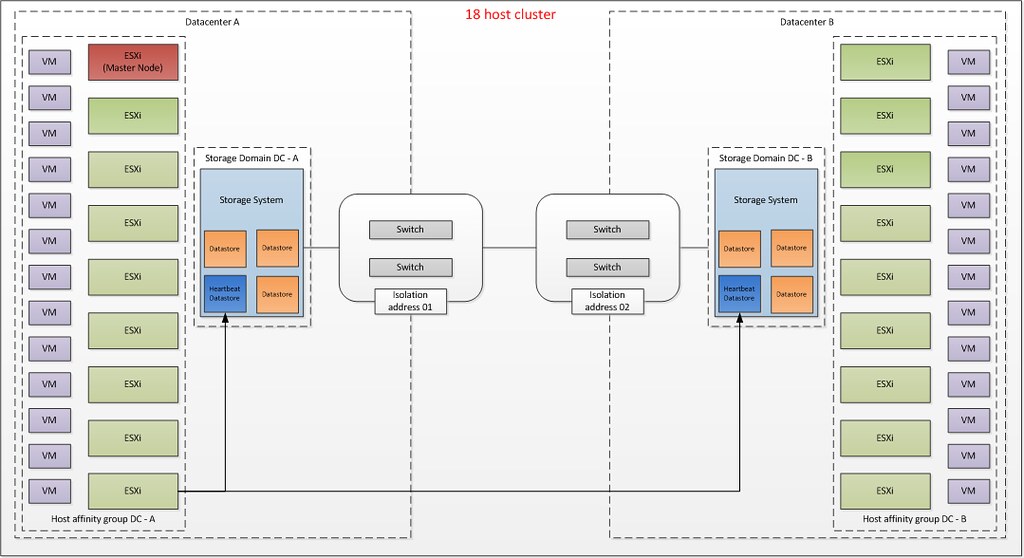
What do you see in this diagram? Each site will have 9 hosts. The HA master is located in Datacenter-A. Each host will use the designated “heartbeat datastore” in each of the datacenters, note that I only drew the line for the lower left ESXi host just to simplify the diagram.
There are many failures which can occur but HA will be unaware of many of these. I will not discuss these as they are explained in-depth in the storage vendor’s documentation. I will however discuss the following “common” failures:
- Host failure in Datacenter-A
- Storage Failure in Datacenter-A
- Loss of Datacenter-A
- Datacenter Partition
- Storage Partition
Host failure in Datacenter-A
When a host fails in Datacenter-A this is detected by the HA master node as network heartbeats from it are not received any longer. When the master has detected network heartbeats are missing it will start monitoring for datastore heartbeats. As the host has failed there will be no datastore heartbeats issued. During this time a third liveness check will be done, which is pinging the management addresses of the failed hosts. If all of these liveness checks are unsuccessful, the master will declare the host dead, and will attempt to restart all the protected virtual machines that were running on the host before the master lost contact with it. . The rules defined on a cluster level are “preferred rules” and as such the virtual machine can be restarted on the other site. If DRS is enabled then it will attempt to correct any sub-optimal placements HA made during the restart of your virtual machines. This same scenario also applies to a situation where all hosts fail in one site without storage being affected.
Storage Failure in Site-A
In this scenario only the storage system fails in Site-A. This failure does not result in down time for your VMs. What will happen? Simply said the mirror, read-only, copy of your datastore will become read-write and be presented with the same identifier and as such the hosts will be able to write to these volumes without the need to resignature. (This sounds very simple of course, but do note I am describing it on an extremely high level and in most solutions manual intervention is required to indicate a failure has occurred.) In most cases however, from a VMs perspective this happens seamlessly. It should be noted that all I/O will now go across your link to the other site. Note that HA is not aware of this failure. Although the storage heartbeat might be lost for a second, HA will not take action as a HA master agent only checks for the storage heartbeat when the network heartbeat has not been received for three seconds.
Loss of Datacenter-A
This is basically a combination of the first and the second failure we’ve described. In this scenario, the hosts in Datacenter-B will lose contact with the master and elect a new one. The new master will access the per-datastore files HA uses to record the set of protected VMs, and so determine the set of HA protected VMs. The master will then attempt to restart any VMs that are not already running on its host and the other hosts in Datacenter-B. At the same time, the master will do the liveness checks noted above, and after 50 seconds, report the hosts of Datacenter-A as dead. From a VMs perspective the storage fail-over could occur seamlessly. The mirror copy of the datastore promoted to Read-write and the hosts on Datacenter-B will be able to access the datastores which were local to Datacenter-A.
Datacenter Partition
This is where most people feel things will become tricky. What happens if your link between the two datacenters fails? Yes I realize that the chances of this happening are slim as you would typically have redundancy on this layer, but I do think it is an interesting one to explain. The main thing to realize here is that with these types of failures VM-Host affinity, or should I call it VM-Datacenter affinity, is very important suddenly, but we will come back to that in a second. Lets explain the scenario first.
In this case a distinction could be made between the two types of metro cluster as briefly explained before. There is a solution, which EMC likes to call “write anywhere” which basically presents a virtual datastore across Datacenters and allows writes on both sites. On the other hand there is the traditional stretched cluster solution where there’s only 1 site actively handling I/Os and a “passive” site which will be used in the case a fail-over need to occur. In the case of “write anywhere” a so-called site bias or preference is defined per datastore. Both scenarios however are similar in terms of that a given datastore will in the case of a failure only be accessible on one site.
If the link between the sites should fail the datastore would become active on just one of the sites. What would happen to the VM that is running on Datacenter-B but has its files stored on a datastore which was configured with site bias for Datacenter-A?
In the case where a VM is running on Datacenter-B the VM would have its storage “yanked” out underneath of it. The VM would more than likely keep running and keep retrying the I/O. However as the link has been broken between the sites, HA in Datacenter-A will try to restart the workload. Why is that?
- The network heartbeat is missing because the link dropped
- The datastore heartbeat is missing because the link dropped and the datastore becomes inaccessible from Datacenter-B
- A ping to the management address of the host fails because the link is missing
- The master for Datacenter-A knows the VM was powered on before the failure, and since it can’t communicate with the VM’s host in Datacenter-B after the failure, it will attempt to restart the VM.
What happens in Datacenter-B? In Datacenter-B a master is elected. This master will determine the VMs that need to be protected. Next it will attempt to restart all those that it knows are not already running. Any VMs biased to this site that are not already running will be powered on. However any VMs biased to the other site, won’t be as the datastore is inaccessible. HA will report a restart failure for the latter since it does not know that the VMs are (still) running in the other site.
Now you might wonder what will happen if the link returns? This is the classic “VM split brain scenario”. For a short period of time you will have 2 active copies of the VM on your network both with the same mac address. However only one copy will have access to the VM’s files and HA will recognize this. As soon as this is detected the VM copy that has no access to the VMDK will be powered off.
I hope all of you understand why it is important to understand what the preferential site is for your datastore as it can and probably will impact your up-time. Also note that although we defined VM-Host affinity rules these are preferential / should rules and can be violated by both DRS.
Storage Partition
This is the final scenario. In this scenario only the storage connection between Datacenter-A and Datacenter-B fails. What happens in this case? This scenario is very straight forward. As the HA master is still receiving network heartbeats it will not take any action unfortunately currently. This is very important to realize. Also HA will not be aware of these rules. HA will restart virtual machines where ever it feels it should, DRS however should move the virtual machines to the correct location based on these rules. That is, if and when correctly defined of course!
Summarizing
Stretched Clusters are in my opinion great solutions to increase resiliency in your environment. There is however always a lot of confusion around failure scenarios and the different type of responses from both the vSphere layer and the Storage layer. In this article I have tried to explain how vSphere HA responds to certain failures in a stretched / metro cluster environment. I hope this will help everyone getting a better understanding of vSphere HA. I also fully realize that things can be improved by a tighter integration between HA and your storage systems, for now all I can is that this is being worked on. I want to finish with a quick summary of some vSphere 5.0 HA design consideration for stretched cluster environments:
- Das.isolationaddress per Datacenter!
Having multiple isolation addresses will help your hosts understanding if they are isolated or if the master has isolated in the case of a network failure. - Designated heartbeat datastores per Datacenter!
Each site will need a designated heartbeat datastore to ensure each site can at a minimum update the heartbeat region of the site local storage.- If there are multiple storage systems on each site it is recommended to increase the number of heartbeat datastores to four, two for each site.
- Define VM-Host affinity rules as it can lower the impact during a failure and it can help keeping I/O local
Thanks for taking the time to read this far, and don’t hesitate to leave a comment if you have any questions or feedback / remarks.
<edit> completely coincidentally Chad Sakac posted an article about Stretched Clusters and the new HCL Category. Read it!</edit>
** Disclaimer: This article contains references to the words master and/or slave. I recognize these as exclusionary words. The words are used in this article for consistency because it’s currently the words that appear in the software, in the UI, and in the log files. When the software is updated to remove the words, this article will be updated to be in alignment. **