• Skip to primary navigation
  • Skip to main content
  • Skip to primary sidebar

Yellow Bricks

by Duncan Epping

  • Home
  • Unexplored Territory Podcast
  • HA Deepdive
  • ESXTOP
  • Stickers/Shirts
  • Privacy Policy
  • About
  • Show Search
Hide Search

5.0

vSphere 5.0 – what’s new for esxtop

Duncan Epping · Oct 4, 2011 ·

I was just playing around with esxtop in vSphere 5.0 and spotted something that changed. I figured there must be more so I started digging. I didn’t dig too deep as there is a great VMworld session (VSP1999) on this topic by Krishna Raj Raja and I figured why re-invent the wheel. Anyway, here’s the things I noticed which will definitely come in handy at some point while troubleshooting performance issues:

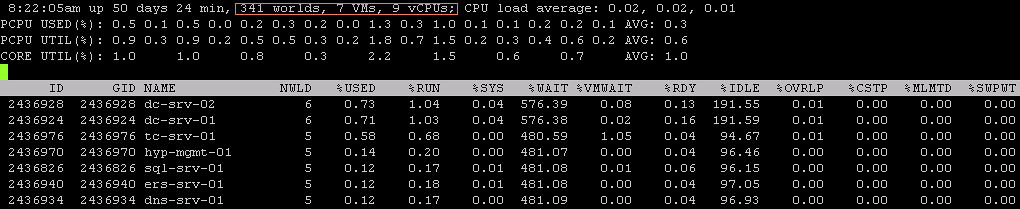
  • Each display type now shows the number of Worlds, VMs and vCPUs on the host on the first line. This will allow you to quickly identify why there for instance is a high %RDY.
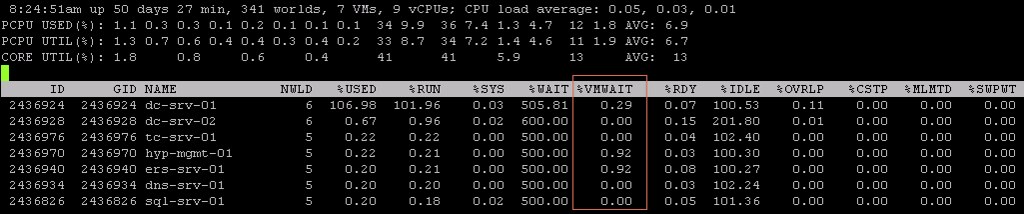
  • %VMWAIT is a derivitive of %WAIT, however it does not include IDLE time and only %SWPWT and “blocked”. It could for instance also be blocked when the connectivity to the storage device has failed.
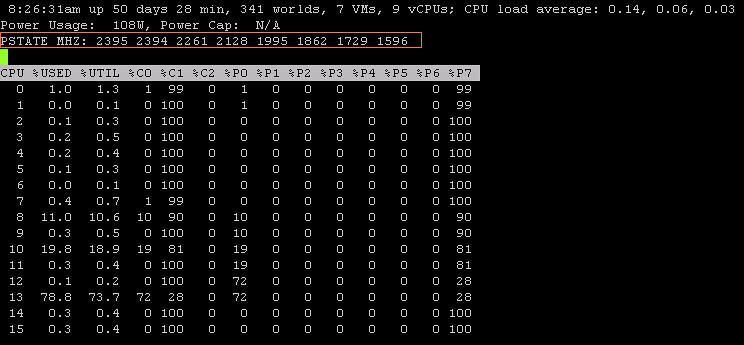
  • In the Power display there’s a new line which is PSTATE MHZ. This shows you the different clock frequencies per state. For instance “2395” is the clock frequency of %P0 and “1596” is the clock frequency of %P7. Please note that “%USED” is based on the base (%P0) of your CPU. %UTIL is the utilization in it’s current state (%Px), so in this case that could be 40% of %P7 (1596) which is 638.
  • In the “Device Display” there are new stats starting with “F”, for example FCMDs, these show the failed I/Os. Fairly quick way to see if there are any I/O errors.

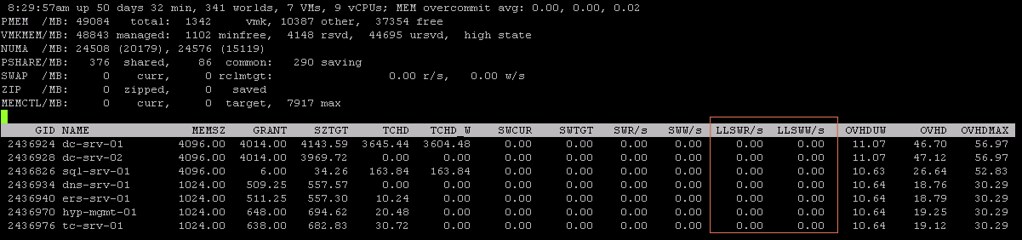
  • These two new counters in the “Memory Display”, LLSWR/s / LLSWW/s, show the amount of memory being written to host cache or read from host cache. Useful when you have enabled this feature and want to know if it is actively being used. Of course there are also vCenter stats for this one.
I love esxtop, with 5.0 is has become even better and especially “%VMWAIT” and the PSTATE details will come in handy at some point in time!

Datastore Heartbeating and preventing Isolation Events?

Duncan Epping · Oct 3, 2011 ·

I was just listening to some of the VMworld sessions and one was about HA. The presenter had a section about Datastore Heartbeats and mentioned that Datastore Heartbeats was added to prevent “Isolation Events”. I’ve heard multiple people make this statement over the last couple of months and I want to make it absolutely clear that this is NOT true. Let me repeat this, Datastore Heartbeats do not prevent an isolation event from occurring.

Lets explain this a bit more in-depth. What happens when a Host is cut off from the network because its NIC which carries the management traffic has just failed?

  1. T0 – Isolation of the host (slave)
  2. T10s – Slave enters “election state”
  3. T25s – Slave elects itself as master
  4. T25s – Slave pings “isolation addresses”
  5. T30s – Slave declares itself isolated and “triggers” isolation response

Now as you can see the Datastore Heartbeat mechanism plays no role whatsoever in the process for declaring a host isolated, or does it? No from the perspective of the host which is isolated it does not. The Datastore Heartbeat mechanism is used by the master to determine the state of the unresponsive host. The Datastore Heartbeat mechanism allows the the master to determine if the host which stopped sending network heartbeats is isolated or has failed completely. Depending on the determined state the master will take appropriate action.

To summarize, the datastore heartbeat mechanism has been introduced to allow the master to identify the state of hosts and is not use by the “isolated host” to prevent isolation.


** Disclaimer: This article contains references to the words master and/or slave. I recognize these as exclusionary words. The words are used in this article for consistency because it’s currently the words that appear in the software, in the UI, and in the log files. When the software is updated to remove the words, this article will be updated to be in alignment. **

vSphere Storage Appliance – Why I think it is cool

Duncan Epping · Sep 19, 2011 ·

While doing some workshops and presentations for some of our partners and customers one of the comments I usually here when discussing the vSphere Storage Appliance is “Why not just buy a cheap NAS device”? Well there are a couple of arguments:

  • Support, many lower end cheap devices are not on the HCL
  • Management, most storage devices require specific knowledge and can be difficult to setup
  • Resiliency, yes resiliency..

Resiliency is what I want to expand on. I like the vSphere Storage Appliance because of the resilience it offers. Many lower end storage devices have a single storage processor and some even a single power-supply but that is different for the VSA. Lets assume you have a 3 node cluster with each of these three serving up their local storage. What will it look like?

I hope this image is clear but what we see above is a three node cluster. Each node holds 2 volumes. One “active” volume and a Replica volume. Now the Replica volume is where the resiliency comes in to play. If one of the nodes would fail one of the other nodes, depending on which holds the replica, picks up! Yes indeed the VSA volumes are RAID-1 and the failure is literally detected in seconds. Note that this is a synchronous technique, so an acknowledgement is required from both the active and replica of the datastore.

In my example above when ESXi-1 (on the left) would fail then ESXi-2 (middle) would pick up as it is holding the replica. Note that this is a seamless fail-over if the VM is running on a node other than ESXi-1. The amount of time it takes for the fail-over to occur is literally second and the replica will be available through the same ip-address. If the VM happened to be running on ESXi-1 than vSphere HA would restart that virtual machine is in any other scenario.

This video demos what it looks like when a host fails:

For more details on the VSA I would like to recommend the following articles by Cormac Hogan:

  • http://blogs.vmware.com/vsphere/2011/08/new-enhanced-vsphere-50-storage-features-part-4-vsphere-storage-appliance.html
  • http://blogs.vmware.com/vsphere/2011/08/vsphere-storage-appliance-vsa-useful-links.html
  • http://blogs.vmware.com/vsphere/2011/08/vsphere-storage-appliance-part-2-resilience.html
  • http://blogs.vmware.com/vsphere/2011/08/vsphere-storage-appliance-vsa-installed-configured-in-10-minutes.html

CDP Information using the commandline…

Duncan Epping · Sep 18, 2011 ·

I was doing some troubleshooting this week and needed the CDP network info. I did not have access to a vSphere client, only HP iLO access. I remoted into the ESXi box and enable ESXi Shell. I knew that I could dig up the info using esxcfg-info but the amount of details provided are overwhelming and I would rather get only the info back I need without too much hassle. I figured there was another way:

vim-cmd hostsvc/net/query_networkhint

The one thing that I find it very useful for is to check the configured VLAN(s) on the port. Below is the result of the above command:

(vim.host.PhysicalNic.NetworkHint) [
(vim.host.PhysicalNic.NetworkHint) {
dynamicType = ,
device = "vmnic0",
subnet = (vim.host.PhysicalNic.NetworkHint.IpNetwork) [
(vim.host.PhysicalNic.NetworkHint.IpNetwork) {
dynamicType = ,
vlanId = 3001,
ipSubnet = "10.91.34.1-10.91.35.254",
},
(vim.host.PhysicalNic.NetworkHint.IpNetwork) {
dynamicType = ,
vlanId = 2912,
ipSubnet = "10.91.32.1-10.91.32.63",
}
],
connectedSwitchPort = (vim.host.PhysicalNic.CdpInfo) null,
lldpInfo = (vim.host.PhysicalNic.LldpInfo) null,
},
]

Windows 8 on ESXi 5.0?

Duncan Epping · Sep 18, 2011 ·

I saw a couple of questions on the VMTN Communities around running Windows 8 Dev Preview on ESXi 5.0 and support and the fact that it doesn’t work. Although the OS is listed in the dropdown list after you have created a VM it does not mean it is supported. Support for Operating Systems should always be validated through the following page: http://www.vmware.com/resources/compatibility/search.php?deviceCategory=software. Currently Windows 8 Dev Preview is not on the list and as such not supported, which means no guarantee that it will work. As some have already noticed it won’t work (HAL_INITIALIZATION_FAILED), for now… as I am sure the engineers at VMware are working on it as I am typing this article. (That’s no guarantee a solution / workaround will come in the near future though.)

There’s a KB article on this topic http://kb.vmware.com/kb/2006859, if you are interested I would suggest bookmarking it or subscribing to it.

I want to point out though that you can run Windows 8 in Workstation 8 or Fusion 4. Yes I know that these are paid products, but you can download the eval version which is valid for 30 days. Workstation 8 comes with VMware Player 4.0, which is completely free! (Not available as a separate download yet unfortunately.)

Installing Windows 8 is straight forward, just use the Windows 7 – 64 Bit profile that is part of both Fusion and Workstation.

  • « Go to Previous Page
  • Page 1
  • Interim pages omitted …
  • Page 21
  • Page 22
  • Page 23
  • Page 24
  • Page 25
  • Interim pages omitted …
  • Page 33
  • Go to Next Page »

Primary Sidebar

About the Author

Duncan Epping is a Chief Technologist and Distinguished Engineering Architect at Broadcom. Besides writing on Yellow-Bricks, Duncan is the co-author of the vSAN Deep Dive and the vSphere Clustering Deep Dive book series. Duncan is also the host of the Unexplored Territory Podcast.

Follow Us

  • X
  • Spotify
  • RSS Feed
  • LinkedIn

Recommended Book(s)

Also visit!

For the Dutch-speaking audience, make sure to visit RunNerd.nl to follow my running adventure, read shoe/gear/race reviews, and more!

Do you like Hardcore-Punk music? Follow my Spotify Playlist!

Do you like 80s music? I got you covered!

Copyright Yellow-Bricks.com © 2026 · Log in