• Skip to primary navigation
  • Skip to main content
  • Skip to primary sidebar

Yellow Bricks

by Duncan Epping

  • Home
  • Unexplored Territory Podcast
  • HA Deepdive
  • ESXTOP
  • Stickers/Shirts
  • Privacy Policy
  • About
  • Show Search
Hide Search

5.0

vShield App and layering your design

Duncan Epping · Nov 10, 2011 ·

I started diving in to vShield App and one thing that I like about vShield App is that it allows you to use different types of objects to apply your policies to. Never really put too much thought in to it, but considering the world is more and more changing to policy based management this fits right in. I just wanted to share something that I was working on, any feedback / thoughts are welcome…

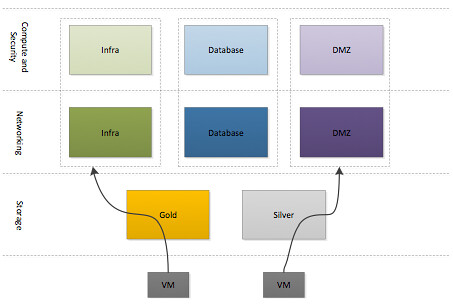
The VMware Cloud Infrastructure aims to reduce operational overhead and lower Total Cost of Ownership (TCO) by simplifying management tasks and abstracting complex processes. The focus of this architecture, as indicated by our customer requirements, is resource aggregation and isolation through the use of pools for each of the crucial pillars: network, storage and compute. Each of the three pillars will be carved in to multiple units of consumption with priority allocated based on their service level agreement. This will be achieved by leveraging core functionality offered by vSphere 5.0. Subsequently vShield App will be used to isolate each of the different type of workloads. As a hypervisor-based application-aware firewall solution, vShield App allows defining policies to logical, dynamic application boundaries (security groups) instead of physical boundaries.

This resource and security layering method will allow for a fast and safe deployment of new workloads.

Each of the different types of resources are carved up in to different groups for each of the respective workload types. A virtual machine, or vApp, will be deployed in one of the three different compute and security groups after which a specific networking group will be selected and a storage tier. Compute, Security and Network  group types are currently defined based on the different type of workloads this virtual infrastructure will host. In the future additional blocks may be added based on the requirements of the internal customers and the different types of workloads being deployed…
Resolved: Slow booting of ESXi 5.0 when iSCSI is configured

Duncan Epping · Nov 6, 2011 ·

My colleague Cormac posted an article about this already, but I figured it was important enough to rehash some of content. As many of you have experienced there was an issue with ESXi 5.0 in iSCSI environments. Booting would take a fair amount of time due to the increase of the amount of retries in the case creating a connection to the array would fail.

This is what the log file would typically look like:

iscsid: cannot make a connection to 192.168.1.20:3260 (101,Network is unreachable)
iscsid: Notice: Reclaimed Channel (H34 T0 C1 oid=3)
iscsid: session login failed with error 4,retryCount=3
iscsid: Login Target Failed: iqn.1984-05.com.dell:powervault.md3000i.6002219000a14a2b00000000495e2886 if=iscsi_vmk@vmk8 addr=192.168.1.20:3260 (TPGT:1 ISID:0xf) err=4
iscsid: Login Failed: iqn.1984-05.com.dell:powervault.md3000i.6002219000a14a2b00000000495e2886 if=iscsi_vmk@vmk8 addr=192.168.1.20:3260 (TPGT:1 ISID:0xf) Reason: 00040000 (Initiator Connection Failure)

This is explained in KB 2007108 which also contains the download link. Make sure to download it and update your environment if you are running iSCSI.

vSphere FT and Dynamically Mirrored Disks?

Duncan Epping · Nov 4, 2011 ·

I was just browsing through our documentation and stumbled on something which has got some cool potential.

http://pubs.vmware.com/vsphere-50/index.jsp?topic=/com.vmware.vsphere.storage.doc_50/GUID-F78EB579-B11C-4E65-9EE3-145888A005F6.html

This describes how to setup the vSphere side of things for a mirrored disk within a Windows 2008 Guest. Just imagine doing in-guest mirroring of your data while doing FT on the outside. This means you would be able to span multiple sites without the need for a replication mechanism.

I asked around and unfortunately this scenario is not supported today for vSphere FT, but it definitely has potential… Another way to solve this problem would be if we could somehow leverage the Mirror Mode driver that is used by Storage vMotion today. Once again, this is not available today and I don’t even know if people are working on it… just something that popped up and something that has great potential and seems like a small step.

All host failed, how does HA respond?

Duncan Epping · Nov 1, 2011 ·

I wrote an article about the scenario where all host fail, due to for instance a power outage, and how HA responds to it. I had a question today if this was still valid with vSphere 5.0. I figured it wouldn’t hurt to describe the steps that vSphere 5.0 takes.

  1. Power Outage, all hosts down
  2. Power on hosts
  3. Election process will be kicked off. Master will be elected.
  4. Master reads protected list
  5. Master initiates restarts for those VMs which were listed as protected but not running

Now the one thing I want to point out is that with vSphere 5.0 we will also track if the VM was cleanly powered off, as in initiated by the admin, or powered-off due to a failure/isolation. In the case they are cleanly powered off they will not be restarted, but in this scenario of course they are not cleanly powered off and as such the VMs will be powered on. The great thing about vSphere 5.0 is that you no longer need to know which hosts where your primary nodes so you can power these on first to ensure quick recovery… No, you can power on any host and HA will sort it out for you.


** Disclaimer: This article contains references to the words master and/or slave. I recognize these as exclusionary words. The words are used in this article for consistency because it’s currently the words that appear in the software, in the UI, and in the log files. When the software is updated to remove the words, this article will be updated to be in alignment. **

Managing resources with HA Admission Control?

Duncan Epping · Oct 26, 2011 ·

Last week at VMworld and on the VMTN community I had a couple of questions around resource management and HA Admission Control. It appears people were using HA Admission Control for managing resources within their environment. In other words, the amount of VMs that HA would allow you to restart would be leading for managing resources. But is that what you should do?

If you look at how HA works and what HA is intended to do the answer in short is, No. Now the reason for this is that HA is all about getting your virtual machines up and running again. If you look at HA Admission Control in vSphere 5.0 you will quickly see that for instance the default value for CPU has been decreased from 256MHz to 32MHz, if no CPU reservations are specified that is. Now in many scenarios virtual machines will consume and demand more than that. Another thing to point out is that if no memory reservation is specified the memory overhead of the VM is used. These values are more than likely much lower than what your virtual machine currently consumes or demands. The thing to keep in mind is that these CPU and Memory values only represent what HA needs in order to power-on your virtual machines.

If you want to manage resources, avoid severe overcommitment, guarantee a certain experience you should start looking at the DRS statistics. You should start exploring tools like VC Ops, Cap IQ… Don’t (ab)use vSphere HA for this. It is not designed to solve this problem. One thing to think about though is maybe increasing the minimum value for slotsizes to avoid scenarios where environments are fully overloaded!? If you have a consolidation ratio in mind it should be fairly simple to figure out which value to use:

available memory esource per host / consolidation ratio = das.vmMemoryMinMB
or
available CPU esource per host / consolidation ratio = das.vmCpuMinMHz

I am not saying that you should do this, but I think it might not be a bad practice in environments where multiple people have access to vCenter and can deploy VMs. At least people will be triggered when you are running out of “slots” to start VMs.

  • « Go to Previous Page
  • Page 1
  • Interim pages omitted …
  • Page 19
  • Page 20
  • Page 21
  • Page 22
  • Page 23
  • Interim pages omitted …
  • Page 33
  • Go to Next Page »

Primary Sidebar

About the Author

Duncan Epping is a Chief Technologist and Distinguished Engineering Architect at Broadcom. Besides writing on Yellow-Bricks, Duncan is the co-author of the vSAN Deep Dive and the vSphere Clustering Deep Dive book series. Duncan is also the host of the Unexplored Territory Podcast.

Follow Us

  • X
  • Spotify
  • RSS Feed
  • LinkedIn

Recommended Book(s)

Also visit!

For the Dutch-speaking audience, make sure to visit RunNerd.nl to follow my running adventure, read shoe/gear/race reviews, and more!

Do you like Hardcore-Punk music? Follow my Spotify Playlist!

Do you like 80s music? I got you covered!

Copyright Yellow-Bricks.com © 2026 · Log in