• Skip to primary navigation
  • Skip to main content
  • Skip to primary sidebar

Yellow Bricks

by Duncan Epping

  • Home
  • Unexplored Territory Podcast
  • HA Deepdive
  • ESXTOP
  • Stickers/Shirts
  • Privacy Policy
  • About
  • Show Search
Hide Search

Software Defined

Looking back: Software Defined Storage…

Duncan Epping · May 30, 2014 ·

Over a year ago I wrote an article (multiple actually) about Software Defined Storage, VSAs and different types of solutions and how flash impacts the world. One of the articles contained a diagram and I would like to pull that up for this article. The diagram below is what I used to explain how I see a potential software defined storage solution. Of course I am severely biased as a VMware employee, and I fully understand there are various scenarios here.

As I explained the type of storage connected to this layer could be anything DAS/NFS/iSCSI/Block who cares… The key thing here is that there is a platform sitting in between your storage devices and your workloads. All your storage resources would be aggregated in to a large pool and the layer should sort things out for you based on the policies defined for the workloads running there. Now I drew this layer coupled with the “hypervisor”, but thats just because that is the world I live in.

Looking back at this article and looking at the state of the industry today, a couple of things stood out. First and foremost, the term “Software Defined Storage” has been abused by everyone and doesn’t mean much to me personally anymore. If someone says during a bloggers briefing “we have a software defined storage solution” I typically will ask them to define it, or explain what it means to them. Anyway, why did I show that diagram, well mainly because I realised over the last couple of weeks that a couple of companies/products are heading down this path.

If you look at the diagram and for instance think about VMware’s own Virtual SAN product than you can see what would be possible. I would even argue that technically a lot of it would be possible today, however the product is also lacking in some of these spaces (data services) but I expect this to be a matter of time. Virtual SAN sits right in the middle of the hypervisor, the API and Policy Engine is provided by the vSphere layer, it has its own caching service… For now it isn’t supported to connect SAN storage, but if I want to I could even today simply by tagging “LUNs” as local disks.

Another product which comes to mind when looking at the diagram is Pernix Data’s FVP. Pernix managed to build a framework that sits in the hypervisor, in the data path of the VMs. They provide a highly resilient caching layer, and will be able do both flash as well as memory caching in the near future. They support different types of storage connected with the upcoming release… If you ask me, they should be in the right position to slap additional data services like deduplication / compression / encryption / replication on top of it. I am just speculating here, and I don’t know the PernixData roadmap so who knows…

Something completely different is EMC’s ViPR (read Chad’s excellent post on ViPR) and although they may not entirely fit the picture I drew today they are aiming to be that layer in between you and your storage devices and abstract it all for you and allow for a single API to ease automation and do this “end to end” including the storage networks in between. If they would extend this to allow for certain data services to sit in a different layer then they would pretty much be there.

Last but not least Atlantis USX. Although Atlantis is a virtual appliance and as such a different implementation than Virtual San and FVP, they did manage to build a platform that basically does everything I mentioned in my original article. One thing it doesn’t directly solve is the management of the physical storage devices, but today neither does FVP or Virtual SAN (well to a certain extend VSAN does…) But I am confident that this will change when Virtual Volumes is introduced as Atlantis should be able to leverage Virtual Volumes for those purposes.

Some may say, well what about VMware’s Virsto? Indeed, Virsto would also fit the picture but the end of availability was announced not too long ago. However, it has been hinted at multiple times that Virsto technology will be integrated in to other products over time.

Although by now “Software Defined Storage” is seen as a marketing bingo buzzword the world of storage is definitely changing. The question now is I guess, are you ready to change as well?
One versus multiple VSAN disk groups per host

Duncan Epping · May 22, 2014 ·

I received two questions on the same topic this week so I figured it would make sense to write something up quickly. The questions were around an architectural decision for VSAN, one versus multiple VSAN disk groups per host. I have explained the concept of disk groups already in various posts but in short this is what a disk group is and what the requirements are:

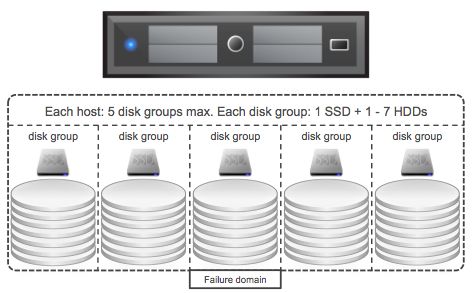
A disk group is a logical container for disks used by VSAN. Each disk groups needs at a minimum 1 magnetic disk and can have a maximum of 7 disks. Each disk group also requires 1 flash device.

VSAN disk groups

Now when designing your VSAN cluster at some point the question will arise should I have 1 or multiple disk groups per host? Can and will it impact performance? Can it impact availability?

There are a couple of things to keep in mind when it comes to VSAN if you ask me. The flash device which is part of each disk group is the caching/buffer layer for those disks, without the flash device the disks will also be unavailable. As such a disk group can be seen as a “failure domain”, because if the flash device fails the whole disk group is unavailable for that period of time. (Don’t worry, VSAN will automatically rebuild all your components that are impacted automatically.) Another thing to keep in mind is performance. Each flash device will provide an X amount of IOPS.A higher total number of IOPS could (probably will) change performance drastically, however it should be noted that capacity could still be a constraint. If this all sounds a bit fluffy lets run through an example!

  • Total capacity required: 20TB
  • Total flash capacity: 2TB
  • Total number of hosts: 5

This means that per host we will require:

  • 4TB of disk capacity (20TB/5 hosts)
  • 400GB of flash capacity (2TB/5 hosts)

This could simply result in each host having 2 x 2TB NL-SAS and 1 x 400GB flash device. Lets assume your flash device is capable of delivering 36000 IOPS… You can see where I am going right? What if I would have 2 x 200GB flash and 4x 1TB magnetic disks instead? Typical the lower capacity drives will do less write IOPS but for the Intel S3700 for instance that is 4000 less. So instead of 1 x 36000 IOPS it would result in 2 x 32000 IOPS. Yes, that could have a nice impact indeed….

But not just that, we also have more disk groups and smaller fault domains as a result. On top of that we will end up with more magnetic disks which means more IOPS per GB capacity in general. (If an NL-SAS drive does 80 IOPS for 2TB then two NL-SAS drives of 1TB will do 160 IOPS. Which means same TB capacity but twice the IOPS if you need it.)

In summary, yes there is a benefit in having more disk groups per hosts and as such more flash devices…

Virtual Volumes vendor demos

Duncan Epping · May 12, 2014 ·

I was at the Italian VMUG last week and one of the users asked me what Virtual Volumes would look like. He wanted to know if the experience would be similar to the “VM Storage Policy” experiences he has been having with Virtual SAN. I didn’t have an environment running capable of demonstrating Virtual SAN unfortunately so I shared the following videos with him. Considering I already did a blog post on this topic almost 2 years back I figured I would also publicly share these videos. Note that these videos are demos/previews, and no statement is made when or even if this technology will ever be released.

PernixData feature announcements during Storage Field Day

Duncan Epping · Apr 23, 2014 ·

During Storage Field Day today PernixData announced a whole bunch of features that they are working on and will be released in the near future. In my opinion there were four major features announced:

  • Support for NFS
  • Network Compression
  • Distributed Fault Tolerant Memory
  • Topology Awareness

Lets go over these one by one:

Support for NFS is something that I can be brief about I guess; as it is what it says it is. Something that has come up multiple times in conversations seen on twitter around Pernix and it looks like they have managed to solve the problem and will support NFS in the near future. One thing I want to point out, PernixData does not introduce a virtual appliance in order to support NFS or create an NFS server and proxy the IOs, sounds like magic right… Nice work guys!

It gets way more interesting with Network compression. What is it, what does it do? Network Compression is an adaptive mechanism that will look at the size of the IO and analyze if it makes sense to compress the data before replicating it to a remote host. As you can imagine especially with larger block sizes (64K and up) this could significantly reduce the data that is transferred over the network. When talking to PernixData one of the questions I had was well what about the performance and overhead… give me some details, this is what they came back with as an example:

  • Write back with local copy only = 2700 IOps
  • Write back + 1 replica = 1770 IOps
  • Write back + 1 replica + network compression = 2700 IOps

As you can see the number of IOps went down when a remote replica was added. However, it went up again to “normal” values when network compression was enabled, of course this test was conducted using large blocksizes. When it came to CPU overhead it was mentioned that the overhead so far has been demonstrated to be negligible.You may ask yourself why, it is fairly simple: the cost of compression weighs up against the CPU overhead and results in an equal performance due to lower network transfer requirements. What also helps here is that it is an adaptive mechanism that does a cost/benefit analyses before compressing. So if you are doing 512 byte or 4KB IOs then network compression will not kick in, keeping the overhead low and the benefits high!

I personally got really excited about this feature: DFTM = Distributed Fault Tolerant Memory. Say what? Yes, distributed fault tolerant memory! FVP, indeed besides virtualizing flash, can now also virtualize memory and create an aggregated pool of resources out of it for caching purposes. Or in a more simplistic way: what they allow you to do is reserve a chunk of host memory as virtual machine cache. Once again happens on a hypervisor level, so no requirement to run a virtual appliance, just enable and go! I would want to point out though that there is “cache tiering” at the moment, but I guess Satyam can consider that as a feature request. Also, when you create an FVP cluster hosts within that cluster will either provide “flash caching” capabilities or “memory caching” capabilities. This means that technically virtual machines can use “local flash” resources while the remote resources are “memory” based (or the other way around). I would avoid this at all cost personally though as it will give some strange unpredictable performance result.

So what does this add? Well crazy performance for instance…. We are talking 80k IOps easily with a nice low latency of 50-200 microseconds. Unlike other solutions, FVP doesn’t restrict the size of your cache either. By default it will make a recommendation of 50% unreserved capacity to be used per host. Personally I think this is a bit high, as most people do not reserve memory this will typically result 50% of your memory to be recommended… but fortunately FVP allows you to customize this as required. So if you have 128GB of memory and feel 16GB of memory is sufficient for memory caching then that is what you assign to FVP.

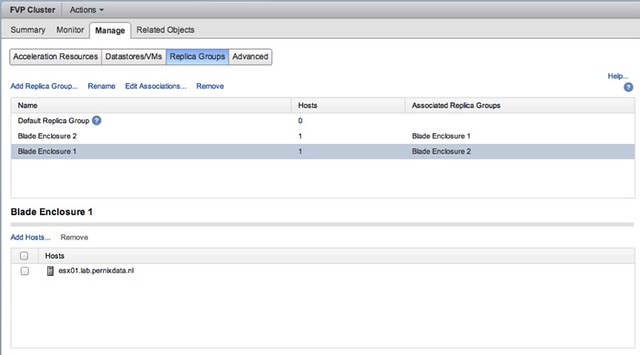
Another feature that will be added is Topology Awareness. Basically what this allows you to do is group hosts in a cluster and create failure domains. An example may make this a bit easier to grasp: Lets assume you have 2 blade chassis each with 8 hosts, when you enable “write back caching” you probably want to ensure that your replica is stored on a blade in the other chassis… and that is exactly what this feature allows you to do. Specify replica groups, add hosts to the replica groups, easy as that!

And then specify for your virtual machine where the replica needs to reside. Yes you can even specify that the replica needs to reside within its failure domain if there are requirements to do so, but in the example below the other “failure domain” is chosen.

Is that awesome or what? I think it is, and I am very impressed by what PernixData has announced. For those interested, the SFD video should be online soon, and those who are visiting the Milan VMUG are lucky as Frank mentioned that he will be presenting on these new features at the event. All in all, an impressive presentation again by PernixData if you ask me… awesome set of features to be added soon!

FUD it!

Duncan Epping · Apr 14, 2014 ·

In the last couple of weeks something stood out to me when it comes to the world of storage and virtualisation and that is animosity. What struck me personally is how aggressive some storage vendors have responded to Virtual SAN, and Server Side Storage in general. I can understand it in a way as Virtual SAN plays in the same field and they probably feel threatened and it makes them anxious. In some cases I even see vendors responding to VSAN who do not even play in the same space, I guess they are in need of attention. Not sure this is the way to go about to be honest, if I were considering a hyper(visor)-converged solution I wouldn’t like being called lazy because of it. Then again, I was always taught that lazy administrators are the best administrators in the world as they plan accordingly and pro-actively take action. This allows them to lean back while everyone else is running around chasing problems, so maybe it was a compliment.

Personally I am perfectly fine with competition, and I don’t mind being challenged. Whether that includes FUD or just cold hard facts is even besides the point, although I prefer to play it fair. It is a free world, and if you feel you need to say something about someone else product you are free to do so. However you may want to think about the impression you leave behind. In a way it is insulting to our customers. With our customers including your customers.

For the majority of my professional career I have been a customer, and personally I can’t think of anything more insulting than a vendor spoon feeding why their competitor is not what you are looking for. It is insulting as it insinuates that you are not smart enough to do your own research and tear it down as you desire, not smart enough to know what you really need, not smart enough to make the decision by yourself.

Personally when this happened in the past, I would simply ask them to skip the mud slinging and go to the part where they explain their value add. And in many cases, I would end up just ignoring the whole pitch… cause if you feel it is more important to “educate” me on what someone else does over what you do… then they probably do something very well and I should be looking at them instead.

So lets respect our customers… let them be the lazy admin when they want, let them decide what is best for them… and not what is best for you.

PS: I love the products that our competitors are working on, and I have a lot of respect how they paved the way of the future.

  • « Go to Previous Page
  • Page 1
  • Interim pages omitted …
  • Page 50
  • Page 51
  • Page 52
  • Page 53
  • Page 54
  • Interim pages omitted …
  • Page 71
  • Go to Next Page »

Primary Sidebar

About the Author

Duncan Epping is a Chief Technologist and Distinguished Engineering Architect at Broadcom. Besides writing on Yellow-Bricks, Duncan is the co-author of the vSAN Deep Dive and the vSphere Clustering Deep Dive book series. Duncan is also the host of the Unexplored Territory Podcast.

Follow Us

  • X
  • Spotify
  • RSS Feed
  • LinkedIn

Recommended Book(s)

Also visit!

For the Dutch-speaking audience, make sure to visit RunNerd.nl to follow my running adventure, read shoe/gear/race reviews, and more!

Do you like Hardcore-Punk music? Follow my Spotify Playlist!

Do you like 80s music? I got you covered!

Copyright Yellow-Bricks.com © 2026 · Log in