• Skip to primary navigation
  • Skip to main content
  • Skip to primary sidebar

Yellow Bricks

by Duncan Epping

  • Home
  • Unexplored Territory Podcast
  • HA Deepdive
  • ESXTOP
  • Stickers/Shirts
  • Privacy Policy
  • About
  • Show Search
Hide Search

Software Defined

VSAN for ROBO?

Duncan Epping · Apr 8, 2014 ·

I noticed this new SuperMicro VSAN Ready Node being published last week. The configuration is potentially a nice solution for ROBO deployments, primarily due to the cost of the system.

Supermicro SuperServer SYS-1018D-73MTF latest addition to @VMwareVSAN vSAN Ready line-up – http://t.co/G07r0InPps pic.twitter.com/p9gz3yRF4S

— Supermicro (@Supermicro_SMCI) April 4, 2014

When I did the math it came in around $ 3800,-. This is the configuration:

  • SuperMicro SuperServer 1018D-73MTF
  • 1 x Intel E3-1270 V3 3.5GHz- Quadcore
  • 32GB Memory
  • 5 x 1TB 7200 RPM NL-SAS HDD
  • 1 x 200GB Intel S3700 SSD
  • LSI 2308 Disk controller
  • 4 x 1GbE NIC port

It is a nice configuration that will allow for roughly fifteen 1 vCPU Virtual Machines with 3GB of memory and 60GB disk capacity per host. Personally I would use a different CPU and some more memory probably as that gives you a bit more headroom, especially during maintenance. The cost from a software point of view is socket based so you can increase memory and change the type of CPU with relative low cost impact. The SuperMicro server listed however is limited to the E3 CPU family and to 32GB but there are alternatives out there. (For instance the Dell R320 or maybe even the R210 etc)

From a software point of view the cost of this configuration is limited to 3 x VSAN license and 3 x vSphere. As VSAN even works with Essentials Plus and Standard you could leverage that to keep the cost down, but keep in mind that you won’t have DRS if you drop down to Standard or lower. Still sounds like a nice ROBO package to me, especially when you have many sites this could be a great way to create a standardized packaged solution.
Startup News Flash part 16

Duncan Epping · Apr 2, 2014 ·

Number 16 of the Startup News Flash, here we go:

Nakivo just announced the beta program for 4.0 of their backup/replication solution. It adds some new features like: recovery of Exchange objects directly from compressed and deduplicated VM backups, Exchange logs truncation, and automated backup verification. If you are interested in testing it, make sure to sign up here. I haven’t tried it, but they seem to be a strong upcoming player in the backup and DR space for SMB.

SanDisk announced a new range of SATA SSDs called “cloudspeed”. They released 4 different models with various endurance levels and workload targets, of course ranging in sizes from 100GB up to 960GB depending on the endurance level selected. Endurance level ranges from 1 up to 10 full drive writes per day. (Just as an FYI, for VSAN we recommend 5 full drive writes per day as a minimum) Performance numbers range between 15k to 20k write IOps and 75 to 88K read IOps. More details can be found in the spec sheet here. What interest me most is the FlashGuard Technology that is included, interesting how SanDisk is capable of understanding wear patterns and workloads to a certain extend and place data in a specific way to prolong the life of your flash device.

CloudPhysics announced the availability of their Storage Analytics card. I gave it a try last week and was impressed. I was planning on doing a write up on their new offering but as various bloggers already covered it I felt there was no point in repeating what they said. I think it makes a lot more sense to just try it out, I am sure you will like it as it will show you valuable info like “performance” and the impact of “thin disks” vs “thick disks”. Sign up here for a 30day free trial!

30K for a VSAN host @theregister? I can configure one for 2250 USD!

Duncan Epping · Mar 31, 2014 ·

I’ve been following the posts from the Register on VSAN and was surprised when they posted the cost of the hosts they configured: 30K each. With 3 at a minimum they concluded that for 90K you could buy yourself a nice legacy storage system. I don’t disagree with that to be honest… for 90K you can buy a nice legacy storage system. I guess you need to ask yourself first though what you will do with that 90K storage system by itself? Not much indeed, as you would need compute resources sitting next to it in order to do anything. So if you want to make a comparison, do not compare a full VSAN environment (or any other hyper-converged solution out there) to just a storage system at it just doesn’t make sense.

Now that still doesn’t make these hosts cheap I can hear you think, and again I agree with that. Although I have absolutely no clue where the 30K came from, and judging by the tweets this morning most people don’t know and feel it probably was overkill. Call me crazy, but I can configure a fully supported VSAN configuration for about 2250 USD (just HW) on the Dell website.

  • Dell T320
  • Intel Xeon E5-2420 1.90GHz 6 Core
  • Perc H310 Disk Controller
  • 32GB Memory
  • 1 x 7200RPM 1TB NL-SAS
  • 1 x 100GB Intel S3700 SSD (or dell equal drive)
  • 5 x 1GbE NIC Port

I would like to conclude that VSAN would be a lot cheaper than those legacy solutions, less than 7500 USD for 3 hosts is peanuts right?!? Yes I know, the above configuration wouldn’t fit many use cases (except for maybe a ROBO deployment where only a couple of VMs are needed) and that was the whole point of the exercise showing how pointless these exercises can be. You can twist these numbers anyway you like, and you can configure your VSAN hosts any way you like as long as the components (HDD/SSD/Controller) are on the VSAN HCL and the system is on the vSphere HCL. PS: Dear Register, next time you run through the exercise, you may want to post the configuration you selected… It makes things a bit clearer.

Selecting a disk controller for VSAN using the HCL

Duncan Epping · Mar 27, 2014 ·

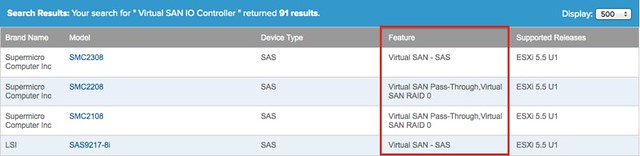
As this was completely unclear to me as well and I started a thread on it on our internal social platform I figured I would share this with you. When you go through the exercise of selecting a disk controller for VSAN using the VMware Compatibility Guide (vmwa.re/vsanhcl) you will see that there are 4 “features” listed. The four features describe how you can use your disk controller to manage the disks in your host. This is important as selecting the wrong disk controller could lead to unwanted side effects.

Let me list the four features and explain what they actually mean:

  • Virtual SAN – SAS
  • Virtual SAN – SATA
  • Virtual SAN Pass-Through
  • Virtual SAN RAID 0

Virtual SAN – SAS / SATA and Pass-through are essentially the same thing. Well not entirely as it is implemented in a different way, but the result is the same. What this does is serving the disks straight up to the hypervisor. This functionality literally passes the disk through to ESXi, and avoids the need to create a RAID set or volume for your disks. This is by far the easiest way to pull your disks in to a VSAN datastore if you ask me.

Virtual SAN RAID 0 means that in order to use the disks you will need to create a single disk RAID 0 set for each disk in your system. The downside is when using this that things like hot-swap will be impossible as your Disk (ID) is bound to the RAID 0 set. However there is also a positive thing, many of these disk controllers support things like encryption of data at rest and if your disks support this you could potentially use this. It should be noted however that as far as I know today this functionality has not been tested (extensively) and support could be an issue. However, I could see why one would want to buy a controller that offer this functionality to be future proof.

Then there is another aspect, I have been asked about this a couple of times already and that is the performance capability of the controller. As far as I have seen the HCL today consists of 3Gbps and 6Gbps controllers. In most cases there is little to no cost difference, so if supported I would always recommend to go with the faster controller. But there is another thing here that is often overlooked and that is the queue depth. Before you pull the trigger and decide to buy controller-A over controller-B you may want to verify what the queue depth is of both of them. In some cases, and especially the cheaper disk controllers, the queue depth is low (32) where others offer 256 and higher. Especially when you are building an environment where a lot of IO is expected these are things to take in to consideration, plus you wouldn’t want to buy a screaming fast SSD and then find out your bottleneck is the queue depth of your disk controller right?

<update>A very good point made by Tom Fenton, if you select a controller and are at the point of rolling out VSAN make sure you validate the firmware and the driver used. If you click on the “Model” you will be able to see those details. This also applies for SSDs and HDDs!</update>

I hope that helps,

Startup News Flash part 15

Duncan Epping · Mar 25, 2014 ·

Number 15 of the Startup News Flash… What happened in the world of (storage / flash related) startup’s in the last couple of weeks? Not too much news, but I felt it was worth releasing anyway as other wise the below would be really old news.

One of the most interesting BC/DR startups of the last couple of years, if you ask me, just announced a new round of funding: 100 million. Investors include North Bridge, Greylock, Advanced Technology Ventures, Andreessen Horowitz, and Technology Crossover Ventures. For those who don’t know Actifio… Actifio offers what is commonly referred to as a “Data Copy Management” solution. It could be described as a solution which sits in between your storage solution and your hypervisor and can do things like: backup, cloning, replication, archiving etc. Really neat solution, with a brilliant super simple UI. Worth checking out if you are looking to improve your business continuity story!

A while back I wrote an introduction to SoftNAS. When doing that review there was one thing that stood out to me and that was that SoftNAS didn’t have a great availability story. I spoke with Rick Brady about that and he said that it would be one of the first things they would try to tackle in an upcoming release. In the just announced release SoftNAS introduces Snap HA. Snap HA provides an “active / passive” solution where when an issue arises ownership is transferred to the “passive” node which then of course becomes “active”. More details can be found in this blog post by Rick Brady. Awesome work guys!

  • « Go to Previous Page
  • Page 1
  • Interim pages omitted …
  • Page 51
  • Page 52
  • Page 53
  • Page 54
  • Page 55
  • Interim pages omitted …
  • Page 71
  • Go to Next Page »

Primary Sidebar

About the Author

Duncan Epping is a Chief Technologist and Distinguished Engineering Architect at Broadcom. Besides writing on Yellow-Bricks, Duncan is the co-author of the vSAN Deep Dive and the vSphere Clustering Deep Dive book series. Duncan is also the host of the Unexplored Territory Podcast.

Follow Us

  • X
  • Spotify
  • RSS Feed
  • LinkedIn

Recommended Book(s)

Also visit!

For the Dutch-speaking audience, make sure to visit RunNerd.nl to follow my running adventure, read shoe/gear/race reviews, and more!

Do you like Hardcore-Punk music? Follow my Spotify Playlist!

Do you like 80s music? I got you covered!

Copyright Yellow-Bricks.com © 2026 ยท Log in