• Skip to primary navigation
  • Skip to main content
  • Skip to primary sidebar

Yellow Bricks

by Duncan Epping

  • Home
  • Unexplored Territory Podcast
  • HA Deepdive
  • ESXTOP
  • Stickers/Shirts
  • Privacy Policy
  • About
  • Show Search
Hide Search

Software Defined

CloudPhysics Storage Analytics and new round of funding

Duncan Epping · Jun 24, 2014 ·

When I just woke up I saw the news was out… A new round of funding for CloudPhysics! CloudPhysics raised $15 million in a series C investment round, bringing the company’s total funding to $27.5 million! Congratulations folks, I can’t wait to see what this new injection will result in to. One of the things that CloudPhysics heavily invested in to the past 12 months has been the storage side of the house. In their SaaS based solution one of the major pillars today is Storage Analytics, along side General Health Checks and Simulations.
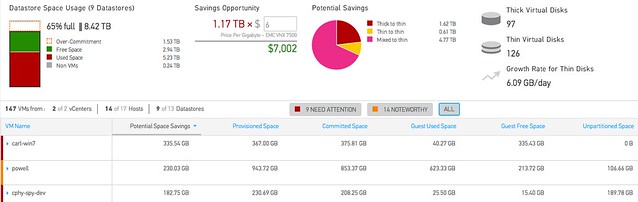
The Storage Analytics section is available as of today to everyone out there! It will allow you to monitor things like “datastore contention”, “unused VMs” and everything there is to know about capacity savings ranging from inside the guest to datastore level details. If you ever wondered how “big data” could be of use to you, I am sure you will understand when you start using CloudPhysics. Not just their monitoring and simulation cards are brilliant, the Card Builder is definitely one of their hidden gems. If you need to convince your management, than all you should do is show the above screenshot: savings opportunity!

Of course there is a lot more to it than I will be able to write about in this short post. In my opinion if you truly want to understand what they bring to the table, just try it out for free for 30 days here!

PS: How about this brilliant Infographic… from the people who taught you how to fight the noisy neighbour, they now show you how to defeat that bully!

**disclaimer: I am an advisor to CloudPhysics **
Quick pointer to new Virtual SAN Ready Node configs

Duncan Epping · Jun 23, 2014 ·

Just a quick pointer to the new document that holds all Virtual SAN Ready Node configurations: Virtual SAN Ready Node.pdf. In this document various new configurations are described and a couple of old ready node configurations appear to have been removed. I expect these new configurations to be added in the upcoming weeks.

Another very useful document recently released on the topic of Virtual SAN hardware is the following: Virtual SAN Hardware Quick Reference Guide. It describes for both Server and VDI workloads different profiles and give examples around how you should configure your hardware to meet certain requirements.

FW: Dear Clouderati Enterprise IT is different…

Duncan Epping · Jun 19, 2014 ·

I hardly ever do this, posting people to a blog post… I was going through my backlog of articles to read when I spotted this article by my colleague Chuck Hollis. I had an article in my draft folder on the subject of web scale myself. Funny enough it so close to Chuck’s that there is no point in publishing it… rather I would like to point you to Chuck’s article instead.

To me personally, the below quote captures the essence of the article really well.

If you’re a web-scale company, IT doesn’t just support the business, IT is the business.

It is a discussion I have had on twitter a couple of times. I think Web Scale is a great concept, and I understand the value for companies like Google, Facebook or any other large organization in the need of highly scalable application landscape. But the emphasize here is on the application and its requirements, and it makes a big difference if you are providing support for hundreds if not thousands of applications which are not build in-house. If anyone tells you that because it is good for Google/Facebook/Twitter it must be good for you, ask yourself what the requirements are of your application. What does your application landscape look like today? What will it look like tomorrow? And what will be your IT needs for the upcoming years? Read more in this excellent post by Chuck, and make sure to leave a comment! Dear Clouderati Enterprise IT is different…


Disconnect a host from VSAN cluster doesn’t change capacity?

Duncan Epping · Jun 13, 2014 ·

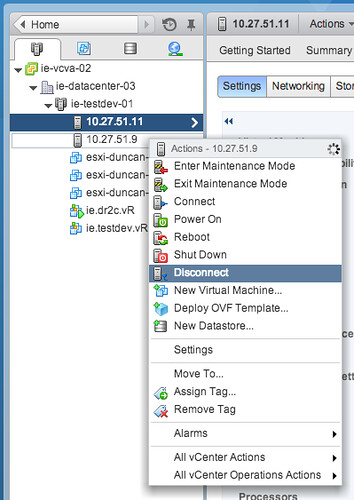
Someone asked this question on VMTN this week and I received a similar question this week from another user… If you disconnect a host from a VSAN cluster it doesn’t change the total amount of available capacity. The customer was wondering why this was. Well the answer is simple: You are not disconnecting the host from your VSAN cluster, but you are rather disconnecting it from vCenter Server instead! (In contrary to HA and DRS by the way) In other words: your VSAN host is still providing storage to the VSAN datastore when it is disconnected.

If you want a host to leave a VSAN cluster you have two options in my opinion:

  • Place it in maintenance mode with full data migration and remove it from the cluster
  • Run the following command from the ESXi command line:
    esxcli vsan cluster leave

Please keep that in mind when you do maintenance… Do not use “disconnect” but actually remove the host from the cluster if you do not want it to participate in VSAN any longer.

Why Queue Depth matters!

Duncan Epping · Jun 9, 2014 ·

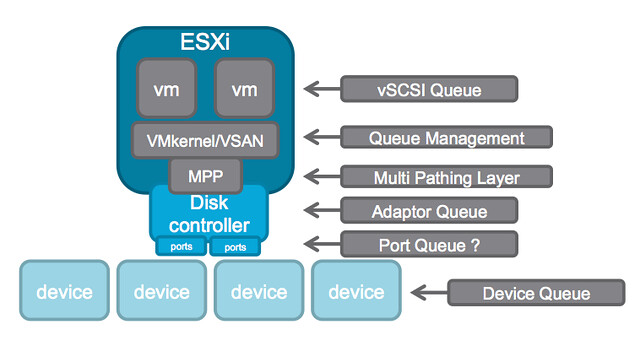
A while ago I wrote an article about the queue depth of certain disk controllers and tried to harvest some of the values and posted those up. William Lam did a “one up” this week and posted a script that can gather the info which then should be posted in a Google Docs spreadsheet, brilliant if you ask me. (PLEASE run the script and lets fill up the spreadsheet!!) But some of you may still wonder why this matters… (For those who didn’t read some of the troubles one customer had with a low-end shallow queue depth disk controller, and Chuck’s take on it here.) Considering the different layers of queuing involved, it probably makes most sense to show the picture from virtual machine down to the device.

queue depth

In this picture there are at least 6 different layers at which some form of queuing is done. Within the guest there is the vSCSI adaptor that has a queue. Then the next layer is VMkernel/VSAN which of course has its own queue and manages the IO that is pushed to the MPP aka muti-pathing layer the various devices on a host. On the next level a Disk Controller has a queue, potentially (depending on the controller used) each disk controller port has a queue. Last but not least of course each device (i.e. a disk) will have a queue. Note that this is even a simplified diagram.

If you look closely at the picture you see that IO of many virtual machines will all flow through the same disk controller and that this IO will go to or come from one or multiple devices. (Typically multiple devices.) Realistically, what are my potential choking points?

  1. Disk Controller queue
  2. Port queue
  3. Device queue

Lets assume you have 4 disks; these are SATA disks and each have a queue depth of 32. Total combined this means that in parallel you can handle 128 IOs. Now what if your disk controller can only handle 64? This will result in 64 IOs being held back by the VMkernel / VSAN. As you can see, it would beneficial in this scenario to ensure that your disk controller queue can hold the same number of IOs (or more) as your device queue can hold.

When it comes to disk controllers there is a huge difference in maximum queue depth value between vendors, and even between models of the same vendor. Lets look at some extreme examples:

HP Smart Array P420i - 1020
Intel C602 AHCI (Patsburg) - 31 (per port)
LSI 2008 - 25
LSI 2308 - 600

For VSAN it is recommended to ensure that the disk controller has a queue depth of at least 256. But go higher if possible. As you can see in the example there are various ranges, but for most LSI controllers the queue depth is 600 or higher. Now the disk controller is just one part of the equation, as there is also the device queue. As I listed in my other post, a RAID device for LSI for instance has a default queue depth of 128 while a SAS device has 254 and a SATA device has 32. The one which stands out the most is the queue depth of the SATA device, only a queue depth of 32 and you can imagine this can once again become a “choking point”. However, fortunately the shallow queue depth of SATA can easily be overcome by using NL-SAS drives (nearline serially attached SCSI) instead. NL-SAS drives are essentially SATA drives with a SAS connector and come with the following benefits:

  • Dual ports allowing redundant paths
  • Full SCSI command set
  • Faster interface compared to SATA, up to 20%
  • Larger (deeper) command queue [depth]

So what about the cost then? From a cost perspective the difference between NL-SAS and SATA is for most vendors negligible. For a 4TB drive the difference at the time of writing on different website was on average $ 30,-. I think it is safe to say that for ANY environment NL-SAS is the way to go and SATA should be avoided when possible.

In other words, when it comes to queue depth: spent a couple of extra bucks and go big… you don’t want to choke your own environment to death!

  • « Go to Previous Page
  • Page 1
  • Interim pages omitted …
  • Page 49
  • Page 50
  • Page 51
  • Page 52
  • Page 53
  • Interim pages omitted …
  • Page 71
  • Go to Next Page »

Primary Sidebar

About the Author

Duncan Epping is a Chief Technologist and Distinguished Engineering Architect at Broadcom. Besides writing on Yellow-Bricks, Duncan is the co-author of the vSAN Deep Dive and the vSphere Clustering Deep Dive book series. Duncan is also the host of the Unexplored Territory Podcast.

Follow Us

  • X
  • Spotify
  • RSS Feed
  • LinkedIn

Recommended Book(s)

Also visit!

For the Dutch-speaking audience, make sure to visit RunNerd.nl to follow my running adventure, read shoe/gear/race reviews, and more!

Do you like Hardcore-Punk music? Follow my Spotify Playlist!

Do you like 80s music? I got you covered!

Copyright Yellow-Bricks.com © 2026 · Log in