• Skip to primary navigation
  • Skip to main content
  • Skip to primary sidebar

Yellow Bricks

by Duncan Epping

  • Home
  • Unexplored Territory Podcast
  • HA Deepdive
  • ESXTOP
  • Stickers/Shirts
  • Privacy Policy
  • About
  • Show Search
Hide Search

Software Defined

VSAN Basics – Changing a VM’s storage policy

Duncan Epping · Mar 22, 2014 ·

I have been talking a lot about the architecture of VSAN and have written many articles. It seems that somehow some of the more basic topics have not been fully addressed yet like changing a VM’s storage policy. One of our field folks had a question from a customer which was based on this video.

The question was how do you change the policy of a single VM? And why would you change the policy for a group of VMs?

Lets answer the “group of VMs” question first. You can imagine setting a policy for VMs that perform a specific function, for instance web servers. It could be that after a period of monitoring you notice that these VMs are not performing as expected when data needs to come from spindles. By changing the policy, as demonstrated in the video, you can simply increase the stripe width for all virtual machines.

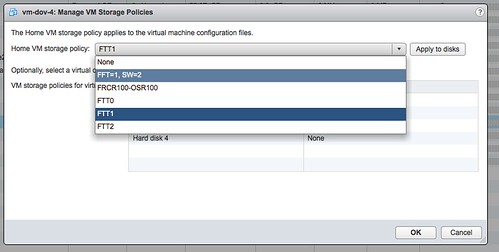
Now the question remains, how do I change the policy of a single VM? It is actually really straight forward:

  • Create a new policy
    • Go to VM Storage Policies
    • Click “Create a new storage policy”
    • Select the capabilities
  • Now go to your virtual machines and right click VM which needs a new policy
  • Click on “all vCenter actions”
  • Click on “VM Storage Policies”
  • Click on “Manage…”
  • Select a new policy
  • Apply to disks
  • Click “Ok”

Now the new policy will be applied to the VM. Depending on the selected policy this will take a certain amount of time as new components of your objects may need to be created.
 

VSAN HCL more than VSAN-ready nodes

Duncan Epping · Mar 20, 2014 ·

Over the last couple of weeks, basically since VSAN was launched, I noticed something and I figured I would blog about it. Many people seem to be under the impression that the VSAN Ready Nodes are your only option if you want to buy new servers to run VSAN on. This is definitely NOT the case. VSAN Ready Nodes are a great solution for people who do not want to bother going through the exercise of selecting components themselves from the VSAN HCL. However, the process is not as complicated as it sounds.

There are a couple of “critical aspects” when it comes to configuring a VSAN host and those are:

  • Server which is on the vSphere HCL (pick any)
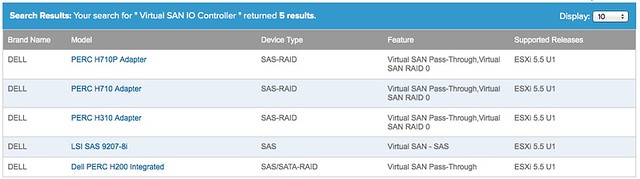
  • SSD, Disk Controller and HDD which is on the VSAN HCL: vmwa.re/vsanhcl

Yes that is it! So if you look at the current list of Ready Nodes for instance, it contains a short list of Dell Servers (T620 and R720). However the vSphere HCL has a long list of Dell Servers, and you can use ANY of those. You just need to make sure your VSAN (critical) components are certified, and you can simply do that using the VSAN HCL. For instance, even the low end PowerEdge R320 can be configured with components that are supported by VSAN today as it supports the H710 and the H310 disk controller which are also on the VSAN HCL.

So let me recap that: You can select ANY host from the vSphere HCL, as long as you ensure the SSD / Disk Controller and HDD are on the VSAN HCL you should be good.

VSAN and the AHCI controller (hint: not supported!)

Duncan Epping · Mar 17, 2014 ·

I have seen multiple people reporting this already so I figured I would write a quick blog post. Several folks are going from Beta to GA release for VSAN and so far people have been very successful, except for those using disk controllers which are not on the HCL like the on-board AHCI controller. For whatever reason it appeared on the HCL for a short time during the beta, but it is not supported (and not listed) today. I have had similar issues in my lab, and as far as I am aware there is no workaround at the moment. The errors you will see appear in the various logfiles have the keywords: “APD”, “PDL”, “Path lost” or “NMP device <xyz> is blocked”.

Before you install / configure Virtual SAN I highly want to recommend validating the HCL: http://vmwa.re/vsanhcl (I figured I will need this URL a couple of times in the future so I created this nice short url)

Update: with 5.5 U2 it is reported AHCI works, however still not supported!

Essential Virtual SAN book, rough cut online now!

Duncan Epping · Mar 17, 2014 ·

A couple of weeks back Eric Sloof broke the news about the book Cormac Hogan and I are working on: Essential Virtual SAN. As of this weekend the rough cut edition is (back) online again, and you can see some of the progress Cormac and I have been making over the last couple of months. As we speak we are working on the final chapters… so hopefully before the end of the month the rough cut should be complete!

Note that this is a rough cut and that means the book will go through tech review (by VSAN Architect Christos Karamanolis, and VMware Integration Engineer Paudie O’Riordan), than editing and a final review by Cormac and I before it will be published. So expect some changes throughout that whole cycle. Never the less, I think it is worth reading for those who have a Safari Online account:

http://my.safaribooksonline.com/book/operating-systems-and-server-administration/virtualization/9780133855036

Building a hyper-converged platform using VMware technology part 3

Duncan Epping · Mar 12, 2014 ·

Considering some of the pricing details have been announced I figured I would write a part 3 of my “Building a hyper-converged platform using VMware technology” series (part 1 and part 2) Before everyone starts jumping in on the pricing details, I want to make sure people understand that I have absolutely no responsibilities whatsoever related to this subject, I am just the messenger in this case. In order to run through this exercise I figured I would take a popular SuperMicro configuration and ensure that the components used are certified by VMware.

I used the thinkmate website to get pricing details on the SuperMicro kit. Lets list the hardware first:

    • 4 hosts each with:
      -> Dual Six-Core Intel Xeon® CPU E5-2620 v2 2.10GHz 15MB Cache (80W)
      -> 128 GB (16GB PC3-14900 1866MHz DDR3 ECC Registered DIMM)
      -> 800GB Intel DC S3700 Series 2.5″ SATA 6.0Gb/s SSD (MLC)
      -> 5 x 1.0TB SAS 2.0 6.0Gb/s 7200RPM – 2.5″ – Seagate Constellation.2
      -> Intel 10-Gigabit Ethernet CNA X540-T2 (2x RJ-45)

The hardware is around $ 30081,-, this is without any discount. Just the online store price. Now the question is, what about Virtual SAN? You would need to license 8 sockets with Virtual SAN in this scenario, again this is the online store price without any discount:

  • $ 2495,- per socket = $ 19960,-

This makes the cost of the SuperMicro hardware including the Virtual SAN licenses for four nodes in this configuration roughly $ 50.041. (There is also the option to license Virtual SAN for View per user which is $ 50,-.) That is around $ 12600 per host including the VSAN licenses.

If you do not own vSphere licenses yet you will need to license vSphere itself as well, I would recommend Enterprise ( $ 2875,- per socket) as with VSAN you will automatically get Storage Policy Based Management and the Distributed Switch. Potentially, depending on your deployment type, you will also need vCenter Server. Standard license for vCenter Server is $ 4995,-. If you would include all VMware licenses the total combined would be: $ 78036,-. That is around 19600 per host including the VSAN and vSphere licenses. Not bad if you ask me,

I want to point out that I did not include Support and Maintenance costs. As this will depend on which type of support you require and what type of vSphere licenses you will have I felt there were too many variable to make a comparison. It should also be noted that many storage solutions come with very limited first year support… Before you do a comparison, make sure to look at what is included and what will need to be bought separately for proper support.

** disclaimer: Please run through these numbers yourself, and validate the HCL before purchasing any equipment. I cannot be held responsible for any pricing / quoting errors, hardware prices can vary from day to day and this is exercise was for educational purposes only! **

  • « Go to Previous Page
  • Page 1
  • Interim pages omitted …
  • Page 52
  • Page 53
  • Page 54
  • Page 55
  • Page 56
  • Interim pages omitted …
  • Page 71
  • Go to Next Page »

Primary Sidebar

About the Author

Duncan Epping is a Chief Technologist and Distinguished Engineering Architect at Broadcom. Besides writing on Yellow-Bricks, Duncan is the co-author of the vSAN Deep Dive and the vSphere Clustering Deep Dive book series. Duncan is also the host of the Unexplored Territory Podcast.

Follow Us

  • X
  • Spotify
  • RSS Feed
  • LinkedIn

Recommended Book(s)

Also visit!

For the Dutch-speaking audience, make sure to visit RunNerd.nl to follow my running adventure, read shoe/gear/race reviews, and more!

Do you like Hardcore-Punk music? Follow my Spotify Playlist!

Do you like 80s music? I got you covered!

Copyright Yellow-Bricks.com © 2026 · Log in