• Skip to primary navigation
  • Skip to main content
  • Skip to primary sidebar

Yellow Bricks

by Duncan Epping

  • Home
  • Unexplored Territory Podcast
  • HA Deepdive
  • ESXTOP
  • Stickers/Shirts
  • Privacy Policy
  • About
  • Show Search
Hide Search

BC-DR

vSphere 5 Coverage

Duncan Epping · Aug 6, 2011 ·

I just read Eric’s article about all the topics he covered around vSphere 5 over the last couple of weeks and as I just published the last article I had prepared I figured it would make sense to post something similar. (Great job by  the way Eric, I always enjoy reading your articles and watching your videos!) Although I did hit roughly 10.000 unique views on average per day the first week after the launch and still 7000 a day currently I have the feeling that many were focused on the licensing changes rather then all the new and exciting features that were coming up, but now that the dust has somewhat settled it makes sense to re-emphasize them. Over the last 6 months I have been working with vSphere 5 and explored these features, my focus for most of those 6 months was to complete the book but of course I wrote a large amount of articles along the way, many of which ended up in the book in some shape or form. This is the list of articles I published. If you feel there is anything that I left out that should have been covered let me know and I will try to dive in to it. I can’t make any promises though as with VMworld coming up my time is limited.

  1. Live Blog: Raising The Bar, Part V
  2. 5 is the magic number
  3. Hot of the press: vSphere 5.0 Clustering Technical Deepdive
  4. vSphere 5.0: Storage DRS introduction
  5. vSphere 5.0: What has changed for VMFS?
  6. vSphere 5.0: Storage vMotion and the Mirror Driver
  7. Punch Zeros
  8. Storage DRS interoperability
  9. vSphere 5.0: UNMAP (vaai feature)
  10. vSphere 5.0: ESXCLI
  11. ESXi 5: Suppressing the local/remote shell warning
  12. Testing VM Monitoring with vSphere 5.0
  13. What’s new?
  14. vSphere 5:0 vMotion Enhancements
  15. vSphere 5.0: vMotion enhancement, tiny but very welcome!
  16. ESXi 5.0 and Scripted Installs
  17. vSphere 5.0: Storage initiatives
  18. Scale Up/Out and impact of vRAM?!? (part 2)
  19. HA Architecture Series – FDM (1/5)
  20. HA Architecture Series – Primary nodes? (2/5)
  21. HA Architecture Series – Datastore Heartbeating (3/5)
  22. HA Architecture Series – Restarting VMs (4/5)
  23. HA Architecture Series – Advanced Settings (5/5)
  24. VMFS-5 LUN  Sizing
  25. vSphere 5.0 HA: Changes in admission control
  26. vSphere 5 – Metro vMotion
  27. SDRS and Auto-Tiering solutions – The Injector

Once again if there it something you feel I should be covering let me know and I’ll try to dig in to it. Preferably something that none of the other blogs have published of course.

vSphere 5 – Metro vMotion

Duncan Epping · Aug 3, 2011 ·

I received a question last week about higher latency thresholds for vMotion… A rumor was floating around that vMotion would support RTT latency up to 10 miliseconds instead of 5. (RTT=Round Trip Time) Well this is partially true. With vSphere 5.0 Enterprise Plus this is true. With any of the versions below Enterprise Plus the supported limit is 5 miliseconds RTT. Is there a technical reason for this?

There’s a new component that is part of vMotion which is only enabled with Enterprise Plus and that components is what we call ‘Metro vMotion’.  This feature enables you to safely vMotion a virtual machine across a link of up to 10 miliseconds RTT. The technique used is common practice in networking and a bit more in-depth described here.

In the case of vMotion the standard socket buffer size is around 0.5MB.  Assuming a 1GbE network (or 125MBps) then bandwidth delay product dictates that we could support roughly 5ms RTT delay without a noticeable bandwidth impact.  With the “Metro vMotion” feature, we’ll dynamically resize the socket buffers based on the observed RTT over the vMotion network.  So, if you have 10ms delay, the socket buffers will be resized to 1.25MB, allowing full 125MBps throughput.  Without “Metro vMotion”, over the same 10ms link, you would get around 50MBps throughput.

Is that cool or what?

vSphere 5.0 HA: Changes in admission control

Duncan Epping · Aug 3, 2011 ·

I just wanted to point out a couple of changes for HA in vSphere 5.0 with regards to admission control. Although they might seem minor they are important to keep in mind when redesigning your environment. Lets just discuss each of the admission control policies and list the changes underneath.

  • Host failures cluster tolerates
    Still uses the slot algorithm. Major change here is that you can have a value larger than 4 hosts. The 4 host limit was imposed by the Primary/Secondary node concept. As this constraint has been lifted it is now possible to select a value up to 31. So in the case of a 16 host cluster you can set the value to 15. (Yes you could even set it to 31 as the UI doesn’t limit you but that wouldn’t make sense would it…) Another change is the default slotsize for CPU. The default slotsize used to be 256MHz. This has been decreased to 32MHz.
  • Percentage as cluster resources reserved
    This admission control policy has been overhauled and it is now possible to select a percentage for both CPU and Memory separately. In other words you can set CPU to 30% and Memory to 25%. The algorithm hasn’t changed and this is still my preferred admission control policy!
  • Specify Failover host
    Allows you to select multiple hosts instead of just 1. So for instance in an 8 host cluster you can specify two as designated failover hosts. These hosts will not be used during normal operations, keep this in mind!

For more details on admission control I would like to refer to the HA deepdive (not updated to 5.0 yet) or my book on vSphere 5.0 Clustering which contains many examples of how to correctly set the percentage for instance.

HA Architecture Series – Datastore Heartbeating (3/5)

Duncan Epping · Jul 26, 2011 ·

**disclaimer: Some of the content has been taken from the vSphere 5 Clustering Technical Deepdive book**

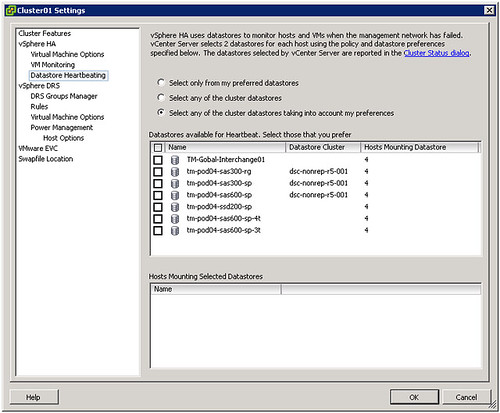
The first time I was playing around with 5.0 and particularly HA I noticed a new section in the UI called Datastore Heartbeating.

Those familiar with HA prior to vSphere 5.0 probably know that virtual machine restarts were always initiated, even if only the management network of the host was isolated and the virtual machines were still running. As you can imagine, this added an unnecessary level of stress to the host. This has been mitigated by the introduction of the datastore heartbeating mechanism. Datastore heartbeating adds a new level of resiliency and allows HA to make a distinction between a failed host and an isolated / partitioned host. Isolated vs Partitioned is explained in Part 2 of this series.

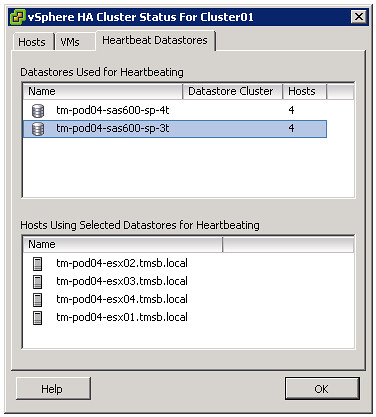
Datastore heartbeating enables a master to more correctly determine the state of a host that is not reachable via the management network. The new datastore heartbeat mechanism is only used in case the master has lost network connectivity with the slaves to validate whether the host has failed or is merely isolated/network partitioned. As shown in the screenshot above two datastores are automatically selected by vCenter. You can rule out specific volumes if and when required or even make the selection yourself. I would however recommend to let vCenter decide.

As mentioned by default it will select two datastores. It is possible however to configure an advanced setting (das.heartbeatDsPerHost) to allow for more datastores for datastore heartbeating. I can imagine this is something that you would do when you have multiple storage devices and want to pick a datastore from each, but generally speaking I would not recommend configuring this option as the default should be sufficient for most scenarios.

How does this heartbeating mechanism work? HA leverages the existing VMFS filesystem locking mechanism. The locking mechanism uses a so called “heartbeat region” which is updated as long as the lock on a file exists. In order to update a datastore heartbeat region, a host needs to have at least one open file on the volume. HA ensures there is at least one file open on this volume by creating a file specifically for datastore heartbeating. In other words, a per-host a file is created on the designated heartbeating datastores, as shown in the screenshot below. HA will simply check whether the heartbeat region has been updated.

If you are curious which datastores have been selected for heartbeating. Just go to your summary tab on your cluster and click “Cluster Status”, the 3 tab “Heartbeat Datastores” will reveal it.


** Disclaimer: This article contains references to the words master and/or slave. I recognize these as exclusionary words. The words are used in this article for consistency because it’s currently the words that appear in the software, in the UI, and in the log files. When the software is updated to remove the words, this article will be updated to be in alignment. **

HA Architecture Series – Primary nodes? (2/5)

Duncan Epping · Jul 25, 2011 ·

**disclaimer: Some of the content has been taken from the vSphere 5 Clustering Technical Deepdive book**

As mentioned in an earlier post vSphere High Availability has been completely overhauled… This means some of the historical constraints have been lifted and that means you can / should / might need to change your design or implementation.

What I want to discuss today is the changes around the Primary / Secondary node concept that was part of HA prior to vSphere 5.0. This concept basically limited you in certain ways… For those new to VMware /vSphere, in the past there was a limit of 5 primary nodes. As a primary node was a requirement to restart virtual machines you always wanted to have at least 1 primary node available. As you can imagine this added some constraints around your cluster design when it came to Blades environments or Geo-Dispersed clusters.

vSphere 5.0 has completely lifted these constraints. Do you have a Blade Environment and want to run 32 hosts in a cluster? You can right now as the whole Primary/Secondary node concept has been deprecated. HA uses a new mechanism called the Master/Slave node concept. This concept is fairly straight forward. One of the nodes in your cluster becomes the Master and the rest become Slaves. I guess some of you will have the question “but what if this master node fails?”. Well it is very simple, when the master node fails an election process is initiated and one of the slave nodes will be promoted to master and pick up where the master left off. On top of that, lets take the example of a Geo-Dispersed cluster, when the cluster is split in two sites due to a link failure each “partition” will get its own master. This allows for workloads to be restarted even in a geographically dispersed cluster when the network has failed….

What is this master responsible for? Well basically all the tasks that the primary nodes used to have like:

  • restarting failed virtual machines
  • exchanging state with vCenter
  • monitor the state of slaves

As mentioned when a master fails a election process is initiated. The HA master election takes roughly 15 seconds. The election process is simple but robust. The host that is participating in the election with the greatest number of connected datastores will be elected master. If two or more hosts have the same number of datastores connected, the one with the highest Managed Object Id will be chosen. This however is done lexically; meaning that 99 beats 100 as 9 is larger than 1. That is a huge improvement compared to what is was like in 4.1 and prior isn’t it?

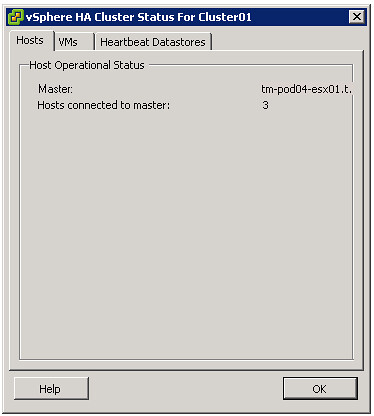
For those wondering which host won the election and became the master, go to the summary tab and click “Cluster Status”.

Isolated vs Partitioned

As this is a change in behavior I do want to briefly discuss the difference between an Isolation and a Partition. First of all, a host is considered to be either Isolated or Partitioned when it loses network access to a master but has not failed. To help explain the difference the states and the associated criteria below:

  • Isolated
    • Is not receiving heartbeats from the master
    • Is not receiving any election traffic
    • Cannot ping the isolation address
  • Partitioned
    • Is not receiving heartbeats from the master
    • Is receiving election traffic
    • (at some point a new master will be elected at which the state will be reported to vCenter)

In the case of an Isolation, a host is separated from the master and the virtual machines running on it might be restarted, depending on the selected isolation response and the availability of a master. It could occur that multiple hosts are fully isolated at the same time. When multiple hosts are isolated but can still communicate amongst each other over the management networks, it is called s a network partition. When a network partition exists, a master election process will be issued so that a host failure or network isolation within this partition will result in appropriate action on the impacted virtual machine(s).


** Disclaimer: This article contains references to the words master and/or slave. I recognize these as exclusionary words. The words are used in this article for consistency because it’s currently the words that appear in the software, in the UI, and in the log files. When the software is updated to remove the words, this article will be updated to be in alignment. **

  • « Go to Previous Page
  • Page 1
  • Interim pages omitted …
  • Page 41
  • Page 42
  • Page 43
  • Page 44
  • Page 45
  • Interim pages omitted …
  • Page 63
  • Go to Next Page »

Primary Sidebar

About the Author

Duncan Epping is a Chief Technologist and Distinguished Engineering Architect at Broadcom. Besides writing on Yellow-Bricks, Duncan is the co-author of the vSAN Deep Dive and the vSphere Clustering Deep Dive book series. Duncan is also the host of the Unexplored Territory Podcast.

Follow Us

  • X
  • Spotify
  • RSS Feed
  • LinkedIn

Recommended Book(s)

Also visit!

For the Dutch-speaking audience, make sure to visit RunNerd.nl to follow my running adventure, read shoe/gear/race reviews, and more!

Do you like Hardcore-Punk music? Follow my Spotify Playlist!

Do you like 80s music? I got you covered!

Copyright Yellow-Bricks.com © 2026 · Log in