• Skip to primary navigation
  • Skip to main content
  • Skip to primary sidebar

Yellow Bricks

by Duncan Epping

  • Home
  • Unexplored Territory Podcast
  • HA Deepdive
  • ESXTOP
  • Stickers/Shirts
  • Privacy Policy
  • About
  • Show Search
Hide Search

BC-DR

VMware HA Deployment Best Practices

Duncan Epping · Dec 13, 2010 ·

Last week VMware officially released an official paper around Deployment Best Practices for HA. I was one of the authors of the document. Together with several people from the Technical Marketing Team we gathered all best practices that we could find, validated and simplified them to make it rock solid. I think it is a good read. It is short and sweet and I hope you will enjoy it.

Latest Revision:
Dec 9, 2010

Download:
http://www.vmware.com/files/pdf/techpaper/VMW-Server-WP-BestPractices.pdf

Description

This paper describes best practices and guidance for properly deploying VMware HA in VMware vSphere 4.1.  These include discussions on proper network and storage design, and recommendations on settings for host isolation response and admission control.
vSphere 4.1 HA and DRS Technical Deepdive, the book!

Duncan Epping · Dec 6, 2010 ·

In August we announced that we were working a secret project and let you guys in on it. The idea was to get it published through an official Publisher but due to several circumstances and a very tight deadline we decided to go the self-publishing route to make it available as soon as possible. So here it is, the moment both Frank Denneman and I have been waiting for…. it is finally available, the HA and DRS technical deepdive.

As of today “vSphere 4.1 HA and DRS Technical Deepdive” is available on paper via CreateSpace and Amazon. We are also working on getting a digital copy up for sale but that will more than likely be early 2011.

There is something I want to make very clear here as I have heard multiple people referring to this book as “Duncan’s Book”. This book was very much a joint effort. Frank has invested at least as much time in this project as I have, and probably even more. I want to thank Frank for his hard work and hope everyone realizes that it is our book and not my book!

We want to take the opportunity to thank our Technical Reviewers for their very valuable feedback and for keeping us honest; fellow VCDX Panel Member Craig Risinger (VMware PSO), Marc Sevigny (VMware HA Engineering), Anne Holler (VMware DRS Engineering) and Bouke Groenescheij (Jume.nl). A very special thanks to Scott Herold for writing the foreword!

For those who can’t wait, order it via CreateSpace or Amazon now. (Please be so kind to leave a review

This is the description of the book that is up on CreateSpace/Amazon:

About the authors:
Duncan Epping (VCDX 007) is a Consulting Architect working for VMware as part of the Cloud Practice. Duncan works primarily with Service Providers and large Enterprise customers. He is focussed on designing Public Cloud Infrastructures and specializes in bc-dr, vCloud Director and VMware HA. Duncan is the owner of Yellow-Bricks.com, the leading VMware blog.
Frank Denneman (VCDX 029) is a Consulting Architect working for VMware as part of the Professional Services Organization. Frank works primarily with large Enterprise customers and Service Providers. He specializes in Resource Management, DRS and storage. Frank is the owner of frankdenneman.nl which has recently been voted number 6 worldwide on vsphere-land.com

VMware vSphere 4.1 HA and DRS Technical Deepdive zooms in on two key components of every VMware based infrastructure and is by no means a “how to” guide. It covers the basic steps needed to create a VMware HA and DRS cluster, but even more important explains the concepts and mechanisms behind HA and DRS which will enable you to make well educated decisions. This book will take you in to the trenches of HA and DRS and will give you the tools to understand and implement e.g. HA admission control policies, DRS resource pools and resource allocation settings. On top of that each section contains basic design principles that can be used for designing, implementing or improving VMware infrastructures.
Coverage includes:

  • HA node types
  • HA isolation detection and response
  • HA admission control
  • VM Monitoring
  • HA and DRS integration
  • DRS imbalance algorithm
  • Resource Pools
  • Impact of reservations and limits
  • CPU Resource Scheduling
  • Memory Scheduler
  • DPM

We hope you will enjoy reading it as much as we did writing it. Thanks,

How does Symantec ApplicationHA integrate/work with VMware HA?

Duncan Epping · Nov 3, 2010 ·

I briefly touched on this topic already, but I guess on Yellow-Bricks the primary focus should be technical. I downloaded Symantec’s Application HA and decided to give it a spin, I already started documenting the installation of the ApplicationHA Console and the Guest Component but Mr Sloof beat me to it and documented his finding in the following two articles.

  • ApplicationHA – Install and Configure
  • The ApplicationHA Configuration Wizard – Monitoring SQL Server 2008

No need to repeat it in my opinion as Eric did an excellent job. I do want to point two things out and they are around the requirements/constraints of the product:

  • Symantec ApplicationHA Console requires Windows Server 2008 or Windows Server 2008 R2.
    • The Console provides the integration between vCenter and ApplicationHA from a UI perspective. An ApplicationHA tab will be added to the vSphere Client which can be used to configure and control ApplicationHA.
  • A 64Bit Guest OS is required for the ApplicationHA Windows Guest Component.
    • This is the actually component that enables application level protection.

This basically means that if you are primarily using 32Bit OS’s, like I for instance do in my homelab, it won’t work as the installer literally throws an error that the VM doesn’t meet the requirements. That is for now, as I bet that when demand grows Symantec will add support for 32Bit OSs.

So what is this ApplicationHA product?

Symantec ApplicationHA is an extension of VM / Application Monitoring. Symantec simplified Veritas Cluster Server (VCS) to enable application availability monitoring including of course responding to issues. Just to be absolutely clear, the foundation still is VCS based the unnecessary bits and pieces were taken out. Note that it is not a multi-node clustering solution like VCS itself but a single node solution.

The question remains how does it integrate with vCenter and more specifically with HA?

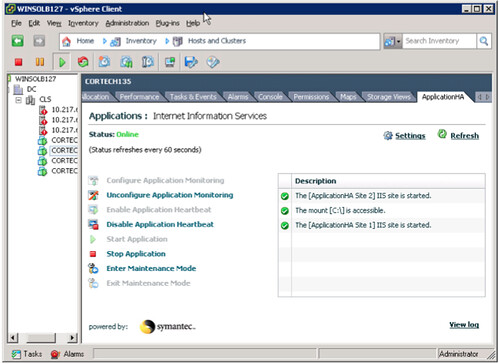
Lets start with the integration with vCenter. This is where the “ApplicationHA Console” comes into play. It basically adds a tab on a VM level that gives you the details of this VM in terms of ApplicationHA of course depending on the fact if you installed the Guest Component or not the Tab will display different info. Ultimately it should look as follows:

Now this example shows IIS being monitoring, but not only IIS also a disk mount. By the way, besides having a standard agent for IIS; ApplicationHA also includes an agent for MS SQL and MS Exchange. My primary focus for this article is Windows by of course Symantec also offers agents for Linux which includes Oracle, SAP and Weblogic. Just because your application is not included today it doesn’t mean you are out of luck. Symantec regularly updates the ApplicationHA Agent pack. However there is also a standard Guest Component which enables you to monitor standard services, mountpoints, processes and is what Symantec calls an Infrastructure Agent.

That brings me to the next point. From a GUI perspective it seems like there is a single component  that monitors the state of your application. That is not the case, as stated above it can monitor the availability of services, process and much more. As stated this is what Symantec calls the Infrastructure Agent and yes it has multiple components. I have listed the most crucial agents below with a short description:

  • Heartbeat Agent – The Heartbeat agent monitors the configured application service group.
  • MountMonitor Agent – The MountMonitor agent monitors the mount path of the configured storage. It is independent of how the underlying storage is managed (whether SFW disk groups or LDM disks or any other storage management software). The mount path can be a drive letter or a folder mount.
  • GenericService Agent – The GenericService agent brings services online, takes them offline, and monitors their status. A service is an application type that is supported by Windows, and conforms to the interface rules of the Service Control Manager (SCM).
  • Process Agent – The Process agent brings processes online, takes them offline, and monitors their status. You can specify different executables for each process routine.

Each of these agents has very specific configuration attributes. An example for instance would be the “DelayBeforeAppFault” for the Heartbeat Agent. This specifies the number of seconds the agent must wait in case of an error before communicating application fault to VMware HA. I guess I just hit the nail on the head. The Heartbeat Agent is the agent that is responsible for communication with VMware HA. Basically it provides a means to trigger VMware HA to kick in when Symantec can not handle the issue with a restart of the service.

So what happens if an Application that has been configured for protection fails?

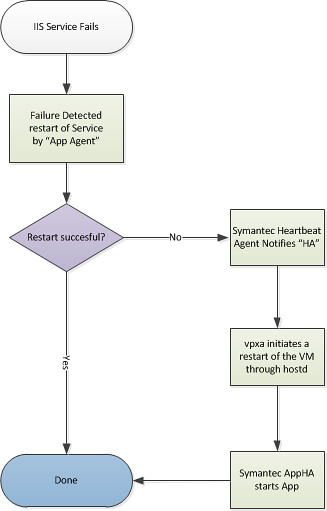
First Symantec ApplicationHA is triggered to try to get the Application up and running after the failure occurred by restarting the application. It should be noted that Symantec’s ApplicationHA is aware of dependencies and knows in which order services should be started or stopped. If however for whatever reason this fails for an “X” amount of times VMware HA will be asked to take action. (X is configurable by changing the config attribute “AppRestartAttempts”.) The action that HA takes will be a restart of the virtual machine.

But wait is it really VMware HA? With that meaning is it the good old “AAM” agent who is responsible for this action? No it isn’t. In this case both “vpxa” and “hostd” are responsible for the action taken. I guess visualizing the process will make it a bit easier to digest:

I hope this makes it a bit more clear on how the product works and how it integrates with VMware HA itself.

Did you know? All hosts failed…

Duncan Epping · Oct 22, 2010 ·

** for vSphere 5.0 check this update! **

Today I received a very valid question around a full cluster failure. What happens when all the hosts in a cluster go down and at some point return? Will the VMs be restarted and what do I need to have in place to ensure they will?

It seems to be an urban myth that you need to use “auto-start” for a full cluster failure. But as you might have noticed that won’t work when HA is enabled. So what will?

VMware HA

Is it really that simple? Yes it is! When a full cluster fails and nodes start powering up HA will restart the VMs. As you know HA (or to be precise the primary nodes) maintains the host states, which includes the status of all VMs on those hosts. When one of the primary nodes returns to duty it will trigger the restarts based on the last known state. Make sure you set the restart priority correct so that any VMs hosting “management apps” will be booted up first.

It can’t get any simpler than that can it!

Soon in a book store near you! HA and DRS Deepdive

Duncan Epping · Aug 25, 2010 ·

Over the last couple of months Frank Denneman and I have been working really hard on a secret project. Although we have spoken about it a couple of times on twitter the topic was never revealed.

Months ago I was thinking about what a good topic would be for my next book. As I already wrote a lot of articles on HA it made sense to combine these and do a full deepdive on HA. However a VMware Cluster is not just HA. When you configure a cluster there is something else that usually is enabled and that is DRS. As Frank is the Subject Matter Expert on Resource Management / DRS it made sense to ask Frank if he was up for it or not… Needless to say that Frank was excited about this opportunity and that was when our new project was born: VMware vSphere 4.1 – HA and DRS deepdive.

As both Frank and I are VMware employees we contacted our management to see what the options were for releasing this information to market. We are very excited that we have been given the opportunity to be the first official publication as part of a brand new VMware initiative, codenamed Rome. The idea behind Rome along with pertinent details will be announced later this year.

Our book is currently going through the final review/editing stages. For those wondering what to expect, a sample chapter can be found here. The primary audience for the book is anyone interested in high availability and clustering. There is no prerequisite knowledge needed to read the book however, the book will consist of roughly 220 pages with all the detail you want on HA and DRS. It will not be a “how to” guide, instead it will explain the concepts and mechanisms behind HA and DRS like Primary Nodes, Admission Control Policies, Host Affinity Rules and Resource Pools. On top of that, we will include basic design principles to support the decisions that will need to be made when configuring HA and DRS or when designing a vSphere infrastructure.

I guess it is unnecessary to say that both Frank and I are very excited about the book. We hope that you will enjoy reading it as much as we did writing it. Stay tuned for more info, the official book title and url to order the book. We hope to be able to give you an update soon.

Frank and Duncan

  • « Go to Previous Page
  • Page 1
  • Interim pages omitted …
  • Page 43
  • Page 44
  • Page 45
  • Page 46
  • Page 47
  • Interim pages omitted …
  • Page 63
  • Go to Next Page »

Primary Sidebar

About the Author

Duncan Epping is a Chief Technologist and Distinguished Engineering Architect at Broadcom. Besides writing on Yellow-Bricks, Duncan is the co-author of the vSAN Deep Dive and the vSphere Clustering Deep Dive book series. Duncan is also the host of the Unexplored Territory Podcast.

Follow Us

  • X
  • Spotify
  • RSS Feed
  • LinkedIn

Recommended Book(s)

Also visit!

For the Dutch-speaking audience, make sure to visit RunNerd.nl to follow my running adventure, read shoe/gear/race reviews, and more!

Do you like Hardcore-Punk music? Follow my Spotify Playlist!

Do you like 80s music? I got you covered!

Copyright Yellow-Bricks.com © 2026 · Log in