• Skip to primary navigation
  • Skip to main content
  • Skip to primary sidebar

Yellow Bricks

by Duncan Epping

  • Home
  • Unexplored Territory Podcast
  • HA Deepdive
  • ESXTOP
  • Stickers/Shirts
  • Privacy Policy
  • About
  • Show Search
Hide Search

VMware

New book: VMware vSAN 8.0 U1 Express Storage Architecture Deep Dive!

Duncan Epping · Apr 27, 2023 ·

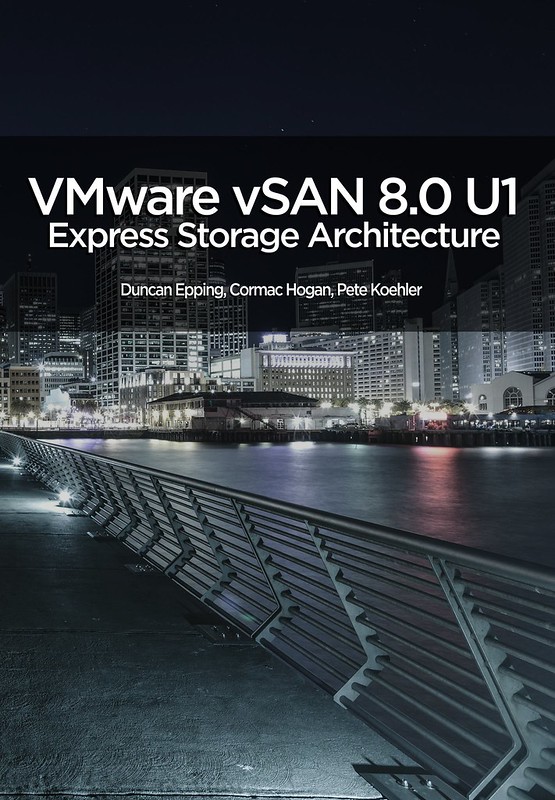
We already gave some hints on twitter, and during an episode of the Unexplored Territory podcast, but here it finally is… The new book, the VMware vSAN 8.0 U1 Express Storage Architecture Deep Dive! It has been a year since we released the vSAN 7.0 U3 Deep Dive book, and with this brand new vSAN architecture being introduced in vSAN 8.0 we figured it was time to do a full overhaul of the book as well. Mind you, this new book purely deals with the Express Storage Architecture, aka vSAN ESA. This also means that some of the features which are not supported by ESA are not discussed in this book, for that you will need to buy the vSAN 7.0 U3 Deep Dive book, which covers OSA. Another big change is that we brought in a third author, we asked our good friend Pete Koehler to contribute to the book. Pete had done reviews of previous books, and considering the amount of material he produced for VMware Tech Marketing for vSAN (and ESA specifically) it made a lot of sense to bring him in!

VMware’s vSAN has rapidly proven itself in environments ranging from hospitals to oil rigs to e-commerce platforms and is the market leader in the hyperconverged space. Along the way, the world of IT has rapidly changed, not just from a software point of view, but also from a hardware perspective. With vSAN 8.0 VMware brought a new architecture to market called vSAN Express Storage Architecture (ESA). This architecture is highly optimized for today’s world of datacenter resources, be it CPU, memory, networking, or NVMe based flash storage.

The authors of the vSAN Deep Dive have thoroughly updated their definitive guide to this transformative technology. Writing for vSphere administrators, architects, and consultants, Cormac Hogan, Duncan Epping , and Pete Koehler explain what vSAN ESA is, why the architecture has changed, what it now offers, and how to gain maximum value from it. The book offers expert insight into preparation, installation, configuration, policies, provisioning, clusters, architecture, and more. You’ll also find practical guidance for using all data services, stretched clusters, two-node configurations, and cloud-native storage services.

Although we pressed publish on Tuesday, sometimes it takes a while before the book is available in all Amazon stores, but it should just trickle down in the upcoming 24-48 hours. The book is priced at 9.99 USD for the ebook and 29.99 USD for a paper copy, and is sold through Amazon only. Get it while it is hot, and we would appreciate it if you would use our referral links and leave a review when you finish it. Thanks for the support, and we hope you will enjoy it!

  • paper – 29.99 USD
  • ebook – 9.99 USD

Of course, we also have the links to other major Amazon stores:

  • United Kingdom – ebook – paper
  • Germany – ebook – paper
  • Netherlands – ebook – paper
  • Canada – ebook – paper
  • France – ebook – paper
  • Spain – ebook – paper
  • India – ebook
  • Japan – ebook – paper
  • Italy – ebook – paper
  • Mexico – ebook
  • Australia – ebook – paper
  • Brazil – ebook
  • Or just do a search in your local amazon store!
RE: Re-Imagining Ransomware Protection with VMware Ransomware Recovery

Duncan Epping · Apr 13, 2023 ·

Last week a blog post was published on VMware’s Virtual Blocks blog on the topic of Ransomware Recovery. Some of the numbers shared were astonishing and hard to contextualize even. Global damages caused by ransomware for instance are estimated to exceed 42 billion dollars in 2024, and this is expected to be doubling every year. Also, 66% of all enterprises were hit by ransomware, of which 96% did not regain full access to their data.

Now, it explicitly mentions “enterprises”, but this does not mean that only enterprise organizations are prone to ransomware attacks. Ransomware attacks do not discriminate, every company, non-profit, and even individuals are at risk if you ask me. As a smart person once said, data is the new oil, and it seems that everyone is drilling for it, including trespassers who don’t own the land! Of course, depending on the type of organization, solutions and services are available to mitigate the risks of losing access to your company’s most valuable asset, data.

VMware, and many other vendors, have various solutions (and services) to protect your data center, your workloads, and essentially your data. But what do you do if you are breached? How do you recover? How fast can you recover, and how fast do you need to recover? How far back do you need to go, and are you allowed to go? Some of you may wonder why I ask these questions, well that has everything to do with the numbers shared at the start of this blog. Unfortunately, today, when organizations are breached malicious code is often only detected after a significant amount of time. Giving the attacker time to collect information about the environment, spread itself throughout the environment, activate the attack, and ultimately request the ransom.

This is when you, the administrator, the consultant, and the cloud admin, will get those questions. How fast can you recover? How far back do we need to go? Where do we recover to? And what about your data? All fair questions, but these shouldn’t be asked after an attack has occurred and ransom is demanded. These are questions we all need to ask constantly, and we should be aligning our Ransomware Recovery strategy with the answers to those questions.

Now, it is fair to say that I am probably somewhat biased, but it is also fair to say that I am as Dutch as it gets and I wouldn’t be writing this blog if I did not believe in this service. VMware’s Ransomware Recovery as a Service, which is part of VMware Cloud Disaster Recovery, provides a unique solution in my humble opinion. First, the service provided can just simply start as a cloud storage service to which you replicate your workloads, without needing to run a full (small but still) software-defined datacenter. This is especially useful for those organizations that can afford to take ~3hrs to spin up an SDDC when there’s a need to recover (or test the process). However, it is also possible to have an SDDC ready for recovery at all times, which will reduce the recovery time objective significantly.

Of course, VMware provides the ability to protect multiple environments, many different workloads, and many point-in-time copies (snapshots). But it also enables you to verify your recovery point (snapshot) in a fully isolated environment. What you will appreciate is that the solution will actually not only isolate the workloads, but on top of that also provide you insights at various levels about the probability of the snapshot being infected. First of all, while going through the recovery process, entropy and change rate are shown which provides insights of when potentially the environment was infected. (Or ransomware was activated for that matter.)

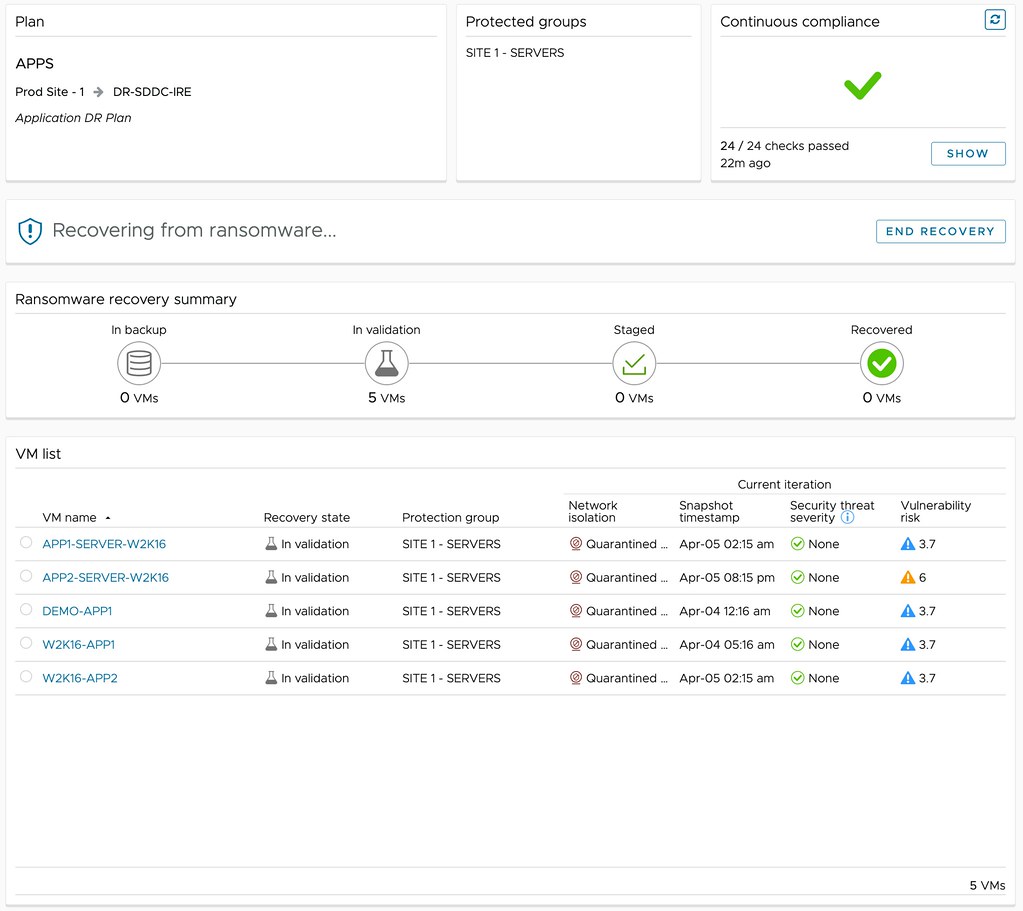
But maybe even more important, through the use of NSX and VMware’s Next Generation Anti-Virus software, a recovery point can be safely tried. A quarantined environment is instantiated and the recovery point can be scanned for vulnerabilities and threats, and an analysis of the workloads to be recovered can be provided, as shown below. This simplifies the recovery and validation process immensely, as it removes the need for many of the manual steps usually involved in this process. Of course, as part of the recovery process, the advanced runbook capabilities of VMware Cloud Disaster Recovery are utilized, enabling the recovery of a full data center, or simply a select group of VMs, by running a recovery plan. This recovery plan includes the order in which workloads need to be powered on and restored, but can also include IP customization, DNS registration, and more.

Depending on the outcome of the analysis, you can then determine what to do with the snapshot. Is the data not compromised? Are the workloads not infected? Are there any known vulnerabilities that we would need to mitigate first? If data is compromised, or the environment is infected in any shape or form, you can simply disregard the snapshot and clean the environment. Rinse and repeat until you find that recovery point that is not compromised! If there are known vulnerabilities, and the environment is clean, you can mitigate those and complete the recovery. Ultimately resulting in full access to your company’s most valuable asset, data.

vSAN 8.0 U1 ESA – Auto Policy Management

Duncan Epping · Mar 28, 2023 ·

One of the features that is introduced in vSAN 8.0 U1 for ESA is Auto-Policy Management. I personally love this feature, as it will help a lot of customers make the right decision in terms of what the default policy should be on their vSAN Datastore. Now, Pete Koehler wrote a very extensive blog post, and I don’t want to copy his work and simply rewrite it, so I suggest you read his blog for the full details on this brand new feature.

I do realize that some of you are just as lazy as I am, so here’s a short summary of what Auto-Policy Management is. Auto-Policy Management, when enabled, creates a new vSAN VM storage policy based on the capabilities enabled on your cluster and the size of your cluster. After creating the policy, the policy is also assigned to the datastore as the “default policy” so that any VMs which are provisioned without the selection of a policy get this optimized policy assigned. What influences the policy characteristics? Well: size of the cluster, stretched vs normal, host rebuild reserve enabled/disabled. All those factors will determine what kind of policy is created and associated with the datastore. If over time your cluster configuration changes, well then Skyline Health will inform you that changes are required to have an optimal policy again. Wonder what that looks like? Watch the demo below!

vSAN 8.0 U1 – Disaggregated Storage Enhancements!

Duncan Epping · Mar 16, 2023 ·

With vSAN 8.0 U1 a lot of new features and enhancements are introduced. There are many blog posts out there describing the long list of enhancements, but in this post, I want to focus on HCI Mesh or Disaggregated vSAN specifically. (Also read this post by Cato!) For this feature, which in the UI is referred to as “Datastore Sharing”, there are 3 key enhancements introduced in vSAN 8.0 U1. There are enhancements for both the Original Storage Architecture (OSA), as well as the Express Storage Architecture (ESA).

With vSAN 8.0 the initial version of ESA was launched, and it did not support the use of Datastore Sharing. Starting with vSAN 8.0 U1 though, vSAN ESA is now also capable of sharing its storage with other clusters in the environment. To be more precise, a vSAN ESA cluster can now mount the datastore of another vSAN ESA cluster. What we also support is a “compute only” cluster mounting the vSAN ESA datastore remotely. So for those planning on implementing vSAN ESA, I think that is a very welcome enhancement!

For OSA there are also two enhancements for Datastore Sharing. The first I want to discuss is cross-vCenter Server datastore sharing. This feature is especially useful with customers who have a larger estate and are managing multiple clusters via different vCenter Server instances. You simply now have the option to connect the vCenter Server instances from a storage point of view, and then you can simply select the remote datastore in the cluster managed by a different vCenter Server instance. Let me just show you how this actually works in the next demo.

The second enhancement for OSA specifically is support for Stretched Cluster configurations. Starting with vSAN 8.0 U1 it is now possible to mount a vSAN Datastore which is stretched across locations. Your “client” cluster” can be “stretched”, “standard”, or compute-only even. We support all of those combinations. On top of that, the interface enables you to specify which location should be paired with which location, or fault domain. In other words, if you look at the diagram below, I can ensure that the hosts in Site A connect via the “local” network” to the remote datastore as part of Site A. This avoids IO traversing the intersite link, which can make a big difference in terms of latency and available bandwidth for other I/O etc.

I can imagine that the concepts are difficult to grasp without seeing the vSphere Client, so I spend some time in the lab to create a demo for you that walks you through the steps of how to configure this. In the lab I created a vSAN Stretched Cluster, and a standard cluster, and I am going to mount the vSAN stretched Datastore to the host in the standard cluster. Enjoy!

vSphere 8.0 U1 and vSAN 8.0 U1 what’s new podcast episodes available now!

Duncan Epping · Mar 15, 2023 ·

We (the Unexplored Territory team) have just published two brand-new episodes which discuss What’s New with vSphere 8.0 U1 and vSAN 8.0 U1. You can of course listen to them using your favorite podcast app, or you simply use the embedded players below to enjoy the content.

  • « Go to Previous Page
  • Page 1
  • Interim pages omitted …
  • Page 6
  • Page 7
  • Page 8
  • Page 9
  • Page 10
  • Interim pages omitted …
  • Page 124
  • Go to Next Page »

Primary Sidebar

About the Author

Duncan Epping is a Chief Technologist and Distinguished Engineering Architect at Broadcom. Besides writing on Yellow-Bricks, Duncan is the co-author of the vSAN Deep Dive and the vSphere Clustering Deep Dive book series. Duncan is also the host of the Unexplored Territory Podcast.

Follow Us

  • X
  • Spotify
  • RSS Feed
  • LinkedIn

Recommended Book(s)

Also visit!

For the Dutch-speaking audience, make sure to visit RunNerd.nl to follow my running adventure, read shoe/gear/race reviews, and more!

Do you like Hardcore-Punk music? Follow my Spotify Playlist!

Do you like 80s music? I got you covered!

Copyright Yellow-Bricks.com © 2026 · Log in