• Skip to primary navigation
  • Skip to main content
  • Skip to primary sidebar

Yellow Bricks

by Duncan Epping

  • Home
  • Unexplored Territory Podcast
  • HA Deepdive
  • ESXTOP
  • Stickers/Shirts
  • Privacy Policy
  • About
  • Show Search
Hide Search

VMware

vSAN Express Storage Architecture cluster sizes supported?

Duncan Epping · Dec 20, 2022 ·

On VMTN a question was asked about the size of the cluster being supported for vSAN Express Storage Architecture (ESA). There appears to be some misinformation out there on various blogs. Let me first state that you should rely on official documentation when it comes to support statements, and not on third party blogs. VMware has the official documentation website, and of course, there’s core.vmware.com with material produced by the various tech marketing teams. This is what I would rely on for official statements and or insights on how things work, and then of course there are articles on personal blogs by VMware folks. Anyway. back to the question, which cluster size is supported?

For vSAN ESA, VMware supports the exact same configuration when it comes to the cluster size as it supports for OSA. In other words, as small as a 2-node configuration (with a witness), as large as a 64-node configuration, and anything in between!

Now when it comes to sizing your cluster, the same applies for ESA as it does for OSA, if you want VMs to automatically rebuild after a host failure or long-term maintenance mode action, you will need to make sure you have capacity available in your cluster. That capacity comes in the form of storage capacity (flash) as well as host capacity. Basically what that means is that you need to have additional hosts available where the components can be created, and the capacity to resync the data of the impacted objects.

If you look at the diagram below, you see 6 components in the capacity leg and 7 hosts, which means that if a host fails you still have a host available to recreate that component, again, on this host you also still need to have capacity available to resync the data so that the object is compliant again when it comes to data availability.
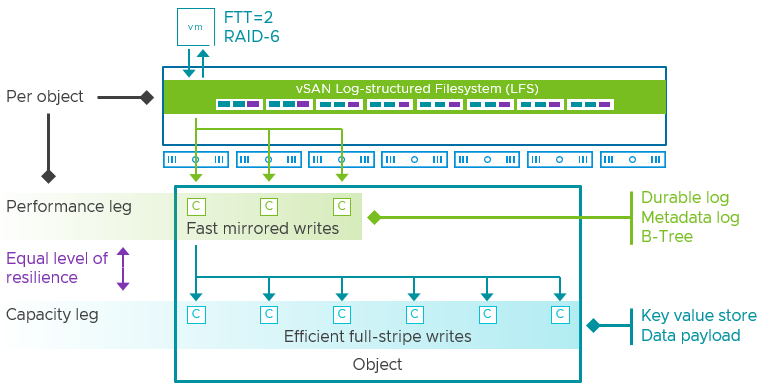
I hope that explains first of all what is supported from a cluster size perspective, and secondly why you may want to consider adding additional hosts. This of course will depend on the requirements you have and the budget you have.
vSAN 8.0 ESA – Introducing Adaptive RAID-5

Duncan Epping · Nov 15, 2022 ·

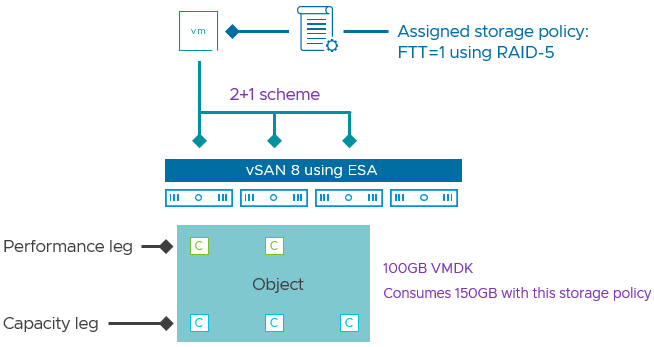
Starting with vSAN 8.0 ESA (Express Storage Architecture) VMware has introduced an adaptive RAID-5 mechanism. What does this mean? Essentially, vSAN deploys a particular RAID-5 configuration depending on the size of the cluster! There are two options, let’s list them out and discuss them individually.

  • RAID-5, 2+1, 3-5 hosts
  • RAID-5, 4+1, 6 hosts or more

As mentioned in the above list, depending on the cluster size, you will see a particular RAID-5 configuration. Clusters of up to 5 hosts will see a 2+1 configuration when RAID-5 is selected. For those wondering, the below diagram will show what this looks like. 2+1 configurations will have a 150% overhead, meaning that when you store 100GB of data, this will consume 150GB of capacity.

Now, when you have a larger cluster, meaning 6 hosts or more, vSAN will deploy a 4+1 configuration. The big benefit of this is that the “capacity overhead” goes down from 150% to 125%, in other words, 100GB of data will consume 125GB of capacity.

What is great about this solution is that vSAN will monitor the cluster size. If you have 6 hosts and a host fails, or a host is placed into maintenance mode etc, vSAN will automatically scale down the RAID-5 configuration from 4+1 to 2+1 after a time period of 24 hours. I of course had to make sure that it actually works, so I created a quick demo that shows vSAN changing the RAID-5 configuration from 4+1 to 2+1, and then back again to 4+1 when we reintroduce a host into the cluster.

One more thing I need to point out. The Adaptive RAID-5 functionality also works in a stretched cluster. So if you have a 3+3+1 stretched cluster you will see a 2+1 RAID-5 set. If you have a 6+6+1 cluster (or more in each location) then you will see a 4+1 set. Also, if you place a few hosts into maintenance mode or hosts have failed then you will see the configuration change from 4+1 to 2+1, and the other way around when hosts return for duty!

For more details, watch the demo, or read this excellent post by Pete Koehler on the VMware website.

Are Nested Fault Domains supported with 2-node configurations with vSAN 8.0 ESA?

Duncan Epping · Oct 28, 2022 ·

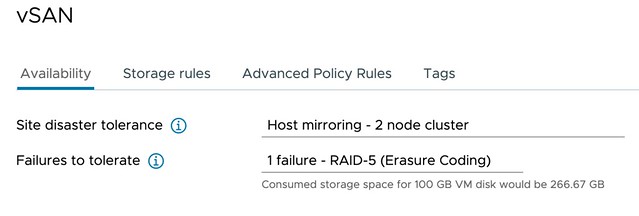
Short answer, yes 2-node configurations with vSAN 8.0 ESA support Nested Fault Domains. Meaning that when you have a 2-node configuration you can also protect your data within each host with RAID-1, RAID-5, or RAID-6! The configuration of this is pretty straightforward. You create a policy with “Host Mirroring” and select the protection you want in each host. The screenshot below demonstrates this.

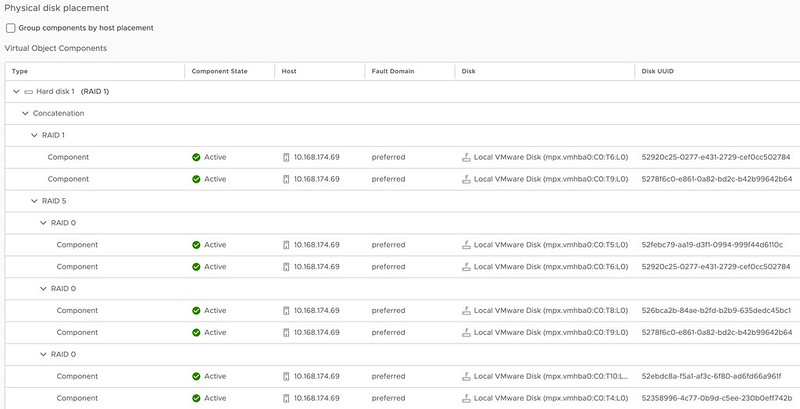
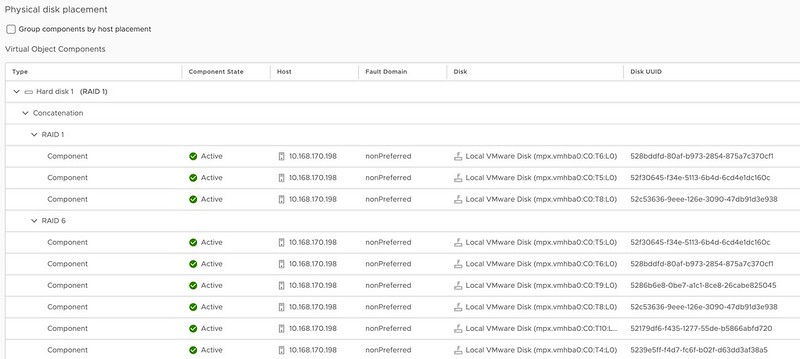
In the above example, I mirror the data across hosts and then have a RAID-5 configuration within each host. Now when I create a RAID-5 configuration within each host I will get the new vSAN ESA 2+1 configuration. (2 data blocks, 1 parity block) If you have 6 devices or more in your host, you can also create a RAID-6 configuration, which is 4+2. (4 data blocks, 2 parity blocks) This provides a lot of flexibility and can lower the overhead when desired compared to RAID-1. (RAID-1 = 100% overhead, RAID-5 = 50% overhead for 2+1, RAID-6 = 50% overhead) When you use RAID-5 and RAID-6 and look at the layout of the data it will look as shown in the next two screenshots, the first screenshot shows the RAID-5 configuration, and the second the RAID-6 configuration.

vSAN ESA 2-node nested fault domain raid-5

vSAN ESA 2-node nested fault domain raid-6

One thing you may wonder when looking at the screenshots is why they also have a RAID-1 configuration for the VMDK object, this is the “performance leg” that vSAN ESA implements. For RAID-5, which is “FTT=1”, this means you get 2 components. For RAID-6, which is FTT=2, this means you will get 3 components so you can tolerate 2 failures.

I hope that helps answer some of the questions folks had on this subject!


Running vSAN ESA? Change the default storage policy to RAID-5/6!

Duncan Epping · Oct 14, 2022 ·

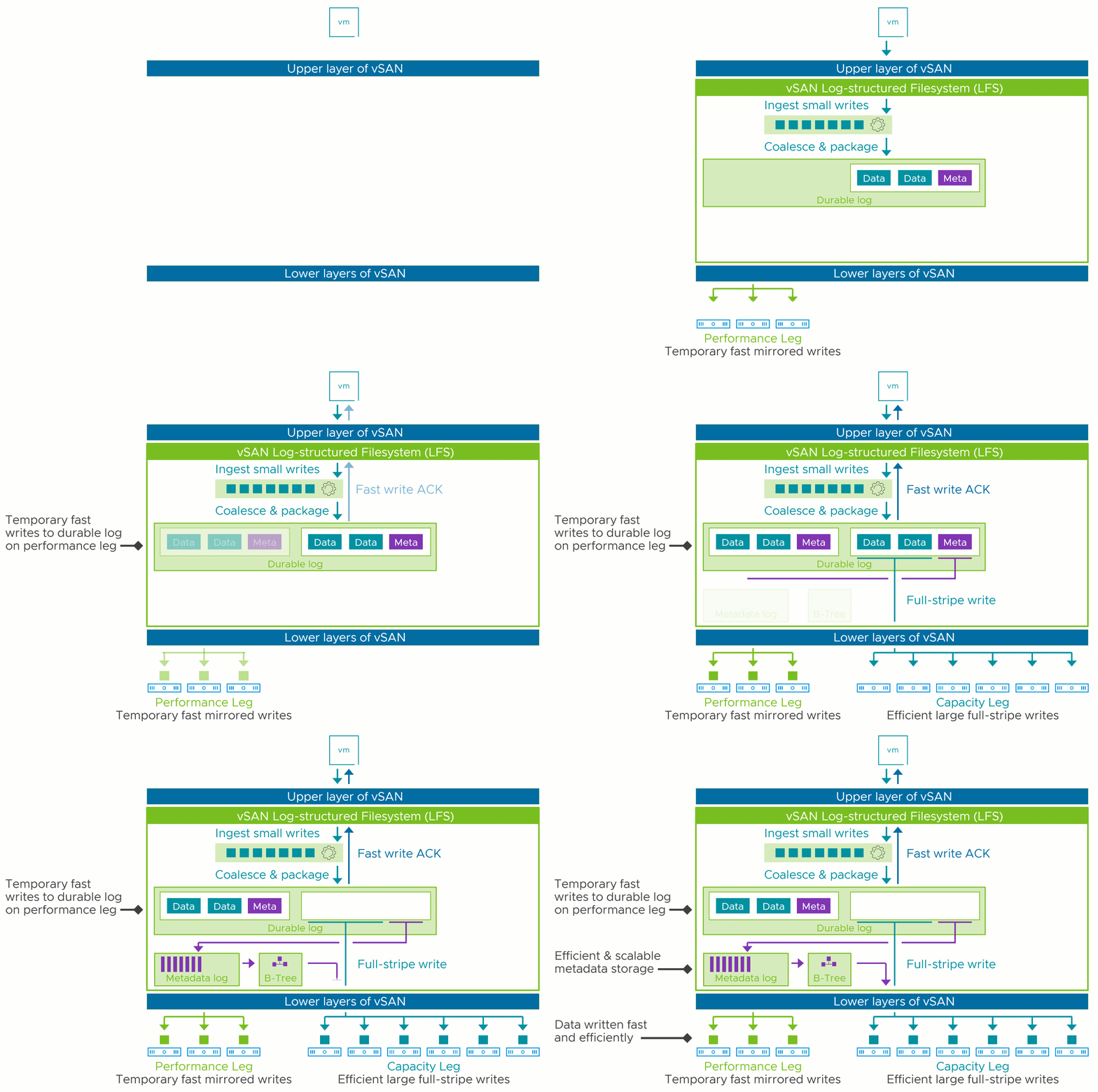
Most of you have read all about vSAN ESA by now. If you have not, you can find my article here, and a dozen articles on core.vmware.com by the Tech Marketing team. What is going to make a huge difference with the Express Storage Architecture is that you get RAID-5 efficiency at RAID-1 performance. This is discussed by Pete Koehler in this blog post in-depth, so no point in me reiterating it. On top of that, the animated gif below demonstrates how it actually works and shows why it not only performance well, but also why it is so efficient from a capacity stance. As we only have a single tier of flash, the system uses it in a smart way and introduces additional layers so that both reads and writes are efficient.

Now one thing I do want to point out is that if you create your ESA cluster, you will need to verify the default storage policy assigned to the vSAN Datastore. In my case this was the regular vSAN Storage Policy, which means RAID-1 configuration for the performance leg, and RAID-1 for the capacity leg. Now, I want to get the most of my system from a capacity perspective and I want to test this new level of performance for RAID-5, even though I only have 4 hosts (which gives me a 2+1 RAID-5 set).

Of course you can select a policy everytime you deploy a VM, but I prefer to keep things simple, so I change the default storage policy on my datastore. Simply click on the Datastore icon in the vSphere Client, then select your vSANDatastore and click on “Configure” and “General”. Next click on “Edit” where is says “Default Storage Policy” and then select the policy you want to have applied to VMs by default for this datastore. As shown below, for me that is RAID-5!

Unexplored Territory Podcast 28 – Data is the new oil! Featuring Christos Karamanolis

Duncan Epping · Oct 5, 2022 ·

After attending the session Christos hosted at VMware Explore, Frank and I felt it would be a good idea to record a podcast with him. In this episode, we discuss the two relatively unknown products and projects, Project Moneta and VMware Data Service Manager. For those who don’t know, Christos used to be the CTO for Storage and Availability, and now is one of the two Fellow’s at VMware. Christos mainly focusses on data management, and how VMware can help customers solve their problems in this space. Listen via Spotify https://spoti.fi/3RvSniF, Apple https://apple.co/3SxMFOn, or just use the embedded player below.

  • « Go to Previous Page
  • Page 1
  • Interim pages omitted …
  • Page 8
  • Page 9
  • Page 10
  • Page 11
  • Page 12
  • Interim pages omitted …
  • Page 124
  • Go to Next Page »

Primary Sidebar

About the Author

Duncan Epping is a Chief Technologist and Distinguished Engineering Architect at Broadcom. Besides writing on Yellow-Bricks, Duncan is the co-author of the vSAN Deep Dive and the vSphere Clustering Deep Dive book series. Duncan is also the host of the Unexplored Territory Podcast.

Follow Us

  • X
  • Spotify
  • RSS Feed
  • LinkedIn

Recommended Book(s)

Also visit!

For the Dutch-speaking audience, make sure to visit RunNerd.nl to follow my running adventure, read shoe/gear/race reviews, and more!

Do you like Hardcore-Punk music? Follow my Spotify Playlist!

Do you like 80s music? I got you covered!

Copyright Yellow-Bricks.com © 2026 ยท Log in