• Skip to primary navigation
  • Skip to main content
  • Skip to primary sidebar

Yellow Bricks

by Duncan Epping

  • Home
  • Unexplored Territory Podcast
  • HA Deepdive
  • ESXTOP
  • Stickers/Shirts
  • Privacy Policy
  • About
  • Show Search
Hide Search

VMware

vSAN ESA ReadyNode configurations are more flexible than you think!

Duncan Epping · Mar 8, 2023 ·

I had a discussion at the Dutch VMUG yesterday about the ReadyNode configurations for vSAN ESA. The discussion was about how difficult it was to select a host and customize it. It was then that I realized that most people hadn’t noticed yet that there is an easier method (or lifehack as my kids would say) when it comes to selecting your server model. How does that work? Well, let me show you!

First, let’s take a look at the vSAN ESA ReadyNode Hardware Guidance Table. The table below shows you what the node capacity is for each profile from a storage, CPU, memory, and networking perspective.

Now if you look at the table you will see that as the “profile” number goes up, so does the capacity for each of the various components. This is actually what provides you with a lot of flexibility in my opinion. If we take Dell as an example, but the same applies for most vendors on the current list, and we select “vSAN-ESA-AF2” and look at the list of options we see the following:

  • PowerEdge R650
  • PowerEdge R6515
  • PowerEdge R750
  • PowerEdge R7515

Now, if we look at “vSAN-ESA-AF8” next, which is the highest profile, we see that we only can pick 1 server model, which happens to be the PowerEdge R750. If we then look at the difference between the hosts selected for each profile a few things stand out:

  • vSAN-ESA-AF2 has an Intel Xeon Silver 4314, while vSAN-ESA-AF8 has a Platinum 8358
  • vSAN-ESA-AF2 has 512GB, while vSAN-ESA-AF8 has 1024GB
  • vSAN-ESA-AF2 a 25Gbps NIC, while vSAN-ESA-AF8 has a 100Gbps NIC
  • vSAN-ESA-AF2 has five 3.2TB NVMe devices while vSAN-ESA-AF8 has twenty-four 3.2TB devices

Now if I look at the KB article which explains what you can, and cannot change, something stands out, most of the components can be modified/customized. For instance, for CPU you can go to a higher core count and/or higher base clock speed! For memory, you can go up, same for storage devices (as long as you stay within supported limits), etc etc.

In other words, what is the difference between a vSAN-ESA-AF2 and a vSAN-ESA-AF8? Basically the expected workload, the performance, the capacity. This ultimately results in a different configuration. Nothing, at this point in time, stops you from selecting the “lowest” vSAN ReadyNode Profile and spec it as an “AF4”, “AF6” or “AF8” from a CPU stance, or from a storage/memory capacity point of view. If you want to have some more flexibility, try selecting a smaller profile, select the host type, and increase the resources/components where needed!

When you start exploring the options it may seem complex, but when you look more closely you will quickly realize that it actually isn’t that complex, and that it actually provides you with a lot of flexibility, as long as you stick to the rules and pick supported components!

Why is vCenter Server trying to access assets.contentstack.io or send DNS requests for it?

Duncan Epping · Feb 9, 2023 ·

On VMTN I noticed somehow asking why vCenter Server was trying to access  assets.contentstack.io, and why there were so many DNS requests for  assets.contentstack.io. It took me a while to figure it out, but I noticed that there’s a plugin for the VMware Cloud Provider Services, this plugin is hosted on contentstack.io, and that is the reason you see vCenter Server trying to connect with that URL and why you are seeing DNS requests for assets.contentstack.io. You can prevent this from happening by simply selecting the plugin, and then removing it. That is, of course, if you are not planning on using these services.

Can I change the “Host Image Profile Acceptance Level” for the vSAN Witness Appliance?

Duncan Epping · Feb 8, 2023 ·

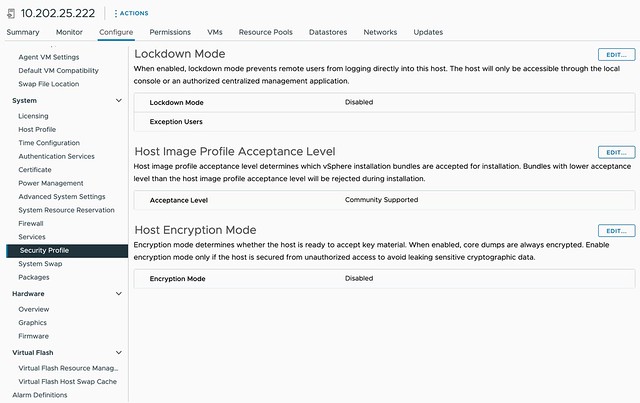
On VMTN a question was asked around the Host Image Profile Acceptance Level for the vSAN Witness Appliance, this is configured to “community supported”. The question was around whether it is supported to change this to “VMware certified” for instance. I had a conversation with the Product Manager for vSAN Stretched Clusters and it is indeed fully supported to make this change, I also filed a feature request to have the Host Image Profile Acceptance Level for the vSAN Witness increased to a higher, more secure, level by default.

So if you want to make that change, feel free to do so!

vSAN ESA is using more CPU cycles than vSAN OSA?

Duncan Epping · Feb 1, 2023 ·

Over the last couple of weeks, I’ve had conversations with customers and partners who have been running performance benchmarks against both vSAN ESA and vSAN OSA. As you can imagine, people want to compare version 8 of OSA against version 8 of ESA, and that is completely fair. What I noticed though is that some of those customers came back with comments around CPU usage of vSAN OSA against ESA. The general comment we get is that vSAN ESA is using more CPU cycles than vSAN OSA.

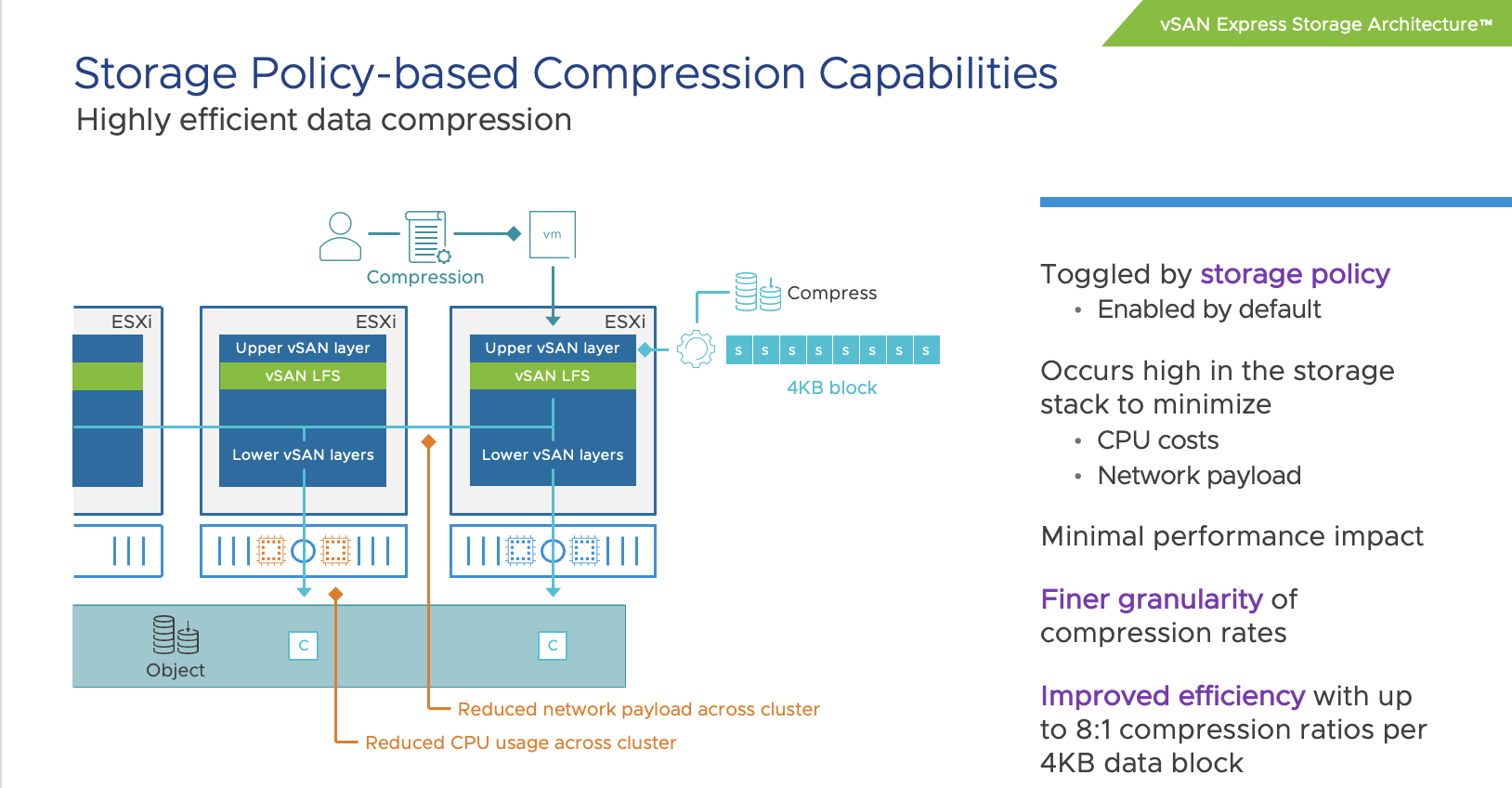
When looking at it from a total number point of view, or CPU cycles consumed, it is very likely you will see vSAN ESA using more cycles than vSAN OSA. The question then typically arises why that is the case, as VMware (the vSAN team) has been claiming that vSAN ESA is much more efficient than vSAN OSA. To be fair, it is much more efficient. For instance data services like checksumming, encryption, and compression have moved to the top of the stack (as shown below) resulting in the fact that we don’t have to compress/encrypt data 3/4/5/6 times but can do it once at the source and then send it over the network to the destination.

Still, it leaves the question, why is more CPU capacity used? The answer is simple, you are pushing much more IO. We’ve seen customers easily reaching 4x the number of IOPS with ESA than with OSA. Even though ESA is more efficient, if you are pushing 4x (or more) the amount of IO then you will need to remember that those additional IOs also come at a cost, and that cost is CPU cycles to process them. So when you make a comparison, please compare apples to apples, and not apples to oranges.

The last thing I want to add, and hopefully I can share some data in the future, the use of RDMA with vSAN 8 ESA seems to have a significant impact on CPU usage, as in lower the amount of CPU required to produce the same results (or better results). So it is worth considering RDMA for sure when adopting vSAN 8 ESA!

Cross connecting vSAN Datastores with HCI Mesh in vSAN 8 OSA

Duncan Epping · Jan 4, 2023 ·

Yesterday I had a discussion internally on Slack about a configuration for a customer. The customer had multiple locations and had the potential to create various clusters within locations, or across locations. Now, as most of you know, I have been talking a lot about stretched clusters for the past decade. However, stretched clusters are not the answer to every problem. Especially not in situations where you end up with unbalanced configurations, or where you lack the ability to place a witness in a third location. Customers tend to gravitate towards stretched clusters as it provides them resiliency, and pooling of all resources even though they are across locations.

With vSAN when you have multiple clusters, you also have multiple vSAN Datastores. Having that separation of resources is typically appreciated. However, in some cases, customers prefer the flexibility of movement with limited overhead. Sure if you have multiple clusters you can simply Storage vMotion VMs from source cluster to destination cluster, but it does mean you need to move ALL the data with the VM, where in some cases you may not care where the data resides.

This is where HCI Mesh comes into play. With HCI Mesh you have the ability to mount a vSAN Datastore. Meaning, you have a “client” and a “server” cluster, and the client mounts the server. Within our documentation on core.vmware.com this is demonstrated as follows:

If you look at this diagram then the top two clusters are “client” clusters and the bottom one is the “server” cluster. This basically means that the “client” cluster consumed the datastore capacity from the “server” cluster. The above diagram however resulted in a bit of confusion as it does not show a situation where your client cluster can simultaneously be a server cluster. This is something I want to point out. You can create a true “mesh” with HCI Mesh! If you have two clusters, let’s say Cluster A and Cluster B, then you can mount the vSAN Datastore from Cluster A to Cluster B and the datastore from Cluster B to Cluster A. This is fully supported, and works great, as demonstrated in the below two screenshots. I tested this with vSphere/vSAN 8.0 OSA, but it is also supported with vSAN 7.0 U1 and up. Do note, vSAN ESA today does not support HCI Mesh just yet, hopefully it will in the near feature!


So before you decide how to configure vSAN, please look at all the capabilities provided, write down your requirements, and see what helps solving the challenges you are facing while meeting those requirements (in a supported way)!

  • « Go to Previous Page
  • Page 1
  • Interim pages omitted …
  • Page 7
  • Page 8
  • Page 9
  • Page 10
  • Page 11
  • Interim pages omitted …
  • Page 124
  • Go to Next Page »

Primary Sidebar

About the Author

Duncan Epping is a Chief Technologist and Distinguished Engineering Architect at Broadcom. Besides writing on Yellow-Bricks, Duncan is the co-author of the vSAN Deep Dive and the vSphere Clustering Deep Dive book series. Duncan is also the host of the Unexplored Territory Podcast.

Follow Us

  • X
  • Spotify
  • RSS Feed
  • LinkedIn

Recommended Book(s)

Also visit!

For the Dutch-speaking audience, make sure to visit RunNerd.nl to follow my running adventure, read shoe/gear/race reviews, and more!

Do you like Hardcore-Punk music? Follow my Spotify Playlist!

Do you like 80s music? I got you covered!

Copyright Yellow-Bricks.com © 2026 · Log in