• Skip to primary navigation
  • Skip to main content
  • Skip to primary sidebar

Yellow Bricks

by Duncan Epping

  • Home
  • Unexplored Territory Podcast
  • HA Deepdive
  • ESXTOP
  • Stickers/Shirts
  • Privacy Policy
  • About
  • Show Search
Hide Search

VMware

Scalable Snapshots demo with the vSAN 8.0 Express Storage Architecture

Duncan Epping · Sep 5, 2023 ·

Starting with vSAN 8 a brand new architecture was introduced called “Express Storage Architecture”. Over the last year or so a lot of information has been shared about ESA and the benefits of ESA. One of the things which ESA introduces is much-improved snapshot scalability.

With vSAN OSA, and with VMFS, when you create a snapshot you typically immediately see a performance degradation. This is because both VMFS and vSAN OSA still operate using the redo-log based snapshot mechanism. This means that with vSAN OSA when you create a snapshot a new object is created and writes are re-directed. It also means that reads will be coming from various files, if you have one or more snapshots. This mechanism is, unfortunately, not very effective. Let me borrow a diagram that is part of a post John Nicholson wrote to demonstrate that old logic.
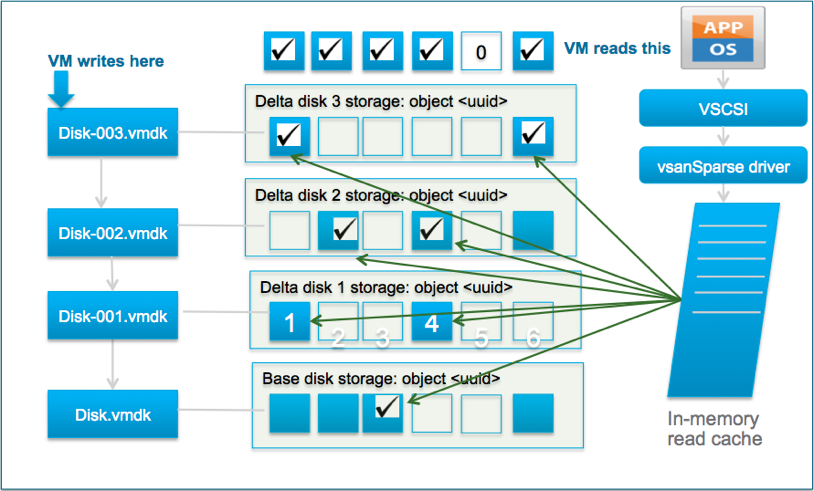
With vSAN 8 ESA the mechanism has changed and no longer does vSAN, or vSphere for that matter, create an additional object. vSAN ESA handles this on a meta-data level. In other words, instead of redirecting writes and traversing files for reads, vSAN now leverages a highly efficient B-Tree structure and pointers to keep track of which block is associated with which snapshot.

Not only is this more efficient from a capacity perspective, but more importantly it is very efficient from a performance standpoint. I ran half a dozen tests in my lab, and what I saw was a below 2% performance impact between a VM without a snapshot and a VM with one or multiple snapshots. I could NOT see a significant difference between the first or the fifth snapshot. I do want to point out that my lab is not officially certified to run vSAN ESA, nevertheless, I was very impressed with the results.

During the last run, I actually recorded the whole exercise. In this demo, I show the creation of one snapshot, while the VM is running a benchmark (HCIBench). Now, during the testing, I created not one but various snapshots and of course, I deleted all of them as well. You have all probably experienced extensive stun times during the deletion of a snapshot at times, and this is where vSAN ESA shines. The stun times have been reduced by 100 times, and that is something I am sure each of you will appreciate. Why have they been reduced drastically? Well, simply because we no longer have to copy data from one vSAN object to another. This makes a huge difference, not just for stun times, but also for performance in general (latency, IOPS, throughput). If you are interested, have a look at the demo!
MAXimizing vSAN’s potential with the Express Storage Architecture (vSAN Max)

Duncan Epping · Aug 31, 2023 ·

Last week at VMware Explore a few vSAN features and offerings were announced, one of them being vSAN Max! All week I have been having conversations with customers who were highly excited about the new solution. For those who did not read the announcements, or listened to the Unexplored Territory Podcast episode on the topic, let me go over what was announced and what vSAN Max is.

As most of you know, vSAN is a hyperconverged storage platform delivered via VMware’s flagship product vSphere. This means that if you have vSphere running, vSAN is literally two clicks away from being enabled. You will need local storage devices, and those local devices then will be formed into a shared datastore on top of which you can run your VMs. Although HCI solutions work for most customers, at certain levels of scale it may be preferred to have a disaggregated solution and share a dedicated storage platform with one or multiple vSphere clusters. This is what vSAN Max brings to the table.

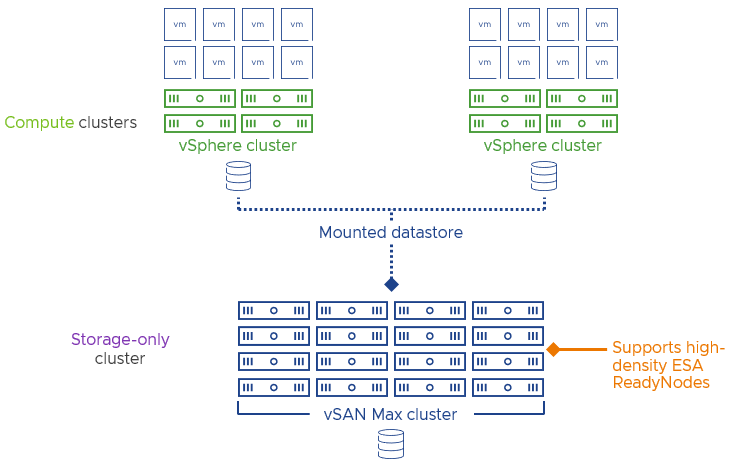
Looking at the above diagram a few things stand out when it comes to vSAN Max. First of all, it says “Storage Only” and secondly it mentions “Supports high-density ESA ReadyNodes”. There are a few things to unwrap here. Firstly, vSAN Max is based on vSAN Express Storage Architecture, aka vSAN ESA. This means that it is a single tier of storage, based on NVMe flash devices. On top of that, it also means that all available data services will also be available on vSAN Max: Fault Domains, Stretched Clustering, vSAN File Services, iSCSI, Compression, Encryption etc. All of these are also included by default in the license by the way, it is just a single edition from a licensing point of view and it will include vSphere. In other words, vSphere + vSAN Enterprise by default, and licensed on capacity instead of CPU/Cores.

Secondly, it mentions “high-density”, vSAN Max starts at 200TB per host, and has a minimum of 6 hosts per cluster. This means that the starting capacity is 1.2 Petabytes for a vSAN Max cluster. The maximum number of hosts within a cluster is 32 at the time of writing (but 24 hosts being the recommended maximum), and it will support up to 8.6 Petabytes and around 3.4 million IOPS.

It also mentions ReadyNodes, and let me stress this, ReadyNodes! We still see a lot of customers picking random components for their vSAN cluster and then being surprised that Skyline Health reports the cluster is not supported. For vSAN Max there will be a separate set of vSAN ReadyNode configurations. These configurations will have for instance 100Gbps network cards, and as mentioned a minimum of 200TB per host.

Now, this doesn’t mean that the connecting clusters need to be running 100GbE, they can be even 1Gbps connected, that’s up to you and the requirements you have from a performance perspective. The 100GbE connections will be used for intra-cluster communications, so the switching architecture also needs to cater to this.

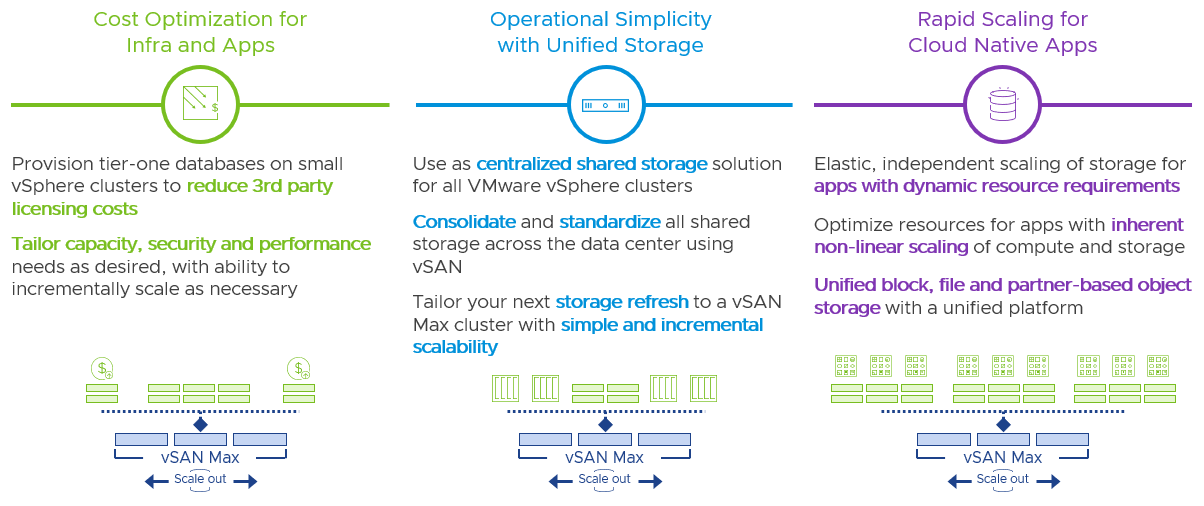
Knowing all of this, you may wonder what the use cases are for vSAN Max. As Pete Koehler mentioned, it can be used for anything, but is primarily targeted at those with high capacity requirements and who prefer a centralized model, but still want to manage their storage platform through vCenter Server and use all the bells and whistles that come with it (and with VROps for instance).

Hopefully, that provides some insights in terms of what to expect when vSAN Max goes “general availability” I will follow up with some short demos showing what it will look like, although that will probably be relatively boring as it will look very similar to vSAN ESA. In the meanwhile, there’s a bunch of material on the VMware website that you can check out.

Unexplored Territory #049 and #050, all about multi-cloud and cloud native workloads!

Duncan Epping · Jul 12, 2023 ·

I was working on my VMware Explore presentations so I forgot to post #049, figured I would post both at the same time for those who hadn’t seen these yet. In episode 049 we had two guests for the very first time, Gerrit Lehr and Andrea Siviero. Andrea and Gerrit talked us through the Multi-Cloud Adoption Framework and explained why customers are interested in this service and how it helps them meet their business goals. Listen to the full episode via Spotify (https://bit.ly/3Ny1EXE), Apple (https://bit.ly/449s2xA), or via the embedded player below.

Episode 050 focusses on Self-Managed Tanzu Mission Control, and we had Corey Dinkens as our guest. Corey discussed what Tanzu Mission Control is about, what the use case is, how customers are consuming it today, and why a self-managed solution makes sense for some customers compared to the SaaS offering. Interesting stuff if you ask me. Listen via Spotify (https://bit.ly/3XHU3dE), Apple (https://bit.ly/3XLm7g5), or use the embedded player below.

Seeing unexpected error messages during ISL failure with Stretched Cluster for secondary site

Duncan Epping · Jun 22, 2023 ·

I had a question this week from one of our field specialists, he ran into a situation where he saw lots of error messages about the fact that vSphere HA could not restart a certain workload during an ISL failure. Let me first explain the scenario, and also explain what vSAN does and doesn’t do. Let’s take the below situation.

Let’s assume Datacenter A is the “preferred site”, and Datacenter B is the “secondary site”. In case the ISL between Datacenter A and Datacenter B fails, the Witness (in a 3rd location) will bind itself automatically with Datacenter A. This means that VMs in Datacenter B will lose access to the vSAN Datastore.

From an HA perspective Datacenter A will have a primary (previously called master), and so will Datacenter B. The primary will detect that there are VMs that are not running, and it will try to restart these VMs. It will try to do this on both sides, and of course the site where access to the vSAN datastore is lost will see the restart fail.

Now here is the important aspect, of course depending on where/how vCenter Server is connected to these locations, it may, or may not, receive information about successful and unsuccessful restarts. I’ve seen situations where vCenter Server could only communicate with the primary in Datacenter B, and this would just lead to unsuccessful failover messages, while in reality all VMs were restarted in Datacenter A. The UI can give a hint by the way when you are in that situation, it will provide you the info on which host is the primary, and it will also tell you that there’s a “network isolation” or a “network partition”, and in this case of course that would be a “network partition”.

vSAN Stretched Cluster failure matrix

Duncan Epping · May 30, 2023 ·

The last couple of weeks I was involved internally in a discussion around the different vSAN stretched cluster failure scenarios. I wrote a lengthy email about how vSAN and HA would respond in certain scenarios. I have documented many of these over the years on my blog already, but never really published them as a whole.

In some of the scenarios below, I discuss a “partition”, a partition is a scenario where both the L3 connection to the witness is down and the inter site / inter switch link to the other site for one of the locations. So in the diagram above for instance, if I say that Site B is partitioned then it means that Site A can still communicate with the witness, but Site B cannot communicate with the Witness and cannot communicate with Site A either.

For all of the below scenarios the following applies, Site A is the preferred location and Site B is the secondary location. When it comes to the table, the first two columns refer to the policy setting for the VM as shown in the screenshot below. The third column refers to the location where the VM runs from a compute perspective. The fourth discusses the type of failure, and the fifth and sixth columns discuss the behavior witnessed.

Time to list the various scenarios, and no, it doesn’t include all failures that could occur but should discuss most scenarios which are important for a stretched cluster configuration. Do note, the below-discussed behavior will only be witnessed when the best practices, as documented here and here, are followed. Also note that the table has multiple pages, there are close to 30 scenarios described! If there are any questions feel free to leave a comment, if you feel a failure scenario is missing, also please leave a comment.

Site Disaster ToleranceFailures to TolerateVM LocationFailurevSAN behaviorHA behavior
None PreferredNo data redundancySite A or BHost failure Site AObjects are inaccessible if failed host contained one or more components of objectsVM cannot be restarted as object is inaccessible
None PreferredRAID-1/5/6Site A or BHost failure Site AObjects are accessible as there's site local resiliencyVM does not need to be restarted, unless VM was running on failed host
None PreferredNo data redundancy / RAID-1/5/6Site AFull failure Site AObjects are inaccessible as full site failedVM cannot be restarted in Site B, as all objects reside in Site A
None PreferredNo data redundancy / RAID-1/5/6Site BFull failure Site BObjects are accessible, as only Site A contains objectsVM can be restarted in Site A, as that is where all objects reside
None PreferredNo data redundancy / RAID-1/5/6Site APartition Site AObjects are accessible as all objects reside in Site AVM does not need to be restarted
None PreferredNo data redundancy / RAID-1/5/6Site BPartition Site BObjects are accessible in Site A, objects are not accessible in Site B as network is downVM is restarted in Site A, and killed by vSAN in Site B
None SecondaryNo data redundancy / RAID-1/5/6Site BPartition Site BObjects are accessible in Site BVM resides in Site B, does not need to be restarted
None PreferredNo data redundancy / RAID-1/5/6Site AWitness Host FailureNo impact, witness host is not used as data is not replicatedNo impact
None SecondaryNo data redundancy / RAID-1/5/6Site BWitness Host FailureNo impact, witness host is not used as data is not replicatedNo impact
Site MirroringNo data redundancySite A or BHost failure Site A or BComponents on failed hosts inaccessible, read and write IO across ISL as no redundancy locally, rebuild across ISLVM does not need to be restarted, unless VM was running on failed host
Site MirroringRAID-1/5/6Site A or BHost failure Site A or BComponents on failed hosts inaccessible, read IO locally due to RAID, rebuild locallyVM does not need to be restarted, unless VM was running on failed host
Site MirroringNo data redundancy / RAID-1/5/6Site AFull failure Site AObjects are inaccessible in Site A as full site failedVM restarted in Site B
Site MirroringNo data redundancy / RAID-1/5/6Site APartition Site AObjects are inaccessible in Site A as full site is partitioned and quorum is lostVM restarted in Site B
Site MirroringNo data redundancy / RAID-1/5/6Site AWitness Host FailureWitness object inaccessible, VM remains accessibleVM does not need to be restarted
Site MirroringNo data redundancy / RAID-1/5/6Site BFull failure Site AObjects are inaccessible in Site A as full site failedVM does not need to be restarted as it resides in Site B
Site MirroringNo data redundancy / RAID-1/5/6Site BPartition Site AObjects are inaccessible in Site A as full site is partitioned and quorum is lostVM does not need to be restarted as it resides in Site B
Site MirroringNo data redundancy / RAID-1/5/6Site BWitness Host FailureWitness object inaccessible, VM remains accessibleVM does not need to be restarted
Site MirroringNo data redundancy / RAID-1/5/6Site ANetwork failure between Site A and B (ISL down)Site A binds with witness, objects in Site B becomes inaccessibleVM does not need to be restarted
Site MirroringNo data redundancy / RAID-1/5/6Site BNetwork failure between Site A and B (ISL down)Site A binds with witness, objects in Site B becomes inaccessibleVM restarted in Site A
Site MirroringNo data redundancy / RAID-1/5/6Site A or Site BNetwork failure between Witness and Site A (or B)Witness object absent, VM remains accessibleVM does not need to be restarted
Site MirroringNo data redundancy / RAID-1/5/6Site AFull failure Site A, and simultaneous Witness Host FailureObjects are inaccessible in Site A and Site B due to quorum being lostVM cannot be restarted
Site MirroringNo data redundancy / RAID-1/5/6Site AFull failure Site A, followed by Witness Host Failure a few minutes laterPre vSAN 7.0 U3: Objects are inaccessible in Site A and Site B due to quorum being lostVM cannot be restarted
Site MirroringNo data redundancy / RAID-1/5/6Site AFull failure Site A, followed by Witness Host Failure a few minutes laterPost vSAN 7.0 U3: Objects are inaccessible in Site A, but accessible in Site B as votes have been recountedVM restarted in Site B
Site MirroringNo data redundancy / RAID-1/5/6Site BFull failure Site B, followed by Witness Host Failure a few minutes laterPost vSAN 7.0 U3: Objects are inaccessible in Site B, but accessible in Site A as votes have been recountedVM restarted in Site A
Site MirroringNo data redundancySite AFull failure Site A, and simultaneous host failure in Site BObjects are inaccessible in Site A, if components reside on failed host then object is inaccessible in Site BVM cannot be restarted
Site MirroringNo data redundancySite AFull failure Site A, and simultaneous host failure in Site BObjects are inaccessible in Site A, if components do not reside on failed host then object is accessible in Site BVM restarted in Site B
Site MirroringRAID-1/5/6Site AFull failure Site A, and simultaneous host failure in Site BObjects are inaccessible in Site A, accessible in Site B as there's site local resiliencyVM restarted in Site B
  • « Go to Previous Page
  • Page 1
  • Interim pages omitted …
  • Page 5
  • Page 6
  • Page 7
  • Page 8
  • Page 9
  • Interim pages omitted …
  • Page 124
  • Go to Next Page »

Primary Sidebar

About the Author

Duncan Epping is a Chief Technologist and Distinguished Engineering Architect at Broadcom. Besides writing on Yellow-Bricks, Duncan is the co-author of the vSAN Deep Dive and the vSphere Clustering Deep Dive book series. Duncan is also the host of the Unexplored Territory Podcast.

Follow Us

  • X
  • Spotify
  • RSS Feed
  • LinkedIn

Recommended Book(s)

Also visit!

For the Dutch-speaking audience, make sure to visit RunNerd.nl to follow my running adventure, read shoe/gear/race reviews, and more!

Do you like Hardcore-Punk music? Follow my Spotify Playlist!

Do you like 80s music? I got you covered!

Copyright Yellow-Bricks.com © 2026 · Log in