Two months ago VMware introduced vSAN Max at VMware Explore. I wrote about it in this blog. Last week I had a conversation with Kalyan Krishnaswamy on the topic of vSAN Max, for which Kalyan is the Product Manager. I figured I would share the episode via my blog as well for those who are not subscribed to the Unexplored Territory podcast just yet. Note, you can either listen to it below, of just listen via Spotify, Apple, or anywhere else you get your podcasts.
VMware
Do I need 2 isolation addresses with a (vSAN) stretched cluster for vSphere HA?
This question has come up multiple times now, so I figured I would write a quick post about it, do you need 2 isolation addresses with a (vSAN) stretched cluster for vSphere HA? This question comes up as the documentation has best practices around the configuration of HA isolation addresses for stretched clusters. The documentation (both for vSAN as well as traditional stretched storage) states that you need to have two reliable addresses, one in each location.
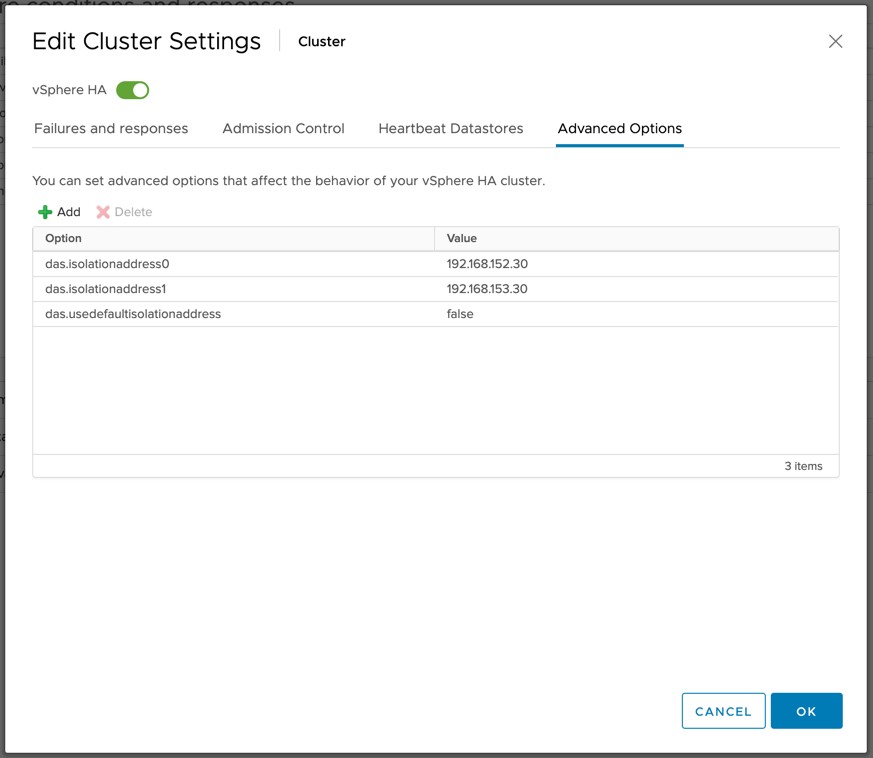
Now I have had the above question multiple times as some folks have mentioned that they can use a Gateway Address with Cisco ACI which would still be accessible in both locations even if there’s a partition due to for instance an ISL failure. If that is the case, and the IP address is indeed available in both locations during those types of failure scenarios then it would suffice to use a single IP address as your isolation address.
You will however need to make sure that the IP address is reachable over the vSAN network when using vSAN as your stretched storage platform. (When vSAN is enabled vSphere HA uses the vSAN network for communications.) If it is reachable you can simply define the isolation address by setting the advanced setting “das.isolationaddress0”. It is also recommended to disable the use of the default gate of the management network by setting “das.usedefaultisolationaddress” to false for vSAN based environments.
I have requested the vSAN stretched clustering documentation to be updated to reflect this.
vSAN ReadyNode emulated configurations? What are those?
Last week Pete Koehler dropped a bomb on us when he blogged about vSAN ReadyNode emulated configurations. Since then I had a few folks asking what this exactly is. It is fairly simple, some vendors have special SKUs for ReadyNodes, which doesn’t always make configuring a ReadyNode to the desired specifications based on the minimum requirements for vSAN ESA and the supported components. SAY WHAT?
Well just imagine you are a Dell shop and you want to use the R750. You simply check if the R750 is listed on the VCG, you list the minimum CPU spec and you go from there based on the minimum (and maximum) specifications for vSAN ESA and based on your workload profile. Just as an example, the minimum specifications for vSAN ESA are now as follows with the introduction of the vSAN AF-0 ReadyNode configuration:
- Minimum of 16 cores Intel or AMD
- For example: 2 x Intel Xeon® Gold 6334 3.6G, 8 cores
- Or: 1 x AMD EPYC 9124 16C 200W 3.0GHz Processor
- Minimum of 128GB memory
- Minimum of 10GbE
- Minimum of 2 NVMe Devices (as listed on vSAN VCG) and 3.2TB per host
Now that we know what those minimums are, I could simply go to the Dell website and spec a Dell R750 Server as desired. This server could have for instance:
- 2 x Intel® Xeon Gold 6342 2.8G, 24 cores
- 256GB memory
- 25GbE networking
- 6 x Dell Ent NVMe CM6 RI 3.84TB
Even though it is not on the list as a ReadyNode configuration, this configuration would be supported as all the components are certified, and the server itself is also certified as a vSAN ReadyNode platform, and we are following the guidelines as documented in the vSAN ESA RN KB.
I hope this helps those who are going through the process of procuring hardware for vSAN ESA.
vSphere 8.0 U2 and vSAN 8.0 U2 just shipped, learn all about it here!
vSphere 8.0 U2 and vSAN 8.0 U2 just shipped, and of course the Unexplored Territory Podcast has already covered this. If you want to learn all about it make sure to listen to the episode below. Or of course read the release notes (vCenter, ESXi, vSAN).
You can find the vSAN 8.0 U2 episode on Spotify (https://bit.ly/3QNjpFk), and Apple (https://bit.ly/3QPt7XL), as well as any other podcast app, or simply listed via the embedded player below!
You can find the vSphere 8.0 U2 episode on Spotify (https://bit.ly/3snOh5l), Apple (https://bit.ly/45lRK2Q), as well as any other podcast app, or simply listed via the embedded player below!
Deleting the vCLS VMs using Retreat Mode starting with vSphere 8.0 U2
I posted about “retreat mode” and how to delete the vCLS VMs when needed a while back, including a quick demo. Back then you needed to configure an advanced setting for a cluster if you wanted to delete the VMs for whatever reason. (Usually for troubleshooting purposes people would do a delete/recreate.) Starting with vSphere 8.0 U2 you can now use the UI to enable retreat mode on a per cluster level. How do you do this? well fairly straight forward:
- Click on the cluster you would want to delete the VMs for
- Click on Configure
- Click on “General” under “vSphere Cluster Services”
- Click on “EDIT VCLS MODE”

- Click on “Retreat Mode” and click “OK”
Now the VMs will be deleted, if you want to recreate the VMs, follow the same procedure, but change “Retreat Mode” to “System Managed”. I tested the process yesterday and created a quick demo for you: