• Skip to primary navigation
  • Skip to main content
  • Skip to primary sidebar

Yellow Bricks

by Duncan Epping

  • Home
  • Unexplored Territory Podcast
  • HA Deepdive
  • ESXTOP
  • Stickers/Shirts
  • Privacy Policy
  • About
  • Show Search
Hide Search

5.0

Death to false myths: The type of virtual disk used determines your performance

Duncan Epping · Dec 19, 2012 ·

I was reading Eric Sloof’s article last week about how the disk type will impact your performance. First of all, let me be clear that I am not trying to bash Eric here… I think Eric has a valid point, well at least in some cases and let me explain why.

On his quest of determining if the virtual disk type determines performance Eric tested the following on his environment:

  • Thin
  • Lazy zero thick
  • Eager zero thick

These are the three disk types you can choose from when creating a new virtual disk. The difference between them is simple. Thick are fully allocated virtual disk files. Lazy zero means that the disk is not zeroed out yet, eager zero means the full disk is zeroed out during the provisioning process. Thin, well I guess you know what it means… not fully allocated and not also not zeroed. This also implies that in the case of “thin” and “lazy zero thick” something needs to happen when a new “block” is accessed. This is what Eric showed in his test. But is that relevant?

First of all, the test was conducted with an Iomega PX6-300d. One thing to point out here  is that this device isn’t VAAI capable and limited from a performance perspective due to the CPU power and limited set of spindles. The lack of VAAI however impacts the outcome the most. This, in my opinion means, that the outcome cannot really be used by those who have VAAI capable arrays. The outcome would be different when one of the following two (or both) VAAI primitives are supported and used by the array:

  • Write Same aka “Zero Out”
  • ATS aka “Hardware Offloaded Locking”

Cormac Hogan wrote an excellent article on this topic and an excellent white paper, if you want to know more about ATS and Write Same make sure to read them.

Secondly, it is important to realize that most applications don’t have the same write pattern as the benchmarking tool used by Eric. In his situation the tool basically fills up an X amount of blocks sequentially to determine the max performance. Only if you do fill up a disk at once, or very large unwritten sections, you potentially could see a similar result. Let me emphasize that, could potentially.

I guess this myth was once a fact, back in 2009 a white paper was released about Thin/Thick disks. In this paper they demonstrate the difference between thin, lazy zero and eager zero thick… yes they do proof there is a difference but this was pre-VAAI. Now if you look at another example, a nice extreme example, which is a performance test done by my friends of Pure Storage you will notice there is absolutely no difference. This is an extreme example considering it’s an all-flash VAAI based storage system, nevertheless it proofs a point. But not just all-flash arrays see a huge improvement, take a look at this article by Derek Seaman about 3Par’s “write same” (zero’ing) implementation, I am pretty sure that in his environment he would also not see the huge discrepancy Eric witnessed.

I am not going to dispel this myth as it is a case of “it depends”. It depends on the type of array used, and for instance how VAAI was implemented as that could make difference. In most cases however it is safe to say that the performance difference will not be big, if noticeable at all during normal usage. I am not even discussing all the operational implications of using eager-zero-thick… (as Frank Denneman will respond soon to this blog post has a nice article about that. :-))
Death to false myths: Admission Control lowers consolidation ratio

Duncan Epping · Dec 11, 2012 ·

Death to false myths probably sounds a bit euuhm well Dutch probably, or “direct” as others would label it. Lately I have seen some statements floating around which are either false or misused. One of them is around Admission Control and how it impacts consolidation ratio even if you are not using reservations. I have had multiple questions around this in the last couple of weeks and noticed this thread on VMTN.

The thread referred to is all about which Admission Control policy to use, as the selected policy potentially impacts the amount of virtual machines you can run on a cluster. Now lets take a look at the example in this VMTN thread, and I have rounded up some of the numbers to simplify things:

  • 7 host cluster
  • 512 GB of memory
  • 132 GHz of CPU resources
  • 217 MB of Memory Overhead (no reservations used)

So if you do the quick math. According to Admission Control (host failures example) you can power-on about ~2500 virtual machines. That is without taking N-1 resiliency in to account. When I take out the largest host we are still talking about ~1800 virtual machines that can be powered on. Yes that is 700 slots/virtual machines less due to the N-1, admission control needs to be able to guarantee that even if the largest host fails all virtual machines can be restarted.

Considering we have 512GB in total that means that if those 1800 virtual machines on average actively use 280MB we will see TPS / swapping / ballooning / compression. (512GB / 1800 VMs) Clearly you want to avoid most of these, swapping / ballooning / compression that is. Especially considering most VMs are typically provisioned with 2GB of memory or more.

So what does that mean or did we learn? Two things:

  • Admission Control is about guaranteeing virtual machine restarts
  • If you set no reservation you can power-on an insane amount of virtual machines

Let me reemphasize the last bullet, you can power-on an INSANE amount of virtual machines on just a couple of hosts when no reservations are used. In this case HA would allow for 1800 virtual machines to be powered-on before it starts screaming it is out of resources. Is that going to work in real life, would your virtual machines be happy with the amount of resources they are getting? I don’t think so… I don’t believe that 280MB of physically backed memory is sufficient for most workloads. Yes, maybe TPS can help a bit, but chances of hitting the swap file are substantial.

Let it be clear, admission control is no resource management solution. It is only guaranteeing virtual machines can be restarted and if you have no reservations set then the numbers you will see are probably not realistic. At least not from a user experience perspective. I bet your users / customers would like to have a bit more resources available than just the bare minimum required to power-on a virtual machine! So don’t let these numbers fool you.

Insufficient resources to satisfy HA failover level on cluster

Duncan Epping · Dec 4, 2012 ·

I had this question yesterday where the error “Insufficient resources to satisfy HA failover level on cluster” comes from. And although it is hopefully clear to all of my regular readers this is caused by something that is called vSphere HA Admission Control, I figured I would reemphasize it and make sure people can easily find it when they do a search on my website.

When vSphere HA Admission Control is enabled vCenter Server validates if enough resources are available to guarantee all virtual machines can be restarted. If this is not the case the error around the HA failover level will appear. So what could cause this to happen and how do you solve it?

  • Are all hosts in your cluster still available (any hosts down )?
    • If a host is down  it could be insufficient resource are available to guarantee restarts
  • Check which admission control policy has been selected
    • Depending on which policy has been selected a single large reservation could skew the admission control algorithm (primarily “host failures” policy is impacted by this)
  • Admission Control was recently enabled
    • Could be that the cluster was overcommitted, or various reservations are used,  causing the policy to be violated directly when enabled

In most cases when this error pops up it is caused by a large reservation on memory or CPU and that should always be the first thing to check. There are probably a million scripts out there to check this, but I prefer to use either the CloudPhysics appliance (cloud based flexible solution with new reports weekly), or RVTools which is a nice Windows based utility that produces quick reports. If you are interested in more in-depth info on admission control I suggest reading this section of my vSphere HA deepdive page.

vCenter Extension error when deploying vSphere Replication?

Duncan Epping · Nov 26, 2012 ·

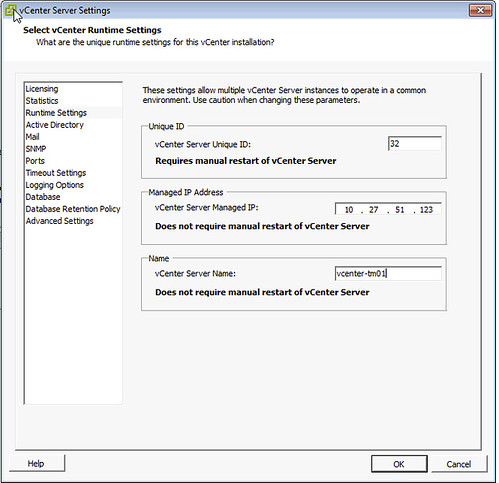
I’ve seen this popping up fairly often now and was under the impression I wrote about it a while back, but can’t find it. So here you go. If during the deployment of an OVF, in this case vSphere Replication, you hit a vCenter extension error it is probably due to a field missing in the vCenter runtime section of the vCenter settings.

The error which is shown in the log is:

“The virtual machine ‘<vm name>’ has a required vService dependency ‘vCenter Extension Installation’ which is not bound to a provider.”

It will show up in the UI with “No provider available” and “This dependency is required”. You can simply solve this by doing the following:

  • Open the vSphere Client
  • Go to “Administration” and “vCenter Server Settings”
  • Click “Runtime Settings”
  • Ensure both “Managed IP Address” (typically missing) and “vCenter Server Name” are filled out.
    vcenter extension error

Now the OVF should deploy correctly. Note that the “Managed IP Address” field is empty by default, so if you are deploying a new vCenter Server instance make sure to fill it out. This will help preventing from running into the vCenter extension error in the future when adding other services.

vSphere Metro Storage Cluster – Uniform vs Non-Uniform

Duncan Epping · Nov 13, 2012 ·

Last week I presented in Belgium at the quarterly VMUG event in Brussels. We did a Q&A and got some excellent questions. One of them was about vSphere Metro Storage Cluster (vMSC) solutions and more explicitly about Uniform vs Non-Uniform architectures. I have written extensively about this in the vSphere Metro Storage Cluster whitepaper but realized I never blogged that part. So although this is largely a repeat of what I wrote in the white paper I hope it is still useful for some of you.

<update>As of 2013 the official required bandwidth is 250Mbps per concurrent vMotion</update>

Uniform Versus Nonuniform Configurations

VMware vMSC solutions are classified in two distinct categories, based on a fundamental difference in how hosts access storage. It is important to understand the different types of stretched storage solutions because this will impact your design and operational considerations. Most storage vendors have a preference for one of these solutions, so depending on your preferred vendor it could be you have no choice. The following two main categories are as described on the VMware Hardware Compatibility List:

  • Uniform host access configuration – When ESXi hosts from both sites are all connected to a storage node in the storage cluster across all sites. Paths presented to ESXi hosts are stretched across distance.
  • Nonuniform host access configuration – ESXi hosts in each site are connected only to storage node(s) in the same site. Paths presented to ESXi hosts from storage nodes are limited to the local site.

We will describe the two categories in depth to fully clarify what both mean from an architecture/implementation perspective.

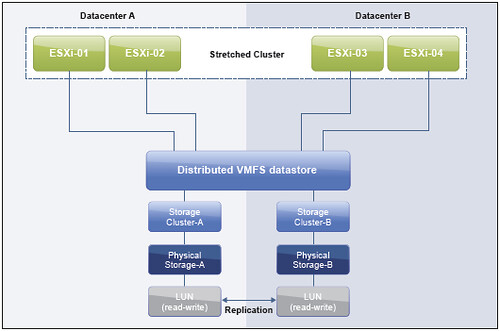
With the Uniform Configuration, hosts in Datacenter A and Datacenter B have access to the storage systems in both datacenters. In effect, the storage-area network is stretched between the sites, and all hosts can access all LUNs. NetApp MetroCluster is an example of this. In this configuration, read/write access to a LUN takes place on one of the two arrays, and a synchronous mirror is maintained in a hidden, read-only state on the second array. For example, if a LUN containing a datastore is read/write on the array at Datacenter A, all ESXi hosts access that datastore via the array in Datacenter A. For ESXi hosts in Datacenter A, this is local access. ESXi hosts in Datacenter B that are running virtual machines hosted on this datastore send read/write traffic across the network between datacenters. In case of an outage, or operator-controlled shift of control of the LUN to Datacenter B, all ESXi hosts continue to detect the identical LUN being presented, except that it is now accessed via the array in Datacenter B.

The notion of “site affinity”—sometimes referred to as “site bias” or “LUN locality”—for a virtual machine is dictated by the read/write copy of the datastore. For example, when a virtual machine has site affinity with Datacenter A, its read/write copy of the datastore is located in Datacenter A.

The ideal situation is one in which virtual machines access a datastore that is controlled (read/write) by the array in the same datacenter. This minimizes traffic between datacenters and avoids the performance impact of reads’ going across the interconnect. It also minimizes unnecessary downtime in case of a network outage between sites. If your virtual machine is hosted in Datacenter B but its storage is in Datacenter A you can imagine the virtual machine won’t be able to do I/O when there is a site partition.

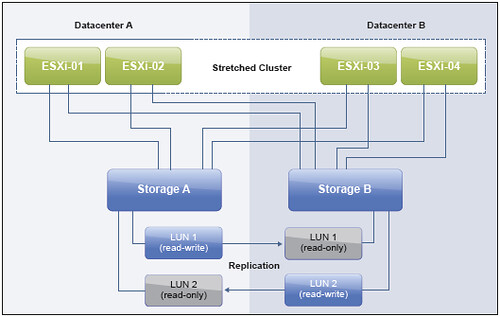
With the Non-uniform Configuration, hosts in Datacenter A have access only to the array in Datacenter A. Nonuniform configurations typically leverage the concept of a “virtual LUN.” This enables ESXi hosts in each datacenter to read and write to the same datastore/LUN. The clustering solution maintains the cache state on each array, so an ESXi host in either datacenter detects the LUN as local. Even when two virtual machines reside on the same datastore but are located in different datacenters, they write locally without any performance impact on either of them.

Note that even in this configuration each of the LUNs/datastores has “site affinity” defined. In other words, if anything happens to the link between the sites, the storage system on the preferred site for a given datastore is the only remaining one that has read/write access to it, thereby preventing any data corruption in the case of a failure scenario. This also means that it is recommended to align virtual machine – host affinity with datastore affinity to avoid any unnecessary disruption caused by a site isolation.

I hope this helps understanding the differences between Uniform vs Non-Uniform configurations. Many more details about vSphere Metro Storage Cluster solutions, including design and operational considerations, can be found in the vSphere Metro Storage Cluster whitepaper. Make sure to read it if you are considering, or have implemented, a stretched storage solution!

  • « Go to Previous Page
  • Page 1
  • Interim pages omitted …
  • Page 4
  • Page 5
  • Page 6
  • Page 7
  • Page 8
  • Interim pages omitted …
  • Page 33
  • Go to Next Page »

Primary Sidebar

About the Author

Duncan Epping is a Chief Technologist and Distinguished Engineering Architect at Broadcom. Besides writing on Yellow-Bricks, Duncan is the co-author of the vSAN Deep Dive and the vSphere Clustering Deep Dive book series. Duncan is also the host of the Unexplored Territory Podcast.

Follow Us

  • X
  • Spotify
  • RSS Feed
  • LinkedIn

Recommended Book(s)

Also visit!

For the Dutch-speaking audience, make sure to visit RunNerd.nl to follow my running adventure, read shoe/gear/race reviews, and more!

Do you like Hardcore-Punk music? Follow my Spotify Playlist!

Do you like 80s music? I got you covered!

Copyright Yellow-Bricks.com © 2026 · Log in