• Skip to primary navigation
  • Skip to main content
  • Skip to primary sidebar

Yellow Bricks

by Duncan Epping

  • Home
  • Unexplored Territory Podcast
  • HA Deepdive
  • ESXTOP
  • Stickers/Shirts
  • Privacy Policy
  • About
  • Show Search
Hide Search

5.0

I set restart priorities but still my VMs seem to be powered on in a different order!

Duncan Epping · Aug 13, 2012 ·

On the VMware Community someone asked this question about restart priorities. At the same time I received a question on a similar topic via email. This particular question was as follows:

I have restart priorities defined on my cluster. However even if I place my virtual machines for which this order applies on one host and test a failure they seem to come online in the wrong order…

In vSphere HA you can define the restart priority for each individual virtual machine. Now this restart priority applies to the power-on task that is initiated by HA when a host has failed. Did you note that I emphasized power-0n attempt? Well there is a reason for that… it is the prioritization of the attempt itself. HA doesn’t wait for a virtual machine to power-on before it starts the next… it just does the power-on attempt and when it completes the next round will be attempted. This also means that if you use 3 different priorities it could happen that a “low priority” virtual machine is restarted literally seconds after a “high priority” virtual machine is. In the case of the person who asked the question he had a large database machine defined as “high priority” and an app as “low priority”. Unfortunately the database machine took minutes to power-on and report up, where the application took less than a minute.

Keep that in mind when defining the restart priorities for your virtual machine. Yes it will help, but only for prioritizing which virtual machine needs to be restarted first. This is not a guarantee your virtual machines will be completed booted up first,
NetApp is now officially vMSC certified

Duncan Epping · Jul 27, 2012 ·

As I had many people asking about this over the last couple of months I figured I would share it. I just noticed that NetApp is now finally officially vSphere Metro Storage Cluster certified (see SAN HCL). NetApp has certified their platform for the following array types:

  • NFS
  • iSCSI

Yes indeed, FC is currently not listed… But for me the great news is that NFS is listed! A KB article has been published with all the details… make sure to read it if you are looking to deploy a stretched cluster with NetApp and vSphere 5.0.

Removing the vCloud Director agent

Duncan Epping · Jul 19, 2012 ·

I had to remove the vCloud Director agent from 14 hosts today after an upgrade. I had to do it manually and I figured I would “document” the process. Although just a couple of steps it might be useful for others who need to do the same thing.

First list all currently installed vibs:

esxcli software vib list | grep vcloud

This will tell you if it is installed and the full name of the vib. Next you can remove it:

esxcli software vib remove -n vcloud-agent --maintenance-mode

Note that I added “–maintenance-mode”, this allows me to remove the vcloud-agent vib without the host being in maintenance mode. In most scenarios you will want the host to be in maintenance mode of course, but as this is a lab environment and I had nothing running on these hosts I figured this was the quickest way.

Chris Colotti also wrote an article on this topic which also includes how to remove “older” vCD agents. This article by Alan Renouf can also come in handy when you need to do dozens of hosts as Alan shows the PowerCLI fully automated way of doing it.

Why is %WAIT so high in esxtop?

Duncan Epping · Jul 17, 2012 ·

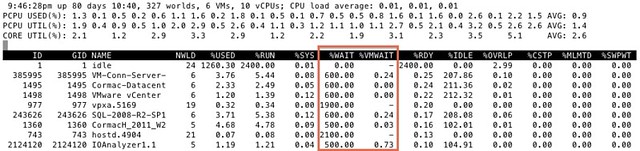
I got this question today around %WAIT and why it was so high for all these VMs. I grabbed a screenshot from our test environment. It shows %WAIT next to %VMWAIT.

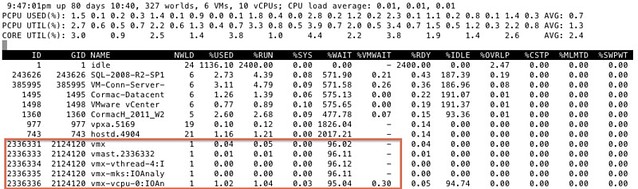
First of all, I suggest looking at %VMWAIT. This one is more relevant in my opinion than %WAIT. %VMWAIT is a derivative of %WAIT, however it does not include %IDLE time but does include %SWPWT and the time the VM is blocked for when a device is unavailable. That kind of reveals immediately why  %WAIT seems extremely high, it includes %IDLE! Another thing to note is the %WAIT for a VM is multiple worlds collided in to a single metric. Let me show you what I mean:

As you can see 5 worlds, which explains the %WAIT time to be around 500% constantly when the VM is not doing much. Hope that helps…

<edit> I just got pointed to this great KB article by one of my colleagues. It explains various CPU metrics in-depth. Key take away from that article for me is the following: %WAIT + %RDY + %CSTP + %RUN = 100%. Note that this is per world! Thanks Daniel for pointing this out!</edit>

Using FT in a stretched cluster environment

Duncan Epping · Jul 17, 2012 ·

I had a discussion around using FT in a stretched cluster (vSphere Metro Storage Cluster) environment. The main discussion point was around the use of “Host-VM” affinity rules. Some people appear to be under the impression that a Host-VM affinity rule can be created to ensure the primary and the secondary FT are divided between sites.

As I heard multiple people mentioning that this was possible I decided to test it. Unfortunately it is not possible. As soon as you enable FT on a VM and that secondary is started you will not see that secondary in the DRS Rules UI? Yes you can see the secondary if you look on a host level, but not in the DRS Rules workflow, this means it is not possible to ensure the secondary VM is bound to the second site.

  • « Go to Previous Page
  • Page 1
  • Interim pages omitted …
  • Page 6
  • Page 7
  • Page 8
  • Page 9
  • Page 10
  • Interim pages omitted …
  • Page 33
  • Go to Next Page »

Primary Sidebar

About the Author

Duncan Epping is a Chief Technologist and Distinguished Engineering Architect at Broadcom. Besides writing on Yellow-Bricks, Duncan is the co-author of the vSAN Deep Dive and the vSphere Clustering Deep Dive book series. Duncan is also the host of the Unexplored Territory Podcast.

Follow Us

  • X
  • Spotify
  • RSS Feed
  • LinkedIn

Recommended Book(s)

Also visit!

For the Dutch-speaking audience, make sure to visit RunNerd.nl to follow my running adventure, read shoe/gear/race reviews, and more!

Do you like Hardcore-Punk music? Follow my Spotify Playlist!

Do you like 80s music? I got you covered!

Copyright Yellow-Bricks.com © 2026 · Log in