• Skip to primary navigation
  • Skip to main content
  • Skip to primary sidebar

Yellow Bricks

by Duncan Epping

  • Home
  • Unexplored Territory Podcast
  • HA Deepdive
  • ESXTOP
  • Stickers/Shirts
  • Privacy Policy
  • About
  • Show Search
Hide Search

5.0

Isolation detection in vSphere 5.1 versus 5.0

Duncan Epping · Dec 31, 2012 ·

I received a question today from someone who wanted to know the difference for isolation detection between vSphere 5.0 and 5.1. I described this in our book, but I figured I would share it here as well. Note that this is an outtake from the book.

The isolation detection mechanism has changed substantially since previous versions of vSphere. The main difference is the fact that HA triggers a master election process before it will declare a host is isolated. In this timeline, “s” refers to seconds. The following timeline is the timeline for a vSphere 5.0 host:

  • T0 – Isolation of the host (slave)
  • T10s – Slave enters “election state”
  • T25s – Slave elects itself as master
  • T25s – Slave pings “isolation addresses”
  • T30s – Slave declares itself isolated and “triggers” isolation response

For a vSphere 5.1 host this timeline slightly differs due the insertion of a minimum 30s delay after the host declares itself isolated before it applies the configured isolation response. This delay can be increased using the advanced option das.config.fdm.isolationPolicyDelaySec.

  • T0 – Isolation of the host (slave)
  • T10s – Slave enters “election state”
  • T25s – Slave elects itself as master
  • T25s – Slave pings “isolation addresses”
  • T30s – Slave declares itself isolated
  • T60s – Slave “triggers” isolation response

Or as Frank would say euuuh show:

Isolation detection in vSphere 5.1 versus 5.0

When the isolation response is triggered, with both 5.0 and 5.1, HA creates a “power-off” file for any virtual machine HA powers off whose home datastore is accessible. Next it powers off the virtual machine (or shuts down) and updates the host’s poweron file. The power-off file is used to record that HA powered off the virtual machine and so HA should restart it. These power-off files are deleted when a virtual machine is powered back on or HA is disabled.

After the completion of this sequence, the master will learn the slave was isolated through the “poweron” file as mentioned earlier, and will restart virtual machines based on the information provided by the slave.


** Disclaimer: This article contains references to the words master and/or slave. I recognize these as exclusionary words. The words are used in this article for consistency because it’s currently the words that appear in the software, in the UI, and in the log files. When the software is updated to remove the words, this article will be updated to be in alignment. **
Using VAAI ATS capable array and VMFS-5?

Duncan Epping · Dec 27, 2012 ·

<update 21-Jan-2013>I have just been informed that this issue was fixed in vSphere 5.0 Update 1. The KB article and 5.0 U1 release notes will be updated shortly!</update>

If you are using a VAAI ATS capable array and VMFS-5 you might want to read this KB Article. The article describes a situation where it is impossible to mount VMFS volumes when they were formatted with VMFS-5 on a VAAI ATS (locking offloading) capable array. These are the kind of problems that you won’t hit on a daily basis but when you do you will be scratching your head for a while. Note that this also applies to scenarios where for instance SRM is used. The error to look for in your vmkernel log is:

Failed to reserve volume

So anyone with a 5.0 environment and newly formatted VMFS-5 volumes might want to test this. Although the article states that so far it has only been encountered with EMC Clariion, NS and VNX storage, it also notes that it might not be restricted to it. The solution fortunately is fairly simple, just disable VAAI ATS for now.

esxcli system settings advanced set -i 0 -o /VMFS3/HardwareAcceleratedLocking

For more details read the KB and I would also suggest following it with an RSS reader if you have this issue, that way you get notified when there is an update.

TechPubs youtube videos

Duncan Epping · Dec 24, 2012 ·

I just noticed these 3 cool TechPubs youtube videos, the techpubs channel has been around for a while and I have been enjoying their videos a lot. Recently a couple of new videos were released and I hadn’t gotten around to watching them yet, but these are definitely part of my favorites. One is on vSphere HA by the lead engineer: Keith Farkas (also a reviewer on our book), and two others are by Sachin Thakkar. Sachin is one of the leads on vSphere virtual networking features like VXLAN. I enjoyed watching these very much as they give a nice overview of what this feature is about in just a couple of minutes. I also personally feel it is nice to “get to know” the people behind this cool feature/technology…

Make sure to follow the TechPubs channel for more cool videos. Now it is back to christmas shopping again 😉

vSphere HA

VXLAN

Renaming virtual machine files using SvMotion back in 5.0 U2

Duncan Epping · Dec 21, 2012 ·

I have been pushing for this heavily internally together with Frank Denneman and it pleases me to say that it is finally back… You can rename your virtual machine files again using Storage vMotion as of 5.0 u2.

vSphere 5 Storage vMotion is unable to rename virtual machine files on completing migration
In vCenter Server , when you rename a virtual machine in the vSphere Client, the vmdk disks are not renamed following a successful Storage vMotion task. When you perform a Storage vMotion of the virtual machine to have its folder and associated files renamed to match the new name. The virtual machine folder name changes, but the virtual machine file names do not change.

This issue is resolved in this release

src: https://www.vmware.com/support/vsphere5/doc/vsp_vc50_u2_rel_notes.html#resolvedissues

Those who want to know what else is fixed, you can find the full release notes here of both ESXi 5.0 U2 and vCenter 5.0 U2:

  • ESXi – https://www.vmware.com/support/vsphere5/doc/vsp_esxi50_u2_rel_notes.html
  • vCenter – https://www.vmware.com/support/vsphere5/doc/vsp_vc50_u2_rel_notes.html

** do note that this fix is not part of 5.1 yet **

Using ESXTOP to check VAAI primitive stats

Duncan Epping · Dec 20, 2012 ·

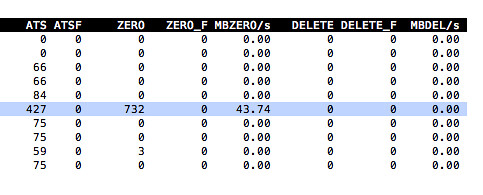
Yesterday a comment was made around a VAAI primitive on my article about virtual disk types and performance. In this case “write same” was mentioned and the comment was about how it would not be used when expanding a thin disk or lazy zero thick disk. Now the nice thing is that with ESXTOP you can actually see VAAI primitive stats. For instance “ATS” (locking) can be seen, but also… write same or “ZERO” as ESXTOP calls it.

If you open up ESXTOP and do the following you will see these VAAI primitive stats:

  • esxtop
  • press “u”
  • press “f”
  • press “o”
  • press “enter”

The screenshot below shows you what that should look like, nice right… In this case 732 blocks were zeroed out using the write-same / zero VAAI primitive.

VAAI primitive stats

  • « Go to Previous Page
  • Page 1
  • Interim pages omitted …
  • Page 3
  • Page 4
  • Page 5
  • Page 6
  • Page 7
  • Interim pages omitted …
  • Page 33
  • Go to Next Page »

Primary Sidebar

About the Author

Duncan Epping is a Chief Technologist and Distinguished Engineering Architect at Broadcom. Besides writing on Yellow-Bricks, Duncan is the co-author of the vSAN Deep Dive and the vSphere Clustering Deep Dive book series. Duncan is also the host of the Unexplored Territory Podcast.

Follow Us

  • X
  • Spotify
  • RSS Feed
  • LinkedIn

Recommended Book(s)

Also visit!

For the Dutch-speaking audience, make sure to visit RunNerd.nl to follow my running adventure, read shoe/gear/race reviews, and more!

Do you like Hardcore-Punk music? Follow my Spotify Playlist!

Do you like 80s music? I got you covered!

Copyright Yellow-Bricks.com © 2026 · Log in