• Skip to primary navigation
  • Skip to main content
  • Skip to primary sidebar

Yellow Bricks

by Duncan Epping

  • Home
  • Unexplored Territory Podcast
  • HA Deepdive
  • ESXTOP
  • Stickers/Shirts
  • Privacy Policy
  • About
  • Show Search
Hide Search

VMworld 2015: vSphere APIs for IO Filtering update

Duncan Epping · Aug 31, 2015 ·

I suspect that the majority of blogs this week will all be about Virtual SAN, Cloud Native Apps and EVO. If you ask me then the vSphere APIs for IO Filtering announcements are just as important. I’ve written about VAIO before, in a way, and it was first released in vSphere 6.0 and opened to a select group of partners. For those who don’t know what it is, lets recap, the vSphere APIs for IO Filtering is a framework which enables VMware partners to develop data services for vSphere in a fully supported fashion. VMware worked closely with EMC and Sandisk during the design and development phase to ensure that VAIO would deliver what partners would require it to deliver.

These data services can be applied to on a VM or VMDK granular level and can be literally anything by simply attaching a policy to your VM or VMDK. In this first official release however you will see two key use cases for VAIO though:

  1. Caching
  2. Replication

The great thing about VAIO if you ask me is that it is an ESXi user space level API, which over time will make it possible for all the various data services providers (like Atlantis, Infinio etc) who now have a “virtual appliance” based solution to move in to ESXi and simplify their customers environment by removing that additional layer. (To be technically accurate, VAIO APIs are all user level APIs, the filters are all running in user space, only a part of the VAIO framework runs inside the kernel itself.) On top of that, as it is implemented on the “right” layer it will be supported for VMFS (FC/iSCSI/FCoE etc), NFS, VVols and VSAN based infrastructures. The below diagram shows where it sits.
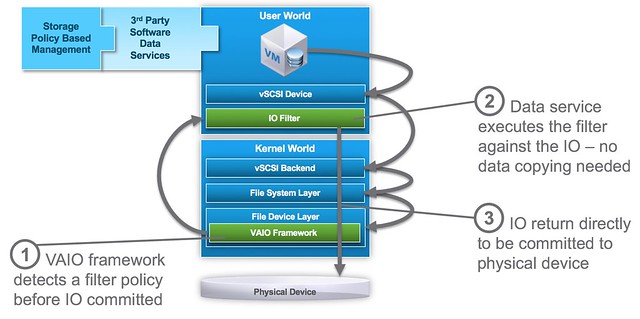
VAIO software services are implemented before the IO is directed to any physical device and does not interfere with normal disk IO. In order to use VAIO you will need to use vSphere 6.0 Update 1. On top of that of course you will need to procure a solution from one of the VMware partners who are certified for it, VMware provides the framework – partners provide the data services!

As far as I know the first two to market will be EMC and Sandisk. Other partners who are working on VAIO based solutions and you can expect to see release something are Actifio, Primaryio, Samsung, HGST and more. I am hoping to be able to catch up with one or two of them this week or over the course of the next week so I can discuss it a bit more in detail.

Project #vGiveback

Duncan Epping · Aug 30, 2015 ·

It is VMworld again, and just like last year VMware decided to give back to the community. No I am not talking about the virtualization community, but I am talking about charity, the great thing is that just like last year you can get VMware to give away an X amount to a charity cause of your choice (health, children, education or environment). As a friend of the VMware foundation I would like to ask ALL of you to help. So what do you need to do, what is the goal?

Well it is simple. Publish a picture on either Instagram or Twitter. Make sure the picture represents the cause and of course you need to tag it, use #vGiveBack and copy in @vmwFoundation. Your message should look like something like this:

Make sure to take a pic at Mos West and select your charity cause! Slightly awkward though 😀 #environment #vGiveBack pic.twitter.com/UUJ1EvO58X

— Duncan Epping (@DuncanYB) August 30, 2015

(Causes can be: #health #children #education or #environment)

The goal is 10,000 photos between Monday, August 31st and Thursday, September 3rd, out of which a mosaic will be crated. The final image for the mosaic symbolizes our community impact, and once complete, unlocks a donation that will be divided in proportion to the causes you select.

So what am I asking?

  1. Post a picture on twitter or instagram with the right hashtags and make copy in @vmwFoundation (it doesn’t need to be in front of one of those signs by the way, it can be a different pic…)
  2. Ask all of your friends to do the same, we need to hit that number lets make this go viral!

Every little bit will help. Each tweet or instagram post will bring us one step closer to unlocking our collective impact. If you don’t have twitter or instagram, ask your wife/son/daughter/friend to post for you!

Startup intro: ZeroStack

Duncan Epping · Aug 26, 2015 ·

A couple of months back one of the people I used to work a lot with in the DRS team reaches out to me. He told me that he started a company with some other people I knew and we spoke about the state of the industry and some of the challenges customers faced. Fast forward to today, ZeroStack just came out of stealth and announced to the world what they are building and an A round funding of roughly $ 5.6m.

At the head of the company as CEO we have Ajay Gulati, former VMware employee and most known for Storage IO Control, Storage DRS and DRS. Kiran Bondapalati is the CTO and some may recognize that name as he was a lead architect on Bromium. The DNA of the company is a mix of VMware, Nutanix, Bromium, Cisco, Google an more. Not a bad list I must say

So what are they selling? ZeroStack has developed a private cloud solution which is delivered in two parts:

  1. Physical 2U/4Node Appliance which comes with KVM preinstalled named ZS1000
  2. Management / Monitoring solution which is delivered in a SaaS model.

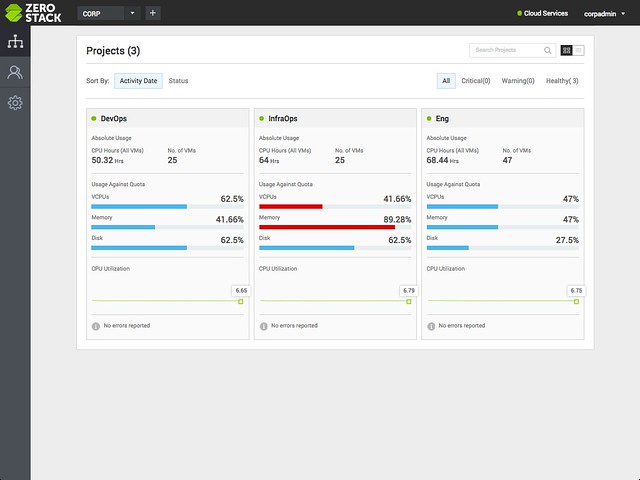
ZeroStack showed me a demo and getting their appliance up and running took about 15 minutes, the configuration wizard wasn’t unlike EVO:RAIL and looked very easy to run through. The magic however if you ask me isn’t in their configuration section, it is the SaaS based management solution. I stole a diagram from their website which immediately shows the potential.

zerostack

The SaaS management layer provides you a single pane of glass of all the deployed appliances. These can be in a single site or in multiple sites. You can imagine that especially for ROBO deployments this is very useful, but also in larger environments. Now it doesn’t just show you the physical aspect, it also shows you all the logical constructs that have been created like “projects”.

At this part of the demo by the way I got reminded of vCloud Director a bunch of times, and AWS for that matter. ZeroStack allows you to create “tenants” and designate resources to them in the form of projects. These can even have a lease times, which is kind of similar to what vCloud Director offers also.

When looking at the networking aspects of ZeroStack’s solution it also has the familiar constructs like private networks and public networks etc. On top of that networking services like routing / firewall’ing are implemented also in a distributed fashion. And before I forget, everything you see in the UI can also be automated through the APIs which are fully Openstack compatible.

Last but not least we had a discussion about patching and updating. With most systems this is usually the most complicated part. ZeroStack took a very customer friendly approach. The SaaS layer is being updated by them, and this can happen as frequent as once every ten days. The team said they are very receptive to feedback and have a short turnaround time for implementing new functionality, as their goal is to provide most functionality through the SaaS layer. The appliance will be on a different patch/update scheme, probably once every 3 or 6 months, of course depending on the problems fixed and features introduced. The updates are done in a rolling fashion and non-disruptive to your workloads, as expected.

That sounds pretty cool right? Well as always with a 1.0 version there is still some functionality missing. Functionality that is missing in 1.0 is for instance a “high availability” feature for your workloads. If a host fails then you as an admin will need to restart those VMs. Also when it comes to load balancing, there is no “DRS-alike” functionality today. Considering the background of the team though, I can imagine both of those showing up at some point in the near future. It does however mean that for some workloads the 1.0 version may not be the right solution for now. Nevertheless, test/dev and things like cloud native apps could land on it.

All in all, a nice set of announcements and some cool functionality coming. These guys are going to be at VMworld so make sure to stop by their booth if you want to see what they are working on.

Virtual SAN Ready Nodes taking charge!

Duncan Epping · Aug 25, 2015 ·

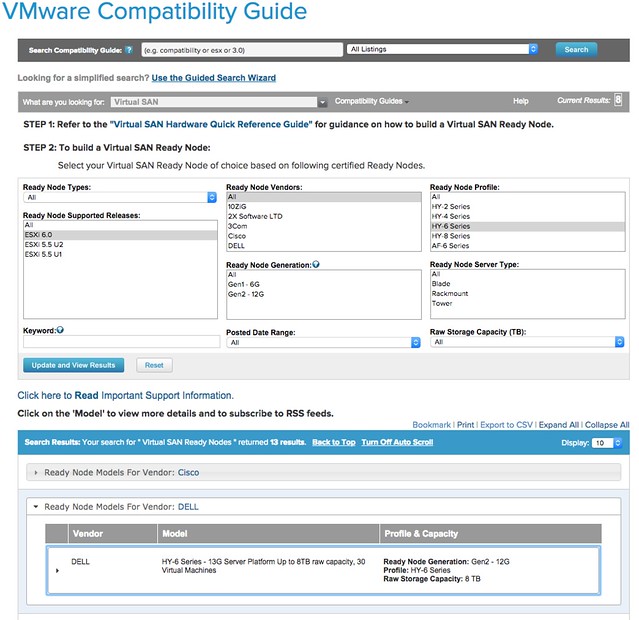
Yes that is right, Virtual SAN Ready Nodes are taking charge! As of today when you visit the VMware Compatibility Guide for Virtual SAN it will all revolve around Virtual SAN Ready Nodes instead of individual components. You may ask yourself why that is, well basically because we want to make it easier for you to purchase the hardware needed while removing the complexity of selecting components. This means that if you are a Dell customer and want to run Virtual SAN you can simply select Dell in the VMware Compatibility Guide and then look at the different models there are of the different sizes. It is very easy as can be seen in the screenshot below.

virtual san ready nodes

Traditionally there were 3 different sizes for “Server Virtualization”, but with the full overhaul of the VSAN VCG a new size was added. The naming of the sizing has also changed. Let me explain what it looks like now, note that these “sizing profiles” are the same across all vendors so comparing HP to Dell or IBM (etc) was never easier!

New NameOld Name
HY-2Hybrid Server Low
HY-4** new **
HY-6Hybrid Server Medium
HY-8Hybrid Server High
HY-8Hybrid VDI Linked Clones
Hybrid VDI Full Clones
AF-6All Flash Server Medium
AF-8All Flash Server High
AF VDI Linked Clones
AF VDI Full Clones

The new model introduced is HY-4 Series, the reason this model was introduced is because some customers felt that the price difference between HY-2 and H&-6 was too big. By introducing a model in between we now cover all price ranges. Note that it is still possible when selecting the models to make changes to the configuration. If you want model HY-2 with an additional 2 disks, or with 128GB of memory instead of 32GB then you can simply request this.

So what are we talking about in terms of capacity etc? Of course this is all documented and listed on the VCG as well, but let me share it with you here also for your convenience. Note that performance and VM numbers may be different for your scenario, this of course will depend on your workload and the size of your VMs etc.

ModelCPU / MemStorage CapStorage PerfVMs per node
HY-21 x 6 core / 32GB2TB4000 IOPSUp to 20
HY-42 x 8 core / 128GB4TB10K IOPSUp to 30
HY-62 x 10 core / 256GB8TB20K IOPSUp to 50
HY-82 x 12 core / 348GB12TB40K IOPSUp to 100
AF-62x12 core / 256GB8TB50K IOPSUp to 60
AF-82x12 core / 348GB12TB80K IOPSUp to 120

In my opinion, this new “Ready Node” driven VMware Compatibility Guide driven approach is definitely 10 times easier then focusing on individual components. You pick the ready node that comes close to what you are looking for, provide your OEM with the SKU listed and tell them about any modifications needed in terms of CPU/Mem or Disk Capacity. PS: If you want to access the “old school HCL” then just click on the “Build Your Own based on Certified Components” link on the VCG page.

Taking on some additional responsibilities… lead evangelist

Duncan Epping · Aug 22, 2015 ·

Some of you may have noticed that this week I posted my first article on the VMware Virtual Blocks blog. In the future you will see me posting there more frequently. Of course I will also stay posting here, but some more VSAN evangelism related stories will probably go to Virtual Blocks blog first. So what has changed?

Chuck Hollis just published a blog that he has decided to pursue a new career opportunity outside of VMware. Chuck has been the lead evangelist for the Storage & Availability BU over the last couple of years, and if you ask me has been instrumental putting Virtual SAN on the map. I want to wish Chuck all the best. Thank for everything you have done for the company and Virtual SAN in particular.

When a door closes a window opens is what they say, window of opportunity that is in this situation. I’m honoured and humbled that I’ve been asked to take on the responsibility as lead evangelist for the Storage and Availability BU effective immediately on top of my current responsibilities as a Chief Technologist in the CTO Office.

I am looking forward to spend even more time talking publicly about all of our efforts in the storage and availability space, expect to hear from me soon!  

  • « Go to Previous Page
  • Page 1
  • Interim pages omitted …
  • Page 120
  • Page 121
  • Page 122
  • Page 123
  • Page 124
  • Interim pages omitted …
  • Page 497
  • Go to Next Page »

Primary Sidebar

About the Author

Duncan Epping is a Chief Technologist and Distinguished Engineering Architect at Broadcom. Besides writing on Yellow-Bricks, Duncan is the co-author of the vSAN Deep Dive and the vSphere Clustering Deep Dive book series. Duncan is also the host of the Unexplored Territory Podcast.

Follow Us

  • X
  • Spotify
  • RSS Feed
  • LinkedIn

Recommended Book(s)

Also visit!

For the Dutch-speaking audience, make sure to visit RunNerd.nl to follow my running adventure, read shoe/gear/race reviews, and more!

Do you like Hardcore-Punk music? Follow my Spotify Playlist!

Do you like 80s music? I got you covered!

Copyright Yellow-Bricks.com © 2026 · Log in