• Skip to primary navigation
  • Skip to main content
  • Skip to primary sidebar

Yellow Bricks

by Duncan Epping

  • Home
  • Unexplored Territory Podcast
  • HA Deepdive
  • ESXTOP
  • Stickers/Shirts
  • Privacy Policy
  • About
  • Show Search
Hide Search

Awesome fling: ESXi Embedded Host Client

Duncan Epping · Aug 13, 2015 ·

A long long time ago I stumbled across a project within VMware which allowed you to manage ESXi through a client which was running on ESXi itself. Basically it presented an html interface for ESXi not unlike the MUI we had in the old days. It was one of those pet-projects being done in spare time by a couple of engineers which for various reasons at the time was never completed. The concept/idea however did not die fortunately. Some very clever engineers felt it was time to have that “embedded host client” for ESXi and started developing something in their spare time and this is the result.

I am not going to describe it in detail as William Lam has an excellent post on this great fling already. The installation is fairly straight forward, basically a vib you need to install. No rocket science. When installed you can manage various aspects of your hosts and VMs including:

  • VM operations (Power on, off, reset, suspend, etc).
  • Creating a new VM, from scratch or from OVF/OVA (limited OVA support)
  • Configuring NTP on a host
  • Displaying summaries, events, tasks and notifications/alerts
  • Providing a console to VMs
  • Configuring host networking
  • Configuring host advanced settings
  • Configuring host services

Is that cool or what? Head over to the Fling website and test it. Make sure to provide feedback when you have it as the engineers are very receptive and always looking to improve their fling. Personally I hope that this fling will graduate and will be added to ESXi by default, or at a minimum be fully supported! Excellent work Etienne Le Sueur and George Estebe!

Datrium finally out of stealth… Welcome Datrium DVX!

Duncan Epping · Jul 28, 2015 ·

Before I get started, I have not been briefed by Datrium so I am also still learning as I type this and it is purely based on the somewhat limited info on their website. Datrium’s name has been in the press a couple of times as it was the company that was often associated with Diane Greene. The rumours back then were that Diane Greene was the founder and was going to take on EMC, that was just a rumour as Diane Greene is actually an investor in Datrium. Not just her of course, Datrium is also backed by NEA (Venture Capitalist) and various other well known people like Ed Bugnion, Mendel Rosenblum, Frank Slootman and Kai Li. Yes, a big buy in from some of the original VMware founders. Knowing that two of the Datrium founders (Boris Weissman and Ganesh Venkitachalam) are former VMware Principal Engineers (and old-timers) that makes sense. (Source) This morning a tweet was send out, and it seems today they are officially out of stealth.

As the sun rises this morning, so does a new dominant #datastorage player #Datrium #stealthmode

— Datrium (@Datrium) July 28, 2015

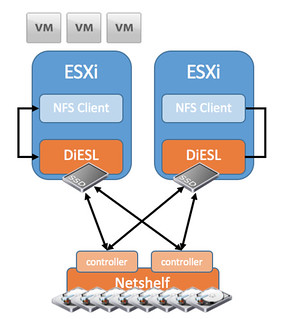
So what is Datrium about? Well Datrium delives a new type of storage system which they call DVX. Datrium DVX is a hybrid solution comprised of host local data services and a network accessed capacity shelf called “netshelf”. I think this quote from their website says it all what their intention is… Move all functionality to the host and let the “shelf” just take care of storing bits. I included a diagram that I found on their website as it makes it more clear.

On the host, DiESL manages in-use data in massive deduplicated and compressed caches on BYO (bring your own) commodity SSDs locally, so reads don’t need a network hop. Hosts operate locally, not as a pool with other hosts.

datrium dvx

It seems that from a host perspective the data services (caching, compression, raid, cloning etc) are implemented through the installation of a VIB. So not VM/Appliance based but rather kernel based. The NetShelf is accessible via 10GbE and Datrium uses a proprietary protocol to connect to it. From a host side (ESXi) they connect locally over NFS, which means they have implemented an NFS Server within the host. The NFS connection is also terminated within the host and they included their own protocol/driver on the host to be able to connect to the NetShelf. It is a bit of an awkward architecture, or better said … at first it is difficult to wrap your head around it. This is the reason I used the word “hybrid” but maybe I should have used unique. Hybrid, not because of the mixture of flash and HDD but rather because it is a hybrid of hyper-converged / host local caching and more traditional storage but done in a truly unique way. What does that look like? Something like this I guess:

datrium dvx

So what does this look like from a storage perspective? Well each NetShelf will come with 29TB of usable capacity. Expected deduplication and compression rate for enterprise companies is between 2-6x which means you will have between 58TB and 175TB to your disposal. In order to ensure your data is high available the NetShelf is a dual controller setup with dual port drives (Which means the drives are connected to both controllers and used in an “active/standby” fashion). Each controller has NVRAM which is used for write caching, and a write will be acknowledge to the VM when it has been written to the NVRAM of both controllers. In other words, if a controller fails there should be no data loss.

Talking about availability, what if a host fails? If I read their website correctly then there is no write caching from a host point of view as it is states that each host operates independently from a caching point of view (no mirroring of writes to other hosts). This also means that all the data services need to be inline –> dedupe / compress / raid. When those actions complete the result will be stored on the NetShelf and then it is accessible by other hosts when needed. It makes me wonder what happens when DRS is enabled and a VM is migrated from one host to another. Will the read cache migrate with it to the other host? And what about very write intensive workloads, how will those perform when all data services are inline? What kind of overhead can/will it have on the host? How will it scale out? What if I need more than 1 Netshelf? Those are some of the questions that popup immediately. Considering the brain-power within Datrium I am assuming they have a simple answer to those questions… (Former VMware, Data Domain, NetApp, EMC etc) I will try to ask them these questions at VMworld or during a briefing and write a follow up.

From an operational aspect it is an interesting solution as it should lower the effort involved with managing storage almost to zero. There is the NFS connection and you have your VMs and VMDKS at the front end, at the back-end you have a blackbox or better said a shelf dedicated to storing bits. This should be dead easy to manage and deploy. It shouldn’t require a dedicated storage administrator but the VMware admin should be able to manage it. Some of you may ask, well what if I want to connect anything other than a VMware host to it? For now Datrium appears to be mainly targeting VMware environments (which makes sense considering their dna) but I guess they could implement this for various platforms in a similar fashion.

Again, I was not briefed by Datrium and I accidentally saw their tweet this morning but their solution is so intriguing I figured I would share it anyway. Hope it was useful.

Interested? More info here:

  • Datasheet – http://www.datrium.com/datasheet/DVX_DataSheet.pdf
  • Host side implementation info – http://www.datrium.com/dvx-overview/diesl-software/
  • DVX Netshelf – http://www.datrium.com/dvx-overview/datrium-netshelf/
  • Twitter: http://www.twitter.com/datriumstorage

My top 15 VMworld sessions for 2015

Duncan Epping · Jul 22, 2015 ·

Every year I do a top VMworld sessions post. It is getting more complicated each year as there are so many great sessions. In the past years I tried to restrict myself to 20 but it always ends up being 22, 23 or even more sessions. This year I am going to be strict, 15 at most and in random order. These are the sessions I would sign up for myself, unfortunately as a VMware employee you can’t register, but I am sure going to try to sneak in when I have time, or watch the recording!

  • INF4528 – vCenter Server Appliance (VCSA) Best Practices & Tips/Tricks – William Lam
  • INF5211 – Automating Everything VMware with PowerCLI – Deep Dive – Alan Renouf & Luc Dekens
  • STO4949 – Extreme Performance Series: Virtual SAN Performance Deep-Dive – Lenin Singaravelu & Sankaran Sivathanu
  • NET4989 – The Future of Network Virtualization with VMware NSX – Bruce Davie
  • STO6228 – Monitoring and Troubleshooting Virtual SAN, Current and Future – Christian Dickmann & Cormac Hogan
  • CNA6649-S – Build and run Cloud-Native Apps in your Software-Defined Data Center – Kit Colbert & Aaron Sweemer & Jared Rosoff
  • VAPP4639 – Best Practices for Performance Tuning of Virtualized Telco and NFV Applications on vSphere ESXi – Bhavesh Davda & Jin Heo
  • STO4649 – Virtual Volumes Technical Deep Dive – Ken Werneburg & Patrick Dirks
  • NET5612 – NSX for vSphere Logical Load Balacing Deep Dive – Dimitri Desmidt & Uday Masurekar
  • INF5701 – Extreme Performance Series: vSphere Compute & Memory – Fei Guo & Seong Beom Kim
  • CTO6455 – Future Meets Present: Insights from VMware’s Field CTOs – Joe Baguley & Chris Wolf & Paul Strong
  • INF5306 – DRS Advancements in vSphere 6, Advanced Concepts, and Future Directions – Naveen Nagaraj
  • STO5336 – VMware Virtual SAN – Architecture Deep Dive – Christos Karamanolis & Rawlinson Rivera
  • INF4529 – VMware Certificate Management for Mere Mortals – Adam Eckerle & Ryan Johnson
  • STO6287-SPO – Instant Application Recovery and DevOps Infrastructure for VMware Environments – A Technical Deep Dive – Chris Wahl & Arvind Nithrakashyap

I did not include any sessions of my own, if you are interested in my sessions, look at the below:

  • INF4535 – 5 Functions of Software Defined Availability – Frank Denneman & Duncan Epping
  • STO5333 – Building a Stretched Cluster with Virtual SAN – Rawlinson Rivera & Duncan Epping
  • SDDC5027 – VCDX Unwrapped – Everything You Wanted to Know About VCDX – Panel
  • STO4650-QT – Five Common Customer Use Cases for Virtual SAN – Lee Dilworth & Duncan Epping
  • SDDC4593 – Ask the Expert vBloggers – Panel

See you guys there!

Extending your vSphere platform with Virtual SAN

Duncan Epping · Jul 21, 2015 ·

Over the last couple of months I’ve spoken to many customers about Virtual SAN. What struck me during these conversations is how these customers spoke about Virtual SAN. In all cases when we start the conversation it starts with a conversation about what their environment used to looked like. What kind of storage they had. How it was configured, number of disks etc you name it. Of course we would discuss what kind of challenges they had with their legacy environment. Thinking back to these conversations there is one thing that really stood out, although never explicitly mentioned, the big difference between Virtual SAN and traditional storage systems is that Virtual SAN is not a storage system but rather an extension of the VMware vSphere Platform.

Source: Wiki
Software extension, a file containing programming that serves to extend the capabilities of or data available to a more basic program

I believe this statement is spot on. What is great about Virtual SAN is that it does the extension of the capabilities of vSphere in an extremely easy way. Virtual SAN achieves this simply by abstracting layers of complexity and pooling the resources and allow these to be assigned to workloads in an automated fashion whether through the use of policies and a simple UI or through the vSphere APIs. Keywords here are definitely: abstract, pool and automate.

Maybe I should have used the word “converging” instead of “abstracting”. That is essentially what is happening, and although many other vendors claim the same, I truly believe that Virtual SAN is one of the few solutions which is truly hyper-converged as it seamlessly converges layers instead of adding a layer on top of another layer. Hyper-convergence is more than just stacking layers in a single box.

With Virtual SAN storage is just there. Not bolted on, layered on top or mounted to the side, an integral part of your environment, an extension of your platform. Virtual SAN does for storage what vSphere does for CPU and Memory, it becomes a fundamental component of your cluster.

More than 8 disks in your Virtual SAN host?

Duncan Epping · Jul 17, 2015 ·

It seems Virtual SAN is on fire… I’ve been getting emails about VSAN configurations on a daily basis from partners, VMware field and customers. More and more customers seem to be looking at deploying Virtual SAN with a high number of disks and this week I ran in to something that I wanted to share with you. I thought it was common knowledge, but I guess I was wrong. If you are planning to have more than 8 disks / devices in your Virtual SAN host then it is good to know that you will either need a second disk controller (Check the HCL!) or use a SAS Expander! This design / sizing principle is listed in the VSAN Ready Node PDF, and should also make its way to the Design / Sizing Guide soon. The following is mentioned in the VSAN Ready Node PDF:

No more than 8 disks (SSD + HDD) supported behind a single controller. In case you need to add more than 8 disks, please add an additional controller.

I met up with the product manager for the compatibility guide and asked him which SAS Expanders are supported, he mentioned that support is done per platform and that the following vendors and platforms have just been update. Note that the HCL will still need to be updated for these:

  • Dell SAS Expanders 5.5 and 6.0 hybrid. Supported on a specific configuration: H730 on 730d platform with 24 drives.
  • Lenovo SAS Expanders 5.5. Supported on a specific configuration: Lenovo 720ix, RD650 platform with 12 drives.

We also are working on support for HP and Cisco (and others over time), and you can also expect an update on those soon. For now, keep in mind that when designing / planning for Virtual SAN the number of virtual disks may mean you need to change the configuration of your host.

  • « Go to Previous Page
  • Page 1
  • Interim pages omitted …
  • Page 122
  • Page 123
  • Page 124
  • Page 125
  • Page 126
  • Interim pages omitted …
  • Page 497
  • Go to Next Page »

Primary Sidebar

About the Author

Duncan Epping is a Chief Technologist and Distinguished Engineering Architect at Broadcom. Besides writing on Yellow-Bricks, Duncan is the co-author of the vSAN Deep Dive and the vSphere Clustering Deep Dive book series. Duncan is also the host of the Unexplored Territory Podcast.

Follow Us

  • X
  • Spotify
  • RSS Feed
  • LinkedIn

Recommended Book(s)

Also visit!

For the Dutch-speaking audience, make sure to visit RunNerd.nl to follow my running adventure, read shoe/gear/race reviews, and more!

Do you like Hardcore-Punk music? Follow my Spotify Playlist!

Do you like 80s music? I got you covered!

Copyright Yellow-Bricks.com © 2026 · Log in