
• Skip to primary navigation
  • Skip to main content
  • Skip to primary sidebar

Yellow Bricks

by Duncan Epping

  • Home
  • Unexplored Territory Podcast
  • HA Deepdive
  • ESXTOP
  • Stickers/Shirts
  • Privacy Policy
  • About
  • Show Search
Hide Search

How do I get to the next level – Part 2

Duncan Epping · May 26, 2016 ·

I was going over some of the posts of the last year which have had a large number of views and/or comments, just to figure out what interests you folks the most. One of the articles that stood out in terms of number of comments definitely was “How do I get to the next level“. Not just the comments, but I also recall the large number of tweets and feedback I received in person. I just read the article again, and there are a few things which I think I should have probably emphasized more. I figured I would write a follow up… Lets start with a quote from that article.

There is also that thing called “being at the right place, at the right time” and of course seeing opportunities, grabbing opportunities and taking risks.

This phrase was in the first paragraph of the article, and I think it captures a lot more of the essence of success than may seem obvious. A month or so ago I was having a conversation with someone and that person mentioned that in terms of my role within VMware I was lucky to be in the position I am in today. Although I agree that I am very fortunate to have found such a great role, and that there is always luck involved in some shape or form, luck is usually not the reason you are rewarded with a promotion or a new opportunity.

Being at the right place at the right time is one part of it, seeing and grabbing (risky) opportunities is another part. Although you need to be somewhat lucky to have picked the right place and time, one could also argue that it is a skill / talent (like football / hockey players knowing intuitively where the ball / puck will be). Also, don’t worry about failures. Everyone makes mistakes, some pick wrong focus areas, some pick the wrong role or even wrong company to work for, be open and stay alert and assess your position or situation. How is the world (around you) evolving? Is your path leading somewhere? Is this what you expected it to be? Use the information next to make decisions. Do you keep going? Do you need to adapt or even abort and go back to the drawing board?
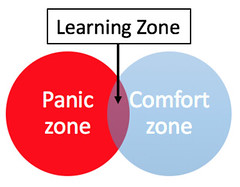
If I have learned one thing, than it is definitely that I learn the most when I am out of my comfort zone. And if you want to set yourself up for success, you will need to make sure you are capable of adapting fast and learn quick. Learning quick typically happens outside of your comfort zone. Now don’t mistake being out of your comfort zone with being in your panic zone. It is okay to be anxious, to be nervous, to have that jittery feeling… but be aware that this does not turn in to anxiety. Most of you have been in that place at some point in time, you need to do something far far out of your comfort zone, for me that was designing and configuring a network environment (including routing) when I had been responsible for Windows/X86 servers for a couple of years. Way out of my depth for sure back then, which resulted in anxiety and ultimately a failed project. Which leads me to the next skill that will help you grow: Knowing what you know.

But maybe more importantly, knowing what you don’t know and admitting you don’t know. Many people know what they are good/great at, and many will also advertise that broadly. But it is more importantly to understand what your limits and weaknesses are. Knowing that will allow you to understand where you need to grow, and come up with a plan to improve skills / behaviour etc. Also, it will allow you to say “no” when you are out of depth, this is key if you want to set your self up for success, and if you want to grow.

For me personally the one thing that stood out as a weakness (or even lacking skill), when I looked at where I wanted to be and what it would take, was public speaking. I tried it, I failed, no need to pretend, I knew I had to get better at it to grow from a personal perspective, but also from a career standpoint. At a certain level within each organization, presenting is simply required. I was foolish enough to throw myself in at the deep end, my first public speaking experience was at one of the largest conferences (VMworld). That was definitely far outside of my comfort zone and straight in to the panic zone. I should have taken 3 steps back, in hindsight, and started with a small session as a small VMware User Group. Read my article on this, don’t make the same mistake I did… Anxiety doesn’t even come close to describing what I felt. Yes, I did take a step back, reconvened and decided I would never do this again… Well that was my first conclusion. Quickly after that I reached the conclusion that I went too fast, I needed to slow down and take smaller steps. I needed to start with something less nerve wrecking (but still right at the edge of learning and panic zone), which was presenting at a VMUG. Today, I spend most of my time talking to customers or at events, it is safe to say that I have overcome the anxiety. Also, I managed to get really close to where I wanted to be in 3-5 years as a result.

As mentioned in “part 1”, being able to share your thoughts/opinion can make a big difference for your career, whether that is in a meeting / a blog / public speaking is besides the point even. But also speaking up and fighting for something you (strongly) believe in can make a big difference (it did for me). Passion, enthusiasm, energy are all character traits I personally value high and is what I look for when I interview potential candidates. Willingness to take that extra step and go all-in when you believe in something, yet at the same time also know which battle to pick, know when to sit down and listen. That last part is probably the most important, you cannot win them all and you cannot even fight all battles, knowing when to back down is key and an important skill to master. (Is it a skill, or a character trait even?)

Last but not least, perseverance and focus. If you truly want something, focus, make a plan and get things done. Learn from your mistakes and adapt. Don’t be afraid to take a step back and take a different route, even if it will take longer to get where you want to be. As Winston Churchill once said, “Continuous effort, not strength or intelligence, is the key to unlocking our potential.”

C# Client is officially dead…

Duncan Epping · May 19, 2016 ·

Many of you have seen the news by now, yesterday VMware announced that the Windows vSphere Client, usually referred to as the C# Client, is dead. Yes indeed, it has been declared dead and going forward will no longer be made available for future release of vSphere. Now this means that it is still available for all releases out there today (up to 6.0) and it will of course stick to the standard support period.

I have always loved the C# Client, but I don’t have mixed feelings on this one… It needs to go, it has been dead for a long time but it was still walking, it is time for a change and time we put it to rest once and for all. Yes it will be painful for some, but I believe this is the only way to move forward.
That also means for you, the admin / consultant, that there needs to be an alternative. Well one has been in the making for a while and that is the HTML-5 based “Host Client”. The Host Client started out as a fling, but as of vSphere 6.0 U2 is part of the default install of ESXi. Personally I really like the client and I can’t wait for it to be feature complete. What I probably like most, besides the slick interface and the speed, is the fact that you can access it from anywhere and that the developers are out there waiting for feedback and ready to engage and improve on what they released. It gets updated very frequently, just visit the Fling’s page (version 8.1 is up there right now) and if you have feedback engage with the engineers through the fling page, or simply drop a note on twitter to Etienne.

But that’s not it, VMware has also shown that it has the intention to get rid of Flash from the Web Client… Again released as a fling and you can download it and try it out as well, next to the regular Web Client. It was recently updated to version 1.6 and believe me when I say that these developers and the PM are also constantly looking for feedback and ways to improve the experience. The message was loud and clear over the past couple of years and they are doing everything they can to improve the Web Client experience, which includes performance and just generic usability aspects.

I would like to ask everyone to try out both the Host Client and the HTML-5 Web Client and leave feedback on those fling pages. What’s working, what is not, what about performance, different devices etc. And if you have strong feelings about the announcement, always feel free to leave a comment here, or on the announcement blog, as PM and Dev will be reading and commenting there where and when needed.

600GB write buffer limit for VSAN?

Duncan Epping · May 17, 2016 ·

Write Buffer Limit for VSANI get this question on a regular basis and it has been explained many many times, I figured I would dedicate a blog to it. Now, Cormac has written a very lengthy blog on the topic and I am not going to repeat it, I will simply point you to the math he has provided around it. I do however want to provide a quick summary:
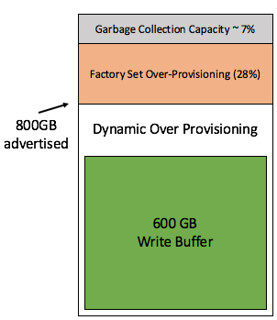
When you have an all-flash VSAN configuration the current write buffer limit is 600GB. (only for all-flash) As a result many seem to think that when a 800GB device is being used for the write buffer that 200GB will go unused. This simply is not the case. We have a rule of thumb of 10% cache to capacity ratio. This rule of thumb has been developed with both performance and endurance in mind as described by Cormac in the link above. The 200GB that is above the 600GB limit of the write buffer is actively used by the flash device for endurance. Note that an SSD usually is over-provisioned by default, most of them have extra cells for endurance and write performance. Which makes the experience more predictable and at the same time more reliable,  the same applies in this case with the Virtual SAN write buffer.

The image at the top right side shows how this works. This SSD has 800GB as advertised capacity. The “write buffer” is limited to 600GB however the white space is considered “dynamic over provisioning” capacity as it will be actively used by the SSD automatically (SSDs do this by default). Then there is an additional x % of over provisioning by default on all SSDs, which in the example is 28% (typical for enterprise grade) and even after that there usually is an extra 7% for garbage collection and other SSD internals. If you want to know more about why this is and how this works, Seagate has a nice blog.

So lets recap, as a consumer/admin the 600GB write buffer limit should not be a concern. Although the write buffer is limited in terms of buffer capacity, the flash cells will not go unused and the rule of thumb as such remains unchanged: 10% cache to capacity ratio. Lets hope this puts this (non) discussion finally to rest.

Partition / Isolation and VM flip flopping between hosts?

Duncan Epping · May 16, 2016 ·

Last week I was talking to one of our developers at our R&D offsite. He has a situation where he saw his VM flip flopping between two hosts when he was testing a certain failure scenario and he wondered why that was. In his case he had a 2 node cluster connected to vCenter Server and a bunch of VMs running on just 1 host. All of the VMs were running off iSCSI storage. When looking at vCenter he literally would see his VMs on host 1 and a split second later on host 2, and this would go on continuously. I have written about this behaviour before, but figured it never hurts to repeat it as not everyone goes back 2-3 years to read up on certain scenarios.

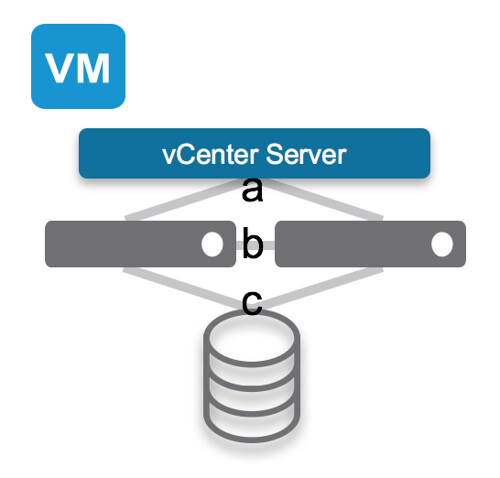
In the above diagram you see a VM running on the first host. vCenter Server is connected to both hosts through Network A and the Datastore being used is on Network C and the host management network is connected through Network B. Now just imagine that Network B is for whatever reason gone. The hosts won’t be able to ping each other any longer. In this case although it is an isolation, the VMs will have access through the central datastore and depending on how the isolation response is configured the VMs may or may not be restarted. Either way, as the datastore is still there, even if isolation response is set to “disabled” / “leave powered on” the VM will not be restarted on the second host as the “VM” is locked through that datastore, and you cannot have 2 locks on those files.

Now if simultaneously Network B and C are gone, this could potentially pose a problem. Just imagine this to be the case. Now the hosts are able to communicate to vCenter Server, however they cannot communicate to each other (isolation event will be triggered if configured), and the VM will lose access to storage (network C is down). If no isolation event was configured (disabled or leave powered on) then the VM on the first host will remain running, but as the second host has noticed the first host is isolated and it doesn’t see the VM any longer and the lock on those files are gone it is capable of restarting that VM. Both hosts however are still connected to vCenter Server and will send their updates to vCenter Server with regards to the inventory they are running… And that is when you will see the VM flip flopping (also sometimes referred to as ping-ponging) between those hosts.

And this, this is exactly why:

  1. It is recommend to configure an Isolation Response based on the likelihood of a situation like this occurring
  2. If you have vSphere 6.0 and higher, you should enable APD/PDL responses, so that the VM running on the first host will be killed when storage is gone.

I hope this helps…

Vote now for your fav VMworld sessions and Virt Blogs!

Duncan Epping · May 5, 2016 ·

Time to get voting again. Eric Siebert just published the new list of Top Blogs to vote for. I’ve been honoured to have won a couple of years in a row, but with so many great blogs on the list that is never a given. Personally I just put in my votes, I am not going to tell you who I voted for this year as I don’t want to influence anyone. I hope I produced sufficient useful content again this year for you guys to considering voting for me. I am not going to point you to my articles, as most of you will have fav articles and know what you appreciate and don’t appreciate. Vote here: http://vsphere-land.com/news/voting-now-open-for-top-vblog-2016.html

Also, voting for VMworld is open. I would like to ask you guys to considering voting for the sessions I will be part of. Here is a list of the sessions, and if they sound interesting please consider voting:

  • Ask the Expert vBloggers [7515] (Rick Scherer, Chris Wahl, Chad Sakac, Derek Seaman, Duncan Epping)
    Back for it’s 9th year at VMworld, Ask the Experts is back with an awesome panel of the industries top bloggers. In this session there are no powerpoints, no sales pitches and no rules! Experts in the industry are here to answer the audiences questions while having some fun in the process. Bring your topic, anything from Software-Defined Data Center, End-User Computing, Cloud Native Applications to Hybrid Cloud…Storage, Networking, Security, Applications. No Holds Barred and No Questions are Off Limits!
  • Enforcing a vSphere Cluster Design with PowerCLI Automation [8036] (Chris Wahl – Duncan Epping)
    The amount of vSphere data center, cluster, storage, and network options available to an administrator are massive. Even specific features such as High Availability (HA) and the Distributed Resource Scheduler (DRS) have a ton of different configuration settings provided to meet the needs of your specific virtualized workloads. It can be a challenge, however, to audit the settings and best understand why they were set in the first place – especially as other administrators join and leave your organization! Join VMware’s Duncan Epping, author of the infamous Cluster Deep Dive series, along with Rubrik’s Chris Wahl, PowerShell MVP and author of Networking for VMware Administrators, as they take a look at how to abstract vSphere configuration settings into declarative configuration files. Learn how to audit, track, and enforce consistent settings – with notes and comments – to ensure the availability and standardization of your vSphere environment.
  • Software Defined Storage @ VMware Primer [7650] (Lee Dilworth – Duncan Epping)
    In this session Lee and Duncan will give an overview of the different VMware Software Defined Storage initiatives and how these fit in to the broader SDDC picture. They will cover Virtual Volumes, Virtual SAN and the vSphere APIs for IO Filtering. For each of these 3 they will explain customer use cases and go over some of the basic concepts providing you with a good understanding of how to apply this to your environment.
  • A day in the life of a VSAN I/O [7875] (John Nicholson – Duncan Epping)
    In this session Duncan and John will discuss what a typical day looks like in the life of an I/O (on a VSAN based solution). How does network based RAID-1 or RAID-5 work? Where does checksumming occur? When and how are blocks deduplicated or compressed? What about caching, are there different layers? Can I control where blocks are stored? And how does all of this influence availability and performance of my I/O?
  • Hyperconverged Infrastructure Panel – Deep Dive Review of Solutions [7765] (Stu Miniman, Steve Poitras, Jesse St Laurent, Duncan Epping)
    The hyperconverged infrastructure market has exploded over the last few years. The good news is there’s lots of choice; the bad news is there’s lots of choice. How do you navigate the vendors and solutions landscape? What are they key evaluation criteria? Join us for a moderated panel discussion with a distinguished group of hyperconvergence experts to examine and discuss the challenges IT organizations are facing with virtualization infrastructure and how hyperconverged infrastructure is playing a dramatic role in the evolution of the data center. The panel will answer your questions on topics such as what constitutes hyperconvergence in the converged infrastructure landscape; business and technical benefits of this data center technology; scenarios to leverage hyperconvergence in your organization; how to avoid traps that could derail hyperconvergence implementation; and others posed by the audience.

Thanks and hope to see you guys at the event, either US or EMEA!

  • « Go to Previous Page
  • Page 1
  • Interim pages omitted …
  • Page 106
  • Page 107
  • Page 108
  • Page 109
  • Page 110
  • Interim pages omitted …
  • Page 497
  • Go to Next Page »

Primary Sidebar

About the Author

Duncan Epping is a Chief Technologist and Distinguished Engineering Architect at Broadcom. Besides writing on Yellow-Bricks, Duncan is the co-author of the vSAN Deep Dive and the vSphere Clustering Deep Dive book series. Duncan is also the host of the Unexplored Territory Podcast.

Follow Us

  • X
  • Spotify
  • RSS Feed
  • LinkedIn

Recommended Book(s)

Also visit!

For the Dutch-speaking audience, make sure to visit RunNerd.nl to follow my running adventure, read shoe/gear/race reviews, and more!

Do you like Hardcore-Punk music? Follow my Spotify Playlist!

Do you like 80s music? I got you covered!

Copyright Yellow-Bricks.com © 2026 · Log in