• Skip to primary navigation
  • Skip to main content
  • Skip to primary sidebar

Yellow Bricks

by Duncan Epping

  • Home
  • Unexplored Territory Podcast
  • HA Deepdive
  • ESXTOP
  • Stickers/Shirts
  • Privacy Policy
  • About
  • Show Search
Hide Search

SPBM integration with vRealize Automation

Duncan Epping · Sep 8, 2016 ·

Last week a new vRealize Automation plugin was released. The plugin enables the use of storage policies within vRealize Automation, or as the Solutions Exchange page says:

Integrating storage policy consumption model into vRealize Automation. This integration enables VM-granular control based on the Storage policy based management framework. This solution exposes vSphere VM Storage policies to vRealize Automation service catalog allows the ability to dynamically assign individual VM storage polcies to virtual disks based on their storage requirements characteristics (performance, availability, security, etc).

Pretty neat solution which was shown also during the VMworld keynote. More extensive demos around the capabilities can be viewed below, and more details around the plugin and how to install / use it can be found here.


Sharing VMworld slides

Duncan Epping · Sep 7, 2016 ·

I know the VMworld team will share them as well over time, but I figured I would do the same thing through my blog. Here are two decks. First deck is the deck for “VMworld – sto7650 -Software defined storage @VMmware primer”. This session I presented with Lee Dilworth. I presented VSAN and Lee did the VVol and VAIO section. Second deck is the deck for “VMworld 2016 – INF8036 – enforcing a vSphere cluster design with PowerCLI automation” which I presented with Chris Wahl. I added the youtube video that the VMworld team shared to the second deck as well. Hope you folks find it useful.

download / comments for “sto7650 -Software defined storage @VMmware primer”

download / comments for “INF8036 – enforcing a vSphere cluster design with PowerCLI automation”

download / comments for “INF7875 – A day in the life of a VSAN IO.”

Want to watch a VMworld 2016 session?

Duncan Epping · Sep 6, 2016 ·

I had a long discussion with the VMworld team about this the past editions and I am happy to say that ALL sessions have been made available to the public straight after the event. VMware made all VMworld 2016 session available to the public. You can find them here: http://www.vmworld.com/en/sessions/2016.html. And also, if you want a more “limited” list, you can go for the top ranked sessions. You can find the top-10 session of each VMworld day here: http://www.vmworld.com/en/sessions/top-10-us.html.
There is one session I want to call out, I wasn’t able to do a live blog on it, mainly because it went deep, and it went deep fast. Ravi R. is one of the best deep tech speakers I have seen: INF8108 – Extreme Performance Series: vCenter Performance Deep Dive.

Thanks VMworld team for doing this. Time for some binge watching 🙂

Taking VSAN to the next level, join the VSAN beta!

Duncan Epping · Sep 5, 2016 ·

In 2013 VSAN saw the day of light, the beta was released. Now 3 years later you have the opportunity to once again sign up and help improve our product. Over the last couple of years we have seen many new features introduced, so you may wonder what is left. There will be various enhancements in this release, but we are in particular looking for feedback on the following 3 features:
  • Software data-at-rest encryption
  • Local Protection for Stretched Clusters, for two-layer protection of stretched clusters: across sites and locally
  • New operational management enhancements (Health checks from vCenter, monitoring networking stats, and more)

I think most of these speak for itself, with regards to the Local Protection for Stretched Clusters, it basically allows you to protect your data within a site and across sites at the same time in a stretched cluster. In other words: RAID-1 across site and then RAID-1, 5 or 6 within a site. Something I am very excited about personally.

I don’t know how many people will be accepted for the beta, but if I find out I will report back. Sign up now: vmware.com/go/virtual-san-beta. PS: remember, these capabilities are still under development, are subject to change without notice and there is no guarantee of future availability.

An Industry Roadmap: From storage to data management #STO7903 by @xtosk

Duncan Epping · Sep 1, 2016 ·

This is the session I have been waiting for, I had it very high on my “must see” list together with the session presented by Christian Dickmann earlier today. Not because it happened to be presented by our Storage an Availability CTO Christos Karamanolis (@XtosK on twitter), but because of the insights I expect to be provided in this session. The title I think says it all: An Industry Roadmap: From storage to data management.

** Keep that in mind when reading the rest of article. Also, this session literally just finished a second ago, I wanted to publish it asap so if there are any typos, my apologies. **

Christos starts with explaining the current problem. There is a huge information growth, 2x growth every 2 years. And that is on the conservative side. Where does the data go? According to analyst it is not expected that this will go to traditional storage, actually the growth of traditional storage is slowing down, actually there is a negative growth seen. Two new types of storage have emerged and are growing fast, Hyper-scale Server SAN Storage and Enterprise Server SAN Storage aka Hyper-converged systems.

With new types of applications changing the world of IT, data management is more important than ever before. Todays storage product do not meet the requirements of this rapidly changing IT world and does not provide the agility your business owners demand. Many of the infrastructure problems can be solved by Hyper-Converged Software, this is all enabled by the hardware evolution we’ve witness over the last years: flash, RDMA, NVMe, 10Gbe etc. These changes from a hardware point of view allowed us to simplify storage architectures and deliver it as software. But it is not just about storage, it is also about operational simplicity. How do we enable our customers to manage more applications and VMs with less. Storage Policy Based Management has enabled this for both Virtual SAN (hyper-converged) and Virtual Volumes in more traditional environments.

Data Lifecycle Management however is still challenging. Snapshots, Clones, Replication, Dedupe, Checksums, Encryption. How do I enable these on a per VM level? How do we decouple all of these data services from the underlying infrastructure? VMware has been doing that for years, best example is vSphere Replication where VMs and Virtual Disks can be replicated on a case by case basis between different types of storage systems. It is even possible to leverage an orchestration solution like Site Recovery Manager to manage your DR strategy end to end from a single interface from private cloud to private cloud, but also from private to public. And from private to public is enabled by vCloud Availability suite, and here you can pay as you g(r)o(w). All of this again driven by policy and through the interface you use on a daily basis, the vSphere Web Client.

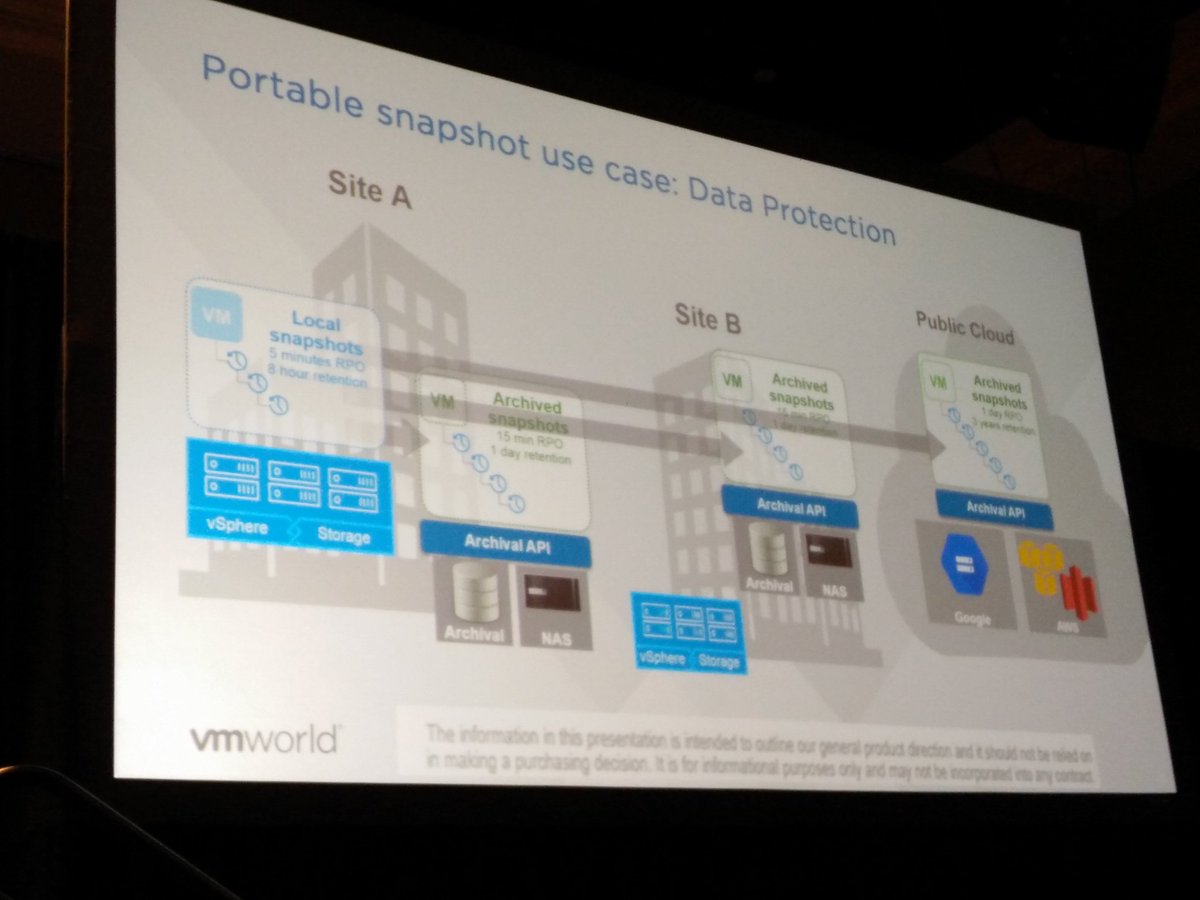
How can we improve the world of DR? Just imagine there was a portable snapshot. A snapshot that was decoupled from storage, can be moved between environments, can be stored in public or private clouds and maybe even both at the same time. This is something we as VMware are working on. A portable snapshot that can be used for Data Protection purposes. Local copies, archived copies in remote datacenters with a different SLA/retention.

How does this scale however when you have 10000s of VMs? Especially when there are 10s of snapshots per VM, or even hundreds. This should all be driven by policy. If I can move the data to different locations, can I use this data as well for other purposes? How about leveraging this for test&dev or analytics? Portable snapshots providing application mobility.

Christos next demoed what the above may look like in the future, the demo shows a VM being replicated from vSphere to AWS, but vSphere to vSphere or vSphere to Azure were also available as an option. The normal settings are configured (destination datastore and network) and literally within seconds the replication starts. The UI looks very crisp and seems to be similar to what was shown in the keynote on day 1 (Cross Cloud Services). But how does this work in the new world of IT, what if I have many new gen applications, containers / microservices?

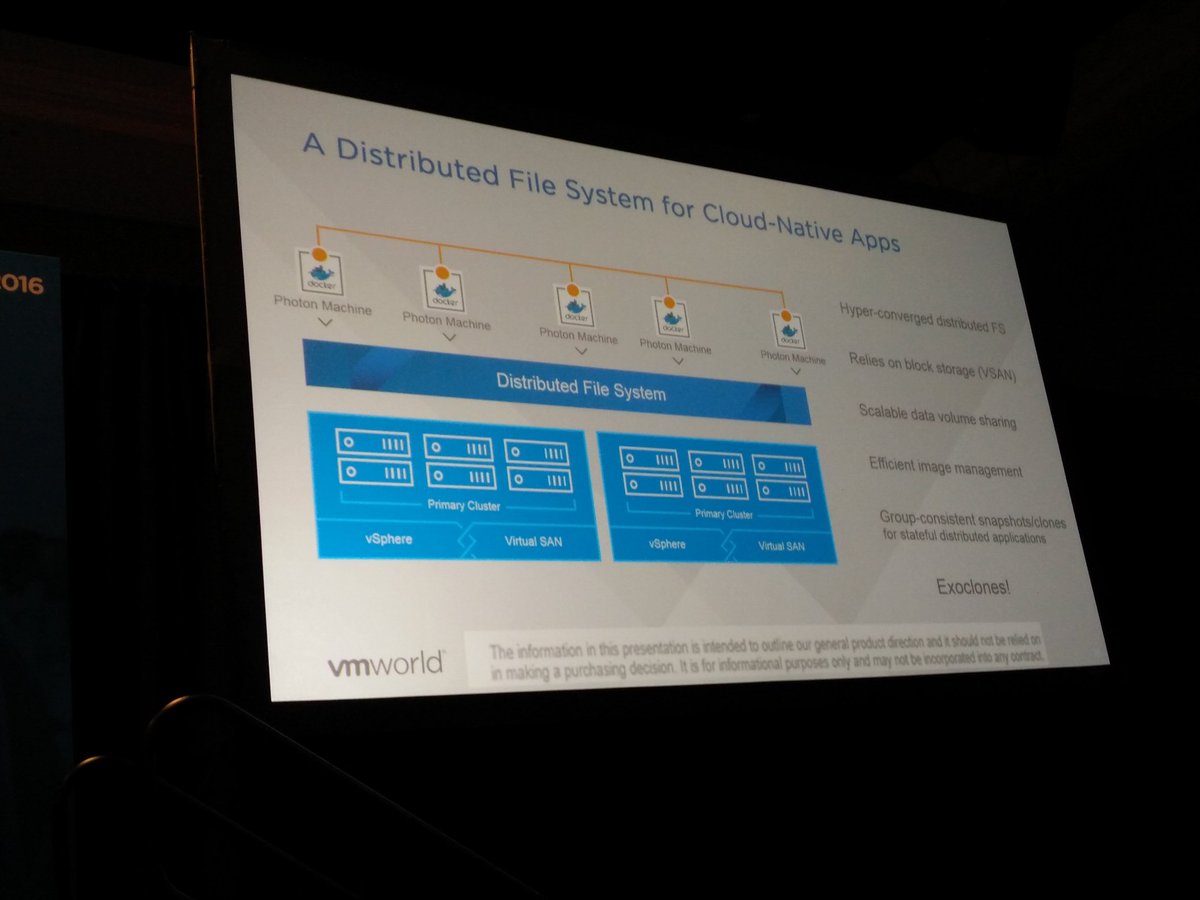
A Distributed File System for Cloud Native apps is now introduced. It appears to be a solution which sits on top of Virtual SAN and provides a file system that can scale to 1000s of hosts with functionality like highly scalable and performing snapshots and clones. These snapshots provided by this Distributed File System are also portable, this concept being developed is called exoclones. It is not something that is just living in the heads of the engineering team, Christos actually showed a demo of an exoclone being exported and imported to another environment.

If VMware does provide that level of data portability, how do you track and control all that data? Data governance is key in most environments, how do we enforce compliance, integrity and availability.  This will be the next big challenge for the industry. There are some products which can provide this today, but nothing that can do this cross-cloud and for both current and new application architectures and infrastructures.

Although for years we seem to have been under the impression that the infrastructure was the center of the universe. Reality is that it serves a clear purpose: host applications and provide users access to data. Your companies data is what is most important. We as VMware realize that and are working to ensure we can help you move forward on your next big journey. In short, it is our goal that you can focus on data management and no longer need to focus on the infrastructure.

Great talk,

  • « Go to Previous Page
  • Page 1
  • Interim pages omitted …
  • Page 104
  • Page 105
  • Page 106
  • Page 107
  • Page 108
  • Interim pages omitted …
  • Page 502
  • Go to Next Page »

Primary Sidebar

About the Author

Duncan Epping is a Chief Technologist and Distinguished Engineering Architect at Broadcom. Besides writing on Yellow-Bricks, Duncan is the co-author of the vSAN Deep Dive and the vSphere Clustering Deep Dive book series. Duncan is also the host of the Unexplored Territory Podcast.

Follow Us

  • X
  • Spotify
  • RSS Feed
  • LinkedIn

Recommended Book(s)

Also visit!

For the Dutch-speaking audience, make sure to visit RunNerd.nl to follow my running adventure, read shoe/gear/race reviews, and more!

Do you like Hardcore-Punk music? Follow my Spotify Playlist!

Do you like 80s music? I got you covered!

Copyright Yellow-Bricks.com © 2026 · Log in