• Skip to primary navigation
  • Skip to main content
  • Skip to primary sidebar

Yellow Bricks

by Duncan Epping

  • Home
  • Unexplored Territory Podcast
  • HA Deepdive
  • ESXTOP
  • Stickers/Shirts
  • Privacy Policy
  • About
  • Show Search
Hide Search

How HA handles a VSAN Stretched Cluster Site Partition

Duncan Epping · Apr 25, 2016 ·

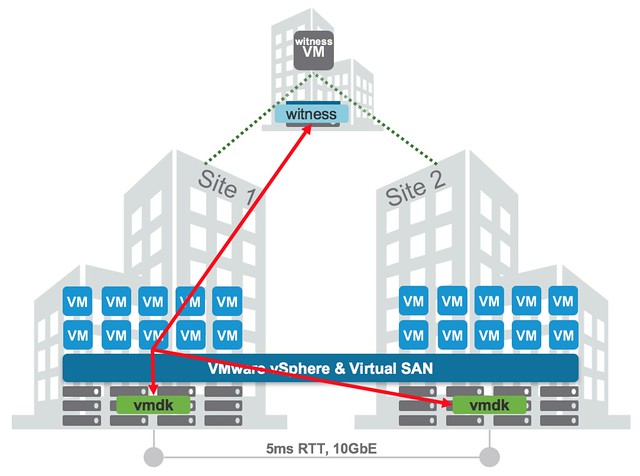
Over the past couple of weeks I have had some interesting questions from folks about different VSAN Stretched failure scenarios, in particular what happens during a VSAN Stretched Cluster site partition. These questions were in particular about site partitions and how HA and VSAN know which VMs to fail-over and which VMs to power-off. There are a couple of things I like to clarify. First lets start with a diagram that sketches a stretched scenario. In the diagram below you see 3 sites. Two which are “data” sites and one which is used for the “witness”. This is a standard VSAN Stretched configuration.
How HA handles a VSAN Stretched Cluster Site Partition

The typical question now is, what happens when Site 1 is isolated from Site 2 and from the Witness Site? (While the Witness and Site 2 remain connected.) Is the isolation response triggered in Site 1? What happens to the workloads in Site 1? Are the workloads restarted in Site 2? If so, how does Site 2 know that the VMs in Site 1 are powered off? All very valid questions if you ask me, and if you read the vSphere HA deepdive on this website closely and letter for letter you will find all the answers in there, but lets make it a bit easier for those who don’t have the time.

First of all, all the VMs running in Site 1 will be powered off. Let is be clear that this is not done by vSphere HA, this is not the result of an “isolation” as technically the hosts are not isolated but partitioned. The VMs are killed by a VSAN mechanism and they are killed because the VMs have no access to any of the components any longer. (Local components are not accessible as there is no quorum.) You can disable this mechanism by the way, although I discourage you from doing so, through the advanced host settings. Set the advanced host setting called VSAN.AutoTerminateGhostVm to 0.

In the second site a new HA master node will be elected. That master node will validate which VMs are supposed to be powered on, it knows this through the “protectedlist”. The VMs that were on Site 1 will be missing, they are on the list, but not powered on within this partition… As this partition has ownership of the components (quorum) it will now be capable of powering on those VMs.

Finally, how do the hosts in Partition 2 know that the VMs in Partition 1 have been powered off? Well they don’t. However, Partition 2 has quorum (Quorum meaning that is has the majority of the votes / components (2 our of 3) and as such ownership and they do know that this means it is safe to power-on those VMs as the VMs in Partition 1 will be killed by the VSAN mechanism.

I hope that helps. For more details, make sure to read the clustering deepdive, which can be downloaded here for free.
How is Virtual SAN doing? 3500 customers reached!

Duncan Epping · Apr 21, 2016 ·

Are you wondering how Virtual SAN is doing? The recent earnings announcement revealed that… Virtual SAN is doing GREAT! Over 3500 customers so far (21 months after the release!) and 200% Year over Year growth. I loved how Pat Gelsinger described Virtual SAN: “VMware’s simple enterprise grade native storage for vSphere”. It doesn’t get more accurate and to the point than that, and that is how people should look at it. vSphere native storage, it just works. Just a couple of things I wanted to grab from the earnings call (transcript here) that I think stood out with regards to VSAN:

and I – having been three years at EMC as a storage company, part of it is it just takes a while to get a storage product mature, right, and that – we have crossed the two-year cycle on VSAN now. The 6.2 release, as I would say, checks all the boxes with regard to key features, capabilities and so on, and we are, I’ll say right on schedule, right, we’re seeing the inflection point on that business, and the 6.2 release really hit the mark in the marketplace very well.

I’d say we’re clearly now seen as number one in a hyper-converged infrastructure space, and that software category we think is going to continue to really emerge as a powerful trend in the industry.

I think Zane mentioned a large financial services company. We had a large EMEA retailer, a large consumer goods manufacturer, a large equipment engines company, and each one of these is really demonstrating the power of the technology.

We also had good transactional bookings as well, so it wasn’t just in big deals but also transactional performance was good. So the channel participation is increasing here.

So we really left Q1 feeling really good about this area, and I’m quite bullish about its growth potential through the year and 2017 and beyond.

I think I don’t need to add anything other than… Go VSAN!

Some recent updates to HA deepdive

Duncan Epping · Apr 15, 2016 ·

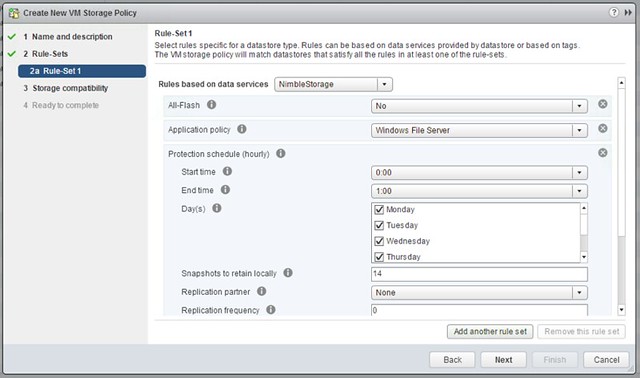
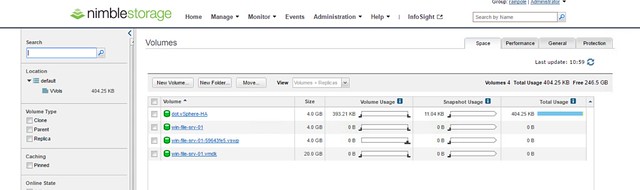
Just a short post to point out that I updated the VVol section in the HA Deepdive. If you downloaded it, make sure to download the latest version. Note that I have added a version number to the intro and a changelog at the end so you can see what changes. Also, I recommend subscribing to it, as I plan to do some more updates in the upcoming months. For the update I’ve been playing with a Nimble (virtual) array all day today and it allowed me to create some cool screenshots of how HA works in a VVol environment. I was also seriously impressed by how easy it was to setup the Nimble (virtual) array and how simple VVol was to configure for them. Not just that, but the number of policy options Nimble exposes, I was amazed. Below is just an example of some of the things you can configure!

vvol-nimble

The screenshot below shows the Virtual Volumes created for a VM, this is the view from a Storage perspective:
Screen Shot 2016-04-15 at 11.59.16

Can I still provision VMs when a VSAN Stretched Cluster site has failed?

Duncan Epping · Apr 13, 2016 ·

A question was asked internally if you can still provision VMs when a site has failed in a VSAN stretched cluster environment. In a regular VSAN environment when you don’t have sufficient fault domains you cannot provision new VMs, unless you explicitly enable Force Provisioning, which most people do not have enabled. In a VSAN stretched cluster environment this behaviour is different. In my case I tested what would happen if the witness appliance would be gone. I had already created a VM before I failed the witness appliance, and I powered it on after I failed the witness, just to see if that worked. Well that worked, great, and if you look at the VM at a component level you can see that the witness component is missing.

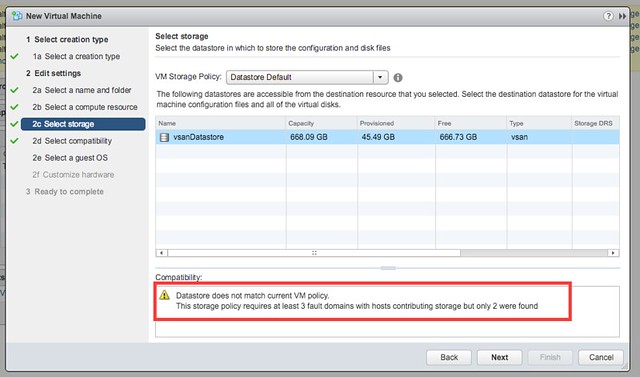
Next test would be to create a new VM while the Witness Appliance is down. That also worked, although I am notified by vCenter during the provisioning process that there are less fault domain than expected as shown in the below screenshot. This is the difference with a normal VSAN environment, here we actually do allow you to provision new workloads, mainly because the site could be down for a longer period of time.

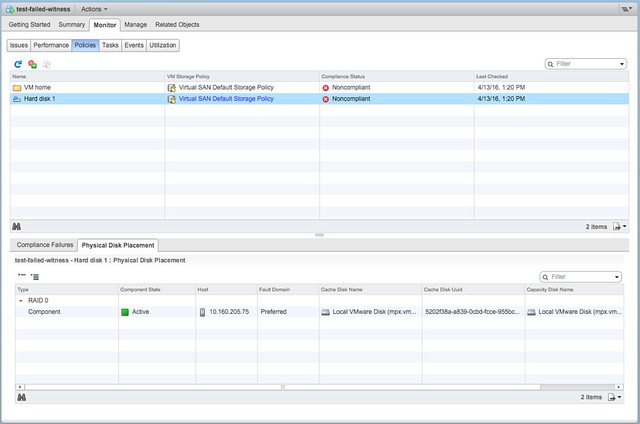
Now next step would be to power on the just created VM and then look at the components. The power on works without any issues and as shown below, the VM is created in the Preferred site with a single component. As soon though as the Witness recovers the the remaining components are created and synced.

Good to see that provisioning and power-on actually does work and that behaviour for this specific use-case was changed. If you want to know more about VSAN stretched clusters, there are a bunch of articles on it to be found here. And there is a deepdive white paper also available here.

VSAN Success Story: Zettagrid and VSAN the perfect match for a reliable cloud infrastructure

Duncan Epping · Apr 5, 2016 ·

Two weeks ago I spoke with Anthony Spiteri about Virtual SAN and how he uses it and why he uses it. For those who don’t know Anthony, he is an architect at a service provider called Zettagrid, he is an avid blogger and spends  some time on twitter now and then. Make sure to bookmark his blog and follow him on twitter, he is a smart guy. I wanted to chat with him just to understand why they selected VSAN as their storage solution for their Management environment.

Anthony mentioned that when he joined Zettagrid they weren’t using dedicated management clusters. As most of you know who manage larger infrastructures, separating production workloads from the management stack can be very useful. You don’t want your management solution contending for CPU/Memory resources, and you surely don’t want any production outage impact your management cluster… Like for instance a storage outage. Which is exactly what happened in Anthony’s case, a storage outage took out (some of) the management components, which in its turn made it impossible to figure out what was going on, a situation you don’t want to ever encounter as a service provider. Luckily they managed to figure it out relatively quick, but it did made them see a change was needed.

What better time to introduce a new concept like hyper-converged and create a self-contained management environment? Anthony mentioned that he had looked at two different platforms but decided to go for VSAN. The reason was straight forward, they did a large amounts of tests and they simply couldn’t break it. It just worked, and it worked in a dead easy way, which also meant that when this would be taken in to production the learning curve would be tiny for the operational guys.

As a hardware platform Dell FX2 is used, I am a big fan of this platform and fully understand why they picked it. 4 nodes in 2u, which even includes switching, so for VSAN this means you can keep the traffic in the chassis with these smaller “4 node management” pods. Zettegrid decided to deploy 3 of these pods and each of them will run services like vCenter Server, vCloud Director, SQL, AD, Veeam Backup etc. Nice solution if you ask me.

We also spoke about pricing, although not part of my responsibilities it is always interesting to see how a solution works out from a TCO/ROI stance. I still recall exchanging some messages with Anthony about the VSPP pricing, and he mentioned it was on the high side. Needless to say, but the recent pricing changes definitely make VSAN a no-brainer for Service Providers. The points cut in half and the billing is one based on what is “used” versus what is “allocated”, and believe me (actually believe Anthony) that makes a huge difference! Such a big difference, Anthony said that they will definitely be looking at VSAN for their Cloud Resources as well.

Thanks Anthony for taking the time. Always good to hear back from customers.

PS: There is an official VSAN reference story coming out soon as well coincidentally, I will link to that as soon as I have received it.

  • « Go to Previous Page
  • Page 1
  • Interim pages omitted …
  • Page 107
  • Page 108
  • Page 109
  • Page 110
  • Page 111
  • Interim pages omitted …
  • Page 497
  • Go to Next Page »

Primary Sidebar

About the Author

Duncan Epping is a Chief Technologist and Distinguished Engineering Architect at Broadcom. Besides writing on Yellow-Bricks, Duncan is the co-author of the vSAN Deep Dive and the vSphere Clustering Deep Dive book series. Duncan is also the host of the Unexplored Territory Podcast.

Follow Us

  • X
  • Spotify
  • RSS Feed
  • LinkedIn

Recommended Book(s)

Also visit!

For the Dutch-speaking audience, make sure to visit RunNerd.nl to follow my running adventure, read shoe/gear/race reviews, and more!

Do you like Hardcore-Punk music? Follow my Spotify Playlist!

Do you like 80s music? I got you covered!

Copyright Yellow-Bricks.com © 2026 · Log in