• Skip to primary navigation
  • Skip to main content
  • Skip to primary sidebar

Yellow Bricks

by Duncan Epping

  • Home
  • Unexplored Territory Podcast
  • HA Deepdive
  • ESXTOP
  • Stickers/Shirts
  • Privacy Policy
  • About
  • Show Search
Hide Search

vSAN

All-flash VSAN configuration example

Duncan Epping · Mar 31, 2015 ·

I was talking to a customer this week who was looking to deploy various 4 node VSAN configurations. They needed a solution which would provide them performance and wanted to minimize the moving components due to the location and environmental aspects of the deployment, all-flash VSAN is definitely a great choice for this scenario. I looked at various server vendors and based on their requirements (and budget) provided them a nice configuration (in my opinion) which comes in for slightly less than $ 45K.

What I found interesting is the price of the SSDs, especially the “capacity tier” as the price is very close to SAS 10K RPM. I selected the Intel S3500 as the capacity tier as it was one of the cheapest listed that is part of the VMware VSAN HCL, will be good to track GB/$ for new entries on the HCL that will be coming soon, so far S3500 seems to be the sweet spot. Also seems that from a price point perspective the 800GB devices are most cost effective at the moment. The 3500 seems to perform well as demonstrated in this paper by VMware on VSAN scaling / performance.

This is what the bill of materials looked like, and I can’t wait to see it deployed:

  • Supermicro SuperServer 2028TP-HC0TR – 2U TwinPro2
  • Each node comes with:
    • 2 x Eight-Core Intel Xeon Processor E5-2630 v3 2.40GHz 20MB Cache (85W)
    • 256 GB in 8 DIMMs at 2133 MHz (32GB DIMMs)
    • 2 x 10GbE NIC port
    • 1 x 4
    • Dual 10-Gigabit Ethernet
    • LSI 3008 12G SAS

That is a total of 16TB of flash based storage capacity, 1TB of memory and 64 cores in mere 2U. The above price is based on a simple online configurator and does not include any licenses, a very compelling solution if you ask me.

All Flash VSAN – One versus multiple disk groups

Duncan Epping · Mar 11, 2015 ·

A while ago I wrote this article on the topic of “one versus multiple disk groups“. The summary was that you can start with a single disk group, but that from a failure domain perspective having multiple disk groups is definitely preferred. Also from a performance stance there could be a benefit.

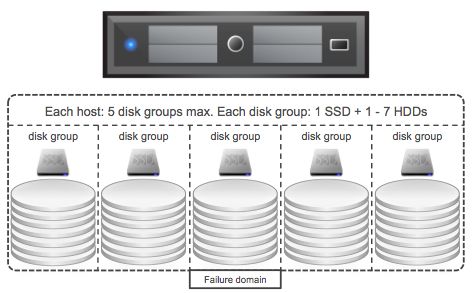
So the question now is, what about all-flash VSAN? First of all, same rules apply: 5 disk groups max, each disk group 1 SDD for caching and 7 devices for capacity. There is something extra to consider though. It isn’t something I was aware off until I read the excellent Design and Sizing Guide by Cormac. It states the following:

In version 6.0 of Virtual SAN, if the flash device used for the caching layer in all-flash configurations is less than 600GB, then 100% of the flash device is used for cache. However, if the flash cache device is larger than 600GB, the only 600GB of the device is used for caching. This is a per-disk group basis.

Now for the majority of environments this won’t really be an issue as they typically don’t hit the above limit, but it is good to know when doing your design/sizing exercise. The recommendation of 10% cache to capacity ratio still stands, and this is used capacity before FTT. If you have a requirement for a total of 100TB, then with FTT=1 that is roughly 50TB of usable capacity. When it comes to flash this means you will need a total of max 5TB flash. That is 5TB of flash in total, with 10 hosts that would be 500GB per host and that is below the limit. But with 5 hosts that would be 1TB per host which is above the 600GB mark and would result in 400GB per host being unused?

Well not entirely, although the write buffer has a max size of 600GB, note that the remainder of the capacity is used by the SSD for endurance, so it will cycle through those cells… and that is also mainly what you are sizing for when it comes to the write buffer. That 10% is mainly around endurance. So you have a couple of options, you can have multiple disk groups to use the full write buffer capability if you feel you need that, or you can trust on VSAN and the flash “internals” to do what they need to do… I have customers doing both, and I have never heard a customer “complain” about the all-flash write-buffer limit… 600GB is a lot to fill up.

EMC VSPEX Blue aka EVO:RAIL going GA

Duncan Epping · Feb 3, 2015 ·

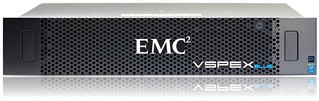
EMC VSPEX BLUEEMC just announced the general availability of VSPEX Blue. VSPEX Blue is basically EMC’s version of EVO:RAIL and EMC wouldn’t be EMC if they didn’t do something special with it. First thing that stands out from a hardware perspective is that EMC will offer two models a standard model with the Intel E5-2620 V2 proc and 128GB of memory, and a performance model which will hold 192GB of memory. That is the first time I have seen an EVO:RAIL offering with different specs. But that by itself isn’t too exciting…

When reading the spec sheet the following bit stood out to me:

EMC VSPEX BLUE data protection incorporates EMC RecoverPoint for VMs and VMware vSphere Data Protection Advanced. EMC RecoverPoint for VMs offers operational and disaster recovery, replication and continuous data protection at the VM level. VMware vSphere Data Protection Advanced provides centralized backup and recovery and is based on EMC Avamar technology. Further, with the EMC CloudArray gateway, you can securely expand storage capacity without limits. EMC CloudArray works seamlessly with your existing infrastructure to efficiently access all the on-demand public cloud storage and backup resources you desire. EMC VSPEX BLUE is backed by a single point of support from EMC 24×7 for both hardware and software.

EMC is including various additional pieces of software including vSphere Data Protection Advanced for backup and recovery, EMC Recovery Point for disaster recovery, EMC CloudArray gateway and the EMC VSPEX BLUE management software and EMC Secure Remote Service which will allow for  monitoring, diagnostics and repair services. This of course will differ per support offering, and there are currently 3 support offerings (basic, enhanced, premium). Premium is where you get all the bells and whistles with full 24x7x4 support.

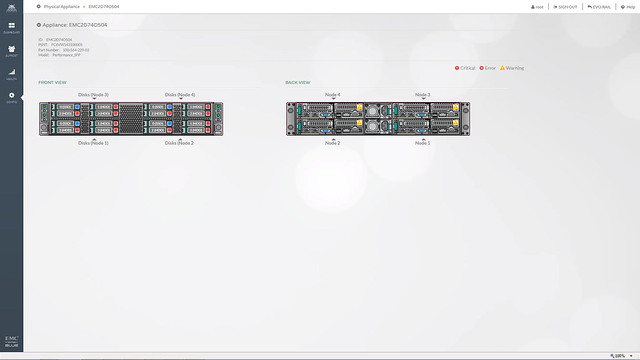
What is special about the management / support software in this case is that EMC took a different approach then normal. In this case the VSPEX BLUE interface will allow you to directly chat with support folks, dig up knowledge base articles and even the community is accessible from within. Also, the management layer will monitor the system and if something fails then EMC will contact you, also known as “phone home”. Besides the fact that the UI is a couple of steps ahead of anything I have seen so far, it looks like EMC will directly tie in with LogInsight which will provide deep insights from the hardware to the software stack. What also impressed me were the demos they provided and how they managed to create the same look and feel as the EVO:RAIL interface.

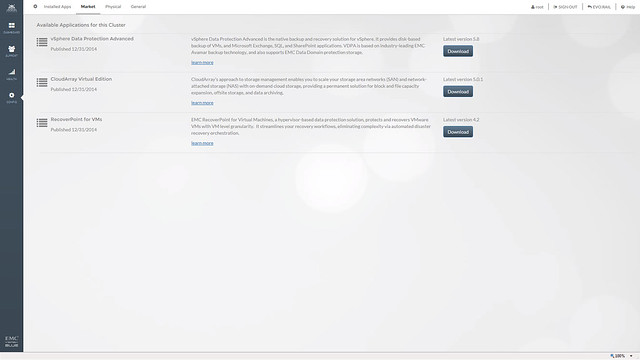
EMC also mentioned that they are working on a market place. This market place will allow you to deploy certain additional services, in this example you can see CloudArray, RecoverPoint and VDPA but more should be added soon! Will be interesting to see what kind of services will end up in the market place. I do feel that this is a great way of adding value on top of EVO:RAIL.

One of the services in the market place that stood out to me was CloudArray. So what about that EMC CloudArray gateway solution, what can you do with that? The CloudArray solution allows you to connect external offsite store as iSCSI or NFS to the appliance. It can be used for everything, but what I find most compelling is that it will allow you to replicate your backup data off-site. The CloudArray will come with 1TB local cache and 10 TB cloud storage!

I have to say that EMC did a great job packing the EVO:RAIL offering with additional pieces of software and I believe they are going to do well with VSPEX BLUE, in fact I would not be surprised if they are going to be the number 1 qualified partner in terms of sales really fast. If you are interested, the offering will be shipping on the 16th of February, but can be ordered today!

What is new for Virtual SAN 6.0?

Duncan Epping · Feb 3, 2015 ·

vSphere 6.0 was just announced and with it a new version of Virtual SAN. I don’t think it is needed to introduce Virtual SAN as I have written many many articles about it in the last 2 years. Personally I am very excited about this release as it adds some really cool functionality if you ask me, so what is new for Virtual SAN 6.0?

  • Support for All-Flash configurations
  • Fault Domains configuration
  • Support for hardware encryption and checksum (See HCL)
  • New on-disk format
    • High performance snapshots / clones
    • 32 snapshots per VM
  •  Scale
    • 64 host cluster support
    • 40K IOPS per host for hybrid configurations
    • 90K IOPS per host for all-flash configurations
    • 200 VMs per host
    • 8000 VMs per Cluster
    • up to 62TB VMDKs
  • Default SPBM Policy
  • Disk / Disk Group serviceability
  • Support for direct attached storage systems to blade (See HCL)
  • Virtual SAN Health Service plugin

That is a nice long list indeed. Let my discuss some of these features a bit more in-depth. First of all “all-flash” configurations as that is a request that I have had many many times. In this new version of VSAN you can point out which devices should be used for caching and which will serve as a capacity tier. This means that you can use your enterprise grade flash device as a write cache (still a requirement) and then use your regular MLC devices as the capacity tier. Note that of course the devices will need to be on the HCL and that they will need to be capable of supporting 0.2 TBW per day (TB written) over a period of 5 years. For a drive that needs to be able to sustain 0.2 TBW per day, this means that over 5 years it needs to be capable of 365TB of writes. So far tests have shown that you should be able to hit ~90K IOPS per host, that is some serious horsepower in a big cluster indeed.
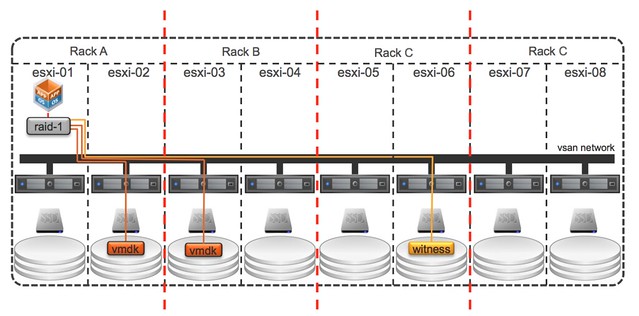
Fault Domains is also something that has come up on a regular basis and something I have advocated many times. I was pleased to see how fast the VSAN team could get it in to the product. To be clear, no this is not a stretched cluster solution… but I would see this as the first step, but that is my opinion and not VMware’s. This Fault Domain feature will allow you to specify fault domains per rack and then when you provision a new virtual machine VSAN will make sure that the components of the objects are placed in different fault domains.

In this case when you do it per rack then even a full rack failure would not impact your virtual machine availability. Very cool indeed. The nice thing about the fault domain feature also is that it is very simple to configure. Literally a couple of clicks in the UI, but you can also use RVC or host profiles to configure it if you want to. Do note that you will need 6 hosts at a minimum for Fault Domains to make sense.

Then of course there is the scalability. Not just the 64 host cluster support but also the 200 VMs per host is a great improvement. Of course there is also the improvements around snapshot and cloning which can be attributed to the new on-disk format and the different snapshotting mechanism that is being used, less then 2% performance impact when going up to 32 levels deep is what we have been waiting for. Fair to say that this is where the acquisition of Virsto is coming in to play, and I think we can expect to see more. Also, the components number has gone up. The max number of components used to be 3000 and is now increased to 9000.

Then there is the support for blade systems with direct attached storage systems… this is very welcome, I had many customers asking for this. Note that as always the HCL is leading, so make sure to check the HCL before you decide to purchase equipment to implement VSAN in a blade environment. Same applies to hardware encryption and checksums, it is fully supported but make sure your components are listed with support for this functionality on the HCL! As far as I know the initial release will have 2 supported systems on there, one IBM system and I believe the Dell FX platform.

All of the operational improvements that were introduced around disk serviceability and being able to tag a device as “local / remote / SSD” are the direct result of feedback from customers and passionate VSAN evangelists internally at VMware. Also for instance pro-active rebalancing is now possible through RVC. If you add a host or remove a host and want to even out the nodes from a capacity point of view then a simple RVC command will allow you to do this. But also for instance the “resync” details can now be found in the UI, something I am very happy about as that will help people during PoCs not to run in to the scenario where they introduce new failures while VSAN is recovering from previous failures.

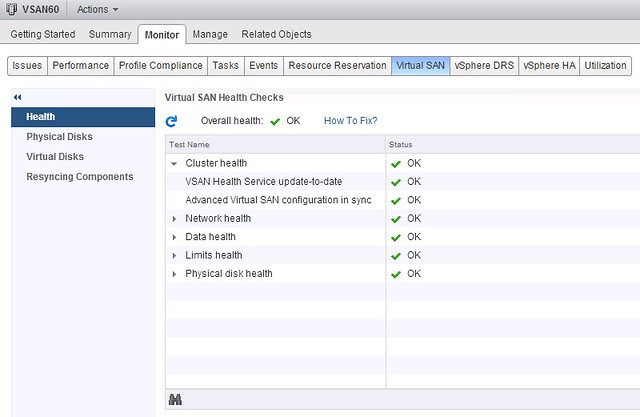
Last one I want to mention is the Virtual SAN Health Service plugin. This is a separately developed Web Client plugin that will provide in-depth information about Virtual SAN. I gave it a try a couple of weeks ago and now have it running in my environment, impressed with what is in there and great to see this type of detail straight in the UI. I expect that we  will see various iterations in the upcoming year.

EZT Disks with VSAN, why would you?

Duncan Epping · Jan 26, 2015 ·

I noticed a tweet today which made a statement around the use of eager zero thick disks in a VSAN setup for running applications like SQL Server. The reason this user felt this was needed was to avoid the hit on “first write to block on VMDK”, it is not the first time I have heard this and I have even seen some FUD around this so I figured I would write something up. On a traditional storage system, or at least in some cases, this first write to a new block takes a performance penalty. The main reason for this is that when the VMDK is thin, or lazy zero thick, the hypervisor will need to allocate that new block that is being written to and zero it out.

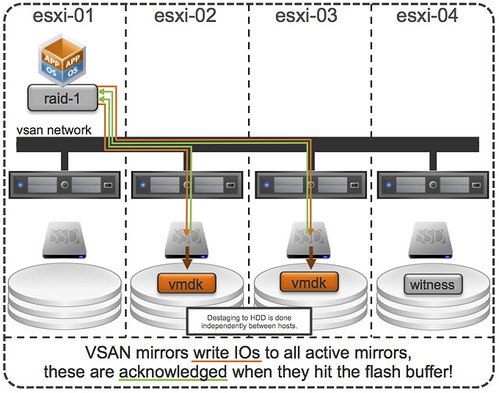
First of all, this was indeed true with a lot of the older storage system architectures (non-VAAI). However, this is something that even in 2009 was dispelled as forming a huge problem. And with the arrival of all-flash arrays this problem disappeared completely. But indeed VSAN isn’t an all-flash solution (yet), but for VSAN however there is something different to take in to consideration. I want to point out, that by default when you deploy a VM on VSAN you typically do not touch the disk format even and it will get deployed as “thin” with potentially a space reservation setting which comes from the storage policy! But what if you use an old template which has a zeroed out disk and you deploy that and compare it to a regular VSAN VM, will it make a difference? For VSAN eager zero thick vs thin will (typically) make no difference to your workload at all. You may wonder why, well it is fairly simple… just look at this diagram:

If you look at the diagram then you will see that the acknowledgement will happen to the application as soon as the write to flash has happened. So in the case of thick vs thin you can imagine that it would make no difference as the allocation (and zero out) of that new block would happen minutes after the application (or longer) has received the acknowledgement. A person paying attention would now come back and say: hey you said “typically”, what does that mean? Well that means that the above is based in the understanding that your working set will fit in cache, of course there are ways to manipulate performance tests to proof that the above is not always the case, but having seen customer data I can tell you that this is not a typical scenario… or extremely unlikely.

So if you deploy Virtual SAN… and have “old” templates floating around and they have “EZT” disks, I would recommend overhauling them as it doesn’t add much, well besides a longer waiting time during deployment.

  • « Go to Previous Page
  • Page 1
  • Interim pages omitted …
  • Page 53
  • Page 54
  • Page 55
  • Page 56
  • Page 57
  • Interim pages omitted …
  • Page 71
  • Go to Next Page »

Primary Sidebar

About the Author

Duncan Epping is a Chief Technologist and Distinguished Engineering Architect at Broadcom. Besides writing on Yellow-Bricks, Duncan is the co-author of the vSAN Deep Dive and the vSphere Clustering Deep Dive book series. Duncan is also the host of the Unexplored Territory Podcast.

Follow Us

  • X
  • Spotify
  • RSS Feed
  • LinkedIn

Recommended Book(s)

Also visit!

For the Dutch-speaking audience, make sure to visit RunNerd.nl to follow my running adventure, read shoe/gear/race reviews, and more!

Do you like Hardcore-Punk music? Follow my Spotify Playlist!

Do you like 80s music? I got you covered!

Copyright Yellow-Bricks.com © 2026 · Log in