• Skip to primary navigation
  • Skip to main content
  • Skip to primary sidebar

Yellow Bricks

by Duncan Epping

  • Home
  • Unexplored Territory Podcast
  • HA Deepdive
  • ESXTOP
  • Stickers/Shirts
  • Privacy Policy
  • About
  • Show Search
Hide Search

vSAN

Horizon View and All-Flash VSAN

Duncan Epping · Jul 3, 2015 ·

I typically don’t do these short posts which simply point to a white paper, but I really liked this paper on the topic of VMware Horizon View and All-Flash VSAN. In the paper it is demonstrated how to build an all-flash VSAN cluster using Dell servers, SanDisk flash and Brocade switches. Definitely recommended read if you are looking to deploy Horizon View anytime soon.

VMware Horizon View and All Flash Virtual SAN Reference Architecture
This Reference Architecture demonstrates how enterprises can build a cost-effective VDI infrastructure using VMware All Flash Virtual SAN combined with the fast storage IO performance offered by SSDs. The combination of Virtual SAN and all flash storage can significantly improve ROI without compromising on the high availability and scalability that customers demand.

Virtual SAN enabling PeaSoup to simplify cloud

Duncan Epping · Jun 25, 2015 ·

This week I had the pleasure of talking to fellow dutchy Harold Buter. Harold is the CTO for Peasoup and we had a lively discussion about Virtual SAN and why Peasoup decided to incorporate Virtual SAN in their architecture, what struck me was the fact that Peasoup Hosting was brought to life partly as a result of the Virtual SAN release. When we introduced Virtual SAN, Harold and his co-founder realized that this was a unique opportunity to build something from the ground up while avoiding big upfront costs typically associated with legacy arrays. How awesome is that, a new product that results in to new ideas and in the end a new company and product offering.

The conversation of course didn’t end there, lets get in to some more details. We discussed the use case first. PeaSoup is a hosting / cloud provider. Today they have two clusters running based on Virtual SAN. They have a management cluster which hosts all components needed for a vCloud Director environment and then they have a resource cluster. The great thing for PeaSoup was that they could start out with a relatively low investment in hardware and scale fast when new customers on-board or when existing customers require new hardware.

Talking about hardware PeaSoup looked at many different configurations and vendors and for their compute platform decided to go with Fujitsu RX300 rack mount servers. Harold mentioned that by far these were the best choice for them in terms of price, build quality and service. Personally it surprised me that Fujitsu came out as the cheapest option, it didn’t surprise me that Fujitsu’s service and build quality was excellent though. Specs wise the servers have 800GB SSDs, 7200 RPM NL-SAS disks and 256GB memory and of course two CPUs (Intel 2620 v2 – 6 core).

Harold pointed out that the only down side of this particular Fujitsu configuration was the fact that it only came with a disk controller that is limited to “RAID O” only, no passthrough. I asked him if they experienced any issues around that and he mentioned that they had 1 disk failure so far and that is resulted in having to reboot the server in order to recreate a RAID-0 set for that new disk. Not too big of a deal for PeaSoup, but of course if possible he would prefer to prevent this reboot from being needed. The disk controller by the way is based on the LSI 2208 chipset and it is one of things PeaSoup was very thorough about, making sure it was supported and that it had a high queue depth. The “HCL” came up multiple times during the conversation and Harold felt that although doing a lot of research up front and creating a scalable and repeatable architecture takes time, it also results in a very reliable environment with predictable performance. For a cloud provider reliability and user experience is literally your bread and butter, they couldn’t afford to “guess”. That was also one of the reasons they selected a VSAN Ready Node configuration as a foundation and tweaked where their environment and anticipated workload would require it.

Key take away: RAID-0 works perfectly fine during normal usage, only when disks need to be replaced a slight different operational process is required.

Anticipated is a keyword once again as it has been in many of the conversations I’ve had before, it is often unknown what kind of workloads will run on top of these infrastructures which means that you need to be able to be flexible in terms of scaling up versus scaling out. Virtual SAN provides just that to PeaSoup. We also spoke about the networking aspect. As a cloud provider running vCloud Director and Virtual SAN networking is a big aspect of the overall architecture. I was interested in knowing what kind of switching hardware was being used. PeaSoup uses Huawei 10GbE switches(CE6850), and each Server is connected with at least 4 x 10GbE port to these switches. PeaSoup dedicated 2 of these ports to Virtual SAN, which wasn’t a requirement from a load perspective (or from VMware’s point of view) but they preferred this level of redundancy and performance while having a lot of room to grow. Resiliency and future proof are key for PeaSoup. Price vs Quality was also a big factor in the decision to go with Huawei switches, Huawei in this case had the best price/quality ratio.

Key take away: It is worth exploring different network vendors and switch models. Prices greatly variate between vendors and models which could lead to substantial cost savings without impacting service / quality

Their host and networking configuration is well documented and can be easily repeated when more resources are needed. They even have discount / pricing documented with their suppliers so they know what the cost will be and can assess quickly what is needed and when, and of course what the cost will be. I also asked Harold if they were offering different storage profiles to provide their customers a choice in terms of performance and resiliency. So far they offer two different policies to their customers:

  • Failures to tolerate = 1  //  Stripe Width = 2
  • Failures to tolerate = 1  //  Stripe Width = 4

So far it appears that not too many customers are asking about higher availability, they recently had their first request and it looks like the offering will include “FTT=2” along side “SW=2 / 4” in the near future. On the topic of customers they mentioned they have a variety of different customers using the platform ranging from companies who are in the business of media conversion, law firms to a company which sells “virtual private servers” on their platform.

Before we wrapped up I asked Harold what the biggest challenge for them was with Virtual SAN. Harold mentioned that although they were a very early adopter and use it in combination with vCloud Director they have had no substantial problems. What may have been the most challenging in the first months was figuring out the operational processes around monitoring. Peasoup is a happy Veeam customer and they decided to use Veeam One to monitor Virtual SAN for now, but in the future they will also be looking at the vR Ops Virtual SAN management pack, and potentially create some custom dashboards in combination with LogInsight.

Key take away: Virtual SAN is not like a traditional SAN, new operational processes and tooling may be required.

PeaSoup is an official reference customer for Virtual SAN by the way, you can find the official video below and the slide deck of their PEX session here.

VSAN and large VMDKs on relative small disks?

Duncan Epping · Jun 4, 2015 ·

Last week and this week I received a question and as it was the second time in a short time I figured I would share it. The question was around how VSAN places a VMDK which is larger than the disks. Lets look at a diagram first as that will make it obvious instantly.

If you look at the diagram you see these stripes. You can define the number of stripes in a policy if you want. In the example above, the stripe width is 2. This is not the only time when you can see objects being striped though. If an object (VMDK for instance) is larger than 256GB it will create multiple stripes for this object. Also, if a physical disk is smaller than the size of the VMDK it will create multiple stripes for that VMDK. These stripes can be located on the same host as you can see in the diagram but also can be across hosts. Pretty cool right.

How Virtual SAN enables IndonesianCloud to remain competitive!

Duncan Epping · Jun 2, 2015 ·

Last week I had the chance to catch up with one of our Virtual SAN customers. I connected to Neil Cresswell through twitter and after going back and forth we got on a conference call. Neil showed me what they had created for the company he works for, a public cloud provider called IndonesianCloud. No need to tell you where they are located as the name kind of reveals it. Neil is the CEO of IndonesianCloud by the way, and very very passionate about IT / Technology and VMware. It was great talking to him, and before I forget I want to say thanks for taking time out of your busy schedule Neil, I very much appreciate it!
IndonesianCloud is a 3 year old, cloud service provider, part of the vCloud Air Network, which focuses on the delivery of enterprise class hosting services to their customers. Their customers primarily run mission critical workloads in IndonesianCloud’s three DC environment, which means that stability, reliability and predictability is really important.

Having operated a “traditional” environment for a long time Neil and his team felt it was time for a change (Servers + Legacy Storage). They needed something which was much more fit for purpose, was robust / reliable and was capable of providing capacity as well as great performance. On top of that, from a cost perspective it needed to be significantly cheaper. The traditional environment they were maintaining just wasn’t allowing them to remain competitive in their dynamic and price sensitive market. Several different hyperconverged and software based offerings were considered, but finally the settled on Virtual SAN.

Since the Virtual SAN platform was placed into production two months ago, they have deployed over 450 new virtual machines onto their initial 12 node cluster. In addition, migration of another 600 virtual machines from one of their legacy storage platforms to their Virtual SAN environment is underway. While talking to Neil I was mostly interested in some of the design considerations, some of the benefits but also potential challenges.

From a design stance Neil explained how they decided to go with SuperMicro Fat Twin hardware, 5 x NL-SAS drives (4TB) and Intel S3700 SSDs (800GB) per host. Unfortunately no affordable bigger SSDs were available, and as such the environment has a lower cache to capacity ratio than preferred. Still, when looking at the cache hit rate for reads it is more or less steady around 98-99%. PCIe flash was also looked at, but didn’t fit within the budget. These SuperMicro systems were on the VSAN Ready Node list, and this was one of the main reasons for Neil and the team to pick them. Having a pre-validated configuration, which is guaranteed to be supported by all parties, was seen as a much lower risk than building their own nodes. Then there is the network; IndonesianCloud decided to go with HP networking gear after having tested various products. One of the reasons for this was the better overall throughput, better multicast performance, and lower price per port. The network is 10GbE end to end of course.

Key take away: There can be substantial performance difference between the various 10GbE switches, do your homework!

The choice to deploy 4TB NL-SAS drives was a little risky; IndonesianCloud needed to balance the performance, capacity, and price ratios. Luckily having already run their existing cloud platform for 3 years, there was a history of IO information readily available. Using this GB/IOPS historical information meant that IndonesianCloud were able to make a calculated decision that 4TB drives with 800GB SSD would provide the perfect combination of performance and capacity. With very good cache hit rates, Neil would like to deploy larger SSD drives when they become available, as he believes that cache is a great way to minimise the impact of the slower drives. Equally, the write performance of the 4TB drives was also concerning. Using the default VSAN stripe size configuration of 1 meant that at most, only 2 drives were able to service write de-stage requests for a given VM, and due to the slow speed of the 4TB drives, this could have an impact on performance. To mitigate this, IndonesianCloud performed a series of internal tests that baselined different stripe sizes to get a good balance of performance. In the end a stripe size of 5 was selected, and is now being used for all workloads. This also helps in situations where reads are coming from disk by the way, great side effect. BTW, the best way to think about Stripe Size and Failures to Tolerate is like Raid 1E (mirrored stripes).

Key take away: Write performance of large NL-SAS drives is low, striping can help improving performance.

IndonesianCloud has standardised on a 12 node Virtual SAN cluster, and I asked why, given that Virtual SAN 5.5 U1 supports up to 32 nodes (64 with 6.0 even). Neil’s response was that 12 nodes is what comprises an internal “zone”, and that customers can balance their workloads across zones to provide higher levels of availability. Having all nodes in a single cluster, whilst possible, was not considered the best fit for a service provider that is all about containing risk. 12 nodes also maps to approximately 1000 VMs, which is what they have modelled the financial costs against, so 1000 VMs deployed on the 12 node cluster would consume CPU/Memory/Disk at the same ratio, effectively ensuring maximum utilisation of the asset.

If you look at the workloads IndonesianCloud customers run, they range from large databases, time sensitive ERP systems, webservers, streaming TV CDN services, and they are even running Airline ERP operations for a local carrier… All of these VMs are from external paying customers by the way, and all of them are mission critical for those customers. On top of Virtual SAN some customers even have other storage services running. One of them for instance is running SoftNAS on top of Virtual SAN to offer shared file services to other VMs. Vast ranges of different applications, with different IO profiles and different needs but all satisfied by Virtual SAN. One thing that Neil stressed was that the ability to change the characteristics (failures to tolerate) specified in a profile was key for them, it allows for a lot of flexibility / agility.

I did wonder, with VSAN being relative new to the market, if they had concerns in terms of stability and recoverability. Neil actually showed me their comprehensive UAT Testing Plan and the results. They were very impressed by how VSAN handled these tests without any problem. Tests ranging from pulling drives, failing network interfaces and switches, through to removing full nodes from the cluster, all of these were performed whilst simultaneously running various burn-in benchmarks. No problems whatsoever were experienced, and as a matter of fact the environment has been running great in production (don’t curse it!!).

Key take away: Testing, Testing, Testing… Until you feel comfortable with what you designed and implemented!

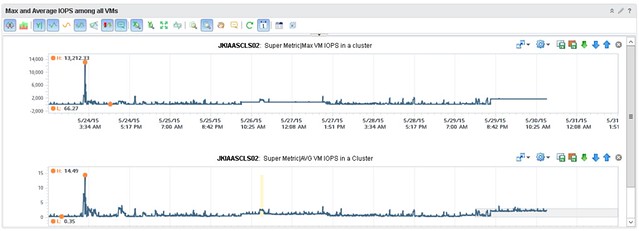
When it comes to monitoring though, the team did want to see more details than what is provided out of the box, especially because it is a new platform they felt that this gave them a bit more insurance that things were indeed going well and it wasn’t just their perception. They worked with one of VMware’s rock stars (Iwan Rahabok) when it comes to VR Ops on creating custom dashboards with all sorts of data ranging from cache hit ratio to latency per spindle to ANY type of detail you want on a per VM level. Of course they start with generic dashboard which then allow you to drill down; any outlier is noted immediately and leveraging VR Ops and these custom dashboards, they can drill deep whenever they need. What I loved most is how relatively easy it is for them to extend their monitoring capabilities. During our WebEx Iwan felt he needed some more specifics on a per VM basis and added these details literally within minutes to VR Ops. IndonesianCloud has been kind enough to share a custom dashboard they created, where they can catch a rogue VM easily. In this dashboard, when a single VM, and it can be any VM, generates excessive IOPS it will trigger a spike right away in the overall dashboard.

I know I am heavily biased, but I was impressed. Not just with Virtual SAN, but even more so with how IndonesianCloud has implemented it. How it is changing the way IndonesianCloud manages their virtual estate and how it enables them to compete in today’s global market.

No one ever got fired for buying IBM/HP/DELL/EMC etc

Duncan Epping · May 26, 2015 ·

Last week on twitter there was a discussion about hyper-converged solutions and how these were not what someone who works in an enterprise environment would buy for their tier 1 workloads. I asked the question: well what about buying Pure Storage, Tintri, Nimble or Solid Fire systems? All non-hyper converged solutions, but relatively new. Answer was straight forward: not buying those either, big risk. Then the classic comment came:

No one ever got fired for buying IBM (Dell, HP, NetApp, EMC… pick one)

Brilliant marketing slogan by the way (IBM) which has stuck around since the 70s and is now being used by many others. I wondered though… Did anyone ever get fired for buying Pure Storage? Or for buying Tintri? What about Nutanix? Or VMware Virtual SAN? Hold on, maybe someone got fired for buying Nimble, yeah probably Nimble then. No of course not, even after a dozen google searches nothing shows up. Why you may ask yourself, well because typically people don’t get fired for buying a certain solution. People get fired for being incompetent / lazy / stupid. In the case of infrastructure and workloads that translates in to managing and placing workloads incorrectly or misconfiguring infrastructure. Fatal mistakes which result in dataloss or long periods of downtime, that is what gets you fired.

Sure, buying from a startup may impose some risks. But I would hope that everyone reading this weighs those risks against the benefits, that is what you do as an architect in my opinion. You assess risks and you determine how to mitigate those within your budget. (Yes of course taking requirements and constraints in to account as well.)

Now when it comes to these newer storage solutions, and “new” is relative in this case as some have been around for over 5 years, I would argue that the risk is in most cases negligible. Will those newer storage systems be free of bugs? No, but neither will your legacy storage system be. Some of those systems have been around for over a decade and are now used in scenarios they were never designed for, which means that new problems may be exposed. I am not saying that legacy storage systems will break under your workload, but are you taking that risk in to account? Probably not, why not? Because hardly anyone talks about that risk.

If you (still) don’t feel comfortable with that “new” storage system (yet) but they do appear to give you that edge or bigger bang for the buck simply ask the sales rep a couple of questions which will help building trust:

  • How many systems are sold world wide similar to what you are looking to buy and for similar platforms
    • If they sold thousands, but none of them is using vSphere for instance then what are the chances of you hitting that driver problem firsts? If they sold thousand it will be useful to know…
  • How many customers for that particular model
    • Wouldn’t be the first time a vendors sells thousands of boxes to a single customer for a very specific use case and it works great for them, just not in your particular use case.
    • But if they have many customers, maybe ask…
  • If you can talk to a couple of customers
    • Best thing you can ask for in my opinion, reference call or visit. This is when you find out if what is promised actually is reality.

I do believe that the majority of infrastructure related startups are great companies with great technology. Personally I see a bigger threat in terms of sustainability, rather than technology. Not every startup is going to be around 10 years from now. But if you look at all the different storage (or infra) startups which are out there today, and then look at how they are doing in the market it shouldn’t be too difficult to figure out who is in it for the long run. Whether you buy from a well-established vendor or from a relatively new storage company, it is all about your workload. What are the requirements and how can those requirements be satisfied by that platform. Assess the risks and weigh them against the benefit and make a decision based on that. Don’t make decisions based on a marketing slogan that has been around since the 70s. The world looks different now, technology is moving faster than ever before, being stuck in the 70s is not going to help you or your company compete in this day and age.

  • « Go to Previous Page
  • Page 1
  • Interim pages omitted …
  • Page 52
  • Page 53
  • Page 54
  • Page 55
  • Page 56
  • Interim pages omitted …
  • Page 71
  • Go to Next Page »

Primary Sidebar

About the Author

Duncan Epping is a Chief Technologist and Distinguished Engineering Architect at Broadcom. Besides writing on Yellow-Bricks, Duncan is the co-author of the vSAN Deep Dive and the vSphere Clustering Deep Dive book series. Duncan is also the host of the Unexplored Territory Podcast.

Follow Us

  • X
  • Spotify
  • RSS Feed
  • LinkedIn

Recommended Book(s)

Also visit!

For the Dutch-speaking audience, make sure to visit RunNerd.nl to follow my running adventure, read shoe/gear/race reviews, and more!

Do you like Hardcore-Punk music? Follow my Spotify Playlist!

Do you like 80s music? I got you covered!

Copyright Yellow-Bricks.com © 2026 · Log in