• Skip to primary navigation
  • Skip to main content
  • Skip to primary sidebar

Yellow Bricks

by Duncan Epping

  • Home
  • Unexplored Territory Podcast
  • HA Deepdive
  • ESXTOP
  • Stickers/Shirts
  • Privacy Policy
  • About
  • Show Search
Hide Search

Server

Operational Efficiency (You’re not Facebook/Google/Netflix)

Duncan Epping · Dec 8, 2014 ·

In previous roles, also before I joined VMware, I was a system administrator and a consultant. The tweets below reminded me of the kind of work I did in the past and triggered a train of thought that I wanted to share…

@jtmcarthur56 That's only achievable when you have 50,000 servers running one application

— Howard Marks @DeepStorage@mastodon.social (@DeepStorageNet) December 3, 2014

Howard has a great point here. For some reason many people started using Google, Facebook or Netflix as the prime example of operational efficiency. Startups use it in their pitches to describe what they can bring and how they can simplify your life, and yes I’ve also seen companies like VMware use it in their presentations.When I look back at when I managed these systems my pain was not the infrastructure (servers / network / storage)… Even though the environment I was managing was based on what many refer to as legacy: EMC Clariion, NetApp FAS or HP EVA. The servers were never really the problem to manage either, sure updating firmware was a pain but not my biggest pain point. Provisioning virtual machines was never a huge deal… My pain was caused by the application landscape many of my customers had.

At companies like Facebook and Google the ratio of Application to Admin is different as Howard points out. I would also argue that in many cases the applications are developed in-house and are designed around agility, availability and efficiency… Unfortunately for most of you this is not the case. Most applications are provided by vendors which don’t really seem to care about your requirements, they don’t design for agility and availability. No, instead they do what is easiest for them. In the majority of cases these are legacy monolithic (cr)applications with a simple database which all needs to be hosted on a single VM and when you get an update that is where the real pain begins. At one of the companies I worked for we had a single department using over 80 different applications to calculate mortgages for the different banks and offerings out there, believe me when I say that that is not easy to manage and that is where I would spent most of my time.

I do appreciate the whole DevOps movement and I do see the value in optimizing your operations to align with your business needs, but we also need to be realistic. Expecting your IT org to run as efficient as Google/Facebook/Netflix is just not realistic and is not going to happen. Unless of course you invest deep and develop the majority of your applications in-house, and do so using the same design principles these companies use. Even then I doubt you would reach the same efficiency, as most simply won’t have the scale to reach it. This does not mean you should not aim to optimize your operations though! Everyone can benefit from optimizing operations, from re-aligning the IT department to the demands of todays world, from revising procedures… Everyone should go through this motion, constantly, but at the same time stay realistic. Set your expectations based on what lands on the infrastructure as that is where a lot of the complexity comes in.

Startup Intro: Eco4Cloud

Duncan Epping · Dec 3, 2014 ·

This week I had the pleasure to be briefed by Eco4Cloud on what it is they bring to the world of IT. First thing which stood out instantly that this startup is based out of Italy, yes indeed… Europe and not a Silicon Valley based startup… that is a nice change if you ask me! Not just from a geographical perspective are they different then most startups today, but also in terms of what solution they are building. Eco4Cloud is all about datacenter optimization and efficiency. What does this mean?
Most of you probably have heard of vSphere DRS and DPM, if you look at DPM from a conceptual perspective then you could say it is all about lowering cost by consolidating more virtual machines on fewer physical hosts and powering off the unneeded hosts. Eco4Cloud is targeting to do something similar, but doesn’t stop just there. Lets look at what they can do today.

Workload Consolidation is the name of the their core piece of technology (in my opinion). Workload Consolidation analyses your hosts and virtual machines and tries to increase consolidation to allow for hosts to be powered off without impacting the virtual machine SLAs. In other words, if your VM is using 1024MB and 2GHz it should have this available after the consolidation as well. (vMotion is used to move VMs around.) Now it does this in a smart way of course by ensuring that resources are properly balanced both from a CPU and Memory point of view. E4C has done many proof of concepts now and they have shown that they can for instance reduce power consumption between 30-60%, as you can imagine this is huge for larger datacenters. Of course it is not just the decrease of power consumption, but it is also reduction in carbon footprint etc.

Besides consolidation of your workload E4C also has a number of features that can help with optimizing your workloads itself. For instance Smart Ballooning which will preemptively, and in a smart way, claim unused memory from specific virtual machines so that other virtual machines can use the memory when needed. But more importantly, free up claimed resources which are not used anyway to avoid the scenario where you reach a state of (false) overcommitment.

Of course it is best to right size your virtual machines in the first place, but as we all know this is fairly difficult and especially with the ever growing demands of the application owners it is not going to get any easier. E4C can also help with that part, they can provide you the data needed to show VMs are oversized and help providing them the correct resources: Capacity Decision Support Manager. It doesn’t just allow you to analyze the current scenario, but also provides you the option to do “what if” scenarios. These “what if” scenarios are very useful in the case where you expect a growth. CDSM will be able to tell you how many hosts you will need to add, but can also help identifying which type of hosts.

Last but not least there is E4C Troubleshooter, a monitoring solution that will help identifying configuration problems for hosts and virtual machines. It can help you with identifying problems in different areas, but for now the focus seems to be SLA compliance, VM mobility and resource accessibility.

So who is doing this? E4C showed me a case study they have done with Telecom Italia, and out of the 500 hosts Telecom Italia had they were able to place 100 hosts in hibernation mode, leading to a 440MWh decrease (avg 20%). What I like about the solution by the way, as that you can run it in analysis mode without having it apply the recommendations. That way you can see first what the potential savings are.

So how does this thing work? Well it is fairly straight forward, as far as I understand. It is a simple appliance and installing it is no rocket science… Of course you will need to ask yourself how you would benefit from this solution, if you have 2 hosts then it probably will not make sense, but in large(r) environments I can definitely see how costs can be dramatically lowered leveraging their datacenter optimization solution.

** disclaimer: I was briefed by E4C, I have no direct experience with their products. E4C is actively looking for Enterprise customers who are willing to test out their solution in there data center. If you work for an Enterprise and are wondering if you can benefit from this, please leave a comment and I can get you in touch with them directly! **

Recommended viewing: VMUG Sessions

Duncan Epping · Nov 28, 2014 ·

Last week I presented at a couple of VMUGs and at those VMUGs all whole bunch of sessions were recorded. I receive a lot of requests to speak at VMUGs and although I try to attend many of them, there is still quite a few I have to decline unfortunately. Whenever I visit a VMUG I try to attend various sessions just to get a better understanding of what it is our partners offer, how our customers use our products and what type of questions are raised. Below you can find a couple of the sessions (including my own) which I enjoyed and recommend watching. I understand that it is difficult to find a block of 5 hrs to watch these, but I would like to urge to do so as they will prepare you for what is coming in the future.

Validate your hardware configuration when it arrives!

Duncan Epping · Nov 18, 2014 ·

In the last couple of weeks I had 3 different instances of people encountering weird behaviour in their environment. In two cases it was a VSAN environment and the other one was an environment using a flash caching solution. What all three had in common is that when they were driving a lot of IO the SSD device would be unavailable, for one of them they even had challenges enabling VSAN in the first place before any IO load was placed on it.

With the first customer it took me a while what was going on. I asked him the standard questions:

  • Which disk controller are you using?
  • Which flash device are you using?
  • Which disks are you using?
  • Do you have 10GbE networking?
  • Are they on the HCL?
  • What is the queue depth of the devices?

All the answers were “positive”, meaning that the full environment was supported… the queue depth was 600 so that was fine, enterprise grade MLC devices used and even the HDDs were on the HCL. So what was causing their problems? I asked them to show me the Web Client and the disk devices and the flash devices, then I noticed that the flash devices were connected to a different disk controller. The HDDs (SAS drives) were connected to the disk controllers which was on the HCL, a highly performant and reliable device… The flash device however was connected to the on-board shallow queue depth and non-certified controller. Yes indeed, the infamous AHCI disk controller. When I pointed it out the customers were shocked ,”why on earth would the vendor do that…”, well to be honest if you look at it: SAS drives were connected to the SAS controller and the SATA flash device was connected to the SATA disk controller, from that perspective it makes sense right? And in the end, the OEM doesn’t really know what your plans are with it when you configure your own box right? So before you install anything, open it up and make sure that everything is connected properly in a fully supported way! (PS: or simply go VSAN Ready Node / EVO:RAIL :-))

Slow backup of VM on VSAN Datastore

Duncan Epping · Nov 14, 2014 ·

Someone at out internal field conference asked me a question around why doing a full back up of a virtual machine on a VSAN datastore is slower then when doing the same exercise for that virtual machine on a traditional storage array. Note that the test that was conducted here was done with a single virtual machine. The best way to explain why this is is by taking a look at the architecture of VSAN. First, let me mention that the full backup of the VM on a traditional array was done on a storage system that had many disks backing the datastore on which the virtual machine was located.

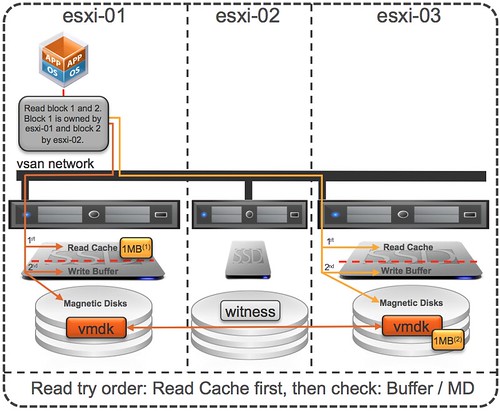
Virtual SAN, as hopefully all of you know, creates a shared datastore out of host local resources. This datastore is formed out of disk and flash. Another thing to understand is that Virtual SAN is an object store. Each object typically is stored in a resilient fashion and as such on two hosts, hence 3 hosts is the minimum. Now, by default the component of an object is not striped which means that components are stored in most cases on a single physical spindle, for an object this means that as you can see in the diagram below that the disk (object) has two components and without stripes is stored on 2 physical disks.

Now lets get back to the original question. Why did the backup on VSAN take longer then with a traditional storage system? It is fairly simple to explain looking at the above info. In the case of the traditional storage array you are reading from multiple disks (10+) but with VSAN you are only reading from 2 disks. As you can imagine when reading from disk performance / throughput results will differ depending on the number of resources the total number of disks it is reading from can provide. In this test, as there it is just a single virtual machine being backed up, the VSAN result will be different as it has a lower number of disks (resources) to its disposal and on top of that is the VM is new there is no data cached so the flash layer is not used. Now, depending on your workload you can of course decide to stripe the components, but also… when it comes to backup you can also decided to increase the number of concurrent backups… if you increase the number of concurrent backups then the results will get closer as more disks are being leveraged across all VMs. I hope that helps explaining  why results can be different, but hopefully everyone understands that when you test things like this that parallelism is important or provide the right level of stripe width.

  • « Go to Previous Page
  • Page 1
  • Interim pages omitted …
  • Page 95
  • Page 96
  • Page 97
  • Page 98
  • Page 99
  • Interim pages omitted …
  • Page 336
  • Go to Next Page »

Primary Sidebar

About the Author

Duncan Epping is a Chief Technologist and Distinguished Engineering Architect at Broadcom. Besides writing on Yellow-Bricks, Duncan is the co-author of the vSAN Deep Dive and the vSphere Clustering Deep Dive book series. Duncan is also the host of the Unexplored Territory Podcast.

Follow Us

  • X
  • Spotify
  • RSS Feed
  • LinkedIn

Recommended Book(s)

Also visit!

For the Dutch-speaking audience, make sure to visit RunNerd.nl to follow my running adventure, read shoe/gear/race reviews, and more!

Do you like Hardcore-Punk music? Follow my Spotify Playlist!

Do you like 80s music? I got you covered!

Copyright Yellow-Bricks.com © 2026 · Log in