I noticed a tweet today which made a statement around the use of eager zero thick disks in a VSAN setup for running applications like SQL Server. The reason this user felt this was needed was to avoid the hit on “first write to block on VMDK”, it is not the first time I have heard this and I have even seen some FUD around this so I figured I would write something up. On a traditional storage system, or at least in some cases, this first write to a new block takes a performance penalty. The main reason for this is that when the VMDK is thin, or lazy zero thick, the hypervisor will need to allocate that new block that is being written to and zero it out.
First of all, this was indeed true with a lot of the older storage system architectures (non-VAAI). However, this is something that even in 2009 was dispelled as forming a huge problem. And with the arrival of all-flash arrays this problem disappeared completely. But indeed VSAN isn’t an all-flash solution (yet), but for VSAN however there is something different to take in to consideration. I want to point out, that by default when you deploy a VM on VSAN you typically do not touch the disk format even and it will get deployed as “thin” with potentially a space reservation setting which comes from the storage policy! But what if you use an old template which has a zeroed out disk and you deploy that and compare it to a regular VSAN VM, will it make a difference? For VSAN eager zero thick vs thin will (typically) make no difference to your workload at all. You may wonder why, well it is fairly simple… just look at this diagram:
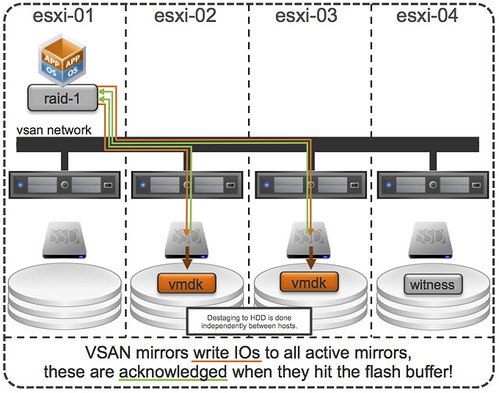
If you look at the diagram then you will see that the acknowledgement will happen to the application as soon as the write to flash has happened. So in the case of thick vs thin you can imagine that it would make no difference as the allocation (and zero out) of that new block would happen minutes after the application (or longer) has received the acknowledgement. A person paying attention would now come back and say: hey you said “typically”, what does that mean? Well that means that the above is based in the understanding that your working set will fit in cache, of course there are ways to manipulate performance tests to proof that the above is not always the case, but having seen customer data I can tell you that this is not a typical scenario… or extremely unlikely.
So if you deploy Virtual SAN… and have “old” templates floating around and they have “EZT” disks, I would recommend overhauling them as it doesn’t add much, well besides a longer waiting time during deployment.