• Skip to primary navigation
  • Skip to main content
  • Skip to primary sidebar

Yellow Bricks

by Duncan Epping

  • Home
  • Unexplored Territory Podcast
  • HA Deepdive
  • ESXTOP
  • Stickers/Shirts
  • Privacy Policy
  • About
  • Show Search
Hide Search

Server

EVO:RAIL now also available through HP and HDS!

Duncan Epping · Oct 14, 2014 ·

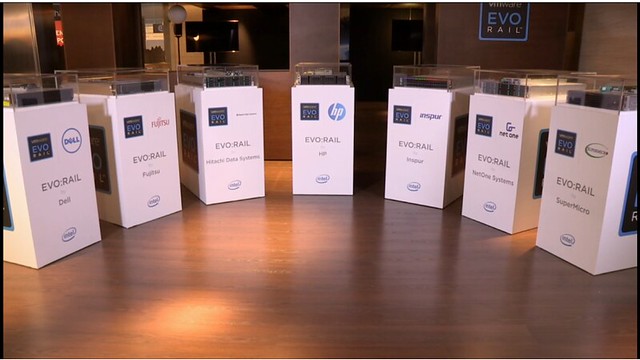
It is going to be a really short blog post, but as many folks have asked about this I figured it was worth a quick article. In the VMworld Europe 2014 keynote Pat Gelsinger today announced that both HP and Hitachi Data Systems have joined the VMware EVO:RAIL program. This is great news if you ask me for customers all throughout the world as it provides more options for procuring an EVO:RAIL hyper-converged infrastructure appliance through your preferred server vendor!

The family is growing: Dell, Fujitsy, Hitachi Data Systems, HP, Inspur, NetOne Systems and SuperMicro… who would you like to see next?
Underlying Infrastructure for your pets and cattle

Duncan Epping · Oct 10, 2014 ·

Last week on twitter Maish asked a question that got me thinking. Actually, I have been thinking about this for a while now. The question deals with how you design your infrastructure for the various types of workloads (pets and cattle). Whether your workload falls in the “pet” category or the “cattle” category. (If you are not familiar with the terms pets/cattle read this article by Massimo)

Pets vs. cattle – I think that people are mistaken as to what that exactly means for the underlying infrastructure.

— Maish Saidel-Keesing (@maishsk) October 5, 2014

I asked Maish what it actually means for your infrastructure, and at the same time I gave it some more thought over the last week. Cattle is the type of application architecture which handles failures by providing a distributed solution, it scales out instead of up typically, the VMs are disposable as they usually won’t hold state. With pets this is different, they typically scale up and resiliency is often provided by either a 3rd party clustering mechanism or the infrastructure under neath, in many cases contain state and recoverability is key. As you can imagine both types of workloads have different requirements of the infrastructure. Going back to Maish’s question, I guess the real question is if you can afford the “what it means for the underlying infrastructure”. What do I mean with that?

If you look at the requirements of both architectures, you could say that “pets” will typically demand more from the underlying infrastructure when it comes to resiliency / recoverability. Cattle will have less demands from that perspective but flexibility / agility is more important. You can imagine that you could implement two different infrastructure architectures for these specific workloads, but does this make sense? If you are Netflix, Google, Youtube etc then it may make sense to do this due to the scale they operate at and the fact that IT is their core business. In those cases “cattle” is what drives the business, and there are back-end systems. Reality is though that for the majority this is not the case. Your environment will be a hybrid, and more than likely “pets” will have the overhand as that is simply what the state of the world is today.

That does not mean they cannot co-exist. That is what I believe is the true strength of virtualization, it allows you to run many different types of workloads on the same infrastructure. Whether that is your Exchange environment or your in-house developed scale out web application which serves hundreds of thousands of customers does not make a difference to your virtualization platform. From an operational perspective the big benefit here is that you will not have to maintain different run books to manage your workloads. From an ops perspective they will look  the same on the outside, although they may differ on the inside. What may change though is the services required for those systems, but with the rich ecosystem available for virtualization platforms these days that should not be a problem. Need extra security / microsegmentation? VMware NSX can provide the security isolation needed to run these applications smoothly. Sub milliseconds latency requirements? Plenty of storage / caching solutions out there that can deliver this!

Will the application architecture shift that is happening right now impact your underlying infrastructure? We have made these huge steps in operational efficiency in the last 5 years, and with SDDC we are about to take the next big step, and although I do believe that the application architecture shift will result in infrastructure changes lets not make the same mistakes we made in the past by creating these infrastructure silos per workload. I strongly believe that repeatability, consistency, reliability and predictability are key and this starts with a solid, scalable and trusted foundation (infrastructure).

vSphere 5.1 Clustering Deep Dive promotion & major milestone

Duncan Epping · Oct 9, 2014 ·

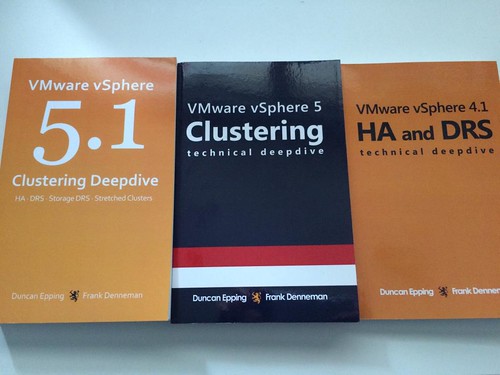
This week when looking at the sales numbers of the vSphere Clustering Deep Dive series and Frank and I noticed that we hit a major milestone! In September 2014 we passed the 45000 copies distributed of the vSphere Clustering Deep Dive. Frank and I never ever expected this or even dared to dream to hit this milestone.

When we first started writing the 4.1 book we had discussions around what to expect from a sales point of view and I recall having a discussion with Frank around the sales number, Frank said he would be happy with 100 and I said well 400 would be nice. Needless to say we reset our expectations many times since then… We didn’t really follow it closely in the last 12-18 months, and as today we were discussing a potential update of the book we figured it was time to look at the numbers again just to get an idea. 45000 copies distributed (ebook + printed) is just remarkable, and we are very humbled, baffled and honoured!

We’ve noticed that the ebook is still very popular, and decided to do a promo. As of Monday the 13th of October the 5.1 ebook (kindle) will be available for only $ 0.99 for 72 hours, then after 72 hours the price will go up to $ 3.99 and then after 72 hours it will be back to the normal price. Make sure to get it while it is low priced!

You can pick it up here on Amazon.com! The only other kindle store we could open the promotion up for was amazon.co.uk, so that is also an option.

Project Fargo aka VMFork – What is it?

Duncan Epping · Oct 7, 2014 ·

I have seen various people talking about Project Fargo (also known as VM Fork or Instant Clone) and what struck me is that many are under the impression that Project Fargo is the result of the CloudVolumes acquisition. Lets set that straight first, Project Fargo is not based on any technology developed by the CloudVolumes team. Project Fargo has been developed in house and as far as I can tell is an implementation of Snowflock (University of Toronto / Carnegie Mellon University), although I know that in house they have been looking at techniques like these for a long time. Okay, now that we have that out of the way, what is Project Fargo?

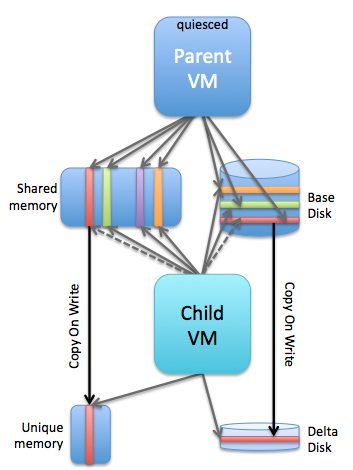
Simply said: Project Fargo is a solution that enables you to rapidly clone a running VM. When I say “rapidly clone”, I mean RAPIDLY… Within seconds. Yes, that is extremely fast for a running VM. What should be noted here of course is the fact that it is not a full clone. I guess this is where the “VMFork” name comes in to play, the “parent” virtual machine is quiesced and forked and a “child” VM is born. This child VM is leveraging the disk and memory of the parent (for reads), this is why it is so extremely fast to instantiate… as I said literally seconds, as it “only” needs to create empty delta files, create a VMX and instantiate the process, and do some networking magic as you do not want to have VMs popping up on the network with the same MAC address. Note that the child VM starts where the parent VM left off, so there is no boot process it is instant on! (just like you suspend and resume it) I can’t reveal too much around how this works, yet, but you can imagine that a technique like “fast suspend resume” (FSR), which is the corner stone of features like Storage vMotion, is leveraged.

The question then arises, what if the child wants to write data to memory or disk? This is where the “copy on write” technique comes in to play. Of course the child won’t be allowed to over write shared memory pages (or disk for that matter) and as such a new page will be allocated. For those having a hard time visualizing it, note that this is a conceptual diagram and not how it actually is implemented, I should have maybe drawn the different layers but it would make it too complex. In this scenario you see a single parent with a single child, but you can imagine there could also be 10 child VMs or more, you can see how efficient that would be in terms of resource sharing! And even for the pages which would be unique compared to the parent, if you clone many similar VMs there is a significant chance that TPS will be able to collapse those even! One thing to point out here is that the parent VM is quiesced, in other words it’s sole purpose is allowing for the quick creation of child VMs.

project fargo

Cool piece of technology I agree, but what would the use case be? Well there are multiple use cases, and those who will be attending VMworld should definitely visit the sessions which will discuss this topic or watch them online (SDDC3227, SDDC3281, EUC2551 etc). I think there are 2 major use cases: virtual desktops and test/dev.

The virtual desktop (just in time desktops) use case is pretty obvious… You create that parent VM, spin it up and it gets quiesced and you can start forking that parent when needed. This will almost be instant, very efficient and also reduce the required resource capacity for VDI environments.

With test/dev scenarios you can imagine that when testing software you don’t want to wait for lengthy cloning processes to finish. Forking a VM will allow you to rapidly test what has been developed , within seconds you have a duplicate environment which you can use / abuse any way you like and destroy it when done. As the disk footprint is small, create/destroy will have a minimal impact on your existing infrastructure both from a resource and “stress” point of view. It basically means that your testing will take less time “end-to-end”.

Can’t wait for it to be available and to start testing it, especially when combined with products like CloudVolumes and Virtual SAN this feature has a lot of potential.

** UPDATE: Various people asked questions around what would happen with VMFork now TPS is disabled by default in upcoming versions of vSphere. I spoke with the lead engineer on this topic and he assured me there is no impact on VMFork. The disabling of TPS will be overruled per VMFork group. So the parent and childs belonging to the same group will be able to leverage TPS and share pages. **

VMware EVO:RAIL demos

Duncan Epping · Sep 22, 2014 ·

I just bumped in to a bunch of new VMware EVO:RAIL demos which I wanted to share. Especially the third demo which shows how EVO:RAIL scales out by a couple of simple clicks.

General overview:

Customer Testimonial:


Clustering appliances:

Management experience:

Configuration experience:

x

  • « Go to Previous Page
  • Page 1
  • Interim pages omitted …
  • Page 97
  • Page 98
  • Page 99
  • Page 100
  • Page 101
  • Interim pages omitted …
  • Page 336
  • Go to Next Page »

Primary Sidebar

About the Author

Duncan Epping is a Chief Technologist and Distinguished Engineering Architect at Broadcom. Besides writing on Yellow-Bricks, Duncan is the co-author of the vSAN Deep Dive and the vSphere Clustering Deep Dive book series. Duncan is also the host of the Unexplored Territory Podcast.

Follow Us

  • X
  • Spotify
  • RSS Feed
  • LinkedIn

Recommended Book(s)

Also visit!

For the Dutch-speaking audience, make sure to visit RunNerd.nl to follow my running adventure, read shoe/gear/race reviews, and more!

Do you like Hardcore-Punk music? Follow my Spotify Playlist!

Do you like 80s music? I got you covered!

Copyright Yellow-Bricks.com © 2026 · Log in