• Skip to primary navigation
  • Skip to main content
  • Skip to primary sidebar

Yellow Bricks

by Duncan Epping

  • Home
  • Unexplored Territory Podcast
  • HA Deepdive
  • ESXTOP
  • Stickers/Shirts
  • Privacy Policy
  • About
  • Show Search
Hide Search

Server

ScaleIO in the ESXi Kernel, what about the rest of the ecosystem?

Duncan Epping · Jan 6, 2015 ·

Before reading my take on this, please read this great article by Vijay Ramachandran as he explains the difference between ScaleIO and VSAN in the kernel. And before I say anything, let me reinforce that this is my opinion and not VMware’s necessarily. I’ve seen some negative comments around Scale IO / VMware / EMC, most of them are around the availability of a second storage solution in the ESXi kernel next to VMware’s own Virtual SAN. The big complaint typically is: Why is EMC allowed and the rest of the ecosystem isn’t? The question though is if VMware is really not allowing other partners to do the same? While flying to Palo Alto I read an article by Itzik which stated the following:

ScaleIO 1.31 introduces several changes in the VMware environment. First, it provides the option to install the SDC natively in the ESX kernel instead of using the SVM to host the SDC component. The V1.31 SDC driver for ESX is VMware PVSP certified, and requires a host acceptance level of “PartnerSupported” or lower in the ESX hosts.

Let me point out here that the solution that EMC developed is under PVSP support. What strikes me is the fact that many seem to think that what ScaleIO achieved is a unique thing despite the “partner support” statement. Although I admit that there aren’t many storage solutions that sit within the hypervisor, and this is great innovation, it is not unique for a solution to sit within the hypervisor.

If you look at flash caching solutions for instance you will see that some sit in the hypervisor (PernixData, SanDisk’s Flashsoft) and some sit on top (Atlantis, Infinio). It is not like VMware favours one over the other in case of these partners. It was their design, it was their way to get around a problem they had… Some managed to develop a solution that sits in the hypervisor, others did not focus on that. Some probably felt that optimizing the data path first was most important, and maybe even more important they had the expertise to do so.

Believe me when I say that it isn’t easy to create these types of solutions. There is no standard framework for this today, hence they end up being partner supported as they leverage existing APIs and frameworks in an innovative way. Until there is you will see some partners sitting on top and others within the hypervisor, depending on what they want to invest in and what skill set they have… (Yes a framework is being explored as talked about in this video by one of our partners, I don’t know when or if this will be release however!)

What ScaleIO did is innovative for sure, but there are others who have done something similar and I expect more will follow in the near future. It is just a matter of time.
Two logical PCIe flash devices for VSAN

Duncan Epping · Jan 5, 2015 ·

A couple of days ago I was asked whether I would recommend to use two logical PCIe flash devices leveraging a single physical PCIe flash device. The reason for the question was the recommendation from VMware to have two Virtual SAN disk groups instead of (just) one disk group.

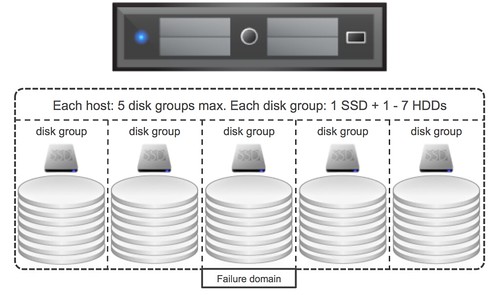
First of all, I want to make it clear that this is a recommended practices but definitely not a requirement. The reason people have started recommending it is because of “failure domains”. As some of you may know, when a flash device becomes unavailable, which is used for read caching / write buffering and fronts a given set of disks, all the disks in that disk group associated with the flash devices becomes unavailable. As such a disk group can be considered a failure domain, and when it comes to availability it is typically best to spread risks so having multiple failure domains is desirable.

When it comes to PCIe devices would it make sense to carve up a single physical device in to multiple logical? From a failure point of view I personally think it doesn’t add much value, if the device fails then it is likely both logical devices fail. From an availability point of view there isn’t much 2 logical devices adds, however it could be beneficial to have multiple logical devices if you have more than 7 disks per server.

As most of you will know each host can have 7 disks per disk group at most and 5 disk groups per server. If there is a requirement for the server to have more than 7 disks then there will be a need to have multiple flash devices, in that scenario creating multiple logical devices would be needed, although I would still prefer having multiple physical devices from a failure tolerance perspective than having multiple logical devices. But I guess it all depends on what type of devices you use, if you have sufficient PCIe slots available etc. In the end the decision is up to you, but do make sure you understand the impact of your decision.

SIOControlFlag2 what is it?

Duncan Epping · Dec 19, 2014 ·

I had a question this week what Misc SIOControlFlag2 was. Some refer to it as SIOControlFlag2 and I’ve also seen Misc.SIOControlFlag2. In the end it is the same thing. It is something that sometimes pops up in the log files, or some may stumble in to the setting in the “advanced settings” on a host level. The question I had was why the value is 0 on some hosts, 2 on others or even 34 on other hosts.

Let me start with saying that it is nothing to worry about, even when you are not using Storage IO Control. It is an internal setting which is used by ESXi (hostd sets it) when there is an operation done where disk files on a volume are opened (vMotion / power on etc). This is set to ensure that when Storage IO Control is used that the “SIOC injector” knows when to or when not to use the volume to characterize it. Do not worry about this setting being different on the hosts in your cluster, it is an internal setting which has no impact on your environment itself, other then when you use SIOC this will help SIOC making the right decision.

Virtualization networking strategies…

Duncan Epping · Dec 18, 2014 ·

I was asked a question on LinkedIn about the different virtualization networking strategies from a host point of view. The question came from someone who recently had 10GbE infrastructure introduced in to his data center and the way the network originally was architected was with 6 x 1 Gbps carved up in three bundles of 2 x 1Gbps. Three types of traffic use their own pair of NICs: Management, vMotion and VM. 10GbE was added to the current infrastructure and the question which came up was: should I use 10GbE while keeping my 1Gbps links for things like management for instance? The classic model has a nice separation of network traffic right?

Well I guess from a visual point of view the classic model is nice as it provides a lot of clarity around which type of traffic uses which NIC and which physical switch port. However in the end you typically still end up leveraging VLANs and on top of the physical separation you also provide a logical separation. This logical separation is the most important part if you ask me. Especially when you leverages Distributed Switches and Network IO Control you can create a great simple architecture which is fairly easy to maintain and implement both from a physical and virtual point of view, yes from a visual perspective it may be bit more complex but I think the flexibility and simplicity that you get in return definitely outweighs that. I definitely would recommend, in almost all cases, to keep it simple. Converge physically, separate logically.

Geek Whisperers episode: Marketing, Blogging & Community

Duncan Epping · Dec 16, 2014 ·

I had the honor a couple of weeks ago to be on the Geek Whisperers podcast. It was very entertaining with John, Amy and Matt. The podcast deals about how I got started with blogging and communities and many other random topics.

There are a couple things which I wanted to share. First and foremost, blogging and social media has got nothing do with marketing for me personally, it is what I do, it is who I am. Everyone has a different way of digesting information, learning new things, dealing with complex matters or even dealing with emotions… Some sit down behind a white board, some discuss it with their colleagues, I write / share.

Secondly, when it comes to social media I am (more and more) a believer in the “social aspect”. I’ve seen the rise of the “message boards” and online communities and all the flame wars that came with it, I’ve seen the same on twitter / facebook etc. Recently I decided to be more hardline when it comes to social media and following people / accepting friend requests. If you look at facebook for instance, which is more personal for me then twitter, I have pictures of my kids up there so in that case I want to make sure I “trust” the person before I accept. And then there is the whole unfollowing / unfriending thing… Anyway, enough said… just have a listen.

And euuhm, thanks Matt for the nice pic of me riding a unicorn shooting rainbows, not sure what to think of it yet 🙂

http://geek-whisperers.com/2014/12/marketing-blogging-community-talking-with-duncan-epping-episode-69/

  • « Go to Previous Page
  • Page 1
  • Interim pages omitted …
  • Page 94
  • Page 95
  • Page 96
  • Page 97
  • Page 98
  • Interim pages omitted …
  • Page 336
  • Go to Next Page »

Primary Sidebar

About the Author

Duncan Epping is a Chief Technologist and Distinguished Engineering Architect at Broadcom. Besides writing on Yellow-Bricks, Duncan is the co-author of the vSAN Deep Dive and the vSphere Clustering Deep Dive book series. Duncan is also the host of the Unexplored Territory Podcast.

Follow Us

  • X
  • Spotify
  • RSS Feed
  • LinkedIn

Recommended Book(s)

Also visit!

For the Dutch-speaking audience, make sure to visit RunNerd.nl to follow my running adventure, read shoe/gear/race reviews, and more!

Do you like Hardcore-Punk music? Follow my Spotify Playlist!

Do you like 80s music? I got you covered!

Copyright Yellow-Bricks.com © 2026 · Log in