• Skip to primary navigation
  • Skip to main content
  • Skip to primary sidebar

Yellow Bricks

by Duncan Epping

  • Home
  • Unexplored Territory Podcast
  • HA Deepdive
  • ESXTOP
  • Stickers/Shirts
  • Privacy Policy
  • About
  • Show Search
Hide Search

Server

Enable SSH on ESXi 4.1

Duncan Epping · Oct 3, 2010 ·

As, to my surprise, I still daily have 300/400 unique views on my article about how to enable SSH on ESXi 3.x I figured people would be interested in knowing how to enable it on ESXi 4.1. SSH is part of the TSM (Tech Support Mode) functionality. There are two different kind of Tech Support Modes:

  1. Local Tech Support (Commandline access)
  2. Remote Tech Support (SSH)

Enabling either of the two is really simple:

  • Open the ESXi console
  • Login(F2) and go to “Troubleshooting Options“
  • Now you will see options called “Tech Support”, hit “enter” on either Remote Tech Support (SSH) or Local Tech Support

You could of course also enable it through the vSphere Client:

  • Select the host and click the Configuration tab.
  • Click Security profile > Properties.
  • Click Local Tech Support or Remote Tech Support (SSH) and click Options.
  • Choose the desired startup policy and click Start, then click OK.
  • Verify that the daemon selected in step 3 shows as running in the Services Properties window.
vCD restart issues

Duncan Epping · Sep 30, 2010 ·

One of my readers had an issue with a vCD cell not starting correctly. He wanted to know how to monitor the progress of the startup of the daemon. You can do that very easy with the following command:

tail -f /opt/vmware/cloud-director/logs/cell.log

Now you should see status updates like the following pass by:

Application Initialization: 9% complete. Subsystem 'com.vmware.vcloud.common.core' started

At some point it should of course say “Application Initialized”. If it doesn’t the cell.log file should give a hint why it hasn’t been initialized. If for whatever reason the issue persists you could always check the “vcloud-vmware-watchdog.log” for details on the dump. There is a great KB article on this topic though, make sure you read it!

Now, what I wanted to use this article for is to document percentage where a start can get stuck and the possible issue that causes it. I have just a one to start with but hopefully this will grow overtime:

  • 9% – Possibly caused by DNS issues

Storage I/O Fairness

Duncan Epping · Sep 29, 2010 ·

I was preparing a post on Storage I/O Control (SIOC) when I noticed this article by Alex Bakman. Alex managed to capture the essence of SIOC in just two sentences.

Without setting the shares you can simply enable Storage I/O controls on each datastore. This will prevent any one VM from monopolizing the datatore by leveling out all requests for I/O that the datastore receives.

This is exactly the reason why I would recommend anyone who has a large environment, and even more specifically in cloud environments, to enable SIOC. Especially in very large environments where compute, storage and network resources are designed to accommodate the highest common factor it is important to ensure that all entities can claim their fair share of resource and in this case SIOC will do just that.

Now the question is how does this actually work? I already wrote a short article on it a while back but I guess it can’t hurt to reiterate thing and to expand a bit.

First a bunch of facts I wanted to make sure were documented:

  • SIOC is disabled by default
  • SIOC needs to be enabled on a per Datastore level
  • SIOC only engages when a specific level of latency has been reached
  • SIOC has a default latency threshold of 30MS
  • SIOC uses an average latency across hosts
  • SIOC uses disk shares to assign I/O queue slots
  • SIOC does not use vCenter, except for enabling the feature

When SIOC is enabled disk shares are used to give each VM its fair share of resources in times of contention. Contention in this case is measured in latency. As stated above when latency is equal or higher than 30MS, and the statistics around this are computed every 4 seconds, the “datastore-wide disk scheduler” will determine which action to take to reduce the overall / average latency and increase fairness. I guess the best way to explain what happens is by using an example.

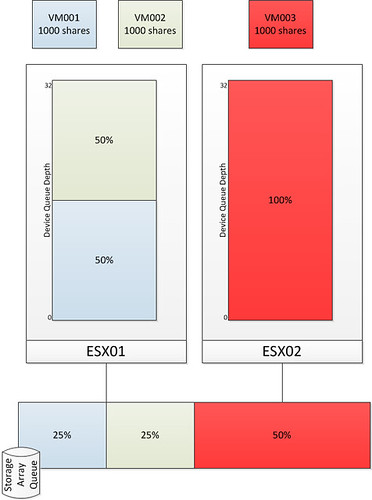
As stated earlier, I want to keep this post fairly simple and I am using the example of an environment where every VM will have the same amount of shared. I have also limited the amount of VMs and hosts in the diagrams. Those of you who attended VMworld session TA8233 (Ajay and Chethan) will recognize these diagrams, I recreated and slightly modified them.

The first diagram shows three virtual machines. VM001 and VM002 are hosted on ESX01 and VM003 is hosted on ESX02. Each VM has disk shares set to a value of 1000. As Storage I/O Control is disabled there is no mechanism to regulate the I/O on a datastore level. As shown in the bottom by the Storage Array Queue in this case VM003 ends up getting more resources than VM001 and VM002 while all of them from a shares perspective were entitled to the exact same amount of resources. Please note that both Device Queue Depth’s are 32, which is the key to Storage I/O Control but I will explain that after the next diagram.

As stated without SIOC there is nothing that regulates the I/O on a datastore level. The next diagram shows the same scenario but with SIOC enabled.

After SIOC has been enabled it will start monitoring the datastore. If the specified latency threshold has been reached (Default: Average I/O Latency of 30MS) for the datastore SIOC will be triggered to take action and to resolve this possible imbalance. SIOC will then limit the amount of I/Os a host can issue. It does this by throttling the host device queue which is shown in the diagram and labeled as “Device Queue Depth”. As can be seen the queue depth of ESX02 is decreased to 16. Note that SIOC will not go below a device queue depth of 4.

Before it will limit the host it will of course need to know what to limit it to. The “datastore-wide disk scheduler” will sum up the disk shares for each of the VMDKs. In the case of ESX01 that is 2000 and in the case of ESX02 it is 1000. Next the  “datastore-wide disk scheduler” will calculate the I/O slot entitlement based on the the host level shares and it will throttle the queue. Now I can hear you think what about the VM will it be throttled at all? Well the VM is controlled by the Host Local Scheduler (also sometimes referred to as SFQ), and resources on a per VM level will be divided by the the Host Local Scheduler based on the VM level shares.

I guess to conclude all there is left to say is: Enable SIOC and benefit from its fairness mechanism…. You can’t afford a single VM flooding your array. SIOC is the foundation of your (virtual) storage architecture, use it!

ref:
PARDA whitepaper
storage i/o control whitepaper
vmworld storage drs session
vmworld storage i/o control session

Number 1 virtualization/VMware Blog!

Duncan Epping · Sep 27, 2010 ·

Eric Siebert (vSphere-Land) published the results of the best VMware/Virtualization blog election today. A slightly different format this time though as they decided to record a special edition of vChat, Eric Siebert together with Simon Seagrave, David Davis and the infamous John Troyer announced the Top 25 and had a stack of compliments for every blogger out there.

I would like to thank everyone for voting for me again. I am honored to be part of the list and humbled to be voted number 1 amongst so many excellent blogs.

Watch the webcast for the full list, or take a shortcut and check Eric Sloof’s article.

vCD – Allocation Models

Duncan Epping · Sep 22, 2010 ·

Over the last two weeks I received multiple questions about the VMware vCloud Director (vCD) Allocation Models. vCD has three different type of allocation models which are used to allocate resources to a tenant. We will first reiterate some of the basic concepts of VMware Cloud Director before we dive into these allocation models.

vCD is an abstraction layer. vCD is a layer on top of vCenter and abstracts all the resources vCenter manages. All these resources are combined into large pools for cloud tenants to consume. (Read Frank’s excellent article on these resource groups.) Within VMware vSphere clusters and resource pools are used as resource containers. As a cloud tenant is unaware of the technology used underneath vCD has introduced the concept of Virtual Data Center’s (vDC).

There are two different types of vDC’s:

  • Provider vDC
  • Organization vDC (Org vDC)

A Provider vDC is a pool of CPU and memory resources combined with the storage resources you selected. A provider vDC can be a VMware vSphere Cluster or a Resource Pool and a provider vDC is the source for Org vDCs. Org vDCs are used within vCD to partition Provider vDCs and to allocate resources to an organization. vCD uses regular vSphere Resource Pools to partition these resources. So each Org vDC corresponds with a resource pool on the vSphere layer. So what is this Allocation Model that we will be discussing? Where does the Allocation Model come into play?

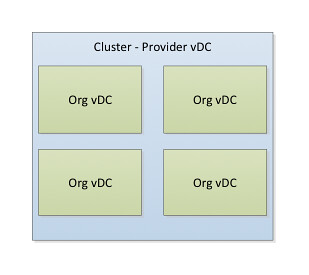
An Allocation Model is defined on an Org vDC level. The Diagram below depicts a scenario where four Org vDCs have been created in a single Provider vDC. The Provider vDC has a 1:1 relationship with the cluster in this case.

vmware vcloud director provider vdc org

Allocation Models

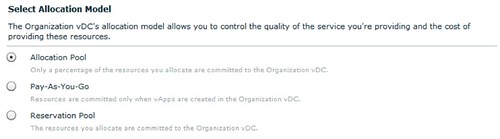
Allocation Models within vCD are used to determine how resources are allocated to the Organization vDC and more than likely how your customer will be charged for these resources. Currently vCD has three different types of allocation models. These allocation models are listed below, with the original description provided by vCD.

  • Allocation Pool
    Only a percentage of the resources you allocate are committed to the organization vDC. You can specify the percentage, which allows you to overcommit resources.
  • Pay-As-You-Go
    Allocated resources are only committed when users create vApps in the organization vDC. You can specify the maximum amount of CPU and memory resources to commit to the organization vDC.
  • Reservation Pool
    All of the resources you allocate are committed to the organization vDC.

Each allocation model has its own characteristics. These characteristics can be placed in two categories:

  • Virtual Machine Level
  • Resource Pool Level

The distinction between each of the Allocation Models is how resources are allocated or to use vSphere terminology how resources are reserved or limited. In order to guarantee resources to a VM or to an entire pool vCD will set a reservation. To avoid extreme contention vCD will also cap your resources by setting a limit. These reservations and limits will be set on a VM or Resource Pool level depending on the chosen allocation model.

For each allocation model shown in the screenshot below the characteristics will be broken down in the following sections.

vmware vcloud director allocation model

Allocation Pool

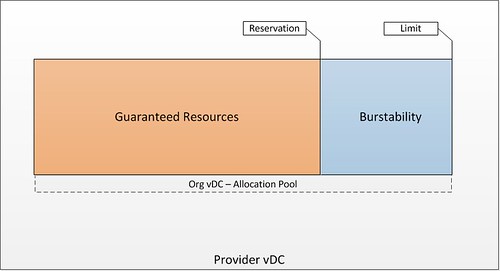
This is the default model, the Allocation Pool. This model allows you to specify the amount of resources for your Org vDC and also specify how much of these resources are guaranteed. Guaranteed means that a reservation will be set and that the amount of guaranteed resources is carved out of your Provider vDC. The total amount of resources specified is your upper boundary, also known as your resource pool limit. I think a diagram will explain it a bit better in this case:

vmware vcloud director allocation pool example

Characteristics

Each model as stated before has very specific characteristics. Each of these are listed below:

  • Pool of resources of which a percentage will be guaranteed
    • A reservation will be set to guarantee resources on a resource pool level
    • By default the resource pool reservations on CPU is 0% and memory 100%
    • Tenant has a guaranteed set of resources and has the ability to burst to the upper limit
  • VM Level characteristics
    • No reservations or limits set on a per VM level for CPU
    • Reservations set on a per VM level for memory. This reservation is based on the percentage of guaranteed resources

These characteristics are more in detail explained in the following example.

Allocation Pool example

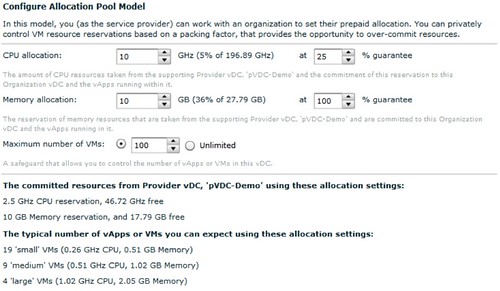
In the example below the tenant requested 10GHz of CPU resources with a guarantee of 25% and 10GB of memory with a guarantee of 100%.

vmware vcloud director allocation pool example

Note that the default for CPU is a 0% Guarantee which has been changed to 25% on CPU as requested by the tenant. Also note that you can specify the maximum amount of VMs that can be deployed in this org vDC. This will also help you restrict the level of over commitment and will be discussed later.

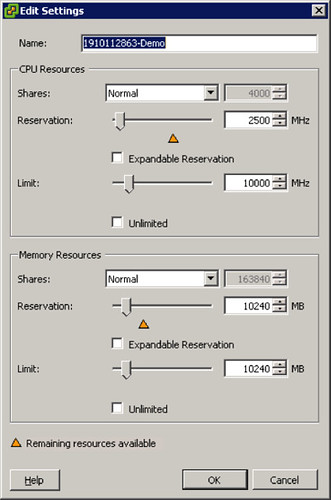
These settings on a vCD level result in a resource pool with a reservation of 2500MHz and a limit of 10.000MHz. As vCD describes it, 2500MHz are guaranteed and the customer will have the ability to burst up to 10.000MHz. The resource pool that is created and its properties are shown in the below screenshot.

vmware vcloud director allocation pool example

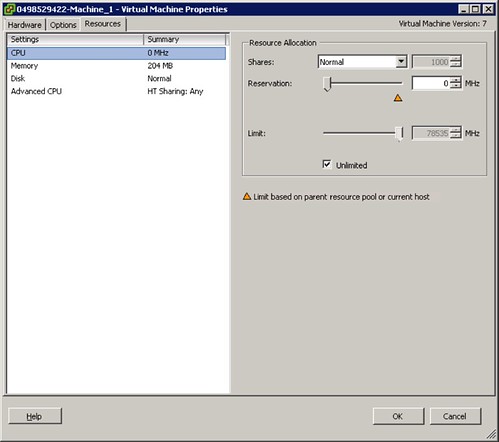
As described in the characteristics section no CPU reservation or limit is set on a VM level which is shown in the following screenshot.

vmware vcloud director allocation pool example

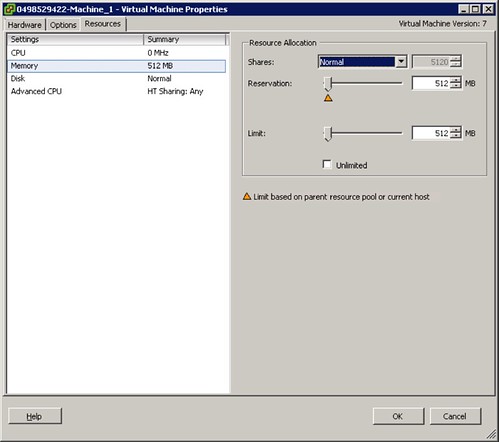
This is different on memory however. On memory both a reservation and a limit has been defined. The limit always equals the provisioned memory and the reservation equals the guaranteed memory as defined of part of the Allocation Model. However, in our example we set the percentage of guaranteed memory to 100% which results in a reservation and a limit of both 512MB.

vmware vcloud director allocation pool vm

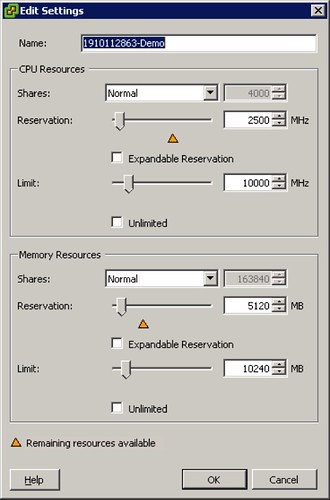
For the sake of completeness we have changed the guaranteed resources for memory to 50%. Of course the resource pool has changed accordingly. As shown in the screenshot below the reservation on memory has changed to 5120, which “happens” to be 50% of 10240.

vmware vcloud director allocation pool vm

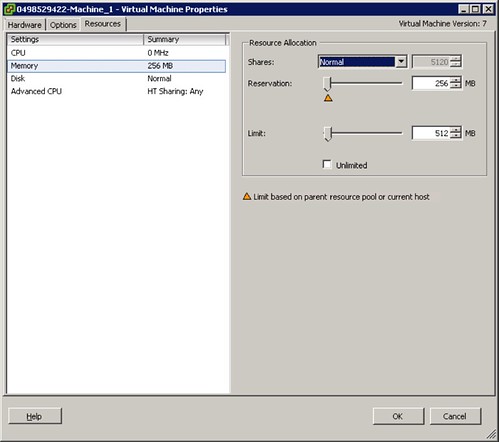
This will in its turn also has set the per VM level memory reservation to 50% of the provisioned memory. In the screenshot below the VM was provisioned with 512MB of which 256MB has been reserved.

vmware vcloud director allocation pool example vm

Summary

As shown in the example the percentage of guaranteed resources will have its impact on the implementation of the resource pool and the limits and reservations associated with these. It is recommended to align the maximum number of VMs with the specified amount of GHz and GB. When limiting the amount of VMs an extreme level of over commitment within the Org vDC can be avoided.

Pay-As-You-Go

This is the model many of you are familiar with and many also adopted in their company, pay-as-you-go. This model allows you to specify the amount of guaranteed resources per VM. When the percentage of guaranteed resources is set to 100% a reservation is set to 100% of what has been allocated that particular VM. Where this model differentiates itself from any of the other models is that it allows you to limit the vCPU speed. By default the vCPU speed is set to 0.26GHz, the impact of this vCPU speed will be shown in example below but be noted that this vCPU speed is set on the VM as a hard limit.

Characteristics

  • Percentage of resources guaranteed on a per VM level
    • A reservation will be set on a VM level
    • By default the VM reservation on CPU is 0% and memory 100%
    • By default the vCPU speed is set to 0.26GHz, which means you vCPU will be limited to 0.26GHz
  • The Org vDC resource pool is just an accumulation of all reservations set on a per VM level

These characteristics are more in detail explained in the following example.

Pay-As-You-Go example

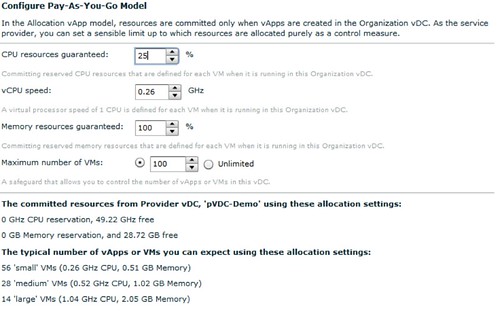
In the example below the customer requests an Org vDC based on the Pay-As-You-Go Org allocation model with a vCPU speed of 0.26GHz of which 25% is guaranteed. Memory will be left to the default setting which is a 100% guarantee.

vmware vcloud director pay as you go

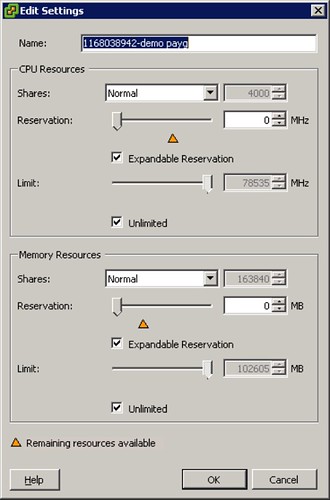
Note that the default for CPU is a 0% Guarantee which I changed to 25% on CPU to see the impact. Also note that the vCPU Speed is set by default to 0.26GHz. This is something that you will want to increase! When the Org vDC is created it results in a resource pool with the following characteristics.

vmware vcloud director pay as you go resource pool

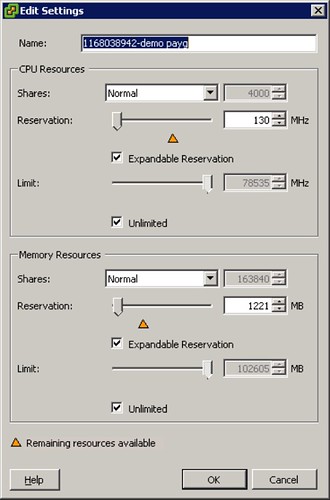
As described in the characteristics when vApps are created the associated reservations will be accumulated into the resource pool. When a vApp is created with two VMs (each having a single vCPU and 512MB of memory) this will result in the following changes, note that both the reservation on memory and CPU have changed.

vmware vcloud director pay as you go resource pool

As can be seen on a Resource Pool level a reservation is set of 130MHz which is 25% of 2 x 0.26GHz. A guarantee of 100% was set on memory which translates to 1221MB in total. (Note that a resource pool includes the Memory Overhead of virtualization. See the Resource Management Guide for more details)

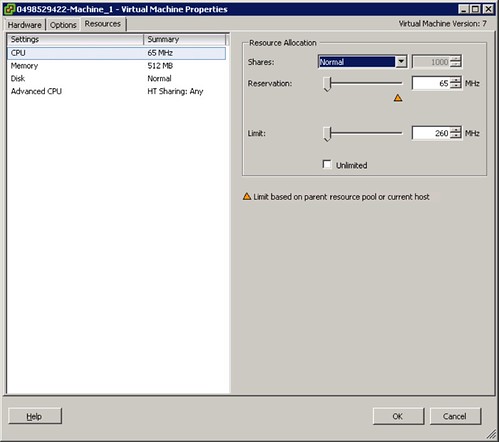
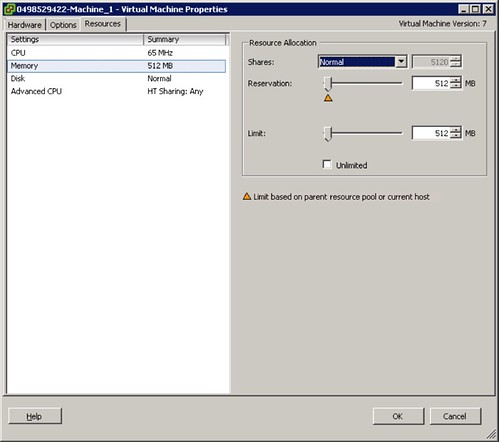
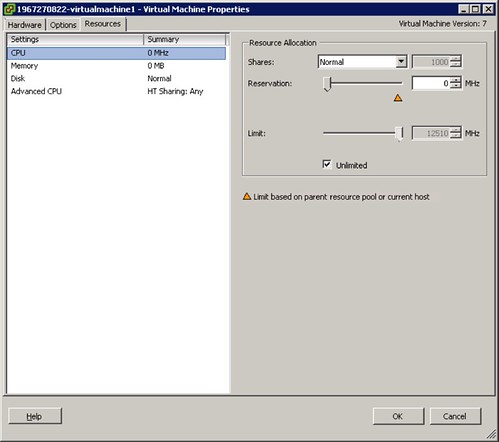
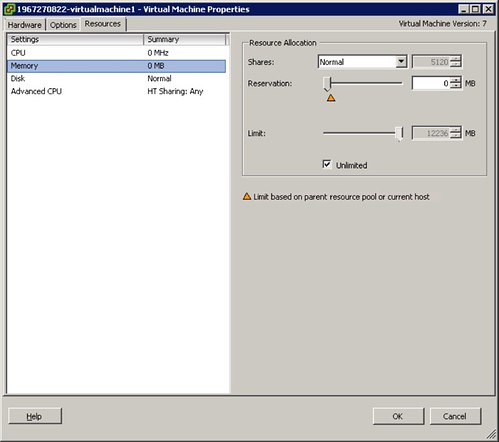
As stated the resource pool is jut an accumulation of all VMs. The following is what has been set on a per VM level, first screenshot shows the CPU details and the second shows the Memory details:

vmware vcloud director pay as you go vm

vmware vcloud director pay as you go vm

As can be seen a reservation has been set of 65MHz and a limit of 260MHz on CPU. For memory a 512MB reservation and limit has been set. If the “guarantee” on memory is set to 50% than the reservation of memory on this VM would be 256MB.

Summary

The tenant will have guaranteed resources per VM. As shown the vCPU speed defined is the limiting factor for a VM. For user experience it is recommended to select at least 1GHz as the vCPU speed. The resource pool created as part of the Org vDC only accumulates reserved resources and does not limit the VMs. Limits are placed on a per VM level. Please note that if the “guarantee” is set to 100% a reservation equal to the limit is set. In the case of a 1GHz reservation this can lead to very conservative consolidation ratios.

Reservation Pool

The third and final Allocation Model is the Reservation Pool. In this model all resources are guaranteed by default. It could be compared to an allocation pool with all guarantees set to 100% and is fairly straight forward.

Characteristics

  • Fully guaranteed pool of resources
    • A reservation will be set to guarantee resources on a resource pool level
  • No reservations or limits set on a per VM level for CPU

These characteristics are more in detail explained in the following example.

Reservation Pool example

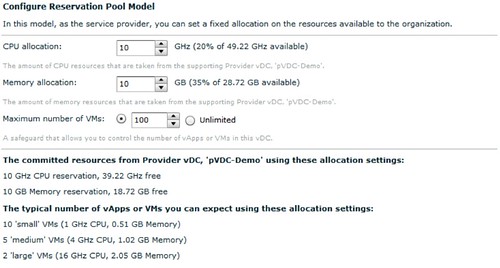
In the example below the customer requested 10GHz of CPU resources. As stated, the default guarantee is 100%. As can be seen in the screenshot there is no way to dictate the amount of MHz per vCPU or a Guarantee for that matter.

vmware vcloud director reservation pool

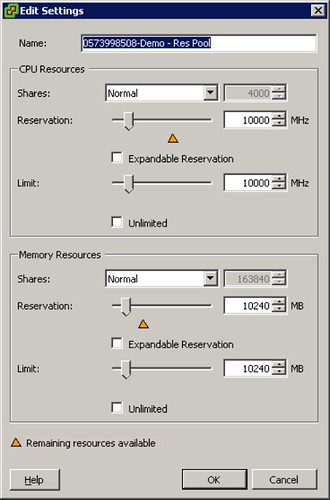
As expected that results in a resource pool with a limit equal to the reservation as shown in below screenshot.

vmware vcloud director reservation pool resourece

On a per VM level no reservations or limits are set. This is shown in the following two screenshots.

vmware vcloud director reservation pool vm

vmware vcloud director reservation pool vm

Summary

As shown the Reservation Pool allocation model is fairly straight forward. A limit equal to the reservation is set on a resource pool level which gives the tenant a guaranteed pool of resources. There are no limits or reservations set on a per VM level which gives the tenant a lot of flexibility. However, this flexibility could lead to severe over commitment within the Org vDC. As such it is recommended to limit the amount of VMs to avoid a degraded user experience.

Conclusion

Each of the three allocation models has its own unique characteristics to fit your customers needs. Is your customer looking for a pool of resources of which a chunk is guaranteed so that they can burst while having a fixed price per month and only pay for the burst space when they are using it? Allocation Pool would be the right answer! Do they have very transient workloads and do they only want to pay for these when using it? Pay-as-you-go would be the best fit. Is your customer just looking to expand their Datacenter with a “dedicated” chunk of resources? Reservation Pool does just that.

However, think before you decide which Allocation Model you will use, think about the amount of resources guaranteed and make sure the amount of resources add up with the max amount of VMs that can be deployed in the Org vDC. One of the most important thing when you are selling a service is user experience!

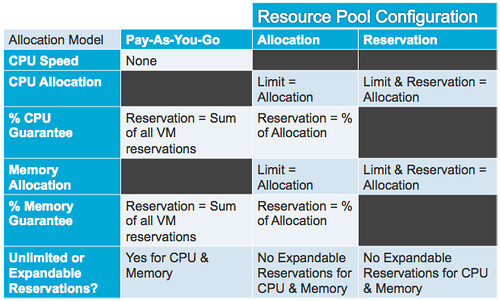
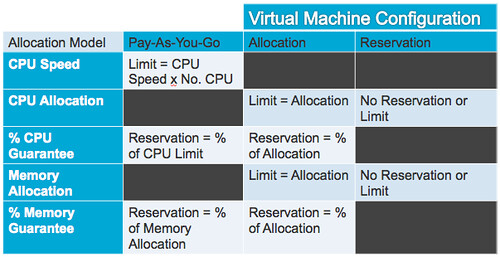
After I wrote all of this one of my colleagues(Thanks Andy!) was so kind to transform it into a table. This says it all in just two simple tables. The first table describes the characteristics on a Resource Pool level and the second on a Virtual Machine level. Enjoy:

vmware vcloud director allocation model table resource pool

vmware vcloud director allocation model table vm

  • « Go to Previous Page
  • Page 1
  • Interim pages omitted …
  • Page 203
  • Page 204
  • Page 205
  • Page 206
  • Page 207
  • Interim pages omitted …
  • Page 336
  • Go to Next Page »

Primary Sidebar

About the Author

Duncan Epping is a Chief Technologist and Distinguished Engineering Architect at Broadcom. Besides writing on Yellow-Bricks, Duncan is the co-author of the vSAN Deep Dive and the vSphere Clustering Deep Dive book series. Duncan is also the host of the Unexplored Territory Podcast.

Follow Us

  • X
  • Spotify
  • RSS Feed
  • LinkedIn

Recommended Book(s)

Also visit!

For the Dutch-speaking audience, make sure to visit RunNerd.nl to follow my running adventure, read shoe/gear/race reviews, and more!

Do you like Hardcore-Punk music? Follow my Spotify Playlist!

Do you like 80s music? I got you covered!

Copyright Yellow-Bricks.com © 2026 · Log in