• Skip to primary navigation
  • Skip to main content
  • Skip to primary sidebar

Yellow Bricks

by Duncan Epping

  • Home
  • Unexplored Territory Podcast
  • HA Deepdive
  • ESXTOP
  • Stickers/Shirts
  • Privacy Policy
  • About
  • Show Search
Hide Search

Server

Application Monitoring (HA)

Duncan Epping · Sep 10, 2010 ·

Over the last couple of weeks I received multiple questions around Application Monitoring. Application Monitoring is part of the HA stack. Application Monitoring is a feature of VM Monitoring and similar to VM Monitoring the VMware Tools heartbeat mechanism is used to detect outages.

Currently the API is only available to a select group of partners who are delivering a solution based on the App Monitoring API. However in the future it should be available to everyone as part of the Guest SDK, but unfortunately I can’t give you a time frame or more details around that. Some of you might have seen one of the recent announcements by Symantec. Symantec’s solution is actually based on VMware App Monitoring and I believe they were the first to announce that they would be using it. If you have seen other announcements let me know!

I have been told that VMware is currently looking into integrating some of it’s app with App Monitoring. In my opinion the most obvious ones that would benefit from this integration would be vCenter, SRM, View, Zimbra, vShield etc. However that is pure speculation and I seriously don’t know if VMware is planning anything around these products.

So in short, Application Monitoring uses the VMware Tools Heartbeat mechanism to detect an app failure. App Monitoring relies on the application to tell it if it needs to be restarted or not…. It is the responsibility of the application developer to utilize this functionality. I am trying to dig up more details around the innerworkings but unfortunately there isn’t more I can disclose at this point in time.

Hopefully this tiny bit of extra info is useful.

vCD – Networking part 2 – Network Pools

Duncan Epping · Sep 9, 2010 ·

In Part 1 of this series we described the different layers of networking. We already briefly spoke about Network Pools and that both a vApp Networks and Org Networks consume a segment out of a pool. In order to fully understand vCD (VMware vCloud Director) networking we will need to explain the foundation for all Cloud Internal traffic first which is the Network Pool.

Network Pools

As described in one of my earlier articles vCD mainly revolves around pooling of resources. This also goes for networking and more specifically for the Org Network and the vApp Network. Each vApp and Org Network will consume a network (segment) out of a defined pool. This network pool typically isolates network “segments” on layer 2 from the other networks in the pool. There are currently 3 types of network pools:

  1. VLAN Backed
  2. vCloud Network Isolation Backed (VCNI)
  3. Portgroup Backed

Each of these pools have specific requirements, recommendations and constraints and they will be listed below. However all of the three different types of pools are interchangeable; with that meaning a segment from a VLAN-Backed Pool and a Portgroup-Backed pool each offer the same functionality to your Org and vApp network and basically should be seen as a means of intra-Cloud transportation. Or to simplify it even further, it provides a wire. This wire enables VMs in a vApp to communicate to each other or vApps in an Org to communicate to each other. This also means, and that might sound very logical to some, the distributed vSwitch / Nexus / vSwitch needs physical uplinks in order to enable communication across multiple hosts in a cluster!

When is a segment of the network pool used? The answer is simple, whenever you create a vApp or Org Network which is not directly connected to the above layer a segment of your designated network pool will be used. Before you ask, the reason the network pool is not used in the case of a “directly” connected Org or vApp network is because the Org/vApp network is just a logical object in that case and the VM/vApp ends up directly in the portgroup the layer above. I will show you what that looks like in Part 3 of this series which will tie part 1 and 2 together including vShield Edge.

Now lets assume you created a VLAN-backed or a vCloud Network Isolation-backed pool. When an isolated or NAT routed vApp/Org network is created vCD will automatically instantiate a new network segment. This segment is essentially a portgroup on a distributed vSwitch. This portgroup will provide layer two isolation between the different segments. As a distributed vSwitch is used every host in your cluster will instantly have the same portgroups available. There is a very specific reason I only mentioned the VLAN Backed and the VCNI Backed pool, for the Portgroup Backed pool you will need to manually pre-create all portgroups and of course ensure all those portgroups are available on every host in the cluster.

To visualize it a bit more I took three screenshots. The first one shows the network pool. The pool is VLAN backed and holds VLAN 1000 through 1100 and these networks will be created on the distributed vSwitched labeled as “dvSwitch”:

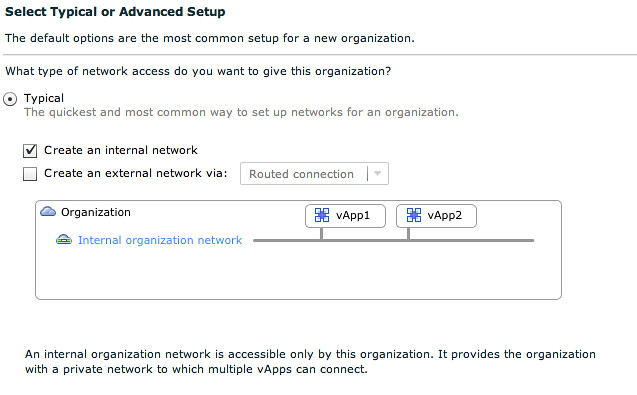
Now that we have created a network pool we can create an isolated Org Network, in this case we create a fully isolated Org Network. This isolated org Network aka “Internal network” enables the vApps within your virtual datacenter to communicate to each other:

In order to be able to communicate we need a network segment. This network segment is provisioned from the Network Pool we created earlier, which was VLAN Backed.

After you fill out some of the other details and click “finish” a portgroup is automatically created within vSphere. Although difficult to read the portgroup name contains the Org Network and the VLAN ID. (VLAN 1008 and Org Network “YB-ISO-ORG”). You can even see the task at the bottom of the screenshot:

Hopefully that visualizes the process a bit more. I dropped some steps for the creation of the pool and the Org Network to keep it relatively simple. You can find a full detailed video here. Now as stated earlier each of the the three types of pools have very specific requirements and constraints I listed them below so you can make a decision based on the requirements or constraints you might have.

VLAN Backed

VLAN-backed network pools require availability of a set of unused VLANs. When an Org or vApp network is created which is based on a VLAN-backed network pool a portgroup is created on a dvSwitch and a VLAN is assigned to this portgroup. It should be noted that all VLANs specified for the pool will need to be trunked to the host and that in most environment the amount of available VLANs is limited.

  • Requirements: Distributed vSwitch, pool of available VLANs, Physical uplinks need to support VLAN Trunks.
  • Recommendations: n/a
  • Constraints: Nexus 1000v and regular vSwitches are not supported currently, amount of available VLANs in most environments.

vCloud Network Isolation Backed

vCloud Network Isolation-backed(VCNI) network pools are flexible, easy to configure and do not require VLANs. vCNI provides layer 2 isolation by utilizing a network overlay. This network overlay is provided by MAC in MAC encapsulation and requires a vDS. For each consumed network vCloud Director creates a portgroup and assigns this portgroup a network ID number. This network ID number is used for the encapsulation of the traffic. As explained vCD uses MAC in MAC for the encapsulation of traffic. However, because of that the use of VCNI requires an increase in the MTU of the underlying transport network(dvSwitch) to avoid frame fragmentation due to the minor overhead cause by the MAC in MAC encapsulation.

Now this is a very thin explanation, but I don’t want to go to deep into this as it would only complicate things.

  • Requirements: Distributed vSwitch
  • Recommendations: minimum of 1 VLAN, MTU Increase (24Bytes, 1500 –> 1524).
  • Constraints: Nexus 1000v and regular vSwitches are not supported currently.

Portgroup Backed

Portgroup-backed pools require pre-created portgroups within the vSphere environment. Portgroup-backed pools are in my opinion the least flexible of all three options. However, Portgroup-backed pools do not require vDS and can be based on vSS, vDS or Cisco Nexus 1000v which can be a specific customer or even platform requirement.

  • Requirements: All portgroups need to be pre-created and available on all hosts of your cluster
  • Recommendations: Use a scripted solution or host profiles to create the portgroups to ensure consistency
  • Constraints: n/a

Wrapping up

Hopefully this clarifies network pools a bit. As explained, when creating and Org of vApp network which is not directly connected to the layer above a network of your Network Pool will be used to provide intra-cloud communication. For those who haven’t used vCD at all, believe me it took me a while to grasp these concepts so don’t be shy and ask questions/comment if anything is unclear.

vCD – Networking part 1 – Intro

Duncan Epping · Sep 7, 2010 ·

After my introduction on vCD last week, I thought it was time to publish an article on Networking. Networking is most likely the most complex concept of vCD(VMware vCloud Director) and can at times be very confusing. I have created three articles which will explain the concepts of networking within vCD and of course will explain on a technical level how things work. (Including the vSphere layer)

If there are any questions don’t hesitate to leave a comment. Please note that I am deliberately trying to simplify things in this first article as I don’t want you to get lost in any of the layers of networking vCD offers.

Layered

Networking within vCD is built up out of 3 distinct layers.

  1. External Network
  2. Org Network
  3. vApp Network

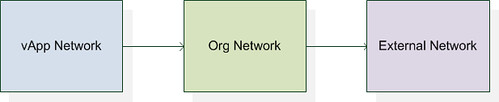
These three layers have been created to give the end-user the flexibility needed in a multi purpose virtual datacenter. I have depicted all three layers in the following diagram which shows the logical relationship between the layers:

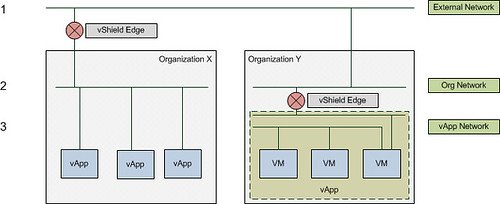
Some of you technical guys might say, that’s nice but I would like to see something less abstract. I created the following diagram which depicts the different layers in a different way. The diagram shows the three layers. I created a single External Network which links to two Org Networks. These Org Networks in its turn connect to multiple VMs(Org Y) and multiple vApps(Org X).

This is just an example however that illustrates possible network connections and as can clearly be seen it can be rather complex. As demonstrated there are multiple ways to connect vApps to each other or the outside world.

Now that we know some of the basics I will break down the three layers of networking. The  first before we will discuss any of the advanced options like vShield Edge or network pools

External Network

The External Network is used for inter-Cloud connections. Or as I like to call it “your connection to the outside world”. It is the first network “object” that you create within vCD. An External Network is always backed by a Portgroup, meaning that a portgroup needs to exist within vSphere before you can create this vCD network object. This portgroup can be on a regular vSwitch, a dvSwitch or you could use Nexus 1KV. It all works, and all of them are supported!

Of course it is heavily recommended to set this portgroup up with a VLAN for layer 2 isolation, again note that this is an outbound facing connection for your Org or for multiple Orgs.

Examples of External Networks are:

  • VPN to customer site
  • Internet connection

As said, an external network can be shared between organizations but is typically created per organization and is your connection from or to your virtual datacenter.

I would to stress that, the external network is your exit from your virtual datacenter or your entrance!

Org Network

The second object that is created is the Org Network. The Org Network is used for intra-Cloud connections. Or as I like to call it “Cloud internal traffic”.  An Org Network is linked to an organization and can be:

  • Directly connected to an External Network
  • NAT/Routed connected to an External Network
  • Completely Isolated

With that meaning that although an Org Network is primarily intended for internal traffic, it can be linked to an External Network to create an entry to or exit from your virtual datacenter. Note that it doesn’t necessarily need to be connected to an External Network, it could be completed isolated and used for “Cloud internal traffic” only! A use case for this would be for instance a test/dev environment where vApps will need to communicate with each other but not with the tenants back-end.

It should also be noted that the Org Network is mandatory! Every organization needs an Org Network, it is the only mandatory network object.

Just for completeness, an Org Network consumes a segment from a Network Pool when it is NAT/Routed or Isolated. A network pool is a collection of L2 networks which will be automatically consumed by vCD when needed, and what I call a segment is one of those L2 networks… basically a portgroup. I will explain Network Pools more in-depth in part 2.

When an Org Network is directly connected it is just a logical entity and physically doesn’t exist. Again in one of the following articles(part 3) I will explain what that looks like in vCenter.

vApp Network

The vApp Network kind of resembles the Org Network as it also consumes a segment from a Network Pool. The vApp Network enables you to have a vApp internal network, this could be useful for isolating specific VMs of a vApp. The vApp Network can be:

  • Directly connected to an Org Network
  • NAT/Routed to an Org Network
  • Completely Isolated

It should be noted that the “directly connected” option for both the Org Network and the vApp Network is just a logical connection. In the back-end it will be directly connected to the layer above.

As shown in an earlier diagram and explained above a vApp can contain multiple networks. This can be used to isolate specific VMs from the outside world. An example is shown in the following diagram where only the Web Server has a connection to the Org Network and the App and Database servers are isolated but do connect to the Web server.

Summary

vCD has three different layers of networking. Each of these layers has a specific purpose. The External Network is your connection to the outside world, the Org Network is linked to a specific Organization and the vApp network only resides within a vApp.

That is it for Part 1. Part 2 will focus on the Network Pools and Part 3 will focus on what these vApp, Org and External Networks look like on a vSphere layer and some general best practices.

My tip of the day, if you want to get to know vCD really well, check vCenter every time you make a change and see what happens!

UPDATE: for a full schematic overview check Hany’s awesome diagram.

Unloading the vCD Agent

Duncan Epping · Sep 6, 2010 ·

I play around in my home lab with VMware vCloud Director(vCD) a lot. I usually end up rebuilding it once in a while. Sometimes however you do it in the incorrect order and you end up with vCD Agents installed on your ESXi host without having vCD to unprepare the host. In that situation you can either rebuild the ESXi host or uninstall the agent.

In case you ever need to, this is the method for uninstalling the agent for both ESX and ESXi:

  • Enable tech support mode (ESXi only)
  • Login with root or anyother account and sudo/su
  • run the following command
/opt/vmware/uninstallers/vslad-uninstall.sh

Of course you can also do this remotely, for instance from your linux desktop or mac:

ssh root@esxhost /opt/vmware/uninstallers/vslad-uninstall.sh

VMworld Labs, the aftermath

Duncan Epping · Sep 6, 2010 ·

Those who follow me on twitter know that I was one of the Lab Captains at VMworld. I was not allowed to talk about the topic of my lab as the product was to be announced at VMworld(vCloud Director). I must say that I have never worked so hard in my life. Days of 14 hrs were considered “normal”, all just to ensure that the quality of the labs would meet your expectations.

It was the first time at VMworld US that it was self-paced labs only, and I guess you can say it was one huge hit. To be honest, I expected nothing less after the successes we had with this concept in Europe.

Many people have asked for the final numbers so I contacted the Lab Cloud team and here you go:

  • Lab Cloud served up 30 lab topics. In 2009 we had 21 lab topics to select from. We had 480 lab seats, with 44 hours of labs resulting in a total of 21120 total lab hours!
  • Every hour Lab Cloud was creating (deploying) and destroying (un-deploying) approximately 4000 Virtual Machines
  • Lab Cloud delivered 15,344 labs. In 2009 we delivered approximately 4500 labs in total.
  • Lab Cloud deployed a total of 145,097 VMs

The Top 10 labs were:

  1. VMware View 4.5 Install and Config (1515)
  2. VMware vSphere Perf & Tuning (1229)
  3. VMware ESX 4.1 new features (1112)
  4. VMware vCloud Director Install & Config (1019)
  5. Basic VMware vSphere Install & Config (829)
  6. VMware View 4.5 Advanced (811)
  7. VMware vSphere Troubleshooting (791)
  8. VMware vCenter SRM Install & Config (789)
  9. VMware vDS & Cisco Nexus 1KV (761)
  10. VMware vShield (734)

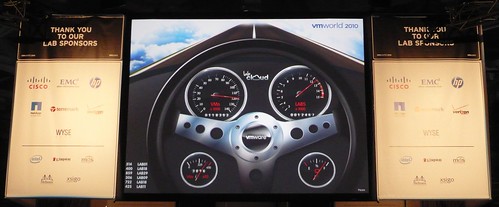
I am proud that the lab that I was responsible for, vCloud Director, came in fourth out of 30 topics. Especially considering there were many other excellent labs. By the way, the picture above is the actual dashboard that was used to display how many labs were done, VMs deployed etc…

Although VMworld EMEA will clearly not have 480 seats, I am 100% confident the labs will be a hit again. If you are planning on going to VMworld make sure you reserve time to attend the self paced labs, I guarantee it is worth your time!

  • « Go to Previous Page
  • Page 1
  • Interim pages omitted …
  • Page 205
  • Page 206
  • Page 207
  • Page 208
  • Page 209
  • Interim pages omitted …
  • Page 336
  • Go to Next Page »

Primary Sidebar

About the Author

Duncan Epping is a Chief Technologist and Distinguished Engineering Architect at Broadcom. Besides writing on Yellow-Bricks, Duncan is the co-author of the vSAN Deep Dive and the vSphere Clustering Deep Dive book series. Duncan is also the host of the Unexplored Territory Podcast.

Follow Us

  • X
  • Spotify
  • RSS Feed
  • LinkedIn

Recommended Book(s)

Also visit!

For the Dutch-speaking audience, make sure to visit RunNerd.nl to follow my running adventure, read shoe/gear/race reviews, and more!

Do you like Hardcore-Punk music? Follow my Spotify Playlist!

Do you like 80s music? I got you covered!

Copyright Yellow-Bricks.com © 2026 · Log in