• Skip to primary navigation
  • Skip to main content
  • Skip to primary sidebar

Yellow Bricks

by Duncan Epping

  • Home
  • Unexplored Territory Podcast
  • HA Deepdive
  • ESXTOP
  • Stickers/Shirts
  • Privacy Policy
  • About
  • Show Search
Hide Search

Server

VMworld Labs Europe – Open on Monday!!

Duncan Epping · Oct 10, 2010 ·

Yes, we will be open on Monday from 13:00 till 18:00! Not only that, but the for the remaining days the labs will open up at 08:00. Some might wonder why the schedule changed, the reason for it is simple the amount of VMworld registrations was so overwhelming VMware wanted to offer everyone the opportunity to get the most out of VMworld. So if you are coming down to the Bella Center on Monday to register stick around and do some labs! There are enough topics to spent your whole Monday afternoon in the Bella Center. My personal favorites definitely are:

  • VMware View 4.5 Install and Configure
  • VMware vShield
  • VMware vCloud Director Install and Configure
  • VMware vCloud Director Networking
  • VMware vSphere Performance & Tuning

But besides these 5 there are about 25 other labs, so enough to get your hands dirty.
SIOC, tying up some loose ends

Duncan Epping · Oct 8, 2010 ·

After my initial post about Storage IO Control I received a whole bunch of questions. Instead of replying via the commenting system I decided to add them to a blog post as it would be useful for everyone to read this. Now I figured this stuff out be reading the PARDA whitepaper 6 times and by going through the log files and CLI of my ESXi host, this is not cast in stone. If anyone has any additional question don’t hesitate to ask them and I’ll be happy to add them and try to answer them!

Here are the questions with the answers underneath in italic:

  1. Q: Why is SIOC not enabled by default?
    A: As datastores can be shared between clusters, clusters could be differently licensed and as such SIOC is not enabled by default.
  2. Q: If vCenter is only needed when enabling the feature, who will keep track of latencies when a datastore is shared between multiple hosts?
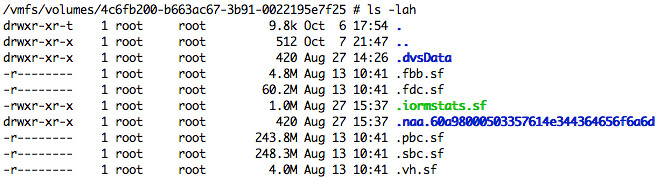
    A: Latency values are actually stored on the Datastore itself. From the PARDA academic paper, I figured two methods could be used for this either through network communication or as stated by using the Datastore. Notice the file “iormstat.sf” in green in the screenshot below, I guess that answers the question… the datastore itself is used to communicate the latency of a datastore. I also confirmed with Irfan that my assessment was true.
  3. Q: Where does datastore-wide disk scheduler run from?
    A: The datastore-wide disk scheduler is essentially SIOC or also known as the “PARDA Control Algorithm” and runs on each host sharing that datastore. PARDA consists of two key components which are “latency estimation” and “window size computation”. Latency estimation is used to detect if SIOC needs to throttle queues to ensure each VM gets its fair share. Window size computation is used to calculate what this queue depth should be for your host.
  4. Q: Is PARDA also responsible for throttling the VM?
    A: No, PARDA itself or better said the two major processes that form PARDA (latency estimation and window size computation) don’t control “host local” fairness, the Local scheduler (SFQ) is responsible for that.
  5. Q: Can we in any way control the I/O contention in vCD VM environment (say one VM running high I/O impacting another VM running on same host/datastore)
    A: I would highly recommend to enable this in vCloud Environments to prevent storage based DoS attacks (or just noisy neighbors) and to ensure IO fairness can be preserved. This is one of the reasons VMware developed this mechanism.
  6. Q: I can’t enable SIOC with an Enterprise licence – “License not available to perform the operation”. Is it Enterprise Plus only?
    A: SIOC requires Enterprise Plus
  7. Q: Can I verify what the Latency is?
    A: Yes you can, go to the Host – Performance Tab and select “Datastore”, “Real Time”, select the datastore and select “Storage I/O Control normalized latency”. Please note that the unit for measurement is microseconds!
  8. Q: This doesn’t appear to work in NFS?
    A: SIOC can only be enabled on VMFS volumes currently.

If you happen to be at VMworld next week, make sure to attend this session: TA8233 Prioritizing Storage Resource Allocation in ESX Based Virtual Environments Using Storage I/O Control!

vCD – Networking part 3 – Use case 2

Duncan Epping · Oct 6, 2010 ·

Part 1 explained the basic concepts of networking within vCD(VMware vCloud Director), Part 2 focussed on Network Pools and Part 3 focussed on a use case which was a vApp directly connected to an External routed Org Network. It took me a while to develop part 3 and I wasn’t sure if I could find the time to do another use case or not. I received a dozen requests for another use case so I decided to free up some time to help you guys out. Please read the other parts of this series before you start reading this part. Okay, let’s dive into those trenches.

vApp fenced to an Internal Org Network

Use case:

  1. Environments where vApps are copied and redeployed for  test and development purposes. There is no connection back to the customers datacenter to avoid any interference that could be cause by these test environments.

We will start with the basics. The flow of the network in this case will be:

vmware vCD cloud director networking logical diagram

Although only two different type of networks are used, this could of course result in multiple layers if and when for instance multiple vApp Networks are created. For the purpose of this exercise we will create a vApp with 3 VMs including two different networks. You could say you classical three-tier application.

  1. WEB = Web Frontend
  2. APP =Application Server
  3. DB = Databaser Server

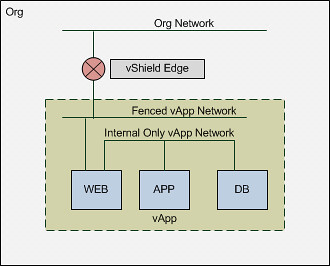
As you can imagine we don’t need users accessing the Application or Database Server so these two will be on a separate network segment. The Web Frontend will need to be accessible though and it will need to be able to access both the Application and the Database Server. Logically speaking that will look as follows:

vmware vCD cloud director networking logical 3-tier app diagram

Please note that the Org Network doesn’t connect back to anything! This means that in order for you to connect to your WEB vm you will need to go through the vCD Portal! Of course you could still test if your web services are working by simply deploying a desktop VM with windows XP in the same Org. Now I can hear some of you think why not just a NAT-Routed Org Network, well that is something that would work as well, but than it would be really similar to what use case 1 provided and this is purely for educational purposes.

Creating the Networks

The first step of course is to ensure you have a Network Pool. If you haven’t already created, you can use Part 2 of this series as a reference.  I am assuming here you already have a network pool and will go straight to the Org Network, which is option 7 on the home screen.

vmware vCD cloud director networking screenshot

Now you will need to select the Org that this Network will belong to and then you can decide what type of network you will create. You can do this in either “Typical” or “Advanced” mode. Both will give you the same options but it is named slightly different and Advanced will only allow you to create 1 network at a time where with Typical you can create multiple. As we have used Typical in the previous use case we will use Advanced this time. We are going to create a fully isolated Org Network so we will select “Internal Organization Network”.

vmware vCD cloud director networking screenshot

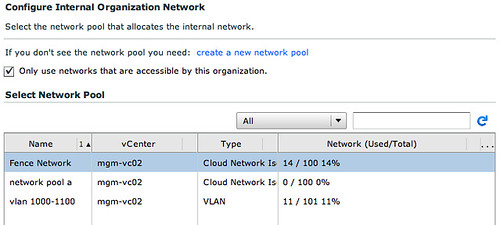
Next up we will need to select a network pool. Now you might ask yourself why we will need one when the Org Network is completely isolated? Well we will need cross-host communication when vApp/VMs need to communicate with each other and don’t reside on the same host. Although it sounds very logical, it is often overseen that this is what a network pool does. It enables cross-host communication. In this case we will select the vCloud Network Isolation Network Pool.

vmware vCD cloud director networking screenshot

Now we will need to specify the IP details for this Org Network. These IP addresses will be consumed by the VMs that are configured to use the “static pool”, in our case that will be the vShield Edge device that is deployed as part of this Isolated Network (deployed for DHCP services etc) and the WEB virtual machine.

vmware vCD cloud director networking screenshot

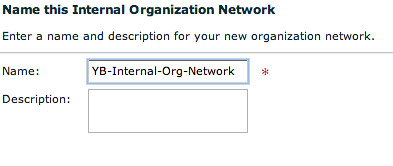
Of course we will need to give it a name. I tend to use the name of the Org and the type of Org Network I created.

vmware vCD cloud director networking screenshot

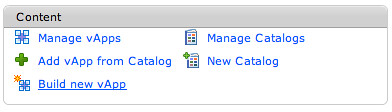
Now we will need to build a vApp. As stated this vApp will contain multiple VMs.

vmware vCD cloud director networking screenshot

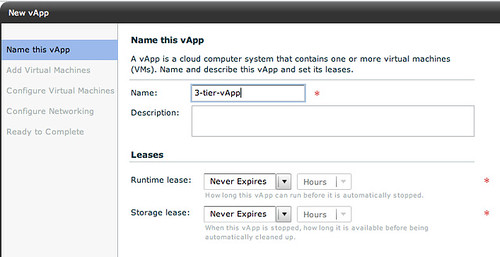
We will give it a name.

vmware vCD cloud director networking screenshot

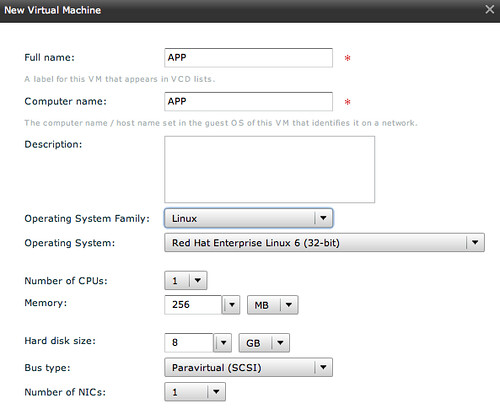
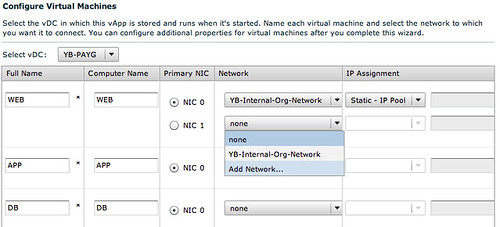
And we will start adding multiple VMs to it. The WEB virtual machine will have 2 NICs as it will need to connect to a device outside of vApp and to two VMs inside of the vApp.

vmware vCD cloud director networking screenshot

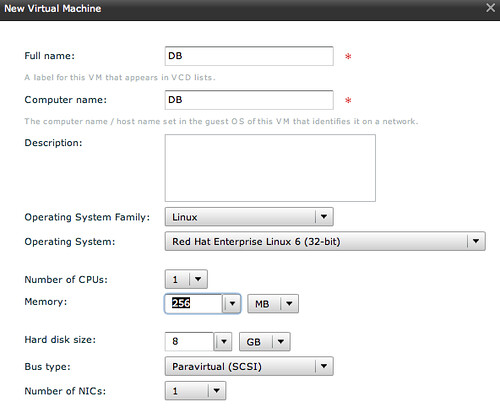
The following two VMs “APP” and “DB” will be configured with a single NIC as they will only need to connect to each other, all contained within the vApp.

vmware vCD cloud director networking screenshot

vmware vCD cloud director networking screenshot

Now this is the part where we will assign specific network segments to the NICs. For WEB we will connect “NIC 0” to the Internal Org Network and NIC 1 will need to be connected to a vApp Network.

vmware vCD cloud director networking screenshot

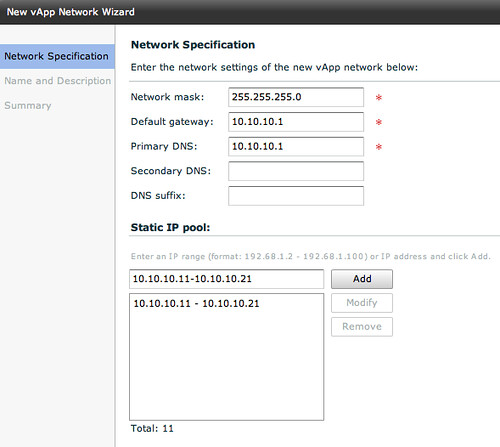
This vApp Network however will need to be created first. Please note that this is a vApp network, so only available to those VMs which are part of this vApp! Again we will need to specify IP details for the VMs to consume.

vmware vCD cloud director networking screenshot

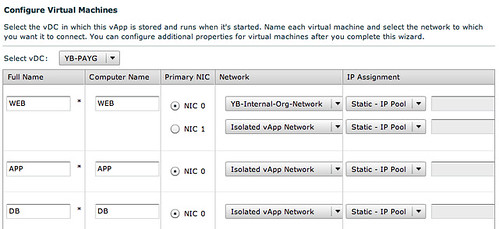
When we have done this and have given the vApp network a name we can connect the remaining VMs to the same network.

vmware vCD cloud director networking screenshot

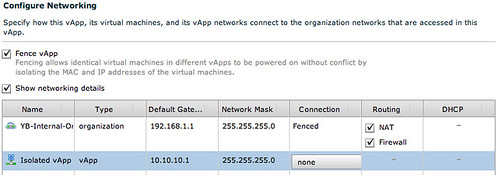
Now in order to have multiple copies of the same vApp running within the Org we will select “Fenced” mode for the vApp which basically will deploy a vShield Edge device.

vmware vCD cloud director networking screenshot

I guess this diagram that vCD creates makes it a bit more clear what your vApp connectivity will look like:

vmware vCD cloud director networking screenshot

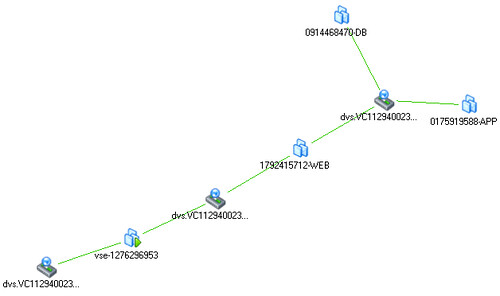
And if that isn’t enough you can also check the Maps functionality that vCenter offers. This will give you a great view of how this vApp is connected within vSphere.

vmware vCD cloud director networking screenshot

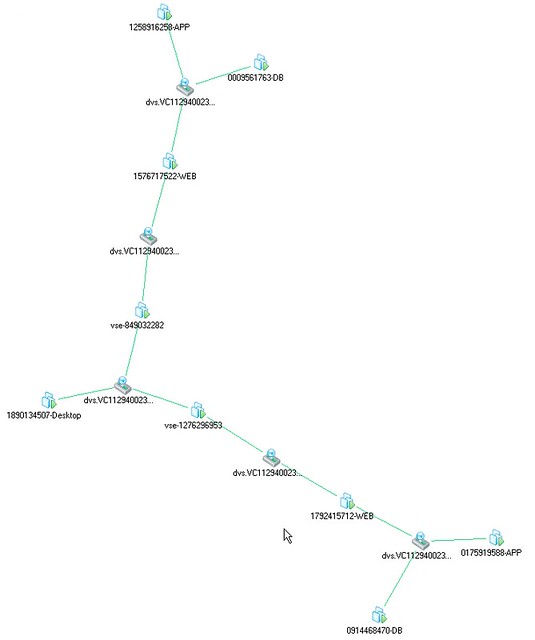
So what about that desktop? And what about if we have two copies of that vApp running? Well this is what the map would look like if when we have created these. On the middle left you will see the desktop that is used for testing the WEB VMs. Both WEB virtual machines can be accessed through the VSE device, which of course means that you will need to setup NAT, but we will leave an in-depth explanation around that for the next article.

vmware vCD cloud director networking screenshot

Summary

vCloud Director Network is really powerful, but as shown by this use case it can get very complex rather fast especially when you are using multiple layers. In this example we kept it simple by using an isolated network, an External NAT/Routed Org Network would have added another layer. Features like vCenter Maps will however make it easier to understand what has been created on the vSphere layer to enable these layers of networking, make sure you take advantage of functionality like this when exploring vCD!

VMUG Party next week, VMworld Copenhagen, be there!

Duncan Epping · Oct 6, 2010 ·

The Danish VMUG is organizing a party Monday next week in Copenhagen during VMworld. It will start around 21:00 and will end around 01:00. In co-operation with VMUnderground they found multiple sponsors (EMC, IBM, Magirus, Veeam, TrendMicro, Quest, Netex, Nexenta) and as such entrance, beer and soda are free. Make sure you are on-time as there is only room for 300 people and judging by how popular WuPaas was at VMworld SF I will bet that the VMUG Party will also be sold out in no time.

Date:Monday, 11th of October
Time: 21:00 – 01:00
Location: Custom House, Havnegade 44, Nyhavn 1058

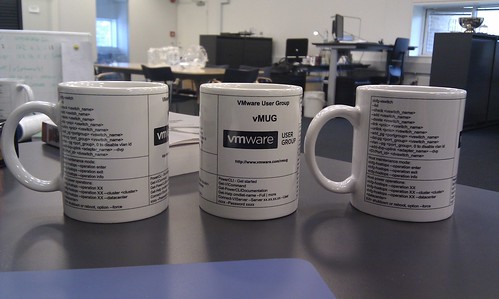
I have been told that the DK VMUG also ordered a new batch of their infamous vMUG, and they will be handing them our during the party!

Last chance to become a VCDX3!

Duncan Epping · Oct 4, 2010 ·

For those who are currently in progress of obtaining a VCDX certification please note that VCDX3 has come to an end. If you still want to become a VCDX 3 and already passed the Design and Enterprise exam Partner Exchange in Orlando (February 7, 2011) is your last chance.

If you have passed both the VCE310 and VCD310 exams and wish to apply for a VCDX3 certification:

  • Download the VCDX3 Application & Handbook and prepare your defense for the week of February 7, 2011.
  • The application will be due on November 22, 2010, at 5:00 PM PST.
  • The final opportunity to deliver a defense in pursuit of the VMware Certified Design Expert on VI3 (VCDX3) certification will be at VMware Partner Exchange in Orlando, Florida the week of February 7, 2011.
  • Please note that defense slots are limited and will be reserved for candidates who submit completed applications in the order received.

You have got a month and a half to submit your design, but I would definitely recommend to get it in as soon as possible. Make sure however that your Application Form is completely filled out. There are a bunch of tips to be found here.

For those who think they can still quickly register both exams to become a VCDX3

  • Registrations for the VMware Enterprise Administration on VMware Infrastructure 3 Exam: VCE310 have been closed.  No new registrations for this exam will be accepted.
  • Registrations for the VMware Design on VMware Infrastructure 3 Exam: VCD310 have been closed. No new registrations for this exam will be accepted.
  • « Go to Previous Page
  • Page 1
  • Interim pages omitted …
  • Page 202
  • Page 203
  • Page 204
  • Page 205
  • Page 206
  • Interim pages omitted …
  • Page 336
  • Go to Next Page »

Primary Sidebar

About the Author

Duncan Epping is a Chief Technologist and Distinguished Engineering Architect at Broadcom. Besides writing on Yellow-Bricks, Duncan is the co-author of the vSAN Deep Dive and the vSphere Clustering Deep Dive book series. Duncan is also the host of the Unexplored Territory Podcast.

Follow Us

  • X
  • Spotify
  • RSS Feed
  • LinkedIn

Recommended Book(s)

Also visit!

For the Dutch-speaking audience, make sure to visit RunNerd.nl to follow my running adventure, read shoe/gear/race reviews, and more!

Do you like Hardcore-Punk music? Follow my Spotify Playlist!

Do you like 80s music? I got you covered!

Copyright Yellow-Bricks.com © 2026 · Log in