• Skip to primary navigation
  • Skip to main content
  • Skip to primary sidebar

Yellow Bricks

by Duncan Epping

  • Home
  • Unexplored Territory Podcast
  • HA Deepdive
  • ESXTOP
  • Stickers/Shirts
  • Privacy Policy
  • About
  • Show Search
Hide Search

Various

VMware Innovate magazine edition available for download!

Duncan Epping · Nov 19, 2012 ·

Internally at VMware we have this cool magazine called “Innovate”. I am part of the team which is responsible for VMware Innovate. I noticed this tweet from Julia Austin and figured I would share it with all of you. This specific edition is about RADIO 2012, which is a VMware R&D innovation offsite. (So looking forward to RADIO 2013!)

Check out #VMware‘s Innovate Magazine.Usually internal only, but we wanted to share this one with our community! ow.ly/fijfP

— Julia Austin (@austinfish) November 14, 2012

There is some cool stuff to be found in this magazine in my opinion. Just one of the many nuggets, did you know VMware was already exploring vSphere FT in 2001? Just a nice reminder of how long typical engineering efforts can take. Download the magazine now!

Ganesh Venkitachalam presented “Hardware Fault Tolerance with Virtual Machines” (or Fault Tolerance, for short) at the “Engineering Offsite 2001.” This was released as a feature called Fault Tolerance for vSphere 4.0.
The State of vSphere Clustering by @virtualirfan

Duncan Epping · Oct 23, 2012 ·

The state of vSphere clustering
By Irfan Ahmad

Some of my colleagues at CloudPhysics and I spent years at VMware and were lucky to have participated in one of the most rapid transformations in enterprise technology history. A big part of that is VMware’s suite of clustering features. I worked alongside Carl Waldspurger in the resource management team at VMware that brought to the world the ESX VMkernel CPU and memory schedulers, DRS, DPM, Storage I/O Control and Storage DRS among other features. As a result, I am especially interested in analyzing and improving how IT organizations use clustering.

Over a series of blog posts, I’ll try to provide a snapshot of how IT teams are operationalizing vSphere.  One of my co-founders, Xiaojun Liu and I performed some initial analysis on the broad community dataset that is continually expanding as more virtualization engineers securely connect us to their systems.

First, we segmented our analysis based on customer size. The idea was to isolate the effect of various deployment sizes including test labs, SMBs, commercial and large enterprise, etc. Our segmentation was in terms of total VMs in customer deployments and divided up as: 1-50 VMs, 51-200, 201-500, 501-upwards. Please let us know if you believe an alternative segmentation would warrant better analysis.

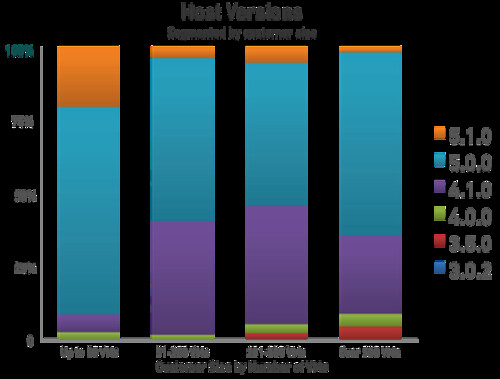
Initially we compared various ESX versions deployed in the field. We found ESXi 5.0 already captured the majority of installations in large deployments. However, 4.0 and 3.5 versions continue to be deployed in the field in small numbers. Version 4.1, on the other hand, continues to be more broadly deployed. If you are still using 4.1, 4.0, and 3.5, we recommend upgrading to 5.0 which provides greatly improved HA clustering, amongst many other benefits. This data shows the 5.0 version has been broadly adopted by our peers and is user-verified production ready.

Next, we looked at cluster sizes. A key question for VMware product managers was often, “How many hosts are there in a typical cluster?” This was a topic of considerable debate, and it is critically important to know when prioritizing features. For example, how much emphasis should go into scalability work for DRS.

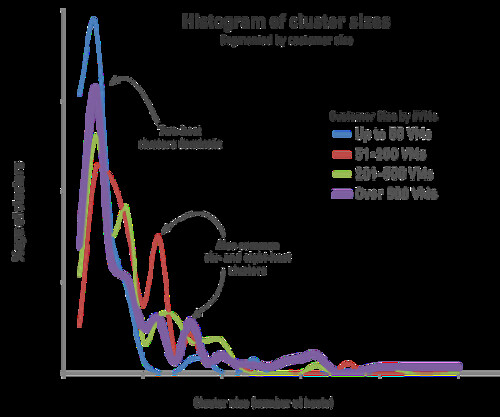
For the first time, CloudPhysics is able to leverage real customer data to provide answers. The highest frequency cluster size is two hosts per cluster for customers with greater than 500 VMs. Refer to the histogram. This result is surprisingly low and we do not yet know all the contributing reasons, though we can speculate on some of the causes. These may be a combination of small trainiång clusters, dedicated clusters for some critical applications, Oracle clustering license restrictions, or perhaps a forgotten pair of older servers. Please tell us why you may have been keeping your clusters small.

Despite the high frequency of two-host clusters, we see opportunities for virtualization architects to increase their resource pooling. By pooling together hosts into larger clusters, DRS can do a much better job at placement and providing resource management. That means real dollars in savings. It also allows for more efficient HA policy management since the absorption of spare capacity needed for infrequent host failures is now spread out over a larger set of hosts. Additionally, having fewer clusters makes for fewer management objects to configure, keep in sync with changing policies, etc. This reduces management complexity and makes for a safer and more optimized environment.

Several caveats arise with regard to the above findings. First is potential sample bias. For instance, it might be the case that companies using CloudPhysics are more likely to be early adopters and that early adopters might be more inclined to upgrade to ESX 5.0 faster. Another possible issue is imbalanced dataset composition. It might be that admins are setting up small training or beta labs, official test & development, and production environments mixed in the same environment thus skewing the findings.

CloudPhysics is the first to provide a method of impartially determining answers based on real customer data, in order to dampen the controversy.

Xiaojun and I will continue to report back on these topics as the data evolves. In the meantime, the CloudPhysics site is growing with new cards being added weekly. Each card solves daily problems that virtualization engineers have described to us in our Community Cards section. I hope you will take the time to send us your feedback on the CloudPhysics site.

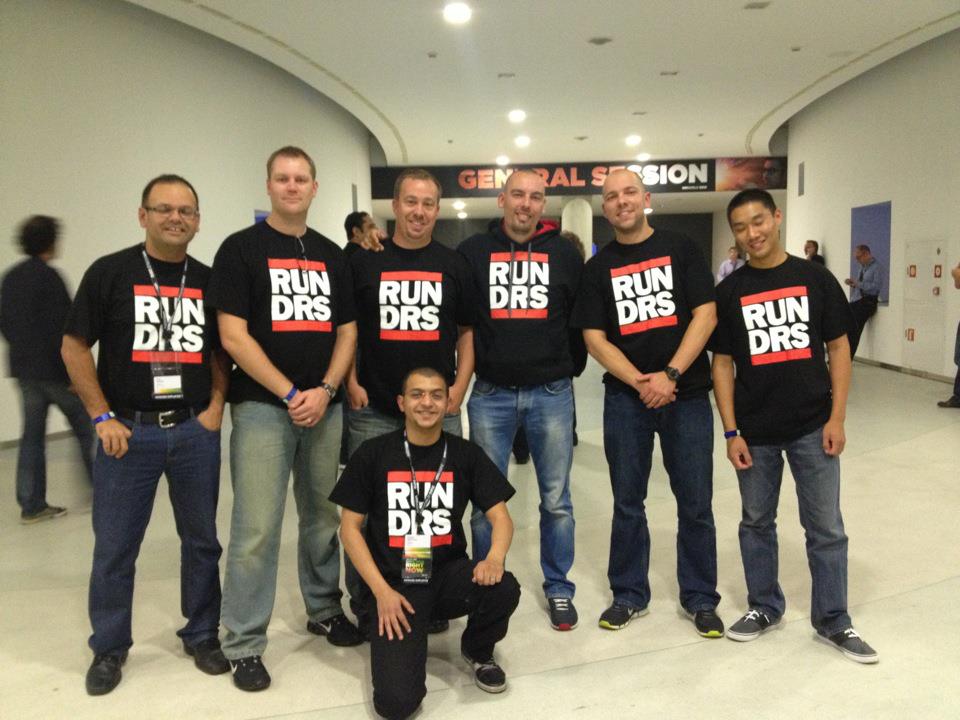
Spotted a RUN DRS t-shirt at VMworld and wondering where to buy them?

Duncan Epping · Oct 16, 2012 ·

I had so many people ask about these RUN DRS shirts I had made in the last weeks… Unfortunately it was a limited print so I cannot offer them, and to be honest I don’t really want to sell them either. Frank created the design and I asked Frank if it would be okay to share it so that everyone who wants one can get it printed themselves.

Frank just published a blog post which contains the details around how to make your own logo, and he also posted the “PSD” file. (Photoshop format) This idea is free for use, however you should not use this design for commercial purposes. Feel free to get a batch printed, maybe work with some local VMUG folks… I am sure they will be a big hit!


Some questions about Stretched Clusters with regards to power outages

Duncan Epping · Oct 9, 2012 ·

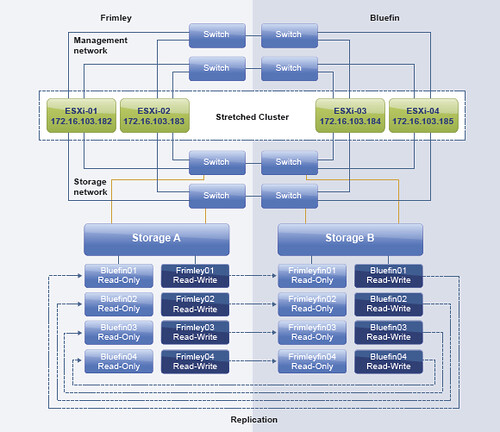
Today I received an email about the vSphere Metro Storage Cluster paper I wrote, or better said about stretched clusters in general. I figured I would answer the questions in a blog post so that everyone can chip in / read etc. So lets show the environment first so that the questions are clear. Below is an image of the scenario.

Below are the questions I received:

If a power outage occurs at Frimley the 2 hosts get a message by the UPS that there is a power outage. After 5 minutes (or any other configured value) the next action should start. But what will be the next action? If a scripted migration to a host at Bluefin starts, will DRS move some VMs back to Frimley? Or could the VMs get a mark to stick at Bluefin? Should the hosts at Frimley placed into Maintenance mode so the migration will be done automatically? And what happens if there is a total power outage both at Frimley and Bluefin? How a controlled shutdown across hosts could be arranged?

Lets start breaking it down and answer where possible. The main question is how do we handle power outages. As in any datacenter this is fairly complex. Well the powering-off part is easy, powering everything on in the right order isn’t. So where do we start? First of all:

  1. If you have a stretched cluster environment and, in this case, Frimley data center has a power outage, it is recommended to place the hosts in maintenance mode. This way all VMs will be migrated to the Bluefin data center without disruption. Also, when power returns it allows you to do check on the host before introducing them to the cluster again.
  2. If maintenance mode is not used and a scripted migration is done virtual machines will be migrated back probably by DRS. DRS is triggered every 5 minutes (at a minimum). Avoid this, use maintenance mode!
  3. If there is an expected power outage and the environment is brought down it will need to be manually powered on in the right order. You can also script this, but a stretched cluster solution doesn’t cater for this type of failure unfortunately.
  4. If there is an unexpected power outage and the environment is not brought down then vSphere HA will start restarting virtual machines when the hosts come back up again. This will be done using the “restart priority” that you can set with vSphere HA. It should be noted that the “restart priority” is only about the completion of the power-on task, not about the full boot of the virtual machine itself.

I hope that clarifies things.

Restoring an iPad that is in perpetual recovery mode

Duncan Epping · Oct 6, 2012 ·

My iPad crashed a couple of weeks back… and as this is the iPad that my kids used it was code red! I tried powering it on but the screen remained black. I figured I was completely out of battery so attached it to the charger for hours but still nothing.

Next I tried the old “holding the home + sleep button for 15 seconds” trick, but that didn’t do anything either. Still a black screen. I hooked the iPad unto my Macbook after charging it again for 8 hrs and leaving it alone for another 8. (not that it probably has anything to do with the solution, but I figured I would document the full process…)

iTunes now said that my iPad was in recovery mode. So I figured I would hit “okay” and do a “restore” as iTunes suggested. After going through the full restore cycle my iPad “rebooted” (screen still black so who knows what it did) and it still said it was in recovery mode”. Again no luck. I tried the same procedure on a different PC, this time using Windows… but again no luck. After googling for a while I stumbled on a procedure that actually worked. All credits go to wikidot for writing this up, but this what I had to do to get it working again:

  1. Launch iTunes
  2. Connect ipad to Macbook
  3. Press and hold for 3 seconds Sleep/Wake button.
  4. After 3 seconds, keeping hold on Sleep/Wake press Home button for 10 seconds.
  5. Release Sleep/Wake one, but hold Home button for another 15 seconds.
  6. When “iTunes has detected …in recovery mode..” message appears on computer screen press OK.
  7. Press SHIFT+CLICK (PC) or ALT+ CLICK on the restore button.
  8. Choose from the opened file dialog the ipsw-file you downloaded. Click Open it. The flashing will begin. Once more, never touch your iPad / iPad 2 / iPad 3 or computer. Let them to complete the job. The tablet will restart itself to complete the firmware flashing.
  9. Wait and your iPad will be as new

** you can find the “ipsw-file” via iClarified, it basically is a firmware file for your iPad, or google it! **

  • « Go to Previous Page
  • Page 1
  • Interim pages omitted …
  • Page 42
  • Page 43
  • Page 44
  • Page 45
  • Page 46
  • Interim pages omitted …
  • Page 127
  • Go to Next Page »

Primary Sidebar

About the Author

Duncan Epping is a Chief Technologist and Distinguished Engineering Architect at Broadcom. Besides writing on Yellow-Bricks, Duncan is the co-author of the vSAN Deep Dive and the vSphere Clustering Deep Dive book series. Duncan is also the host of the Unexplored Territory Podcast.

Follow Us

  • X
  • Spotify
  • RSS Feed
  • LinkedIn

Recommended Book(s)

Also visit!

For the Dutch-speaking audience, make sure to visit RunNerd.nl to follow my running adventure, read shoe/gear/race reviews, and more!

Do you like Hardcore-Punk music? Follow my Spotify Playlist!

Do you like 80s music? I got you covered!

Copyright Yellow-Bricks.com © 2026 · Log in