• Skip to primary navigation
  • Skip to main content
  • Skip to primary sidebar

Yellow Bricks

by Duncan Epping

  • Home
  • Unexplored Territory Podcast
  • HA Deepdive
  • ESXTOP
  • Stickers/Shirts
  • Privacy Policy
  • About
  • Show Search
Hide Search

Various

Awesome appliance, vCenter Support Assistant

Duncan Epping · Jan 25, 2013 ·

Today an awesome appliance called the vCenter Support Assistant was made available to the world. I have seen some screenshots and a demo and feel that this appliance is a MUST HAVE for anyone who files Support Requests. Just the fact that you can do that from a single interface, which also allows you to upload the support bundle just makes life a whole lot easier.

vCenter Support Assistant

Ryan Johnson wrote an excellent article on this topic… and I am going to steal his thunder so I suggest you head over to the VMware TAM Program blog (open to everyone) and read up on this excellent Appliance.
Fixed: Macbook waking up every hour or so

Duncan Epping · Jan 18, 2013 ·

For the last months I have people asking me why on earth I was on google talk / messenger in the middle of the night, but then did not respond when they said hi. It appears that my Macbook had been waking up roughly every hour while I had put it to sleep.

At first I thought it was the messenger software I was running called Adium. But after closely checking this didn’t seem to be the problem. Then I started digging and checked my log files. My log files did reveal something:

syslog |grep -i "Wake reason"
Jan 12 00:37:59 Depping-MBA kernel[0] <Debug>: Wake reason: RTC (Alarm)

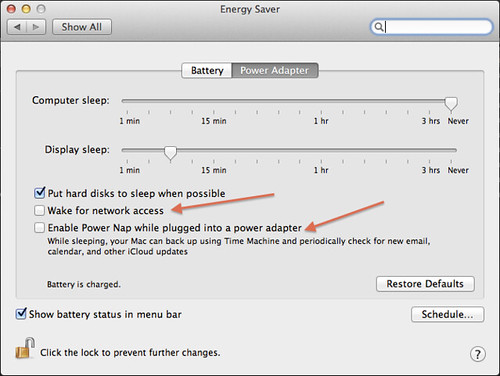
So I did a quick search on “RTC” and stumbled on this article which explained why this was happening. The article refers to an Apple KB, which hints at what to disable. When disabling “Wake for network access” as suggested by the KB I noticed another feature called “Power Nap”. It appears that Power Nap also enables your Mac to do certain things on a regular interval. For instance it can allow for a backup to occur or it will check email every hour.

Prevent Macbook waking up

In my case there is no need to power-on in the middle of the night to do these things, so I disabled both “Wake for network access” and “Power Nap”. There is some more info about “Power Nap” to be found in this KB article.

My Bookstore

Duncan Epping · Jan 13, 2013 ·

I had various people asking why I didn’t make it easier to buy my books via my website. Greg Schulz from StorageIOblog.com mentioned that he created an amazon store. So I took a peek at how he set it up and kinda did something similar. If you click “My Bookstore” at the top you will be automatically brought to a custom Amazon store. It will list all my books on the first page, paper copies that is. On the right side you have two more options:

  • Kindle Items – ebook versions of what I have published so far
  • Books by Friends – exactly what it says… books that my friends have written

Over time of course new books will be added to the appropriate sections. Thanks and I hope it makes things easier.

Automating ESXi host level changes without opening SSH

Duncan Epping · Jan 8, 2013 ·

I have been asked by many if it is possible automating ESXi host level changes without opening SSH. In many organizations people are prohibited to open SSH however they do have the need to make certain changes on a host level. One of those changes for instance is in a stretched cluster environment where “disk.terminateVMOnPDLDefault” needs to be set to true. This setting can only be configured in /etc/vmware/settings unfortunately. So how do you automate this?

Andreas Peetz from V-Front.de came up with an awesome solution. He created a plugin to esxcli allowing you to run commands on an ESXi host. So in other words, when you install his plugin (it is a vib) you can remotely fire off a command on an ESXi host as if you are sitting behind that host.

How does that work? Well first of all you install the vib Andreas created. (Or include it in your image.) When it is installed you can simply run the following on any machine that has the vSphere CLI installed:

esxcli -s hostname -u username -p password shell cmd -c "command"

Awesome right?! I think so, this is probably one of the coolest things I have seen in a while. Very clever solution, once again… awesome work Andreas and head over to V-Front.de to get more details and the actually download of this plugin!

** Disclaimer: implementing this solution could result in an unsupported configuration. This article was published to demonstrate the capabilities of esxcli and for educational purposes **

Failed to connect to VMware Lookup Service, SSL certificate verification failed

Duncan Epping · Dec 19, 2012 ·

I ran in to this error today that which says “Failed to connect to VMware Lookup Service”. Or to be more precise:

Failed to connect to VMware Lookup Service.
SSL certificate verification failed.

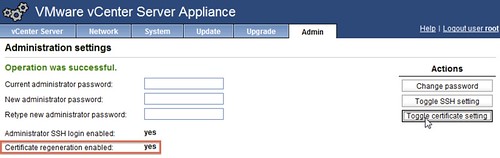
I had been playing around in my lab and I am guessing this error was caused by the fact that I changed the hostname of my vCenter Server Appliance after configuring it. When I rebooted the VCVA I bumped in to this issue. Luckily it is very easy to solve:

  1. Go to http://<vcenter ip address or fqdn>:5480
  2. Click “Admin” Tab
  3. Click “Toggle certificate setting” under “Actions”
  4. Restart the vCenter Server Appliance
  5. During the restart the certificates will be regenerated
  6. Click “Admin” Tab and disable the “Toggle certificate setting”

Failed to connect to VMware Lookup Service

  • « Go to Previous Page
  • Page 1
  • Interim pages omitted …
  • Page 40
  • Page 41
  • Page 42
  • Page 43
  • Page 44
  • Interim pages omitted …
  • Page 127
  • Go to Next Page »

Primary Sidebar

About the Author

Duncan Epping is a Chief Technologist and Distinguished Engineering Architect at Broadcom. Besides writing on Yellow-Bricks, Duncan is the co-author of the vSAN Deep Dive and the vSphere Clustering Deep Dive book series. Duncan is also the host of the Unexplored Territory Podcast.

Follow Us

  • X
  • Spotify
  • RSS Feed
  • LinkedIn

Recommended Book(s)

Also visit!

For the Dutch-speaking audience, make sure to visit RunNerd.nl to follow my running adventure, read shoe/gear/race reviews, and more!

Do you like Hardcore-Punk music? Follow my Spotify Playlist!

Do you like 80s music? I got you covered!

Copyright Yellow-Bricks.com © 2026 · Log in