• Skip to primary navigation
  • Skip to main content
  • Skip to primary sidebar

Yellow Bricks

by Duncan Epping

  • Home
  • Unexplored Territory Podcast
  • HA Deepdive
  • ESXTOP
  • Stickers/Shirts
  • Privacy Policy
  • About
  • Show Search
Hide Search

Various

VXLAN requirements

Duncan Epping · Oct 4, 2012 ·

When I was writing my “Configuring VXLAN” post I was trying to dig up some details around VXLAN requirements and recommendations to run a full “VMware” implementation. Unfortunately I couldn’t find much, or at least not a single place with all the details. I figured I would gather all I can find and throw it in to a single post to make it easier for everyone.

Virtual:

  • vSphere 5.1
  • vShield Manager 5.1
  • vSphere Distributed Switch 5.1.0
  • Portgroups will be configured by vShield Manager, recommend to use either “LACP Active Mode”, “LACP Passive Mode” or “Static Etherchannel”
    • When “LACP” or “Static Etherchannel” (Cisco only) is configured note that a port/ether channel will need to be created on the physical side
    • “Fail Over” is supported, but not recommended
    • You cannot configure the portgroup with “Virtual Port ID” or “Load Based Teaming”, these are not supported
  • Requirement for MTU size of 1600 (Kamau explains why here)

Physical:

  • Recommend to have DHCP available on VXLAN transport VLANs, fixed IP also works though!
  • VXLAN port (UDP 8472) is opened on firewalls (if applicable)
  • Port 80 is opened from vShield Manager to the Hosts (used to download the “vib / agent”)
  • For Link Aggregation Control Protocol (LACP), 5- tuple hash distribution is highly recommended but not a hard requirement
  • MTU size requirement is 1600
  • Strongly recommended to have IGMP snooping enabled on L2 switches to which VXLAN participating hosts are attached. IGMP Querier must be enabled on router or L3 switch with connectivity to the multicast enabled networks when IGMP snooping is enabled.
  • If VXLAN traffic is traversing routers –> multicast routing must be enabled
    • The recommended Multicast protocol to deploy for this scenario is Bidirectional Protocol Independent Multicast (PIM-BIDIR), since the Hosts act as both multicast speakers and receivers at the same time.

That should capture most requirements and recommendations. If anyone has any additions please leave a comment and I will add it.

** Please note, proxy arp is not a requirement for a VXLAN / VDS implementation, only when Cisco Nexus 1000v is used this is a requirement **

References:
VXLAN Primer by Kamau
vShield Administration Guide
Internal training ppt
KB 2050697 (note my article was used as the basis for this KB)
Cool Tool update: RVTools 3.4

Duncan Epping · Sep 25, 2012 ·

It has been a while since I blogged about RVTools, but I just received an email from Rob saying that there is an update out so I figured it was about time. RVTools is in my opinion THE best free and independent tool out there for a vSphere enviroment. This is a must-have tool for every virtualization admin / consultant!

I have used it many times in the past, and I can tell you that it helped me digging up some nasty inconsistencies in environments and misconfigured VMs etc. I am surprised that none of the monitoring/reporting vendors has approached Rob to sponsor the tool itself… Especially considering RVTools was downloaded over 150.000 times so far.

What’s new for RVTools 3.4?

  • Overall performance improvements and better end user experience
  • VI SDK reference changed from 4.0 to 5.0
  • Added reference to Log4net (Apache Logging Framework) for debugging purpose
  • Fixed a SSO problem
  • CSV export trailing separator removed to fix PowerShell read problem
  • On vDisk tabpage new fields: Eagerly Scrub and Write Through
  • On vHost tabpage new field: vRAM = total amount of virtual RAM allocated to all running VMs
  • On vHost tabpage new fields: Used memory by VMs, Swapped memory by VMs and Ballooned memory by VMs
  • Bugfix: Snapshot size was displayed as zero when smaller than 1 MM
  • Added a new preferences screen. Here you can disable / enable some performance killers. By default they are disabled

Go and download it and give it a try, I am certain it will discover things you did not know about…

Call for speakers for Lightning and NotSupported talks at VMworld Barcelona

Duncan Epping · Sep 25, 2012 ·

At VMworld San Francisco the vBrownBag crew and Randy Keener held a series of excellent talks at the community lounge. Randy was responsible for the “NotSupported” talks and the vBrownBag crew ran the “lightning” talks. Both type of sessions were typically around 10-15 minutes tops and technical…

The Brown Bag crew is organizing these talks again for Barcelona and they are looking for people to present. Did you submit a session for VMworld but got rejected? Have you always wanted to do a lightning talk? Got something cool but totally unsupported that you want to share?

S I G N – U P – T O D A Y !

I will be there for sure, this is Europe… lets show them how it is done. 10 minutes, who can’t spare 10 minutes… Go for it I say,

Back to Basics: Using the vSphere 5.1 Web Client to add an NFS share to all hosts

Duncan Epping · Sep 13, 2012 ·

If you look at the following workflow you know why I am starting to love NFS more and more… Adding an NFS datastore was easy with 5.0 (and prior) but with 5.1 it is even easier. Just a couple of steps to add an NFS datastore to your cluster:

  • Open the Web Client
  • Go to your host under “vCenter” —> “Hosts and Clusters”.
  • Click “New Datastore”.
  • Provide a name for the datastore and click “Next”.
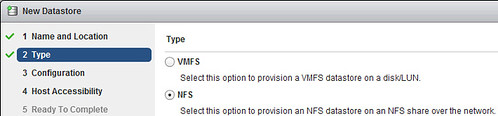
  • Select “NFS” and click “Next”. Fill out the NFS “Server” and “Folder” details and click “Next”.
  • [Read more…] about Back to Basics: Using the vSphere 5.1 Web Client to add an NFS share to all hosts

Back to Basics: Using the vSphere 5.1 Web Client to configure a vSwitch

Duncan Epping · Sep 13, 2012 ·

In the previous articles we created a Datacenter, a cluster and added hosts to it. Now that we have done that we can start finalizing the configuration. This is just one example out of the many ways to configure networking for an ESXi host, and I kept it really really simple. This is not following any best practices, I just wanted to show some of the steps. In this scenario I have 4 network cards per host and I have VLANs for each network segment. Separating traffic through the use of VLAN is highly recommended and is a best practice.

Lets configure the virtual switch first. I will use a “standard vSwitch” for now. In this case we will set all vmnics to active on the vSwitch and control NIC usage on a portgroup level. [Read more…] about Back to Basics: Using the vSphere 5.1 Web Client to configure a vSwitch

  • « Go to Previous Page
  • Page 1
  • Interim pages omitted …
  • Page 43
  • Page 44
  • Page 45
  • Page 46
  • Page 47
  • Interim pages omitted …
  • Page 127
  • Go to Next Page »

Primary Sidebar

About the Author

Duncan Epping is a Chief Technologist and Distinguished Engineering Architect at Broadcom. Besides writing on Yellow-Bricks, Duncan is the co-author of the vSAN Deep Dive and the vSphere Clustering Deep Dive book series. Duncan is also the host of the Unexplored Territory Podcast.

Follow Us

  • X
  • Spotify
  • RSS Feed
  • LinkedIn

Recommended Book(s)

Also visit!

For the Dutch-speaking audience, make sure to visit RunNerd.nl to follow my running adventure, read shoe/gear/race reviews, and more!

Do you like Hardcore-Punk music? Follow my Spotify Playlist!

Do you like 80s music? I got you covered!

Copyright Yellow-Bricks.com © 2026 · Log in