• Skip to primary navigation
  • Skip to main content
  • Skip to primary sidebar

Yellow Bricks

by Duncan Epping

  • Home
  • Unexplored Territory Podcast
  • HA Deepdive
  • ESXTOP
  • Stickers/Shirts
  • Privacy Policy
  • About
  • Show Search
Hide Search

Software Defined

Rebuilding your Virtual SAN Lab? Wipe the disks first!

Duncan Epping · Mar 12, 2014 ·

** You can do this in the vSphere UI these days, read William’s article on how to! **

Are you ready to start rebuilding your Virtual SAN lab from beta builds to GA code, vSphere 5.5 U1? One thing I noticed is that the installer is extremely slow when there are Virtual SAN partitions on disk. It sits there at “VSAN: successfully initialized” for a long time and when you get to the “scanning disks” part it takes equally as long. Eventually I succeeded, but it just took a long time. Could be because I am running with an uncertified disk controller of course, either way if you are stuck in the following screen there is a simple solution.
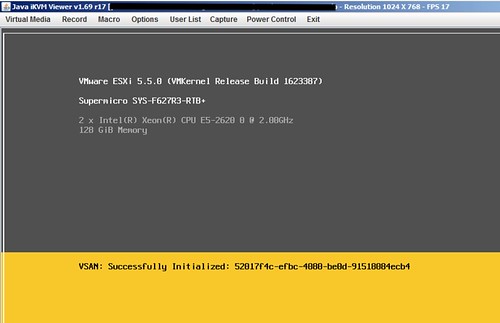
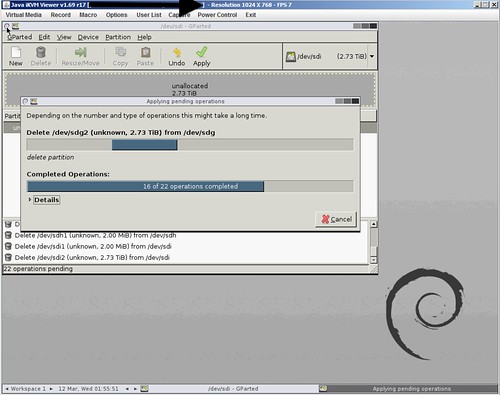
Just wipe ALL disks first before doing the installation. I used the Gparted live ISO to wipe all my disks clean, just delete all partitions and select “apply”. Takes a couple of minutes, but saved me at least 30 minutes waiting during the installation.
Virtual SAN GA aka vSphere 5.5 Update 1

Duncan Epping · Mar 12, 2014 ·

Just a quick note for those who hadn’t noticed yet. Virtual SAN went GA today, so get those download engines running and pull-in vSphere 5.5 Update 1. Below the direct links to the required builds:

  • vCenter Server Update 1 downloads | release notes
  • ESXi 5.5 Update 1 | release notes
  • Horizon View 5.3.1 (VSAN specific release!) | release notes
  • Horizon Workspace 1.8 | release notes

It looks like the HCL is being updated as we speak. The Dell T620 was just added as the first Virtual SAN ready node, and I expect many more to follow in the days to come. (Just published a white paper with multiple configurations.) Also the list of supported disk controllers has probably quadrupled.

A couple of KB Articles I want to call out:

  • Horizon View 5.3.1 on VMware VSAN – Quickstart Guide
  • Adding more than 16 hosts to a Virtual SAN cluster
  • Virtual SAN node reached threshold of opened components
  • Virtual SAN insufficient memory
  • Storing ESXi coredump and scratch partitions in Virtual SAN

Two things I want to explicitly call out, first is around upgrades from Beta to GA:

Upgrade of Virtual SAN cluster from Virtual SAN Beta to Virtual SAN 5.5 is not supported.
Disable Virtual SAN Beta, and perform fresh installation of Virtual SAN 5.5 for ESXi 5.5 Update 1 hosts. If you were testing Beta versions of Virtual SAN, VMware recommends that you recreate data that you want to preserve from those setups on vSphere 5.5 Update 1. For more information, see Retaining virtual machines of Virtual SAN Beta cluster when upgrading to vSphere 5.5 Update 1 (KB 2074147).

The second is around Virtual SAN support when using unsupported hardware:

KB reference
Using uncertified hardware may lead to performance issues and/or data loss. The reason for this is that the behavior of uncertified hardware cannot be predicted. VMware cannot provide support for environments running on uncertified hardware.

Last but not least, a link to the documentation , a ;and of course a link to my VSAN page (vmwa.re/vsan) which holds a lot of links to great articles.

VSAN Design Consideration: Booting ESXi from USB with VSAN?

Duncan Epping · Mar 10, 2014 ·

** Update, as of November 21st we also support SD/USB boot with higher memory configurations when core dump partition is increased. Also read this KB article on the topic of increasing the ESXi diagnostic partition size **

One thing most probably won’t realize is that there is a design consideration with VSAN when it comes to installing ESXi. Many of you have probably been installing ESXi on USB or SD and this is also still supported with VSAN. There is one caveat however and this caveat is around the total number of GBs of memory in a host. The design consideration is fairly straight forward and also documented in the VSAN Design and Sizing Guide. Just to make it a bit easier to find it I copied/pasted it here for your convenience:

  • Use SD, USB, or hard disk devices as the installation media whenever ESXi hosts are configured with as much as 512GB memory. Minimum size for USB/SD card is 4GB, recommended 8GB.
  • Use a separate magnetic disk or solid-state disk as the installation device whenever ESXi hosts are configured with more than 512GB memory.

You may wonder what the reason is, the reason for this is that VSAN will use the core dump partition to store VSAN traces that can be used by VMware Global Support Services and the VMware Engineering team for root cause analysis when needed. So make sure when configuring host to keep this in mind when going above 512GB of memory.

Please note that this is what has been tested by VMware and will be supported, so this is not just any recommendation but could have impact on support!

Virtual SAN GA update: Flash vs Magnetic Disk ratio

Duncan Epping · Mar 7, 2014 ·

With the announcement of Virtual SAN 1.0 a change in recommended practice when it comes to SSD to Magnetic Disk capacity ratio was also introduced (page 7) has been introduced. (If you had not spotted it yet, the Design and Sizing Guide for VSAN was updated!) The rule was straight forward: Recommended SSD to Magnetic Disk capacity ratio is 1:10. This recommendation has been changed to the following:

The general recommendation for sizing flash capacity for Virtual SAN is to use 10 percent of the anticipated consumed storage capacity before the number of failures to tolerate is considered.

Lets give an example to show the differences:

  • 100 virtual machines
  • Average size: 50GB
  • Projected VM disk utilization: 50%
  • Average memory: 5GB
  • Failures to tolerate = 1

Now this results in the following from a disk capacity perspective:

100 VMs * 50GB * 2 = 10.000GB
100 VMs * 5GB swap space * 2 = 1000GB
(We multiplied by two because FTT was set to 1)

This means we will need 11TB to run all virtual machines. As explained in an earlier post I prefer to add additional capacity for slack space (snapshots etc) and meta data overhead, so I suggest to add 10% at a minimum.This results in ~12TB of total capacity.

From an SSD point of view this results in:

  • Old rule of thumb: 10% of 12TB = 1.2TB of cache. Assuming 4 hosts, this is 300GB of SSD per host.
  • New rule of thumb: 10% of ((50% of (100 * 50GB)) + 100 * 5GB) = 300GB. Assuming 4 hosts this is 75GB per host.

Now lets dig some deeper, 70% read cache and 30% write buffer. On a per host basis that means:

  • Old rule: 210GB Read Cache, 90GB Write Buffer
  • New rule: 52,5GB Read Cache, 22,5GB Write Buffer

Sure from a budgetary perspective this is great, only 75GB versus 300GB per host. Personally, I would prefer to spend more money and make sure you have a larger read cache and write buffer… Nevertheless, with this new recommendation you have the option to go lower without violating any of the recommendations.

Note, this is my opinion and doesn’t reflect VMware’s statement. Read the Design and Sizing Guide for more specifics around VSAN sizing.

VMware Virtual SAN launch and book pre-announcement!

Duncan Epping · Mar 6, 2014 ·

Today is the day, finally… the Virtual SAN (VSAN) launch. Many people have been waiting for this one. With 12.000 plus beta participants this was one of the biggest projects I have ever seen within VMware. It is truly impressive to see how the product has grown and what the team has done. Before I will provide you with some of the details of the announcement I want to share something else that all of you should look out for:

Cormac Hogan and I decided it was time for a book on Virtual SAN. Both of us have published many articles about VSAN the last 9 months and have been working with the product for over a year now so it only made sense. We have decided, and this wasn’t an easy decision for me, to go with VMware Press. When I say “not an easy decision” I don’t want to sound negative about using publisher, but it is just that I have had a great experience (and results) with self-publishing. It was time for a new experience though, try something different. As we speak we are working hard to get the final set of chapters in for review / editing and we are hoping to have the book available before VMworld. I am guessing that the rough cuts will be available through Safari in the upcoming weeks, if so I will let you know via a blog post.

Now lets get back to the topic of the day again, Virtual SAN Launch… So what was announced today?

  • General Availability of Virtual SAN 1.0 the week of the 10th of March
  • vSphere 5.5 Update 1 will support VSAN GA
  • Support for 32 hosts in a Virtual SAN cluster
  • Support for 3200 VMs in a Virtual SAN cluster
    • Note, due to HA restrictions only  2048 VMs can be HA protected!
  • Full support for VMware Horizon / View
  • Elastic and Linear Scalability for both capacity and performance
  • VSAN is not a VSA. Performance is much better than any VSA!
  • 2 Million IOPS validated in a 32 host Virtual SAN cluster
  • ~ 4.5PB in a 32 host cluster
  • 13 different VSAN Ready Node configurations between Cisco IBM Fujitsu and Dell available at GA, more coming soon!

Once again, great work by the VSAN team. Version 1.0 just got release, and I can barely wait for the next release to become available!

  • « Go to Previous Page
  • Page 1
  • Interim pages omitted …
  • Page 53
  • Page 54
  • Page 55
  • Page 56
  • Page 57
  • Interim pages omitted …
  • Page 71
  • Go to Next Page »

Primary Sidebar

About the Author

Duncan Epping is a Chief Technologist and Distinguished Engineering Architect at Broadcom. Besides writing on Yellow-Bricks, Duncan is the co-author of the vSAN Deep Dive and the vSphere Clustering Deep Dive book series. Duncan is also the host of the Unexplored Territory Podcast.

Follow Us

  • X
  • Spotify
  • RSS Feed
  • LinkedIn

Recommended Book(s)

Also visit!

For the Dutch-speaking audience, make sure to visit RunNerd.nl to follow my running adventure, read shoe/gear/race reviews, and more!

Do you like Hardcore-Punk music? Follow my Spotify Playlist!

Do you like 80s music? I got you covered!

Copyright Yellow-Bricks.com © 2026 · Log in