• Skip to primary navigation
  • Skip to main content
  • Skip to primary sidebar

Yellow Bricks

by Duncan Epping

  • Home
  • Unexplored Territory Podcast
  • HA Deepdive
  • ESXTOP
  • Stickers/Shirts
  • Privacy Policy
  • About
  • Show Search
Hide Search

Management & Automation

CloudPhysics card builder, how awesome is that?

Duncan Epping · Jul 2, 2013 ·

A while ago Irfan Ahmad (CloudPhysics CTO), Frank Denneman and I were discussing various ideas around the CloudPhysics platform… One of the ideas that Ifran and team pitched was this notion of a card builder. Both Frank and I are advisors to CloudPhysics and immidiately jumped up and said “YES PLEASE, when can we have it?” Over the last couple of weeks you have probably seen various blog posts pop up about the card builder that CloudPhysics created and I can honestly say that it has exceeded my expectations. (Suggested reads: Willam’s blog post, Anthony Spiteri’s post) So what is so special about this card designer? I think this paragraph from William’s blog post describes it best:

The vSphere platform provides a very powerful and rich set of APIs (Application Programming Interface) that can be consumed by both vSphere administrators as well as developers. However, there is a high learning curve when using the API and it takes quite a bit of time to learn and of course your manager is expecting the report to be done in the next 5 minutes. Even with abstraction tools such as PowerCLI, quickly building a robust, scalable and performant script is not always a trivial task, not to mention the maintenance and updates to the script because your manager wants to continually add more things to the report.

Not everyone is an API guru like William or a scripting god like Alan Renouf or Luc Dekens. Sure, these guys will knock out an awesome looking report in a matter of minutes, maybe 10 – 15 minutes depending on what kind of metrics they need and how complex the report will be. For normal people, like myself, who aren’t scripting gods this typically takes a lot longer. Personally I am happy if I can produce something within an hour, but when it gets more complex you are probably talking about way more than that, potentially a full day. The CloudPhysics card builder was designed to lower the barrier to create meaningful reports!

How simple is it? I would say, that if I can figure it out in seconds it is dead simple:

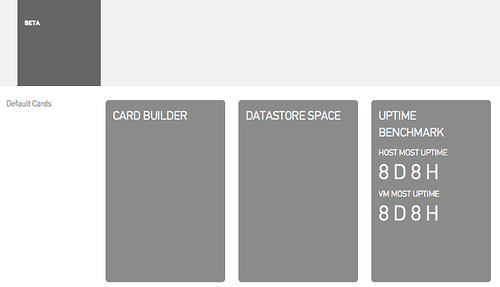
  1. Click “Card Builder”
    CloudPhysics Card Builder
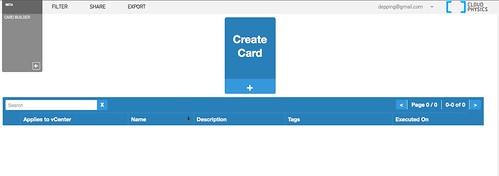
  2. Click “Create card”
    CloudPhysics Card Builder
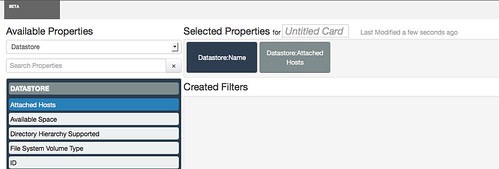
  3. Select the “Property”
    CloudPhysics Card Builder
  4. I selected “Datastore:Name” and “Datastore:Attached Hosts” and below the results
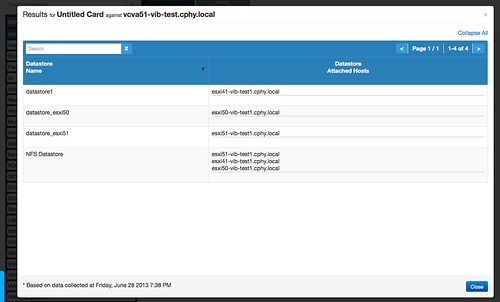
    CloudPhysics Card Builder

That is it, really easy right? In just a couple of clicks I can see which hosts are connected to which datastores. Yes of course this was a simple example, but the nice thing is that you can make it as complex as you want or need. Currently this is in a limited Beta, but soon (I mean really soon!!) this will be exposed to the rest of the world. If you want to know more, just check the webinar recording by Irfan link can be found on the CPhy website!

Only thing I wonder is… why on earth did no one come up with this concept before for the virtualization space? Creating reports and should always be dead simple if you ask me, and now with CloudPhysics Card Builder it finally is.
vCenter Single Sign On aka SSO, what do I recommend?

Duncan Epping · Jun 26, 2013 ·

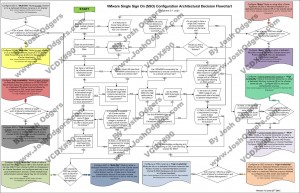
I have had various people asking me over the last 9 months what I would recommend when it comes to SSO. Would I use a multi-site configuration, maybe even an HA configuration or would I go for the Basic configuration? What about when I have multiple vCenter Server instances, would I share the SSO instance between these or deploy multiple SSO instances? All very valid questions I would say. I have kept my head low intentionally the last year to be honest, but after reading this excellent blog post by Josh Odgers where he posted an awesome  architectural decision flow chart I figured it was time voice my opinion. Just look at this impression of the flow chart (for full resolution visit Josh’s website):

Complex? Yes I agree, probably too complex for most people. Difficult to digest, and that is not due to Josh’s diagramming skills. SSO has various deployment models (multi site, HA, basic), and then there is the option to deploy it centralized or localized as well. On top of that there is also the option to protect it using Heartbeat. Now you can probably understand why the flow diagram ended up looking complex. Many different options but what makes sense?

Justin King already mentioned this in his blog series on SSO (part 1, 2, 3, 4) as a suggestion, but lets drive it home! Although it might seem like it defeats the purpose I would recommend the following in almost every single scenario one can imagine: Basic SSO deployment, local to vCenter Server instance. Really, the KISS principle applies here. (Keep It Simple SSO!) Why do I recommend this? Well for the following simple reasons:

  • SSO in HA mode does not make sense as clustering the SSO database is not supported, so although you just deployed an HA solution you still end up with a single point of failure!
  • You could separate SSO from vCenter, but why would you create a dependency on network connection between the vCenter instance and the SSO instance? It is asking for trouble.
  • A centralized SSO instance sounds like it make sense, but the problem here is that it requires all connecting vCenter instances to be on the same version. Yes indeed, this complicates your operational model. So go localized for now.

So is there a valid reason to deviate from this? Yes there is and it is called Linked Mode. Linked Mode “requires” SSO to be deployed in a “multi-site” configuration, this is probably one of the few reasons I would not follow the KISS principle when there is a requirement for linked-mode… personally I never use Linked Mode though, I find it confusing.

So there you have it, KISS!

vOpenData – feed up!

Duncan Epping · Apr 15, 2013 ·

A couple of weeks ago I asked this question on twitter about what the average disk size of a virtual machine is these days. Within a couple of minutes Ben Thomas replied and said we might be able to create a survey script and he copied William Lam in. Now for those who never worked with William, if you ask him a question like that you can expect him to knock something out… William and Ben decided not to just knock out a survey script, but rather an open community project called vOpenData.

vOpenData

This open community project consists of a script that collects the data (and they collect a significant amount, you can see what they collect here.) and is aiming to provide various trending statistics and data for virtualized environments. The data is fed back in to the vOpenData database. The vOpenData website has a great dashboard which provides you all these cool stats. For instance, at the moment there are 77 infrastructures that provided data to their collection. The question I asked, what is the average disk size, currently says “61.51GB”. That average is based on those 77 infrastructures with over 27.000 VMs in total combined. Nice right!?!

I have already emailed William a bunch of suggestions, and as I will be in Palo Alto this week I am sure some more will bubble up during conversations. I am hoping that everyone sees the power of a solution like this and can help feeding data in to the vOpenData platform.

Go here to download the bits and feed up!

** I have had some people asking me how vOpenData compares to CloudPhysics. I have also seen some people comparing vOpenData to CloudPhysics… To be honest you can’t really compare them. Where vOpenData is about averages and statistics, CloudPhysics is more about analytics and simulation models. **

VMware vCenter Multi-Hypervisor-Manager 1.1 is out, sign up for it!

Duncan Epping · Mar 19, 2013 ·

VMware vCenter Multi-Hypervisor Manager 1.1 is a minor release with the following new capabilities:

  • Migration of virtual machines from Hyper-V to ESX or ESXi hosts.
  • Support for the latest Microsoft Hyper-V3 hypervisor (as well as the earlier versions).
  • Increased scalability with regards to the number of supported third-party hosts to 50 (from 20 in MHM 1.0).
  • Ability to provide custom certificates for the MHM server from the installer wizard.
  • Multiple objects selection in the UI and a number of other usability improvements.
  • Plus a number of server and client-side bug fixes.

If you have some Hyper-V hosts in your environment that you want to manage, or need to migrate from Hyper-V to vSphere, then make sure to download this nice vCenter add-on. It is in Beta, and I am certain the engineering team will appreciate all the feedback you can give.

Cool tool update: RVTools 3.5

Duncan Epping · Mar 9, 2013 ·

Yes, there is it is again… an updated version of RVTools. Rob just emailed me and provided me with a nice list of enhancements:

RVTools Version 3.5 (March, 2013)

  • On vInfo tabpage new field: Resource pool
  • On vInfo tabpage new field: Consolidation needed.
  • On vCPU tabpage new field: Number of cores per socket
  • New tabpage with resource pool information
  • On vNetwork tabpage new column: Switch name
  • On vNetwork tabpage new column: Starts Connected
  • On vTools tabpage new column: required version
  • On vHost tabpage new columns: custom fields
  • On vDisk tabpage new columns: raw disk information
  • Improved error handling for SSO login problems
  • Bug fix: Invalid snapshot size fixed
  • Bug fix: All datetime fields now use the local time zone
  • Bug fix: data not refreshed after changing filter

Now just go and download RVTools! I am certain you will find it very very useful.

  • « Go to Previous Page
  • Page 1
  • Interim pages omitted …
  • Page 7
  • Page 8
  • Page 9
  • Page 10
  • Page 11
  • Interim pages omitted …
  • Page 44
  • Go to Next Page »

Primary Sidebar

About the Author

Duncan Epping is a Chief Technologist and Distinguished Engineering Architect at Broadcom. Besides writing on Yellow-Bricks, Duncan is the co-author of the vSAN Deep Dive and the vSphere Clustering Deep Dive book series. Duncan is also the host of the Unexplored Territory Podcast.

Follow Us

  • X
  • Spotify
  • RSS Feed
  • LinkedIn

Recommended Book(s)

Also visit!

For the Dutch-speaking audience, make sure to visit RunNerd.nl to follow my running adventure, read shoe/gear/race reviews, and more!

Do you like Hardcore-Punk music? Follow my Spotify Playlist!

Do you like 80s music? I got you covered!

Copyright Yellow-Bricks.com © 2026 · Log in