• Skip to primary navigation
  • Skip to main content
  • Skip to primary sidebar

Yellow Bricks

by Duncan Epping

  • Home
  • Unexplored Territory Podcast
  • HA Deepdive
  • ESXTOP
  • Stickers/Shirts
  • Privacy Policy
  • About
  • Show Search
Hide Search

Management & Automation

vCloud ecosystem announcements at VMware Partner Exchange

Duncan Epping · Feb 27, 2013 ·

It is has been a while since I wrote anything about vCloud Director itself… Primarily because I have been focused on other things within the vCloud Suite the last couple of months. This week various partners of VMware announced new products at VMware Partner Exchange 2013 (By the way, 2014 is scheduled to be held at the Moscone Center in San Francisco). I wanted to take a couple of minutes to provide a quick overview of what was announced. Personally I think it is great that we are starting to see more and more partners developing products and solutions to enhance the vCloud Director experience, especially in the Backup/Restore space this was more than welcome. So what was announced this week so far, in no particular order:

  • Zerto announced Virtual Replication 3.0
    In a blog article they explain what is new and improved in version 3.0. What I personally think is exciting is the fact that they support vCloud Director 5.1 and provide support and integration with vCloud Automation Center. On top of that the 3.0 product offers a self-service portal, I bet this is what a lot of the service providers were waiting for. It will make creating DR as a Service solution offering a lot simpler. There is a lot more added, so for all the details make sure you hit the links above.
  • Veeam announced version 7 of Veeam Backup and Replication with vCloud Director integration
    I guess the title says it all. With version 7 Veeam will support vCloud Director environment. Veeam will not only allow you to back up the VMs in a vCloud Director vApp but it will also allow you to back all vApp metadata and attributes. Of course restore functionality of vApps and VMs directly in to vCloud Director is included. Definitely something I know a lot people were waiting for.
  • Commvault announced Simpana version 10 with vCloud Director integration
    I have always been impressed with Commvault’s backup solution. It is simple and robust. So you can imagine I was happy when I found out they were working on integration Simpana with vCloud Director. I can’t find too much details about the level of integration to be honest, but there is a long list of new features in version 10 to be found here. Hopefully we will find out more soon. For more details it probably easier to read Viktor’s post then it is to read the Commvault website.
  • EMC announced VMAX Cloud Edition
    Not so much specifically targeted at vCloud users, but more at Service Providers who are looking to build a large fully self-service cloud environment. VMAX Cloud Edition is not a bigger or more scalable version of VMAX, no it is a fully self-service, multi-tiered and multi-tenancy capable VMAX. No point in me diving too deep, as Chad wrote an excellent article about VMAX Cloud Edition, make sure to read it.

If I find other announcements I will add them to this article throughout the week of VMware Partner Exchange

CloudPhysics adds functionality: VM reservations/limits and Snapshots

Duncan Epping · Oct 5, 2012 ·

CloudPhysics just announced two new cards. One card is titled “Snapshots Gone Wild Card“, the other is titled “VM Reservations & Limits Card“. This is the direct result of the contest that CloudPhysics held right before VMworld US. I guess that is the nice thing about being a start-up, being able to respond to community / customer requests quickly. However, it is also due to the nature of the CloudPhysics solution.

All the cards CloudPhysics will be offering are objects by itself, making it easy to add new cards or changing cards based on customer requests without the need to QA the whole platform. Flexibility / Agility right there.

So what exactly was added? The first card “Snapshots gone wild” is all about … yes you guessed it VMware snapshots. Which virtual machines have snapshots? How many snapshots? How old is the snapshot? That is the kind of data it reveals. Considering the many problems I have seen out in the field with snapshots, I would say that this is one you will want to check regularly.

The second card is all about VM Reservations and Limits. Frank and I wrote about this many times, and warned people about the impact many times. I guess most of you are aware of the impact by now, but you would be surprised to see what comes up when you run this card in your environment. I have done many many health checks in the past, and VM limits always kept popping up randomly. Definitely highly recommend to take a look at.

Of course besides these two new cards there are various others which are very useful like the Cluster Health card or the VMware Tools cards. I suggest you head over to CloudPhysics.com and sign up and give it a try.

Cool Tool update: RVTools 3.4

Duncan Epping · Sep 25, 2012 ·

It has been a while since I blogged about RVTools, but I just received an email from Rob saying that there is an update out so I figured it was about time. RVTools is in my opinion THE best free and independent tool out there for a vSphere enviroment. This is a must-have tool for every virtualization admin / consultant!

I have used it many times in the past, and I can tell you that it helped me digging up some nasty inconsistencies in environments and misconfigured VMs etc. I am surprised that none of the monitoring/reporting vendors has approached Rob to sponsor the tool itself… Especially considering RVTools was downloaded over 150.000 times so far.

What’s new for RVTools 3.4?

  • Overall performance improvements and better end user experience
  • VI SDK reference changed from 4.0 to 5.0
  • Added reference to Log4net (Apache Logging Framework) for debugging purpose
  • Fixed a SSO problem
  • CSV export trailing separator removed to fix PowerShell read problem
  • On vDisk tabpage new fields: Eagerly Scrub and Write Through
  • On vHost tabpage new field: vRAM = total amount of virtual RAM allocated to all running VMs
  • On vHost tabpage new fields: Used memory by VMs, Swapped memory by VMs and Ballooned memory by VMs
  • Bugfix: Snapshot size was displayed as zero when smaller than 1 MM
  • Added a new preferences screen. Here you can disable / enable some performance killers. By default they are disabled

Go and download it and give it a try, I am certain it will discover things you did not know about…

CloudPhysics, not so much stealth mode start-up anymore…

Duncan Epping · Jul 19, 2012 ·

<disclaimer: I am a technical advisor for CloudPhysics>

cloud physics logoToday at the New England VMUG CloudPhysics has their first official “public appearance”. Yes some of you have heard the name a couple of times before and some of you might even know who the brains are behind this new start-up… for those who don’t let me give a brief introduction.

CloudPhysics was recently founded by John Blumenthal and Irfan Ahmad. Some of you might recognize their names as they used to work at VMware, John was a Product Manager for storage and Irfan was the person who was responsible for awesome features like Storage DRS and Storage IO Control. Together with several other brilliant people, including no one less than Carl “TPS / DRS” Waldspurger acting as an advisor and consultant, they founded a new company.

So what is CloudPhysics about? CloudPhysics is about big data, about centralized data, about analytics, about modeling data. CloudPhysics is essentially about helping you! How? Well let me try to explain that without revealing too much.

We’ve all monitored and managed environments, some of you are responsible for 3 hosts and some might be responsible for 80 hosts in different sites and in different companies. We all face several challenges and in many cases these are similar… How do you find common themes? How do you validate best practices are applied on all levels in your environment? How do you validate if your practices are actually used by others, and do you benefit from them? How do you know if you sized correctly? How do I solve specific problems? Would I benefit from a different storage platform or SSD? All of these are questions or problems you probably face daily and that is where CloudPhysics aims to come in to play.

CloudPhysics will enable you to find common best practices and problems in your environment. CloudPhysics will provide you guidance, this could be custom but also generic through for instance a link to a VMware KB article. They will enable you to compare and explore performance results. Find patterns in your environment… See trends and provide you with meaningful statistics about your environment. Sounds amazing right and probably something you wouldn’t mind testing today… The CloudPhysics product will come as a virtual appliance. The data gathered will go up to the cloud and all of the analysis will happen outside of your environment, of course with various degrees of anonymity.

CloudPhysics is constructing an analytics platform for vSphere for the application of collective intelligence to individual, local vSphere environments and users.  At the same time the platform is intended to service the needs of consulting companies, customers and the blogging community by providing APIs to enable unique exploration and discovery within the dynamic, changing dataset CloudPhysics continuously generates. Access to this dataset enables them to transform qualitative discussions into quantitative views of vSphere design and operation. CloudPhysics is not seeking to build a community; rather, it exists to empower the engineer and architect in all of us, particularly the commentators and critics essential to the industry.

For those who can’t wait, sign up at www.cloudphysics.com now for announcements and news on the beta. I am excited about CloudPhysics and I hope you all are as well.

Why is %WAIT so high in esxtop?

Duncan Epping · Jul 17, 2012 ·

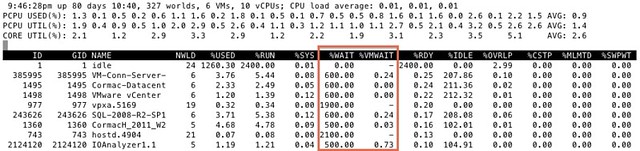
I got this question today around %WAIT and why it was so high for all these VMs. I grabbed a screenshot from our test environment. It shows %WAIT next to %VMWAIT.

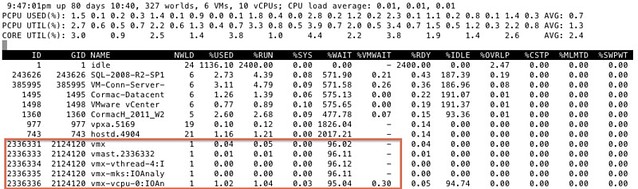
First of all, I suggest looking at %VMWAIT. This one is more relevant in my opinion than %WAIT. %VMWAIT is a derivative of %WAIT, however it does not include %IDLE time but does include %SWPWT and the time the VM is blocked for when a device is unavailable. That kind of reveals immediately why  %WAIT seems extremely high, it includes %IDLE! Another thing to note is the %WAIT for a VM is multiple worlds collided in to a single metric. Let me show you what I mean:

As you can see 5 worlds, which explains the %WAIT time to be around 500% constantly when the VM is not doing much. Hope that helps…

<edit> I just got pointed to this great KB article by one of my colleagues. It explains various CPU metrics in-depth. Key take away from that article for me is the following: %WAIT + %RDY + %CSTP + %RUN = 100%. Note that this is per world! Thanks Daniel for pointing this out!</edit>

  • « Go to Previous Page
  • Page 1
  • Interim pages omitted …
  • Page 8
  • Page 9
  • Page 10
  • Page 11
  • Page 12
  • Interim pages omitted …
  • Page 44
  • Go to Next Page »

Primary Sidebar

About the Author

Duncan Epping is a Chief Technologist and Distinguished Engineering Architect at Broadcom. Besides writing on Yellow-Bricks, Duncan is the co-author of the vSAN Deep Dive and the vSphere Clustering Deep Dive book series. Duncan is also the host of the Unexplored Territory Podcast.

Follow Us

  • X
  • Spotify
  • RSS Feed
  • LinkedIn

Recommended Book(s)

Also visit!

For the Dutch-speaking audience, make sure to visit RunNerd.nl to follow my running adventure, read shoe/gear/race reviews, and more!

Do you like Hardcore-Punk music? Follow my Spotify Playlist!

Do you like 80s music? I got you covered!

Copyright Yellow-Bricks.com © 2026 · Log in