• Skip to primary navigation
  • Skip to main content
  • Skip to primary sidebar

Yellow Bricks

by Duncan Epping

  • Home
  • Unexplored Territory Podcast
  • HA Deepdive
  • ESXTOP
  • Stickers/Shirts
  • Privacy Policy
  • About
  • Show Search
Hide Search

Management & Automation

Performance of vCenter 5.0 in Remote Offices and Branch Offices (ROBO) white paper

Duncan Epping · Jun 19, 2012 ·

I just finished reading the “Performance of VMware vCenter 5.0 in remote offices and branch offices (ROBO)” white paper. I thought it was an excellent read and recommend it to anyone who has a ROBO environment. Also it is interesting to know what kind of traffic hosts / VMs drive in general to vCenter. Especially the details around the statistics level are worth reading for those deploying larger environments as it also gives a sense of the amount of data that vCenter is processing.

Nice work Fei Chen! You can find the paper here:

Performance of VMware vCenter 5.0 in Remote Offices and Branch Offices (ROBO)
This document details the performance of typical vCenter 5.0 operations in a use case where vCenter manages ESXi hosts over a network with limited bandwidth and high latency, which is also known as a remote office, branch office (ROBO) environment.

(Although the date stamp on this entry says 2010 it is a June / 2012 paper, I will try to get this fixed!)
Cool tool update: RVTools 3.3 released!

Duncan Epping · Apr 24, 2012 ·

Rob de Veij just published RVTools 3.3. I know many of you are using it and I definitely suggest downloading the latest version! RVTools has been downloaded more than 100.000, so definitely worth checking out if you had not so far! Here are the changes in this release:

Version 3.3 (April, 2012)

  • GetWebResponse timeout value changed from 5 minutes to 10 minutes (for very big environments)
  • New tabpage with HBA information
  • On vDatastore tab the definition of the Provisioned MB and In Use MB columns was confusing! This is changed now.
  • RVToolsSendMail accepts now multiple recipients (semicolon is used as separator)
  • Folder information of VMs and Templates are now visible on vInfo tabpage
  • Bugfix: data in comboboxes on filter form are now sorted
  • Bugfix: Problem with api version 2.5.0 solved
  • Bugfix: Improved exception handling on vCPU tab.
  • Bugfix: Improved exception handling on vDatastore tab.

Scripts release for Storage vMotion / HA problem

Duncan Epping · Apr 17, 2012 ·

Last week when the Storage vMotion / HA problem went public I asked both William Lam and Alan Renouf if they could write a script to detect the problem. I want to thank both of them for their quick response and turnaround, they cranked the script out in literally hours. The scripts were validated multiple times in a VDS environment and worked flawless. Note that these scripts can detect the problem in an environment using a regular Distributed vSwitch and a Nexus 1000v, the script can only mitigate the problem though in a Distributed vSwitch environment. Here are the links to the scripts:

  • Perl: Identifying & Fixing Virtual Machines Affected By SvMotion / VDS Issue (William Lam)
  • PowerCLI – Identifying and fixing VMs Affected By SvMotion / VDS Issue (Alan Renouf)

Once again thanks guys!

Fling: vBenchmark 1.0.1 just released

Duncan Epping · Apr 4, 2012 ·

An update to the recently released fling vBenchmark was just posted. This update includes some fixes and a feature request which was heard often… Here is what’s new/fixed with 1.0.1:

  • Added a checkbox to include or exclude vCenter license keys when submitting the data to the community repository
  • The application now listens on port 443 (https), requests to port 80 will be automatically redirected to 443
  • The appliance will now prompt you to change the root password at first logon
  • Fixed bugs that prevented some customers from proceeding to the dashboard when they have ESX 3.x hosts in their cluster or are using vCenter credentials that did not have access to the full inventory
  • vBenchmark application log is now written to the VM serial port. If you are using the VMX package, the serial port output will be redirected to a file named vBenchmark.log in the virtual machine folder. If you are importing an OVA or OVF, you need to manually add a serial port device and specify a filename.

Make sure to download the latest version of vBenchmark and try it out! If you don’t have a clue what it does, check out my introduction post here…

Cool tool: vBenchmark fling

Duncan Epping · Feb 29, 2012 ·

Today I decided to start testing the vBenchmark fling. It sounded like a cool tool so I installed it in my lab. You can find the fling here for those wanting to test it themselves. So what doe the tool do? The VMware Labs website summarizes it in a good way:

Have you ever wondered how to quantify the benefits of virtualization to your management? If so, please consider using vBenchmark. vBenchmark measures the performance of a VMware virtualized infrastructure across three categories:

  • Efficiency: for example, how much physical RAM are you saving by using virtualization?
  • Operational Agility: for example, how much time do you take on average to provision a VM?
  • Quality of Service: for example, how much downtime do you avoid by using availability features?

vBenchmark provides a succinct set of metrics in these categories for your VMware virtualized private cloud. Additionally, if you choose to contribute your metrics to the community repository, vBenchmark also allows you to compare your metrics against those of comparable companies in your peer group. The data you submit is anonymized and encrypted for secure transmission.

The appliance can be deployed in a fairly simple way:

  • Download OVA –> unzip
  • Open vCenter client –> File –> Deploy OVF Template
  • Select the vBenchmark OVA as a source
  • Give it a name, I used used the default (vBenchmark)
  • Select a resource pool
  • Select a datastore or datastore cluster
  • Select the disk format
  • Select the appropriate (dv)portgroup
  • Fill out the network details
  • Finish

Now after it has been deployed you can power it on. When it is powered on check the summary tab and remember the ip-address (for those using dhcp). You can access the web interface on “http://<ip-address>:8080/”.

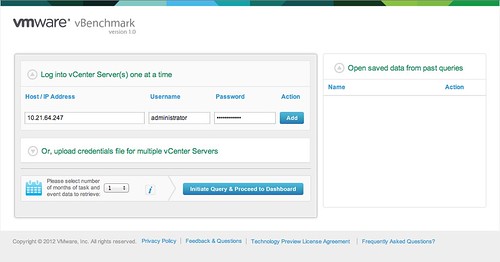
Now you will see a config screen. You can simply enter the details of the vCenter Server of the vSphere environment you want to “analyze” and hit “Initiate Query & Proceed to Dashboard”.

Now comes the cool part. vBenchmark will analyze your environment and provide you with a nice clean looking dashboard… but that is not it. You can decide to upload your dataset to VMware and compare it with “peers”. I tried it and noticed their wasn’t enough data for the peer group I selected. So I decided to select “All / All” to make sure I saw something.

I can understand that many of you don’t want to send data to an “unknown” destination. The good thing is though that you can inspect what is being sent. Before you configure the upload just hit “Preview all data to be sent” and you will get a CSV file of the data set. This data is transported over SSL, just in case you were wondering.

I am going to leave this one running for a while and am looking forward to see what the averages are of my peers. I also am wondering what this tool will evolve in to.

One thing that stood out from the “peer results” is the amount of GBs of Storage per VM: 116.40GB. That did surprise me as I would have estimated this to be around 65GB. Anyway, download it and try it out. It is worth it.

  • « Go to Previous Page
  • Page 1
  • Interim pages omitted …
  • Page 9
  • Page 10
  • Page 11
  • Page 12
  • Page 13
  • Interim pages omitted …
  • Page 44
  • Go to Next Page »

Primary Sidebar

About the Author

Duncan Epping is a Chief Technologist and Distinguished Engineering Architect at Broadcom. Besides writing on Yellow-Bricks, Duncan is the co-author of the vSAN Deep Dive and the vSphere Clustering Deep Dive book series. Duncan is also the host of the Unexplored Territory Podcast.

Follow Us

  • X
  • Spotify
  • RSS Feed
  • LinkedIn

Recommended Book(s)

Also visit!

For the Dutch-speaking audience, make sure to visit RunNerd.nl to follow my running adventure, read shoe/gear/race reviews, and more!

Do you like Hardcore-Punk music? Follow my Spotify Playlist!

Do you like 80s music? I got you covered!

Copyright Yellow-Bricks.com © 2026 · Log in