• Skip to primary navigation
  • Skip to main content
  • Skip to primary sidebar

Yellow Bricks

by Duncan Epping

  • Home
  • Unexplored Territory Podcast
  • HA Deepdive
  • ESXTOP
  • Stickers/Shirts
  • Privacy Policy
  • About
  • Show Search
Hide Search

Management & Automation

Updating LSI firmware through the ESXi commandline

Duncan Epping · Apr 8, 2014 ·

I received an email this week from one of my readers / followers on twitter who had gone through the effort of upgrading his LSI controller firmware. He shared the procedure with me as unfortunately it wasn’t well documented. I hope this will help others in the future, I know it will help me as I was about to look at the exact same for my VSAN environment, thanks for sharing this Tom!

— copy / paste from Tom’s document —

We do quite a bit of virtualization and storage validation and performance testing in the Taneja Group Labs (http://tanejagroup.com/). Recently, we were performing some tests with VMware’s VSAN and due to some performance issues we were having with the AHCI controllers on our servers we needed to revise our environment to add some LSI SAS 2308 controllers and attach our SSD and HDDs to the LSI card. However our new LSI SAS controllers didn’t come with the firmware mandated by the VSAN HCL (they had v14 and the HCL specifies v18) and didn’t recognize the attached drives.  So we set about updating LSI 2308 firmware. Updating the LSI firmware is a simple process and can be accomplished from an ESXi 5.5 U1 server but isn’t very well documented. After updating the firmware and rebooting the system the drives were recognized and could be used by VSAN. Below are the steps I took to update my LSI controllers from v14 to v18. [Read more…] about Updating LSI firmware through the ESXi commandline

Cool tool update: RVTools 3.6

Duncan Epping · Feb 24, 2014 ·

It has been a while since I reported an update of RVTools. Rob just emailed me and told me that Version 3.6 is available as of today. He has been working really hard to get some great new functionality in, which I am sure all of you will appreciate. One of the coolest free tools out there if you ask me! Great work again Rob, thanks for contributing to the community like this.

Version 3.6 (February, 2014)

  • New tabpage with cluster information
  • New tabpage with multipath information
  • On vInfo tabpage new fields HA Isolation response and HA restart priority
  • On vInfo tabpage new fields Cluster affinity rule information
  • On vInfo tabpage new fields connection state and suspend time
  • On vInfo tabpage new field The vSphere HA protection state for a virtual machine (DAS Protection)
  • On vInfo tabpage new field quest state.
  • On vCPU tabpage new fields Hot Add and Hot Remove information
  • On vCPU tabpage cpu/socket/cores information adapted
  • On vHost tabpage new fields VMotion support and storage VMotion support
  • On vMemory tabpage new field Hot Add
  • On vNetwork tabpage new field VM folder.
  • On vSC_VMK tabpage new field MTU
  • RVToolsSendMail: you can now also set the mail subject
  • Fixed a datastore bug for ESX version 3.5
  • Fixed a vmFolder bug when started from the commandline
  • Improved documentation for the commandline options

Startup News Flash part 2

Duncan Epping · Aug 13, 2013 ·

First part of the Startup News Flash was published a couple of weeks ago, and as many things have happened I figured I would publish another. At times I guess I will miss out on a news fact or a new company, if that happens don’t hesitate to leave a comment with your findings/opinion or just a link to what you feel is newsworthy! As mentioned in part 1 the primary focus of this article is Startup news / Flash related news. As you can see most flash related except for one.

Nimbus Data launched two brand new arrays: Gemini F400 / F600 arrays. These are all flash arrays, and bring something unique to the table for sure… and that is costs: price per useable gigabyte is $0.78. Yes, that is low indeed. How do they bring it down? Well of course by very efficient deduplication and compression. On top of that, by leveraging standard hardware and getting all smarts from software the price can be kept low. According to the press release these new arrays will be able to provide between 3TB and 48TB of capacity (I almost said disk space there…) and will be shipping end of this year! Although Nimbus declared Hybrid Storage officially dead, mainly because of the cost of Nimbus all flash solution (the F400 starts under US$60,000, the F600 starts under US$80,000.), I still think there is a lot of room for growth in that space and many customer will be interested in those solutions. My question yesterday on twitter was to Nimbus which configuration they did the math with to declare hybrid dead, because cost per gigabyte is one thing, the upfront investment to reach that price point is another. It will be interesting to see how they will do the upcoming 12-18 months, but it is needless to say that they will be going after their competition aggressively. Talking about competition….

Last year at VMworld I briefly stopped at the Tegile booth, besides the occasional tweet I kind of lost track until recent as Tegile just announced series C funding… Not pocket money I would say but a serious round, $35 million, led by Meritech Capital Partners and original stakeholder August Capital and strategic partners Western Digital and SanDisk.  For those who don’t know, Tegile is a storage company who sells both a hybrid and an “all-flash” solution and they have done this in an interesting modular fashion (all-flash placed in front of spinning disks = modular hybrid). Of course they also offer functionality like dedupe/compression and replication. Although I haven’t heard too much from them lately it is a booth I will surely stop by at VMworld. Again, there is a lot of competition in this space and it would be interesting to see an “All-flash / Hybrid Storage bake off”. Tegile vs Nimbus, Nimble vs Tintri, Pure Storage vs Violin…

Violin Memory just announced the 6264 flash Memory Array. This new all flash storage system can provide a capacity of 64 TiB/70.3 TB with a footprint of just 3U, and that is impressive if you ask me. On top of that, it can provide up to 1 million IOps and at a ultra low latency! Who doesn’t want to have 1 million IOps to its disposal right? (More specs to be found here.) To me though what was more exciting in this press release was the announcement of a management tool called Symphony. Symphony provides a single pane of glass for all your Violin devices (read more details here.) It provides a smart management interface that allows you to create custom dashboard, comprehensive reporting, tagging and filtering and of course they provide a RESTful API for you admins out there who love to automate things. Nice announcement from Violin Memory, and those already running Violin hardware I would definitely recommend evaluating Symphony as the video looks promising.

CloudPhysics just announced the Card Store is GA as of today (13th August 2013) and a new round of funding ($ 10 million) led by Kleiner Perkins Caufield & Byers. Previous investors the Mayfield Fund, Mark Leslie, Peter Wagner, Carl Waldspurger, Nigel Stokes, Matt Ocko and VMware co-founders also participated in this round. I would say an exciting day for CloudPhysics. Many have asked over the last year why have I always been enthusiastic about what they do? I think John Blumenthal (CEO) explains it best:

Our servers receive a daily stream of 80+ billion samples of configuration, performance, failure and event data from our global user base with a total of 20+ trillion data points to date. This ‘collective intelligence,’ combined with CloudPhysics’ patent-pending datacenter simulation and unique resource management techniques, empowers enterprise IT to drive Google-like operations excellence using actionable analytics from a large, relevant, continually refreshed data set.

If you are interested in testing their solution, sign up for a free trial  at cloudphysics.com. Pricing starts at $49/month per physical server, more details here. For those wondering what CloudPhysics has to do with flash, well they’ve got a card for that!

That was it for Part 2, hope you found it a useful round-up and I will expect to be able to publish another startup news flash within 2 weeks!


Network port diagram for vSphere 5.x

Duncan Epping · Jul 10, 2013 ·

Somehow I missed this one, but as I reviewed the diagram and helped selecting the right format I figured I would still share it. This Network port diagram for vSphere 5.x is one awesome resource for those folks who want to get to the bottom of how components interact with each other.

I don’t think there is a lot more I can say about it, those who love diagrams and like to know the details make sure to hit: http://kb.vmware.com/kb/2054806

Cool Tool: VisualEsxtop

Duncan Epping · Jul 8, 2013 ·

My ESXTOP page is still one of the most visited pages I have, it actually comes in on a second spot just right after the HA Deepdive. Every once in a while I revise the page and this week it was time to add VisualEsxtop to the list of tools people should use. I figured I would write a regular blog post first and roll it up in to the page at the same time. So what is VisualEsxtop?

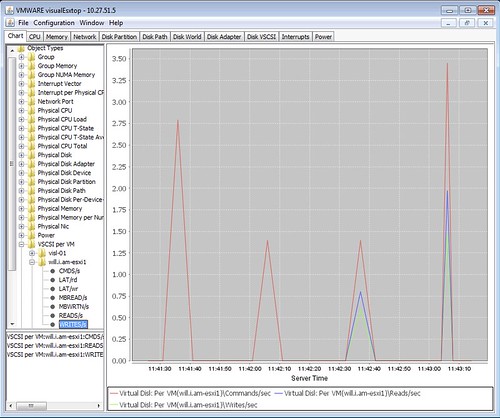
VisualEsxtop is an enhanced version of resxtop and esxtop. VisualEsxtop can connect to VMware vCenter Server or ESX hosts, and display ESX server stats with a better user interface and more advanced features.

That sounds nice right? Lets have a look how it works, this is what I did to get it up and running:

  • Go to “http://labs.vmware.com/flings/visualesxtop” and click “download”
  • Unzip “VisualEsxtop.zip” in to a folder you want to store the tool
  • Go to the folder
  • Double click “visualesxtop.bat” when running Windows (Or follow William’s tip for the Mac)
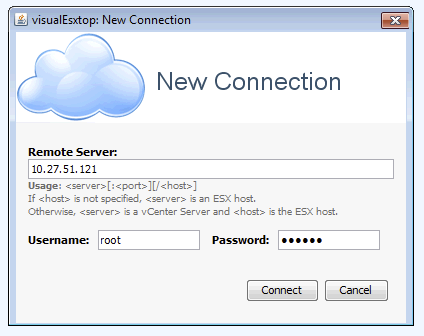
  • Click “File” and “Connect to Live Server”
  • Enter the “Hostname”, “Username” and “Password” and hit “Connect”
  • That is it…

Now some simple tips:

  • By default the refresh interval is set to 5 seconds. You can change this by hitting “Configuration” and then “Change Interval”
  • You can also load Batch Output, this might come in handy when you are a consultant for instance and a customers sends you captured data, you can do this under: File -> Load Batch Output
  • You can filter output, very useful if you are looking for info on a specific virtual machine / world! See the filter section.
  • When you click “Charts”  and double click “Object Types” you will see a list of metrics that you can create a chart with. Just unfold the ones you need and double click them to add them to the right pane

There are a bunch of other cool features in their like color-coding of important metrics for instance. Also the fact that you can show multiple windows at the same time is useful if you ask me and of course the tooltips that provide a description of the counter! If you ask me, a tool everyone should download and check out.

If you have feedback, make sure to leave a comment on the flings site as the engineers of this tool will be tracking that to see where improvements can be made.


  • « Go to Previous Page
  • Page 1
  • Interim pages omitted …
  • Page 6
  • Page 7
  • Page 8
  • Page 9
  • Page 10
  • Interim pages omitted …
  • Page 44
  • Go to Next Page »

Primary Sidebar

About the Author

Duncan Epping is a Chief Technologist and Distinguished Engineering Architect at Broadcom. Besides writing on Yellow-Bricks, Duncan is the co-author of the vSAN Deep Dive and the vSphere Clustering Deep Dive book series. Duncan is also the host of the Unexplored Territory Podcast.

Follow Us

  • X
  • Spotify
  • RSS Feed
  • LinkedIn

Recommended Book(s)

Also visit!

For the Dutch-speaking audience, make sure to visit RunNerd.nl to follow my running adventure, read shoe/gear/race reviews, and more!

Do you like Hardcore-Punk music? Follow my Spotify Playlist!

Do you like 80s music? I got you covered!

Copyright Yellow-Bricks.com © 2026 · Log in