• Skip to primary navigation
  • Skip to main content
  • Skip to primary sidebar

Yellow Bricks

by Duncan Epping

  • Home
  • Unexplored Territory Podcast
  • HA Deepdive
  • ESXTOP
  • Stickers/Shirts
  • Privacy Policy
  • About
  • Show Search
Hide Search

BC-DR

vSphere HA fail-over in action – aka reading the log files

Duncan Epping · Oct 17, 2012 ·

I had a discussion with Benjamin Ulsamer at VMworld and he had a question about the state of a host when both the management network and storage network was isolated. My answer was that in that case the host will be reported as “dead” as there is no “network heartbeat” and no “datastore heartbeat”. (more info about heartbeating here) Funny thing is when you look at the log files you do see isolated instead of dead. Why is that? Before we answer it lets go through the log files and paint the picture:

Two hosts (esx01 and esx02) with a management network and an iSCSI storage network. vSphere 5.0 is used and Datastore Heartbeating is configured. For whatever reason for the network of esx02 is isolated (both storage and management as it is a converged environment. So what can you see in the log files?

Lets look at “esx02” first:

  • 16:08:07.478Z [36C19B90 info ‘Election’ opID=SWI-6aace9e6] [ClusterElection::ChangeState] Slave => Startup : Lost master
    • At 16:08:07 the network is isolated
  • 16:08:07.479Z [FFFE0B90 verbose ‘Cluster’ opID=SWI-5185dec9] [ClusterManagerImpl::CheckElectionState] Transitioned from Slave to Startup
    • The host recognizes it is isolated and drops from Slave to “Startup” so that it can elect itself as master to take action
  • 16:08:22.480Z [36C19B90 info ‘Election’ opID=SWI-6aace9e6] [ClusterElection::ChangeState] Candidate => Master : Master selected
    • The host has elected itself as master
  • 16:08:22.485Z [FFFE0B90 verbose ‘Cluster’ opID=SWI-5185dec9] [ClusterManagerImpl::CheckHostNetworkIsolation] Waited 5 seconds for isolation icmp ping reply. Isolated
    • Can I ping the isolation address?
  • 16:08:22.488Z [FFFE0B90 info ‘Policy’ opID=SWI-5185dec9] [LocalIsolationPolicy::Handle(IsolationNotification)] host isolated is true
    • No I cannot, and as such I am isolated!
  • 16:08:22.488Z [FFFE0B90 info ‘Policy’ opID=SWI-5185dec9] [LocalIsolationPolicy::Handle(IsolationNotification)] Disabling execution of isolation policy by 30 seconds.
    • Hold off for 30 seconds as “das.config.fdm.isolationPolicyDelaySec” was configured
  • 16:08:52.489Z [36B15B90 verbose ‘Policy’] [LocalIsolationPolicy::GetIsolationResponseInfo] Isolation response for VM /vmfs/volumes/a67cdaa8-9a2fcd02/VMWareDataRecovery/VMWareDataRecovery.vmx is powerOff
    • There is a VM with an Isolation Response configured to “power off”
  • 16:10:17.507Z [36B15B90 verbose ‘Policy’] [LocalIsolationPolicy::DoVmTerminate] Terminating /vmfs/volumes/a67cdaa8-9a2fcd02/VMWareDataRecovery/VMWareDataRecovery.vmx
    • Lets kill that VM!
  • 16:10:17.508Z [36B15B90 info ‘Policy’] [LocalIsolationPolicy::HandleNetworkIsolation] Done with isolation handling
    • And it is gone, done with handling the isolation

Lets take a closer look at “esx01”, what does this host see with regards to the management network and storage network isolation of “esx02”:

  • 16:08:05.018Z [FFFA4B90 error ‘Cluster’ opID=SWI-e4e80530] [ClusterSlave::LiveCheck] Timeout for slave @ host-34
    • The host is not reporting itself any longer, the heartbeats are gone…
  • 16:08:05.018Z [FFFA4B90 verbose ‘Cluster’ opID=SWI-e4e80530] [ClusterSlave::UnreachableCheck] Beginning ICMP pings every 1000000 microseconds to host-34
    • Lets ping the host itself, it could be the FDM agent is dead.
  • 16:08:05.019Z [FFFA4B90 verbose ‘Cluster’ opID=SWI-e4e80530] Reporting Slave host-34 as FDMUnreachable
  • 16:08:05.019Z [FFD5BB90 verbose ‘Cluster’] ICMP reply for non-existent pinger 3 (id=isolationAddress)
    • As it is just a 2 node cluster, lets make sure I am not isolated myself, I got a reply so I am not isolated!
  • 16:08:10.028Z [FFFA4B90 verbose ‘Cluster’ opID=SWI-e4e80530] [ClusterSlave::UnreachableCheck] Waited 5 seconds for icmp ping reply for host host-34
  • 16:08:14.035Z [FFFA4B90 verbose ‘Cluster’ opID=SWI-e4e80530] [ClusterSlave::PartitionCheck] Waited 15 seconds for disk heartbeat for host host-34 – declaring dead
    • There is also no datastore heartbeat so the host must be dead. (Note that it cannot see the difference between a fully isolated host and a dead host when using IP based storage on the same network.)
  • 16:08:14.035Z [FFFA4B90 verbose ‘Cluster’ opID=SWI-e4e80530] Reporting Slave host-34 as Dead
    • It is officially dead!
  • 16:08:14.036Z [FFE5FB90 verbose ‘Invt’ opID=SWI-42ca799] [InventoryManagerImpl::RemoveVmLocked] marking protected vm /vmfs/volumes/a67cdaa8-9a2fcd02/VMWareDataRecovery/VMWareDataRecovery.vmx as in unknown power state
    • We don’t know what is up with this VM, power state unknown…
  • 16:08:14.037Z [FFE5FB90 info ‘Policy’ opID=SWI-27099141] [VmOperationsManager::PerformPlacements] Sending a list of 1 VMs to the placement manager for placement.
    • We will need to restart one VM, lets provide its details to the Placement Manager
  • 16:08:14.037Z [FFE5FB90 verbose ‘Placement’ opID=SWI-27099141] [PlacementManagerImpl::IssuePlacementStartCompleteEventLocked] Issue failover start event
    • Issue a failover event to the placement manager.
  • 16:08:14.042Z [FFE5FB90 verbose ‘Placement’ opID=SWI-e430b59a] [DrmPE::GenerateFailoverRecommendation] 1 Vms are to be powered on
    • Lets generate a recommendation on where to place the VM
  • 16:08:14.044Z [FFE5FB90 verbose ‘Execution’ opID=SWI-898d80c3] [ExecutionManagerImpl::ConstructAndDispatchCommands] Place /vmfs/volumes/a67cdaa8-9a2fcd02/VMWareDataRecovery/VMWareDataRecovery.vmx on __localhost__ (cmd ID host-28:0)
    • We know where to place it!
  • 16:08:14.687Z [FFFE5B90 verbose ‘Invt’] [HalVmMonitor::Notify] Adding new vm: vmPath=/vmfs/volumes/a67cdaa8-9a2fcd02/VMWareDataRecovery/VMWareDataRecovery.vmx, moId=12
    • Lets register the VM so we can power it on
  • 16:08:14.714Z [FFDDDB90 verbose ‘Execution’ opID=host-28:0-0] [FailoverAction::ReconfigureCompletionCallback] Powering on vm
    • Power on the impacted VM

That is it, nice right… and is just a short version of what is actually in the log files. It contains a massive amount of details! Anyway, back to the question… if not already answered, the remaining host in the cluster sees the isolated host as dead as there is no:

  • network heartbeat
  • response to a ping to the host
  • datastore heartbeat

The only thing the master can do at that point is to assume the “isolated” host is dead.


** Disclaimer: This article contains references to the words master and/or slave. I recognize these as exclusionary words. The words are used in this article for consistency because it’s currently the words that appear in the software, in the UI, and in the log files. When the software is updated to remove the words, this article will be updated to be in alignment. **
Some questions about Stretched Clusters with regards to power outages

Duncan Epping · Oct 9, 2012 ·

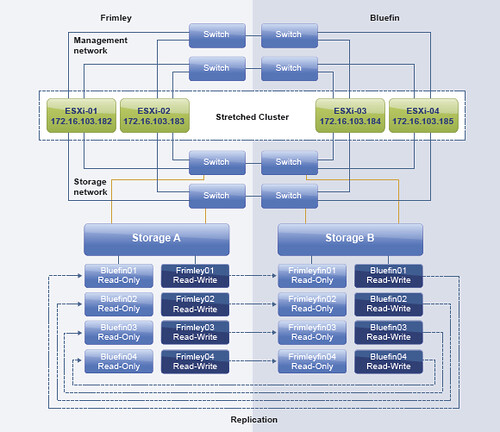
Today I received an email about the vSphere Metro Storage Cluster paper I wrote, or better said about stretched clusters in general. I figured I would answer the questions in a blog post so that everyone can chip in / read etc. So lets show the environment first so that the questions are clear. Below is an image of the scenario.

Below are the questions I received:

If a power outage occurs at Frimley the 2 hosts get a message by the UPS that there is a power outage. After 5 minutes (or any other configured value) the next action should start. But what will be the next action? If a scripted migration to a host at Bluefin starts, will DRS move some VMs back to Frimley? Or could the VMs get a mark to stick at Bluefin? Should the hosts at Frimley placed into Maintenance mode so the migration will be done automatically? And what happens if there is a total power outage both at Frimley and Bluefin? How a controlled shutdown across hosts could be arranged?

Lets start breaking it down and answer where possible. The main question is how do we handle power outages. As in any datacenter this is fairly complex. Well the powering-off part is easy, powering everything on in the right order isn’t. So where do we start? First of all:

  1. If you have a stretched cluster environment and, in this case, Frimley data center has a power outage, it is recommended to place the hosts in maintenance mode. This way all VMs will be migrated to the Bluefin data center without disruption. Also, when power returns it allows you to do check on the host before introducing them to the cluster again.
  2. If maintenance mode is not used and a scripted migration is done virtual machines will be migrated back probably by DRS. DRS is triggered every 5 minutes (at a minimum). Avoid this, use maintenance mode!
  3. If there is an expected power outage and the environment is brought down it will need to be manually powered on in the right order. You can also script this, but a stretched cluster solution doesn’t cater for this type of failure unfortunately.
  4. If there is an unexpected power outage and the environment is not brought down then vSphere HA will start restarting virtual machines when the hosts come back up again. This will be done using the “restart priority” that you can set with vSphere HA. It should be noted that the “restart priority” is only about the completion of the power-on task, not about the full boot of the virtual machine itself.

I hope that clarifies things.

Can I protect my vCenter Server with vSphere Replication?

Duncan Epping · Sep 21, 2012 ·

Someone asked this question last week when I posted my “back to basics” vSphere Replication blog. I guess protecting vCenter Server isn’t too difficult but how about recovering it after a failure?

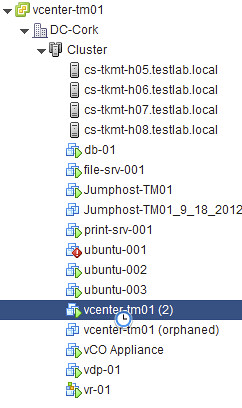
Those who have used vSphere Replication know that you need vCenter Server to click “Recover”. In a dual vCenter Server configuration that is not a problem. But what if you just want to protect your vCenter Server virtual machine and replicate it to a second piece of storage. I tested this and then “killed” my vCenter Server. How do I get my vCenter Server up and running again from this replica?

Let me start by saying that this is unsupported as far as I know. So lets start by checking the folder in which the replica of the vCenter Server resides:

  8.5K Sep 21 09:46 hbrcfg.GID-d69c6cad-42a5-474a-86c4-c3158d1a3b42.6.nvram.18
  3.4K Sep 21 09:46 hbrcfg.GID-d69c6cad-42a5-474a-86c4-c3158d1a3b42.6.vmx.16
   267 Sep 21 09:46 hbrcfg.GID-d69c6cad-42a5-474a-86c4-c3158d1a3b42.6.vmxf.17
124.0K Sep 21 09:46 hbrdisk.RDID-9786ae39-cd3a-4773-be63-cd1bc3641d59.14.175750085646519-delta.vmdk
   379 Sep 21 09:46 hbrdisk.RDID-9786ae39-cd3a-4773-be63-cd1bc3641d59.14.175750085646519.vmdk
 52.0K Sep 21 09:46 hbrdisk.RDID-ae17cfad-c8d8-460c-99a1-8f26ff1133b9.13.43820857661344-delta.vmdk
   375 Sep 21 09:46 hbrdisk.RDID-ae17cfad-c8d8-460c-99a1-8f26ff1133b9.13.43820857661344.vmdk
  4.1K Sep 21 09:46 hbrgrp.GID-d69c6cad-42a5-474a-86c4-c3158d1a3b42.txt
 25.0G Sep 21 09:46 vcenter-tm01-flat.vmdk
   473 Sep 21 09:46 vcenter-tm01.vmdk
 60.0G Sep 21 09:46 vcenter-tm01_1-flat.vmdk
   476 Sep 21 09:46 vcenter-tm01_1.vmdk

As you can see the folder contains a lot of files we are familiar with… Especially the vmdk files and the vmx files is something we can work with. So how would we get this vcenter up and running. Lets look at the vmxf file first as that will reveal the original name of the vmx file:

<vmxPathName type="string">vcenter-tm01.vmx</vmxPathName></VM></Foundry>

Next I am going to copy the “.nvram”, “.vmx” and “.vmxf” file and give them the name “vcenter-tm01.nvram” etc.

cp hbrcfg.GID-d69c6cad-42a5-474a-86c4-c3158d1a3b42.6.vmxf.17 vcenter-t 
vcenter-tmp.vmxf

So now I have all the files I need with the right name… Next I will first “unregister” the original vCenter Server virtual machine… just to avoid any weird issues. I list all the virtual machines registered against this host first:

vim-cmd /vmsvc/getallvms

Now that I have the “vmid” I can unregister the original virtual machine:

vim-cmd /vmsvc/unregister <vmid>

Now that the original virtual machine is removed unregistered from the host, I should be able to register the “new” vCenter Server virtual machine… aka the replica.

vim-cmd /solo/register /vmfs/volumes/4f228789-84f6b84c-e17e-984be1047b16/vcenter-tm01/vcenter-tm01.vmx

Lets break that one down just to be clear:

vim-cmd /solo/register /path/to/vmxfile/filename.vmx

This command will return the “vmid” of the virtual machine we just registered. Now we can power it on…

vim-cmd /vmsvc/power.on

Now it sits there for a while, and when I log in with the vSphere Client and check the host it is running on I see this message that says “the virtual machine might have been moved or copied…”, I answer it by saying that is was copied and now the vCenter virtual machine boots up and I can login again. Yes there is an orphaned vCenter Server instance there, and you will need to clean that up… also there might be some obsolete files in the folder of this replica, and you might want to clean those up as well. Anyway, the vCenter Server virtual machine is up and running again, and that was the goal of this exercise right 🙂

A host has failed, which VMs were impacted and restarted by HA?

Duncan Epping · Sep 20, 2012 ·

Someone asked me a question a while back and I figured it was time to write it down… Or in this case to record a video. The vSphere Web Client is a powerful tool when it comes to finding events and problems. This video shows how you can use the vSphere Web Client to figure out which virtual machines were impacted by a host failure and restarted by HA. On top of that I also show you how you can use PowerCLI to list all virtual machines that were restarted recently by HA. No I didn’t write that PowerCLI blurb myself, I elegantly stole it from the infamous PowerCLI guru Jonathan Medd. So if you need the blurb, hit his article and check the “update 2” section as it contains the code for vSphere 5.0 and up. (I tested it on 5.1 and it works as you can see in the video.)

Enabling PDL enhancements in a non-stretched environment?

Duncan Epping · Sep 20, 2012 ·

I received two questions on the same topic last week. The question was around using the PDL enhancements in a non-stretched environment… does it make sense? The question was linked to a scenario where for instance a storage admin makes a mistake and removes access for a specific host to a LUN. For those who don’t know what a PDL is read this article, but in short it is a SCSI sense code issued by an array when it believes storage will be permanently unavailable.

First of all, the vSphere HA advanced option “das.maskCleanShutdownEnabled” is enabled by default as of vSphere 5.1. In other words, HA is going to assume a virtual machine needs to be restarted when it is powered and isn’t able to update the config files. (Config files contain the details about the shutdown state normally, was it an admin initiated shutdown?)

Now, one thing to note is that “disk.terminateVMOnPDLDefault” is not on by default. If this setting is not explicitly enabled then the virtual machine will not be killed and HA won’t be able to take action. In other words, if your storage admin changes the presentation of your LUNs and removes a host accidentally the virtual machine will just sit there without access to disk. The OS might fail at some point, your application will definitely not be happy, but this is it.

To answer the question, yes even in a non-stretched environment it makes sense to enable both disk.terminateVMOnPDLDefault and das.maskCleanShutdownEnabled. Virtual machines will be automatically restarted by HA if they are killed by the VMkernel when a PDL has been detected.

  • « Go to Previous Page
  • Page 1
  • Interim pages omitted …
  • Page 29
  • Page 30
  • Page 31
  • Page 32
  • Page 33
  • Interim pages omitted …
  • Page 63
  • Go to Next Page »

Primary Sidebar

About the Author

Duncan Epping is a Chief Technologist and Distinguished Engineering Architect at Broadcom. Besides writing on Yellow-Bricks, Duncan is the co-author of the vSAN Deep Dive and the vSphere Clustering Deep Dive book series. Duncan is also the host of the Unexplored Territory Podcast.

Follow Us

  • X
  • Spotify
  • RSS Feed
  • LinkedIn

Recommended Book(s)

Also visit!

For the Dutch-speaking audience, make sure to visit RunNerd.nl to follow my running adventure, read shoe/gear/race reviews, and more!

Do you like Hardcore-Punk music? Follow my Spotify Playlist!

Do you like 80s music? I got you covered!

Copyright Yellow-Bricks.com © 2026 · Log in