One of the coolest features that has been included with vSphere 5.1 in my opinion is vSphere Replication. (Make sure to read the what’s new paper) The reason for it being is that it now brings “advanced” technology to everyone (Essentials Plus and upwards). I have used vSphere Replication in 5.0 and it was nice, but with 5.1 the installation and configuration process has been improved. For instance the database is now included in the appliance and it isn’t as DNS sensitive as it was with 5.0. This makes installing and configuring it a matter of minutes.
I am going to assume you have “vSphere Replication” traffic enabled on a VMkernel NIC, if you do not know how to create a VMkernel NIC check this article
Lets get started. I downloaded the vSphere Replication virtual appliance and imported and configured it in just a couple of steps using the vSphere 5.1 Web Client:
- Go to your cluster under “vCenter” —> “Hosts and Clusters”.
- Right click the cluster object and click “All vCenter Actions” —> “Deploy OVF Template”
- As a source I select the ova file I downloaded, now click “Next”
- Validate the details and click “Next”
- If you agree “Accept” the EULA and click “Next”
- Select the “Name and folder” this virtual machine will needs to be placed in and click “Next”
- Select the “Datastore” it needs to be provisioned to and click “Next”
- Select the “Network” it needs to be connected to and click “Next”
- Provide an administrative “password” and enter the “Networking properties” and click “Next”
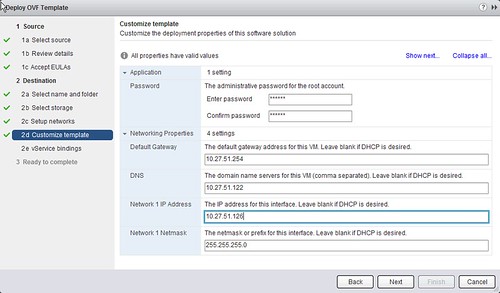
- Click “Next” on the vService bindings, when the binding status is “ok”
- Click “Finish”
Now the vSphere Replication appliance is ready to be powered on. Depending on where you are replicating to there might be some additional steps required. If you are replicating to a second vCenter Server you will need to deploy a vSphere Replication appliance in that environment as well. Note that you will need to link two appliances together before you can replicate anything.
I don’t have a second vCenter Server and I just want to replicate virtual machines to a secondary remote storage device as a form of backup. So I will go ahead and replicate a virtual machine.
- Go to your cluster under “vCenter” —> “Hosts and Clusters”.
- Right click one of your virtual machines, I will use the vCenter Server as an example, and select “All vSphere Replication Actions” and then click on “Configure Replication”.
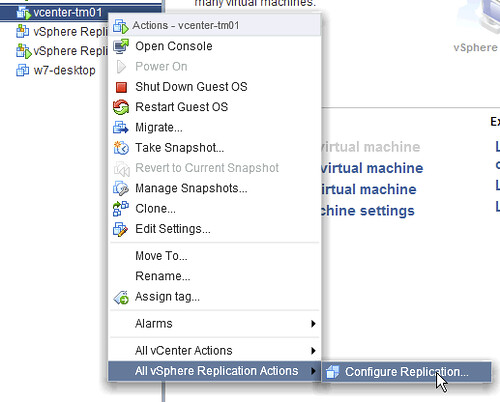
- As a target site select the vCenter Server itself and click “next”.
- As a target location select a datastore and click “next”.
- Decide what the RPO (recovery point objective) should be, I selected 15 minutes and click “next”.
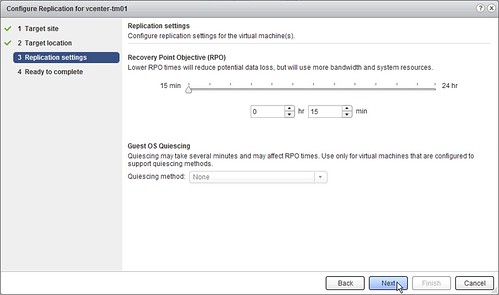
- Click “finish”.
Now replication will be configured and the virtual machine will be replicated with an RPO of 15 minutes. Next lets check on the progress of the replica:
- Click on the “Home” button.
- Click on “vSphere Replication” in the upper right.
- Click on “Sites” and then on your vCenter Server instance, in my case “vcenter-tm01”.
- On the “Summary” tab you can see that a virtual machine replication is in progress.
- If you click “View details” you can see some more specifics. It is the first time it is being synced so it will do a full sync as indicated.
- When it is finished it should show a nice green check.
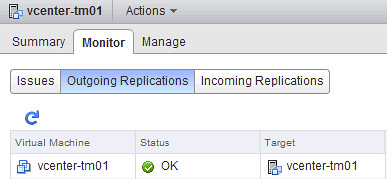
Now if needed you can recover this virtual machine. You can also pause syncing or stop it completely. There is also the option to force an instant sync or even reconfigure the replication process. All of this can be found as follows:
- Click on the “Home” button.
- Click on “vSphere Replication” in the upper right.
- Click on “Sites” and then on your vCenter Server instance, in my case “vcenter-tm01”.
- Click on the “Monitor” tab and next on “Incoming Replications”.
- Right click the appropriate virtual machine.

- If you select “Recover” you will notice your virtual machine needs to be powered off before you can recover it.
- Select the “folder” you want to recover your virtual machine to and click “Next”.
- Select the “cluster” and click “Next”.
- Note that your virtual machine will be powered on, but with a disconnected network, click “Finish”.
- Now you should see the status change to “Recovering” and when it is done to “Recovered”.
That is it… Simple right 🙂
Now this is ideal for replication between vCenter and most probably between sites. But lets say if one wants to do this within the same vcenter on the same site would the flexibility to dictate the rpo be a good reason to implement it like that. A simple backup tool may not have that much flexibility. Trying to come up with good use cases for it besides just replication.
Obviously this must not be used as a replacement for any backup tool either because it does not have the backup tool abilities like going back in time and such to restore a certain file etc.
Where can I download this OVA file from? I can’t find it listed on VMware.com other then a tab of the vSphere itself. Is this a seperate package or is it bundled in the vSphere install?
Go to:
vmware.com/download –> click “VMware vSphere” –> then you will see the download from Essentials Plus and upwards.
Definitely a cool tool which has been missing up till now. Easy to setup and use.
Just a small note, I had to reboot my vCenter server to make the menu visible ( the “All replication actions”).
Was replication available in 5.0? I thought it was ony via srm
Please clarify
Thanks
Only via SRM, in 5.1 it is part of the core platform.
Is there no option to reverse this? Fail back after a recovery has been performed? I know that there is not currently an automated method with SRM and VR, but is there not a manual method from the recovery interface?
nevermind, I know the answer to this….
What was the answer to this?
I did this last night on my 5.1 test lab. A couple of steps you missed pointing out are that after installing the vSphere Replication appliance (from within vCenter, not by directly connecting to an ESXi 5.1 host), you need to log out and log back in again to the vSphere Web Client, so that the “Configure Replication” option becomes available. I spent ages looking for it! It is also is only visible in the Web Client…
I then set up replication from my test lab server to a server running ESXi5.1 with only locally attached SATA drives. One thing that I recommend is that you make your Windows Pagefile reside on a dedicated volume, and then you reconfigre the replication to ignore the pagefile disk – saves a lot on replication!
Log out / log in is typically the first thing I do when I run in to an issue with the Web Client… hence I probably forgot to add it.
Did I miss anything else? (as you said a couple of steps… and I don’t deem the pagefile criticial in this process)
Can this be used for an active, active replication between two sites?
For example VM’s 1-10 replicate from site A to site B and VM’s 11-20 replicate from site B to site A?
Or will that require SRM!
Was there ever an answer to this question on I am having the same delima :
Can this be used for an active, active replication between two sites?
For example VM’s 1-10 replicate from site A to site B and VM’s 11-20 replicate from site B to site A?
Or will that require SRM!
Yes, you can do that. Once VC a is connected to VC B you can replicate in each direction. Keep just in mind that VSphere replication has a limitation of 500 replications (both incoming and outgoing)
Thanks Duncan-
Question about a DR scenario involving a production environment exploding with the replicas being on a non-damaged storage device. Could I create another vCenter with the Replication appliance and recover? It looks like the vmx file is in flux because of the deltas being replicated. The vmdk looks in tact though. What would you do? This is more out of curiosity than anything else. We are using multiple backup tools for data, we are struggling with VM backups from a money standpoint.
Hello Duncan, thanks for this article. I just have a small issue. I have the same configuration as you (1 VC and local replication). But when I do the Recover on the “Incoming replication” page, jobs start on my VC but I finally have an error because the primary VM is still registered on the VC (The name ‘VM Name’ already exists)… Is it normal? Could we set a different name on the config for this secondary VM? Many thanks.
You need to recover the vm in different VM & Templates folder. Otherwise the VC will reject the registration of the new VM and the complete process of recovery will fail.
Hi All, this is my first time setting up vSphere Replication 5.1 and i am having some trouble with configuration. dont know what exactly to do but it keeps giving errors when i try to register the appliance. Any help would be greatly appreciated.
What kind of errors do you receive? Have you deployed the appliance through the vsphere web client connected to the VC or to the esx? You must do it the first way. This is mandatory because of some settings the VR need to get of the VC.
Check your DNS
Hi Duncan,
I have the same problem as a Renaud, actually I can’t do VM recovery because I have only one vcenter server and when start recovery process get error “VM name already exist. Many TKS
Duncan,
In the case of only having once vCenter and using vSphere replication to other local replication, how do you recover the VMs if you loose your vCenter in a DR event?
Maybe put your VC server on your DR sites ? If DR, you already of your VC running.
Quick question – what’s the minimum licensing level for the target host / cluster? Can I replicate from Essentials Plus to Essentials?
can i deploy and configure vSphere Replication in my vSphere 5.0 u1 environment?
This is only available in 5.1 for the equivalent in 5.0 you need to use SRM and that has a cost and other requirements attached to it
Hi,
is it possible to power up a replica without restoring it through the Replication Appliance?
Hi Duncan,
Can we keep replica of a vm on the same datastore where my original vm is running and what is the advantage of having one VR appliance each site.
Duncan/All – You mention creating a VMkernel port for vSphere Replication traffic, however even with that VMkernel configured my VR the traffic is still running over my Management NIC. I read that in 5.0 static routes were needed for the Protected Site’s Hosts – Do we still need those static routes or is there another setting/command that’s needed for the traffic to traverse that VMkernel?
Hi guys, I have a question, maybe dumb. Which way the replication goes, when replicating a VM? Does it go through Ethernet or Fiber Channel?
Thanks.
Geraldo – It currently it runs over the ESXi’s Management NIC, see my post above.
Hello Duncan,
Can we Replicate a VM from a Host in one vCenter to a Host in different vCenter ?
I have one vcenter managing two hosts (say host A and host B). I have set up replication for VM from host A to a data store on Host B. Once replication is complete and when I try to recover the the VM from Host B, i get the error message – “the source virtual machine has no instance for recovery”
What am I doing wrong? This is my lab set up which I am validating for a potential Small Business Prospect. Please help.
Could you elaborate on this, I am also trying to restore a replicated VM in a single site and cannot figure out how to get around it failing to register because the name already exists.
“You need to recover the vm in different VM & Templates folder. Otherwise the VC will reject the registration of the new VM and the complete process of recovery will fail.”
Geraldo, Steve
Using the Web Client you can change the VMKernel Port and enable services for vSphere Replication traffic. This is not visible with the vSphere Client and can only be done with the Web GUI.
Selec the Host, select Manage, select Networking, Select Virtual Switches, select one of the Switches, select one of the VMKernel Ports, for example vmk0 and then click on the Pencil icon to edit it.
On the Port Properties you will see Enable Services with options for vMotion Traffic, Fault Tolerant Logging, Management Traffic and vSphere Replication traffic.
The issue I see is that is VMKernel Port based, so even if you have a vSwitch with two vVMkenrel ports with dual nics in link agregation it is only applicable to one of the ports. If you try adding it to the second port it takes it off the first one.
Regards,
Paul
I have a single vcenter server managing several clusters across 2 separate physical datacenters. Can I use vsphere replication appliance to replicate the VM’s from one datacenter to another without having 2 vcenter servers?
Also, can anyone tell me what is the remote site IP address in vsphere replication 5.1? Is it the IP address of the remote vsphere replication appliance?
Your comments and response would be appreciated.
Regards
Yes you can replicate within one single VC. In that case while configuring a replication chose the same VC as target site. When you are connecting to a remote VC, e.g VC not in your inventory, you need to provide the remote VC address, either ip or dns. Keep in mind that the vsphere replication servers must be able to resolve the remote VCs
Hi Martin,
Thanks for your reply. I have a couple of more questions-
1. Is there any advantage of having 2 separate vcenter servers in 2 physical sites vs having a single vcenter server? We have configured a single vcenter server in high availability mode by using a cheap method of keeping a clone in the 2nd datacenter pointing to the same SQL DSN with services stopped.
2. If I lose my physical site where the Replication appliance is running from including the vcenter server. As long as my vcenter database is replicated to the other site, can I bring my cloned vcenter back up and use the vsphere replicattion appliance web plugin to recover the replicated VM’s?
3. Where is the replicated data getting stored by the appliance? I was reading it uses CBT to replicate blocks of data but is it making a clone of the replicated VM?
Any insight would be helpful.
Thanks
Also what’s the advantage of pairing 2 vcenter servers in the primary and secondary sites for replication? I am little fuzzy about it.
Ok, one by one 🙂
– having 2 VCs and replicating between them is a case when you have long distance between your VIs and you can not administrate them through single VC. However this requires more licenses, at least for the each VC. Replicating within the same VC is the so called remote office branch office where you have near hosts that can be administrated by a single VC. Regarding to the replication itself – well if you just replicated them – it doesn’t matter. However, if you decide to grow and want to use SRM to protect them – then you must have 2 VC as this is the topology SRM supports.
– In order to recover replicated VM (it doesn’t matter if we are talking about one or 2 VCs scenario) you need to have vSphere Web Client which can access the VC, where the replication goes, e.g. the target site. If you lose this VC…. that is bad. In the related posts above, you will see “Can I protect my vCenter Server with vSphere Replication?” which is a workaround, but not officially supported by VMware way of doing things.
– The replicated data are stored on the datastore you point during configure a replication. This datastore is located on the target site.
– You actually pair sites (both VC and VR). From user perspective and vSphere Web Client perspective you are working with VCs. That is why you pair them. Also, SRM users are common with that behavior. The pairing can somehow be defined of the administrative role of defining where VMs could be replicated and other users w/o administrative role to configure the replications.
Thanks again. With a single replication appliance and a single vcenter server, the replication appliance is responsible for sending the changed data from the running VM and applies the changes to the datastore in the remote datacenter.
The only thing is replicated VM’s are not visible in vcenter? Can I view the replicated VM’s in vcenter?
Although replicating vcenter using the appliance sounds like a cool workaround and I understand it’s a unsupported option. Can I recover the vcenter server from the web client if my vcenter server is unavailable?
Your answers are much appreciated.
Wait…
Replication of data is done by a module living on the ESX host. The VR appliance is responsible to receive the data and write it down on the target datastore.
In order to see what is replicated and where, you need to go to the vSphere Replication UI in the vSphere Web Client. Under Monitor->Outgoing replications you will see all VMs that replicated. Under Monitor->Incoming replications you will see the VMs are replicated to this site.
If this is the ROBO case – you have the replicated VMs already. If it is not – on the target site the only place you can see the replicated VMs is under incoming replications. Those replications are not actually a real VMs or placeholder VMs.
The web client is connecting to a VC – so in order to anything you need a VC. The VR does not care what is in the replicated VM. So replicated a VC is absolutely supported. The unsupported issue here is the recovery described in the above article. This manual recovery process is valid for every replicated VM.
One last question. I know you must be hating me by now 🙂
What is the DR for the replication appliance itself? What if the appliance is corrupted beyond recovery and it was replicating 100 VM’s. How will I see my VM’s?
🙂 No problem. As you can imagine – this is a VM, and since VR does not care what is in the VM you can protect it as each other VM
Dear Martin,
I am facing a problem at my site.
As I just saw in the history, many people asked you about replicating using one Vcenter managing 2 servers at the ,main and 1 at the dr site.
I have installed 1 replication instance and located it at the main site. the replication went smooth.
And since my VCenter is located on the main site, I need to replicate it or clone it to the DR so if anything happened to the main site, I need it to recover my replicated VMs.
I tried both ideas but went into the same problem in both.
But when simulating the main site failure, the cloned Vcenter couldn’t detect the Vcenter at the replicating aapliance. I tried to move the Replication instance to be running at the DR site, but this didn’t help either since when logging to the web client on the cloned vcenter, and go to the vsphere replication tab, it couldn’t detect my site, thus couldn’t recover.
Do you think I should have 1 replication appliance on each site?
Or do you think that the cloned Vcenter idea doesn’t work? and if so, What can I do to recover my Vms if I have a major failure in my main site including vcenter failure.
Sorry for the long post, but I am becoming desperate.
Hi Elie,
I’m not sure I got the complete picture here.
If you replicate VMs from one VC to another (doesn’t matter the number of the hosts, but each VC must have VR appliance installed) in case of disaster you need only the VC and VR on the DR site to recover the machines. Those machines will be registered in the DR VC. You are not required to replicate the main VC itself – you already have one on the secondary site. In case you want full mirror of the main site to the DR site you will need SRM on top of VR on both sites.
You can get more info by reading http://www.vmware.com/files/pdf/techpaper/Introduction-to-vSphere-Replication.pdf for both 2 VC and 1 VC use cases
Regards,
Martin thx for your reply but my main problem is that I have 1 VC which manages the main and the DR Site.
when the main site is down, i do not have a vcenter at the dr.
so I have 2 options;
either I power up an already cloned version of the Vcenter at the dr and try to recover the vms from it,
or I try to power up the replica of the vcenter, knowing that I already replicated my vcenter vm to the dr site.
the cloned VC isn’t working.
I tried to follow this link:
http://www.yellow-bricks.com/2012/09/21/can-i-protect-my-vcenter-server-with-vsphere-replication/
and I could manage to recover my vms, knowing that my replication appliance is powered up on the dr site, or when powering up the replicated vc on the dr site, i can not detect the appliance to recover.
isn’t there any official way to do it?
i try to setup this for testing, but Configure Replication was not show up after i deploy the virtual replicate appliance in one Vcenter..i got two hosts connect to this vcenter…any idea?
vSphere Web Client will download/install VR UI upon login. So once the VR appliance boot you need to logout and log back in the web client. Then you’ll see VR UI and configure replication option
All,
Is it possible to replicate to more than one datastore? As an example, I have a one vCenter site. I want to replicate my critical VM’s from SAN1 to SAN2, but could I also replicate them to a branch office site for DR? It’s not obvious that I can at this point….
Another quickie, sort of related, is about the one vCenter issue everyone seems to be having. Sounds like clones and replication of your vCenter is not having much success? Has anybody tried replicating at the SAN/LUN level for a DR scenario? Or has anybody found the holy grail to replicate the vCenter AND restore your environment from it?
TIA
Stuart
Great notes but missing 1 vital step, the vmkernal/routing so that we don’t saturate the LAN with replication traffic if using VR locally to a NAS (which is actually on SAN Subnet).
The;
> “I am going to assume you have “vSphere Replication” traffic enabled on a VMkernel NIC, if you do not know how to create a VMkernel NIC check this article” according to the below link/post suggest that is just a TAG, not really a routing change. We clicked the tick for vSphere replication and even rebooted appliance, still ignores and goes to office router back into LAN switch, etc… we want it to direct from SAN to NAS, leaving the LAN out of it.
http://communities.vmware.com/thread/390076?start=0&tstart=0
Any thoughts? or do we need to wait on vmware to address this?
Hi there,
I have a problem here with vSphere plug-in.
Anyone knows how to install the VR Management plug-in?
It´s appears under “Avaliable Plug-ins” but I cant install it.
In my lab I used 2 Sites with 1 vCenter server on each Site(Version 5.1.0 Build 1064983) and 2 nodes (ESXi 5.1.0 Build 799733) for each vCenter.
My vSphere client version is 5.1.0 Build 78611
Everything works fine under Web Client but under vSphere I could not install the VR Management plug-in with the message:
“no client side download is needed for this plugin”.
Any help is appreciated.
Regards
Antonio
You need to deploy vSphere Replication appliance available from VMware’s download page. Once it is up and running log out and log back in. Thus you’ll have VR operational and the corresponding UI.
Use VMware community for further questions
Hi Martin,
Thank you for the reply.
I did that.
1.Restarted both the vCenters and all the clients.
2.The VR is up and running.
3.It works fine under vSphere Web Interface, but doesn´t work under vSphere client.
Under Plug-ins –> Manage Plug-ins -> Avaliable Plug-ins
I can see the plug-in:
*VR Management Vendor: VMware Inc.
*Status: no client side download is needed for this plugin
*Description: vSphere Replication Management (VRM)
Any trcik to install the plug-in?
I see. Well the VR plugin without SRM is only available in the web client.
All new vSphere features are available through the web client and not the standalone one
Hi,
When you enable replication for a VM, does the VM experience any performance hit during the initial full sync?
Thank you.
Hi Martin,
Thank you for your reply.
I thought that this new appliance was an update of SRM.
But I see now that they are different products.
Can you explain what is the differences between these two products?
Best regards,
Antonio
Well, there are actually not so differences.
The general one is that with no SRM you don’t have orchestration, such as recovery plan (you do manual recover per VM), no fIlback and test. But you have replication between hosts within the same VC aka ROBO case.
hi duncan,
nice article of the vshere replication.
my scenerio one vshere server and i have install replication template,so it is possible to replicate all vm on different data store.
Hi Duncan,
do you know if there is the way to configure an email alert in case of replication failure?
I have foud this article: http://www.v-front.de/2013/06/monitoring-vsphere-replication-rpo-with.html
but I am not pretty sure about its effectiveness.
I just started digging into vSphere Replication for our company and here’s our scenario. We have two vCenters, one in site A and one in site B. vCenterA manages hosts in site A, vCenterB manages hosts in site B. vCenterA also manages hosts in sites C,D,E,F,G… I was hoping to be able to replicate from site c to d, or at a minimum site C,D,E,F to site B for DR, but it looks like all the replication traffic is transferred thru the virtual appliance which this would cause a lot of unnecessary traffic crossing the wan from Site C to A then to B. Am I going about this wrong?
My end goal would be a way to have remote site C replicate directly to remote site D.
Hi Matt,
All replication traffic goes through the vSphere Replication appliance in vSphere Replication 5.1.
So if you hosts C and D are located in one and the same vCenter server (vCenterB) then replication traffic for the virtual machines will goes through the vSphere Replication appliance installed in the vCenterB.
Ok, one of the postings has a question I never thought about:
If I am replicating servers from one VCenter (VC1) to a DR VCenter (DR), and the entire VC1 infrastructure goes down, will I be able to reconfigure my protected VMs at the DR location since the appliance (running in VCenter) is down as well? If the answer to that question is no, is the workaround to replicate the actual appliance from VC1 to DR as well, as was suggested earlier in the thread?
For those asking if the main site fell over and you needed to restore and get a VM up and running, whilst it may be unlikely. Would the scenario not be as follows.
Presumably you would have a VCServer in the DR site and a VR appliance on your backup site. (Site B) Once the data is in sync and you lost your primary site (site A) would not the replication job show up in site B as an incoming connection and would you not have the option to recover from that APP?
In my min if the VMDK was up to date could you not simply create a new VM with a nice new name and point that to the VMDK and create a machine from it.?
I’ve used DoubleTake availability and this was my issue with that. Great idea but what if you also loose the DT console. If you attempted to then start the replica VM it would fail as during the failover process the console would make adjustments to the files and the VM could launch, without this process it was a useless replica.
Veeam however created a fully running replica which if you lost everything, you could simply power it on and you were away…
I’m curious and will try this next week in different failover scenarios.
In my scenario I have a physical management server which also doubles up as my venture server. In my mind if I lost this server I already have a blank Vcentre server running on another standby machine with VReplication but no hosts added. If I were to loose my VC server and yet I knew all the hosts IP and passwords, would I not be able to simply re add the hosts to my standby Vcentre server. Yes a little more configuration but in the event you lost an entire site your clients would expect a little downtime.
If in addition to this you actually could get a VM up and running by manually creating the VM again and pointing to the VMDK file then we can at least get things up and running. However it fully understandable if you have hundreds of VMs running its not practical.
Veeam7 which has just been released in my mind goes hand in hand with VMware replication as we can have a 15 min RPO that takes 2 mins to run with very little resources and then veeam replication that gives me a fully working replica that I get to run to a second data store total yindependent of any post processing and if which keeps multiple versions that can be instantly mounted in veeam to extract files and folders including exchange server objects.
In summary
can we get a vsphere replica up and running without post processing?
Will the DR site VRA be able to run the recovery in the event of the master site being unavailable?
Hello
I found your articel and it was realy helpfull to me. I’ve two questions, if I restore a Server to test if replication is working, should I delete the restored Server after the test or can I simple shut down the Server to establish the ongoing replication?
If I’ve on both sites a vcenter and a replication instance, can I restore the Server if one of the vcenter or replication instances on the other site are not avalible?
thanks in advance
Greetings
I have two sites main and DR. I am running two ESXi hosts on main site with vCenter virtual machine running on one of them. Now in case of main site failure/down, I want to powerup the same enviornment in my DR site. I have two physical hosts in my DR sites also. both the sites are in different vlans and I am not using SRM. Is it possible with vSphere replication or no OR how can I achieve this?
thanks
Hi,
is it possible to power up a replica without restoring it through the Replication Appliance?
HI Duncan,
how i set the time to start replica?
ex:
I want set the replica every 4h to start at 6am
next I have copy at 6-10-14-18-22
TKS
Loved you article. However, I was unable to figure out something.
I have a clean install of vCenter 5.5 and 2 ESX hosts. License level is Essentials Plus. Why can I not see the replication settings anywhere? I was even able to install the Replication Appliance. Forgive me for being a dunce. 🙂
Hi ,
We have setup a vmlab with two hosts in a single vcenter appliance. We installed vsphere replication appliance and replication server. Doing a recovery test to another host is not going ahead showing ” DataStore is not accessible in read-write mode from the host..” . Tried to reboot replication appliance and server and still same. Any helpful ideas please.
hi guys I have Site A wich replicates to Site B (one way), Both are active Sites. Site A is one office and Site B is another Office both production. Now VMs hosted in Site B need to be replicated to a new site, Site C. So my questions I know that only one Vmware Replication appliance can be installed per each vCenter knowing that. Can I replicate using the same Vmware Replication appliance to site C? something like Site B can be Target and source at the same time?
so something like this
http://screencast.com/t/DGSyNueH3 I took the picture from VDP administration guide and added a new Site
Hi, I am trying to find documentation on single site replication with HA & vMotion. I am trying to understand when to use HA or vMotion on the replicated servers when they will already have the replicated vm’s. I understand that HA will automate the restarting of vms on the replicated server but how will that impact the replicated vms?
Thanks
When recovering VM 1 host to other
Error is
DataStore is not accessible in read-write mode from the host.:
Similar problem can any one help???
Hi, I m having issues of replicating between the Esxi virtual machine and the physical network, unable to replicate between dc and mail server. Converted the mail server from physical to VM and now it wont replicate with the DC
please help.
thanks