• Skip to primary navigation
  • Skip to main content
  • Skip to primary sidebar

Yellow Bricks

by Duncan Epping

  • Home
  • Unexplored Territory Podcast
  • HA Deepdive
  • ESXTOP
  • Stickers/Shirts
  • Privacy Policy
  • About
  • Show Search
Hide Search

BC-DR

Free Kindle copy of vSphere 5.0 Clustering Deepdive?

Duncan Epping · May 28, 2013 ·

Do you want a free Kindle copy of the vSphere 5.0 Clustering Deepdive or the vSphere 4.1 HA and DRS Deepdive? Well make sure to check Amazon next week! I just put both of the books up for a promotional offer… For 48 hours, Wednesday June the 5th and Thursday June the 6th, you can download the Kindle (US Kindle Store) copy of both these books for free, yes that is correct ZERO dollars.
So make sure you pick it up either Wednesday June the 5th or Thursday June the 6th, it might be the only time this year it is on promo.

Replaced certificates and get vSphere HA Agent unreachable?

Duncan Epping · May 24, 2013 ·

Replaced certificates and get vSphere HA Agent unreachable? I have heard this multiple times in the last couple of weeks. I started looking in to it and it seems that in many of these scenarios the common issue was the thumbprints. The log files typically give a lot of hints that look like this:

[29904B90 verbose 'Cluster' opID=SWI-d0de06e1] [ClusterManagerImpl::IsBadIP] <ip of the ha primary> is bad ip

Also, note that the UI will state “vSphere HA agent unreachable” in many of these cases. Yes I know, these error messages can be improved for sure.

You can simply solve this by disconnecting and reconnecting the hosts. Yes, it really is as simple as that, and you can do this without any downtime. No need to move the VMs off even, just right-click the host and disconnect it. Then when the disconnect task is finished reconnect it.

vSphere HA – VM Monitoring sensitivity

Duncan Epping · May 14, 2013 ·

Last week there was a question on VMTN about VM Monitoring sensitivity. I could have sworn I did an article on that exact topic, but I couldn’t find it. I figured I would do a new one with a table explaining the levels of sensitivity that you can configure VM Monitoring to.

The question that was asked was based on a false positive response of VM Monitoring, in this case the virtual machine was frozen due to the consolidation of snapshots and VM Monitoring responded by restarting the virtual machine. As you can imagine the admin wasn’t too impressed as it caused downtime for his virtual machine. He wanted to know how to prevent this from happening. The answer was simple, change the sensitivity as it is set to “high” by default.

As shown in the table high sensitivity means that VM Monitoring responds to missing “VMware Tools heartbeat” within 30 seconds. However, before VM Monitoring restarts the VM though it will check if their was any storage or networking I/O for the last 120 seconds (advanced setting: das.iostatsInterval). If the answer is no to both, the VM will be restarted. So if you feel VM Monitoring is too aggressive, change it accordingly!

Sensitivity Failure Interval Max Failures Max Failures Time window
Low 120 seconds 3 7 days
Medium 60 seconds 3 24 hours
High 30 seconds 3 1 hour

Do note that you can change the above settings individually as well in the UI, as seen in the screenshot below. For instance you could manually increase the failure interval to 240 seconds. How you should configure it is something I cannot answer, it should be based on what you feel is an acceptable response time to a failure. Also, what is the sweet spot to avoid a false positive… A lot to think about indeed when introducing VM Monitoring.

Guaranteeing availability through admission control, chip in!

Duncan Epping · Apr 9, 2013 ·

I have been having these discussions with our engineering teams for the last year around guaranteed restarts of virtual machines in a cluster. In the current shape / form we use Admission Control to guarantee virtual machines are restarted. Today Admission Control is all about guaranteeing virtual machine restarts by keeping track of Memory and CPU resource reservations, but you can imagine that in the Software Defined Datacenter this could be expanded with for instance storage or networking reservation.

Now why am I having these discussions, what is the problem with Admission Control today? Well first of all it is the perception that many appear to have of Admission Control. Many believe the Admission Control algorithm uses “used” resources. Reality however is that Admission Control is not that flexible, it uses resource reservations and as you know this is static. So what is the result of using reservations?

By using reservations for “admission control” vSphere HA has a simple way of guaranteeing a restart is possible at all times. Simply because it checks if sufficient “unreserved resources” are available and if so it allows the virtual machine to be powered-on. If not, then it won’t allow the power-on just to ensure that all virtual machines can be restarted in case of a failure. But what is the problem? Although we guarantee a restart we do not guarantee any type of performance after the restart! Unless, unless of course you are setting your reservations equal to what you provisioned… but I don’t know anyone doing this as it eliminates any form of overcommitment and will result in an increase of cost and a decrease in flexibility.

So that is the problem. Question is – what should we do about it? We (the engineering teams and I) would like to hear from YOU.

  • What would you like admission control to be?
  • What guarantees do you want HA to provide?
  • After a failure, what criteria should HA apply in deciding which VMs to restart?

One idea we have been discussing is to have Admission Control use something like “used” resources… or for instance an “average of resources used” per virtual machine. What if you could say: I want to ensure that my virtual machines always get at least 80% of what they use on average? If so, what should HA do when there are not enough resources to meet the 80% demand of all VMs? Power on some of the VMs? Power on all with reduced share values?

Also, something we have discussed is having vCenter show how many resources are used on average taking your high availability N-X setup in to account, which should at least provide an insight around how your VMs (and applications) will perform after a fail-over. Is that something you see value in?

What do you think? Be open and honest, tell us what you think… don’t be scared, we won’t be bite, we are open for all suggestions.

Tintri releases version 2.0 – Replication added!

Duncan Epping · Apr 8, 2013 ·

I have never made it a secret that I am a fan of Tintri. I just love their view on storage systems and the way they decided to solve specific problems. When I was in Palo Alto last month I had the opportunity to talk to the folks of Tintri again and what they were working on. Of course we had a discussion about the Software Defined Datacenter and more specifically Software Defined Storage and what Tintri would bring to the SDS era. As all of that was under strict NDA I can’t share it, but what I can share are some cool details of what Tintri has just announced, version 2.0 of their storage system.

For those who have never even looked in to Tintri I suggest you catch-up by reading the following two articles:

  1. Tintri – virtual machine aware storage
  2. Tintri follow-up

When I was briefed initially about Tintri back in 2011 one of the biggest areas of improvement I saw were around availability. Two things were on my list to be solved, first one was the “single controller” approach they took. This was solved back in 2011. Another feature I missed was replication. Replication is the main feature that is announced today and it will be part of the 2.0 release of their software. What I loved about Tintri is that all data services they offered were on a virtual machine level. Of course the same applies to replication, announced today.

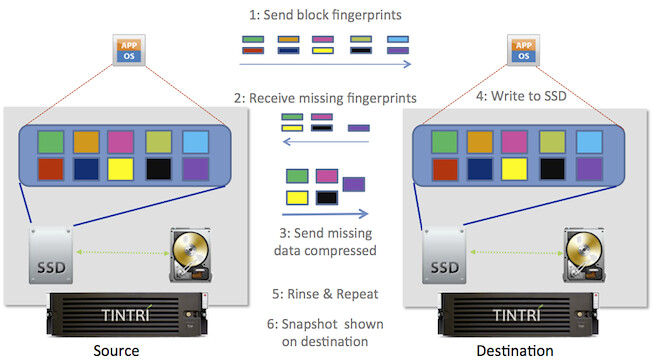
Tintri offers a-synchronous replication which can go down to a recovery point objective (RPO) of 15 minutes. Of course I asked if there were plans on bringing this down, and indeed this is planned but I can’t say when. What I liked about this replication solution is that as data is deduplicated and compressed the amount of replication traffic is kept to a limit. Let me rephrase that, globally deduplicated… meaning that if a block already exists in the DR site then it will not be replicated to that site. This will definitely have a positive impact on your bandwidth consumption, and Tintri has seen up to 95% reduction in WAN bandwidth consumption. The diagram below shows how this works.

The nice thing about the replication technique Tintri offers is that it is well integrated with VMware vSphere and thus it offers “VM consistent” snapshots by leveraging VMware’s quiescing technology. My next obvious question was what about Site Recovery Manager? As failover is on a per VM basis, orchestrating / automating this would be a welcome option. Tintri is still working on this and hopes to add support for Site Recovery Manager soon. Another I would like to see added was grouping of virtual machines for replication consistency; again this is something which is on the road map and hopefully will be added soon.

One of the other cool features which is added with this release is remote cloning. Remote cloning basically allows you to clone a virtual machine / template to a different array. Those who have multiple vCenter Server instances in their environment know what a pain this can be, hence the reason I feel this is one of those neat little features which you will appreciate once you have used it. Would be great if this functionality could be integrated within the vSphere Web Client as a “right click”, judging by the comments made by the Tintri team I would expect that they are already working on deeper / tighter integration with the Web Client, and I can only hope a vSphere Web Client plugin will be released soon so that all granular VM level data services can be managed from a single console.

All-in-all a great new release by Tintri, if you ask me this release is 3 huge steps forward!

  • « Go to Previous Page
  • Page 1
  • Interim pages omitted …
  • Page 24
  • Page 25
  • Page 26
  • Page 27
  • Page 28
  • Interim pages omitted …
  • Page 63
  • Go to Next Page »

Primary Sidebar

About the Author

Duncan Epping is a Chief Technologist and Distinguished Engineering Architect at Broadcom. Besides writing on Yellow-Bricks, Duncan is the co-author of the vSAN Deep Dive and the vSphere Clustering Deep Dive book series. Duncan is also the host of the Unexplored Territory Podcast.

Follow Us

  • X
  • Spotify
  • RSS Feed
  • LinkedIn

Recommended Book(s)

Also visit!

For the Dutch-speaking audience, make sure to visit RunNerd.nl to follow my running adventure, read shoe/gear/race reviews, and more!

Do you like Hardcore-Punk music? Follow my Spotify Playlist!

Do you like 80s music? I got you covered!

Copyright Yellow-Bricks.com © 2026 · Log in