• Skip to primary navigation
  • Skip to main content
  • Skip to primary sidebar

Yellow Bricks

by Duncan Epping

  • Home
  • Unexplored Territory Podcast
  • HA Deepdive
  • ESXTOP
  • Stickers/Shirts
  • Privacy Policy
  • About
  • Show Search
Hide Search

BC-DR

vSphere HA Futures: Restart Order

Duncan Epping · Sep 13, 2013 ·

At VMworld I hosted a group discussion together with Keith Farkas (HA Lead Engineer) on the topic of HA Futures. Based on this discussion group session Keith and I decided to gather more feedback from the field, this post will hopefully help us with that. Please do not hesitate to comment. I will have a couple of articles following this one, but lets get started with HA futures for the Restart Order first.

A topic that has come up at various sessions is HA restart ordering / priorities. Today HA provides four levels of restart priority: High, Medium, Low, Disabled. The thing to note with the current restart priority though is that there is no guarantee VMs are actually restarted in that order when the VMs are started on more than one host. Even when HA would restart them in the right order there is also no guarantee around when the boot cycle completes. Typically large virtual machines with for instance a database will take longer to boot than a server just running DNS. So what do we propose? We propose restart orders instead of restart priority. What does this mean, and what would we like to now from you?

There are two complementary ways of implementing this and we would like your feedback including which one you think would be most useful.

  1. Global Restart Order aka Bucketing
  2. VM to VM dependency Chains

Lets explain these two options and then I let you guys chime in.

Global Restart Order aka Bucketing is basically what you have today with “restart priorities” only it will actually enforce the restart order and it will allow for more flexibility. So with this option you could for instance create 5 buckets, and then add virtual machines to these buckets appropriately. These buckets could be: Priority 1, Priority 2 and so on. When a failure has occurred vSphere HA would then restart all VMs in the bucket “Priority 1” first and when that bucket has finished starting (e.g., wait for VMware Tools Heartbeat to report “alive” for each VM) vSphere HA would continue with the next bucket and so on.  Waiting for VMtools to report “alive” is one way to determine that a VM is “ready”. We are thinking of providing three other “wait” options —  wait for an application heartbeat, wait a certain amount of time after the VM powers on, or today’s behavior, wait for the power on task to complete”.

I guess a couple of questions we have:

  1. How many levels would you like to see?
  2. Which of the wait conditions (e.g., wait on VMtools) are most useful for you?
  3. Suppose HA could not power on a “Priority 1” VM. Do you want HA to stop powering on the “Priority 2” etc VMs until it can, move to the “Priority 2” group after a timeout, or something else?
The second option is VM to VM dependency Chains. These can be seen as an explicit restart order for a specific group of VMs which typically would form a service. I guess not unlike the vApp construct today, but then without all the caveats and restrictions around this. (vApps are essential resource pools, and we don’t want resource management in this case… just restart orderering.) In the simplest form, you could imagine specifying ordered lists of VMs, each list specifying the restart order for that set — the VMs in a list would be powered on sequentially. For example, something like the following:

Database VM –> Application Server –> Web Server

As you can see that would offer a significant amount of granularity, but also potentially a lot of operational complexity. How far would you like to go I guess is the question? Questions we have for you:

  1. Is an ordered list sufficient to express dependencies in a chain of VMs or do you need more sophistication?
  2. A VM with a dependent fails, do you expect HA to restart that child VM even though the previous has failed?
  3. What if HA could not be able to restart a VM with dependents — should HA restart these dependent VMs after a delay or only after the first VM is restarted?
A final question. We think bucketing will be easier to manage operationally but it introduces artificial dependencies between VMs and will make it take much longer to restart all VMs after a failure. How significant are these limitations?

That is it for now… Please chime in, as your response will help us define the future of vSphere HA.
vSphere 5.5 nuggets: changes to disk.terminateVMOnPDLDefault

Duncan Epping · Aug 28, 2013 ·

Those who were in the vSphere 5.5 beta program might have noticed it but I am suspecting many did not. With vSphere 5.5 there is finally an advanced setting to enable Disk.terminateVMOnPDLDefault. This advanced setting was introduced with vSphere 5.0 and unfortunately needed to be enabled in a file (/etc/vmware/settings); which was inconvenient to say the least. I asked the engineering team what the plans were to improve this but there were no direct plans. It took a bit longer then expected, but nevertheless the feature request I created made it in to the product. So if you are using a vSphere Metro Storage Cluster (what a coincidence, I am presenting on this topic in an hour at VMworld) please note that the following method should now be used to allow vSphere HA to respond to a Permanent Device Loss aka PDL:

  1. Browse to the host in the vSphere Web Client navigator
  2. Click the Manage tab and click Settings
  3. Under System, click Advanced System Settings
  4. In Advanced System Settings, select “VMkernel.Boot.terminateVMOnPDL”
  5. Click the Edit button (pencil) to edit the value and set it to “Yes”
  6. Click OK

Note the change in setting name from Disk.terminateVMOnPDLDefault to VMkernel.Boot.terminateVMOnPDL!

Prepare for the worst…

Duncan Epping · Jul 9, 2013 ·

Over the last couple of months I have been contacted by various folks who thought long and hard about their Business Continuity and Disaster Recovery design. They bought a great backup solution which integrated with vSphere and they replicated their SAN to a second site. In their mind they were definitely prepared for the worst… I agree on that to a certain extend, their design was well thought-out indeed and carefully covered all aspects there are for BC/DR. From an operational perspective though things look different, first significant failure occurred and then they couldn’t fully recall the steps to recovery. That is what my tweet below was inspired by…

https://twitter.com/DuncanYB/status/352832506552262658

Funny thing is that this tweet also triggered some responses like “Go SRM” or “that is where Zerto comes in”, and again I agree that an orchestration layer should be part of your DR plan but when talking about BC/DR I think it is more about the strategy, the processes that will need to be triggered in a particular scenario. What is involved typically? I am not going in to the business specific side of things even and all the politics that comes along with it. But instead look at you process, take one step back and ask yourself: what if this part of the process fails?

One of the things Lee and I will mention multiple times during our VMworld session on Stretched Clusters is: Test It! Not once, not twice but various times and be prepared for the worst to happen. Yes, none of us likes to test the most destructive and disruptive failure scenario, but you bet when something goes wrong it will be that scenario you did not test. Although I think for instance SRM is a rock solid solution, what if for whatever reason your recovery plan does not work as planned? While testing make sure you document your recovery plan, even though you might have a bunch of scripts laying around who knows if they will work as expected? Some scripts (or SRM type of solutions) have a dependency on certain components / services to be up, what if they are not? Besides your BC/DR strategy of course a lot of procedures will need to be documented. What kind of procedures are we talking about? Just a couple of random ones I would suggest you document while testing your scenarios at a bare minimum:

  • Order in which to power-on all physical components in your Datacenter (and power-off)
  • Location of infrastructure related services (AD, DNS, vCenter, Syslogging, NTP, etc), when virtual and on SAN document the datastore for instance
  • Order in which to power-on all infrastructure related services
  • Order in which to power-on all remaining virtual machines /vApps
  • How to get your vCenter Server up and running from the commandline (this will make it a lot easier to get the rest of your VMs up and running)
  • How to power-on virtual machines from the commandline after a failure
  • How to re-register a virtual machine from the commandline after a failure
  • How to mount a LUN from the commandline after a failover
  • How to resignature  a LUN from the commandline after a failover
  • How to restore a full datastore
  • How to restore a virtual machine
  • etc etc

Now I can hear some of you think why would I document that, I know all of that stuff inside out? Well what if you are on a holiday or at home sick? Just imagine your junior colleague is by himself when disaster strikes, does he know in which order the services of that business critical multi tier application need to start?

When you do document these, make sure to have a (physical) copy available outside of your infrastructure, believe me … you wouldn’t be the first finding yourself locked out of a system and trying to find the documents to recover and then realizing they are stored on the system they need to recover. Those who have ever been in a total datacenter outage know what I am talking about. I have been in the situation where a full datacenter went down due to a power-outage, believe me when I say that bringing up over 300 VMs and all associated physical components without documentation was a living nightmare.

Although you probably get it by now… it is not the tool but a proper strategy, procedures and documentation are the key to success! Just do it.

Unmounting datastore fails due to vSphere HA?

Duncan Epping · Jul 5, 2013 ·

On the VMware Community Forums someone reported he was having issues unmounting datastores when vSphere HA was enabled. Internally I contacted various folks to see what was going on. The error that this customer was hitting was the following:

The vSphere HA agent on host '<hostname>' failed to quiesce file activity on datastore '/vmfs/volumes/<volume id>'

After some emails back and forth with Support and Engineering (awesome to work with such a team by the way!) the issue was discovered and it seems that in two separate instances issues were resolved that had to do with unmounting of datastores. Keith Farkas explained on the forums how you can figure out if you are hitting those exact problems or not and in which release they are fixed, but at I realize those kind of threads are difficult to find I figured I would post it here for future reference:

You can determine if you are encountering this issue by searching the VC log files. Find the task corresponding to the unmount request, and see if the follow error message is logged during the task’s execution (Fixed in 5.1 U1a) :

2012-09-28T11:24:08.707Z [7F7728EC5700 error 'DAS'] [VpxdDas::SetDatastoreDisabledForHACallback] Failed to disable datastore /vmfs/volumes/505dc9ea-2f199983-764a-001b7858bddc on host [vim.HostSystem:host-30,10.112.28.11]: N3Csi5Fault16NotAuthenticated9ExceptionE(csi.fault.NotAuthenticated)

While we are on the subject, I’ll also mention that there is another know issue in VC 5.0 that was fixed in VC5.0U1 (the fix is in VC 5.1 too). This issue related to unmounting a force mounted VMFS datastore. You can determine whether you are hitting this error by again checking the VC log files. If you see an error message such as the following with VC 5.0, then you may be hitting this problem. A work around, like above, is to disable HA while you unmount the datastore.

2011-11-29T07:20:17.108-08:00 [04528 info 'Default' opID=19B77743-00000A40] [VpxLRO] -- ERROR task-396 -- host-384 -- vim.host.StorageSystem.unmountForceMountedVmfsVolume: vim.fault.PlatformConfigFault:

CPU Affinity and vSphere HA

Duncan Epping · Jun 27, 2013 ·

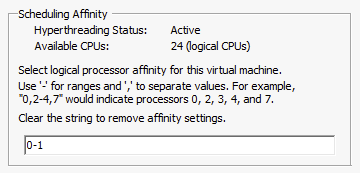
On the VMware Community Forums someone asked today if CPU Affinity and vSphere HA worked in conjunction and if it was supported. To be fair I never tested this scenario, but I was certain it was supported and would work… Never hurts to  validate though before you answer a question like that. I connected to my lab and disabled a VM for DRS so I could enable CPU affinity. I pinned the CPUs down to core 0 and 1 as shown in the screenshot below:

cpu affinity

After pinning the vCPUs to a set of logical CPUs I powered on the VM. The result was, as expected, a “Protected” virtual machine as shown in the screenshot below.

HA protection

But would it get restarted if anything happened to the host? Yes it would, and I tested this of course. I switched the server off which was running this virtual machine and within a minute vSphere HA restarted the virtual machine on one of the other hosts in the cluster. So there you have it, CPU Affinity and vSphere HA work fine.

PS: Would I ever recommend using CPU Affinity? No I would not!

  • « Go to Previous Page
  • Page 1
  • Interim pages omitted …
  • Page 23
  • Page 24
  • Page 25
  • Page 26
  • Page 27
  • Interim pages omitted …
  • Page 63
  • Go to Next Page »

Primary Sidebar

About the Author

Duncan Epping is a Chief Technologist and Distinguished Engineering Architect at Broadcom. Besides writing on Yellow-Bricks, Duncan is the co-author of the vSAN Deep Dive and the vSphere Clustering Deep Dive book series. Duncan is also the host of the Unexplored Territory Podcast.

Follow Us

  • X
  • Spotify
  • RSS Feed
  • LinkedIn

Recommended Book(s)

Also visit!

For the Dutch-speaking audience, make sure to visit RunNerd.nl to follow my running adventure, read shoe/gear/race reviews, and more!

Do you like Hardcore-Punk music? Follow my Spotify Playlist!

Do you like 80s music? I got you covered!

Copyright Yellow-Bricks.com © 2026 · Log in