• Skip to primary navigation
  • Skip to main content
  • Skip to primary sidebar

Yellow Bricks

by Duncan Epping

  • Home
  • Unexplored Territory Podcast
  • HA Deepdive
  • ESXTOP
  • Stickers/Shirts
  • Privacy Policy
  • About
  • Show Search
Hide Search

BC-DR

VMworld session on vSphere Metro Storage Cluster on youtube!

Duncan Epping · Nov 16, 2013 ·

I didn’t even realize this, but just found out that the session Lee Dilworth and I did at VMworld on the subject of vSphere Metro Storage Clusters can actually be viewed for free on youtube!

There are some more sessions up on youtube, so make sure you have a look around!
Disable “Disk.AutoremoveOnPDL” in a vMSC environment!

Duncan Epping · Nov 8, 2013 ·

** UPDATE 20-March 2016 **

When using vSphere 6.0 or higher, please be advised that Disk.AutoremoveOnPDL needs to be set to 1 (default value) in order for “PDL Scenarios” to be handles correctly in vMSC based infrastructures. Please do not change the default value, or when upgrading to vSphere 6.x please set this value to 1 when changed in previous version.

** UPDATE 20-March 2016 **

Last week I tweeted the recommendation to disable the advanced setting Disk.AutoremoveOnPDL in a vSphere 5.5 vMSC environment:

https://twitter.com/DuncanYB/status/394740133079298048

Based on this tweet I received a whole bunch of questions. Before I explain why I want to point out that I have contacted the folks in charge of the vMSC program and have requested them to publish a KB article asap on this subject.

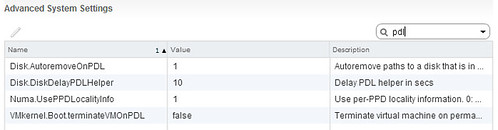
With vSphere 5.5 a new setting was introduced called “Disk.AutoremoveOnPDL”. When you install 5.5 this setting is set to 1 which means it is enabled. What it does is the following:

The host automatically removes the PDL device and all paths to the device if no open connections to the device exist, or after the last connection closes. If the device returns from the PDL condition, the host can discover it, but treats it as a new device. Data consistency for virtual machines on the recovered device is not guaranteed.

(Source: http://pubs.vmware.com/vsphere-55/index.jsp?topic=%2Fcom.vmware.vsphere.storage.doc%2FGUID-45CF28F0-87B1-403B-B012-25E7097E6BDF.html)

In a vMSC environment you can understand that removing devices which are in a PDL state is not desired. As when the issue that caused the PDL has been solved (from a networking or array perspective) customers would expect the LUNs to automatically appear again. However, as they have been removed a “rescan” is needed to show these devices again instantly, or you will need to wait for the vSphere periodic path evaluation to occur. As you can imagine, in a vSphere Metro Storage Cluster environment (stretched storage) you expect devices to always be there instantly on recovery… even when they are in a PDL or APD state they should be available instantly when the situation has been resolved.

For now, I recommend to set Disk.AutoremoveOnPDL to 0 instead of the default of 1:

Hopefully soon this KB on the topic of Disk.AutoremoveOnPDL will be updated to reflect this.

EMC VPLEX and Storage DRS / Storage IO Control

Duncan Epping · Nov 1, 2013 ·

At VMworld various people asked me why VMware did not support the use of Storage DRS and Storage IO Control in a VPLEX Metro environment. This was something new to me and when someone pointed me to a KB article I started digging.

When discussing it with the various teams the following is what we concluded for EMC VPLEX, this is what I drafted up. I have requested the KB to be updated in a more generic fashion (text all the way down below) so that the support statement will apply for all vMSC configurations. Hopefully will be published soon. The EMC specific statement, which I provided to the EMC VPLEX team, will look roughly as follows:

EMC VPLEX supports three different configurations, namely VPLEX Local, VPLEX Metro and VPLEX Geo. This KB article describes the supported configurations for VPLEX Local and VPLEX Metro with regards to Storage DRS (SDRS) and Storage I/O Control (SIOC). VMware supports Storage DRS and Storage IO Control on EMC VPLEX in each of the two configurations with the restrictions described below.

VPLEX Local:
In a VPLEX Local configuration VPLEX volumes are contained within site/location. In this configuration the following restrictions apply:
– Storage IO Control is supported
– Storage DRS is supported
– A Datastore Cluster should only be formed out of similar volumes
– It is recommended to run Storage DRS in “Manual Mode” to control the point in time migrations occur

VPLEX Metro:
In a VPLEX Metro configuration VPLEX volumes are distributed across locations/sites. In this configuration the following restrictions apply:
– Storage IO Control is not supported
– Storage DRS is only supported when “IO Metric” is disabled
– It is recommended to run Storage DRS in “Manual Mode” to control the point in time migrations occur
– Each location/site should have a Datastore Cluster formed only out of dvols (Distributed VPLEX volumes) which are part of the same consistency groups, and only with site bias to that particular location / site!
– Example: Site A will have Datastore Cluster A which contains all dvols with bias to Site A.

The more generic support statement will roughly look like this:

This KB article describes the supported configurations for vSphere Metro Storage Cluster (vMSC) environments with regards to Storage DRS (SDRS) and Storage I/O Control (SIOC). VMware supports Storage DRS and Storage IO Control with the restrictions described below.

In a vMSC configuration volumes are distributed across locations/sites. In both uniform and non-uniform configurations the following restrictions apply:
– Storage IO Control is not supported
– Storage DRS is only supported when “IO Metric” is disabled
– It is recommended to run Storage DRS in “Manual Mode” to control the point in time migrations occur
– Each location/site should have a Datastore Cluster formed only out of stretched datastore and only with site bias to that particular location / site
– Example: Site A will have Datastore Cluster A which contains all stretched datastores with bias to Site A.

Hopefully this will help the folks implementing vMSC today to make the decision around the usage of SDRS. KB team has informed me they are working on the update and as soon as it has been published I will update this article.

** KB Article has been updated: http://kb.vmware.com/kb/2042596 **

HA Futures: Pro-active response

Duncan Epping · Oct 4, 2013 ·

We all know (at least I hope so) what HA is responsible for within a vSphere Cluster. Although it is great that vSphere HA responds to a failure of a host / VM / application and even in some cases your storage device; wouldn’t it be nice if vSphere HA could pro-actively respond to conditions which might lead to a failure? That is what we want to discuss in this article.

What we are exploring right now is the ability for HA to avoid unplanned downtime. HA would detect specific (health) conditions that could lead to catastrophic failures and pro-actively move virtual machines of that host. You could for instance think of a situation where 1 out of 2 storage paths goes down. Although not directly impacting the machines from an availability perspective, it could be catastrophic if that second path goes down. So in order to avoid ending up in this situation vSphere HA would vMotion all the virtual machines to a host which does not have a failure.

This could of course also apply to other components like networking or even memory or CPU. You could potentially have a memory dimm which is reporting specific issues that could impact availability, this in its turn could then trigger HA to pro-actively move all potentially impacted VMs to a different host.

A couple of questions we have for you:

  1. When such partial host failures occur today, how do you address these conditions? When do you bring the host back online?
  2. What level of integration do you expect with management tools? In other words, should we expose an API that your management solution can consume, or do you prefer this to be a stand-alone solution using a CIM provider for instance?
  3. Should HA treat all health conditions the same? I.e., always evacuate all VMs from an “unhealthy” host?
  4. How would you like HA to compare two conditions? E.g., H1 fan failure, H2 network path failure?

Please chime in,

vSphere HA advanced settings, the KB

Duncan Epping · Sep 26, 2013 ·

I’ve posted about vSphere HA advanced settings various times in the past, and let me start by saying that you shouldn’t play around with them unless you have a requirement to do so. But if you do, there is a KB article which I can highly recommend as it lists all the known and lesser known advanced settings. I had the KB article updated with vSphere 5.5 advanced settings yesterday (Thanks KB team for being so responsive!) but it also applies to vSphere 5.0 and 5.1. Recommended read for those who want to get in to the nitty gritty details of vSphere HA.

http://kb.vmware.com/kb/2033250

  • « Go to Previous Page
  • Page 1
  • Interim pages omitted …
  • Page 22
  • Page 23
  • Page 24
  • Page 25
  • Page 26
  • Interim pages omitted …
  • Page 63
  • Go to Next Page »

Primary Sidebar

About the Author

Duncan Epping is a Chief Technologist and Distinguished Engineering Architect at Broadcom. Besides writing on Yellow-Bricks, Duncan is the co-author of the vSAN Deep Dive and the vSphere Clustering Deep Dive book series. Duncan is also the host of the Unexplored Territory Podcast.

Follow Us

  • X
  • Spotify
  • RSS Feed
  • LinkedIn

Recommended Book(s)

Also visit!

For the Dutch-speaking audience, make sure to visit RunNerd.nl to follow my running adventure, read shoe/gear/race reviews, and more!

Do you like Hardcore-Punk music? Follow my Spotify Playlist!

Do you like 80s music? I got you covered!

Copyright Yellow-Bricks.com © 2026 · Log in